Cycling through all six. Tap any point to stop.
Measured on six things
Cash Book is an iPhone AI expense tracker you talk to: say what you spent, snap a receipt, or let every Apple Pay tap log itself.
Security
52HTTPS enforced with X-Content-Type-Options and Referrer-Policy, but no HSTS, CSP, frame protection or DMARC (5/12 probe points). Privacy model is genuinely strong: no account, no bank link, on-device data, disclosed AI processing. No audits published.
Screenshots
1 / 1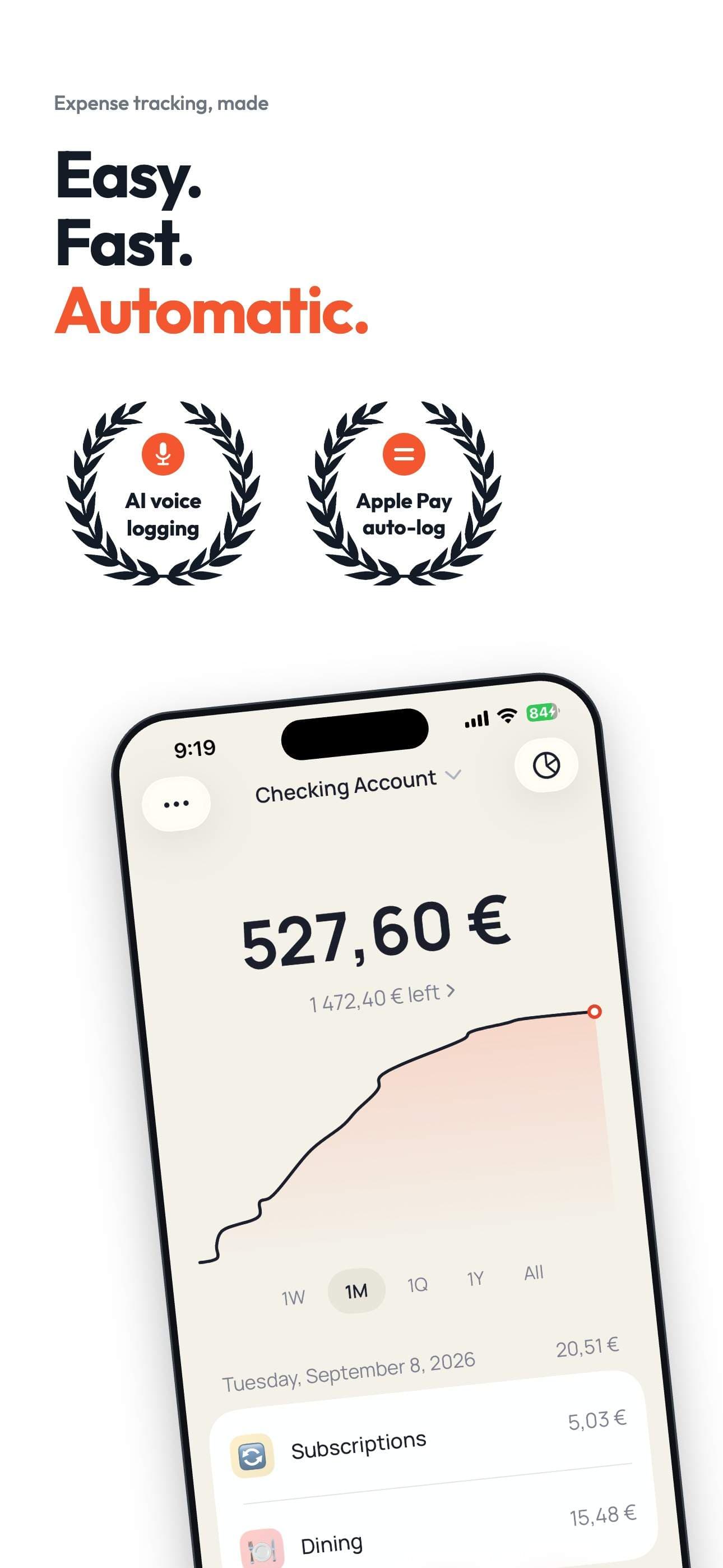
About this app
Cash Book is an expense tracker for iPhone built on one idea: logging so fast you actually keep doing it. Say "12 euros lunch" and AI turns your voice into a transaction with amount, merchant, tag and date. Snap a receipt or a screenshot and every line is read for you. Set up one Apple Shortcuts automation and every Apple Pay tap logs itself. Or use the keypad: three taps. Your money is then organised the way you think: tags grouped into categories, accounts for cash, cards and savings with one net-worth number, and monthly or weekly budgets that show what is left. Insights show where the money went, what changed against last month, and six months of income against expenses. There is no account and no sign-up, and Cash Book never connects to your bank. Data stays on your iPhone, with optional encrypted iCloud sync to your own Apple account. 128 currencies, 26 languages, Face ID lock, CSV and Excel export.
Key features
- 1Voice logging: say '12 euros lunch at Beshamel' and AI returns a transaction with amount, merchant, tag and date.
- 2Receipt and screenshot scanning reads every line into transactions, including bank notifications.
- 3Apple Pay auto-logging via a one-time Apple Shortcuts automation on the Transaction trigger.
- 4No account, no bank connection — data stays on-device with optional encrypted iCloud sync.
- 5128 currencies, 26 languages, Face ID lock, CSV and Excel export, accounts, budgets and insights.
Target customer profile
Drawn from the product itself, not from a survey.
Demographic
Busy professionals aged 25-45
Pain points
Too busy to manually log expenses; forget to track spending; dislike complex finance apps
Primary needs
Quick, effortless expense entry; automatic logging; clear overview of spending
Demographic
Freelancers and self-employed individuals
Pain points
Need to track business expenses for tax deductions; struggle with receipt organization; want to separate personal and business spending
Primary needs
Easy receipt scanning; tagging and categorization; exportable reports
Demographic
Privacy-conscious iPhone users
Pain points
Uncomfortable with apps that connect to bank accounts; worried about data breaches; prefer local storage
Primary needs
No bank linking; no account creation; data stored on device with optional iCloud sync
Scout Review
Written by AI from measured evidence, scored out of 100.
Cash Book is an iPhone expense tracker built around one honest thesis: logging has to be faster than forgetting. Voice entry, receipt scanning and Apple Pay via Shortcuts deliver three genuinely different routes to a logged transaction, and the app UI — judged from its store screenshots — is calm, consistent and clearly designed by someone tired of dashboards. The privacy model is the real differentiator: no account, no bank connection, on-device data, with the AI processing asterisk disclosed rather than buried. Where it stumbles is hardening and reach — 5/12 security header points, no published audits, a contrast failure, and an iPhone-only footprint. The pricing is refreshingly blunt: 7 days free, then $39.99/year or $19.99 once, no hidden free tier. For privacy-first iPhone users who hate bank linking, it's a credible pick; for everyone else, it's a deliberate non-fit.
Measure by measure
Usability
72No sign-up, three logging paths (voice, receipt scan, Apple Pay via Shortcuts), 7-day full trial, and 8 how-to guides. The Apple Pay setup is self-described as 'fiddly once' — real friction, but honestly disclosed.
Design
74Judging the app UI from 8 store screenshots: coral accent, card-based Home with a big balance number, emoji tag chips and clean budget bars. Consistent, modern, and the site mirrors the same palette. Polished for an indie iPhone tracker.
Speed
80Lighthouse mobile 93/100 with CLS 0 and TBT 0ms; desktop a clean 100/100. LCP 2.7s on mobile is the one soft spot, just over the 2.5s 'good' line. Fast, stable marketing site with no reported lag.
Security
52HTTPS enforced with X-Content-Type-Options and Referrer-Policy, but no HSTS, CSP, frame protection or DMARC (5/12 probe points). Privacy model is genuinely strong: no account, no bank link, on-device data, disclosed AI processing. No audits published.
Accessibility
78Lighthouse a11y 96/100 with one failing audit: insufficient color contrast. 26 languages across app and site is strong reach. No WCAG statement published, and iPhone-only limits platform coverage. Solid but not audited.
Growth
58A real, specific wedge: no bank link, no account, on-device data, with voice and Apple Pay logging. It deliberately excludes Android, shared budgets and bank feeds — a narrow but defensible privacy-first iPhone niche.
Improvement areas
- Security headers incomplete: no HSTS, CSP, frame protection or DMARC (5/12 probe points).
- Accessibility contrast failure at 96/100; no published WCAG conformance statement.
- Apple Pay logging requires a manual Shortcuts setup the site itself calls 'fiddly once'.
- iPhone-only with no Android or web app, limiting reach despite 26-language localization.
Design & Usability
Judging the app itself, not the landing page: the 8 App Store screenshots show a calm, coral-accented iPhone UI — a big balance number on Home, emoji tag chips, thin budget bars that only turn red when you're over. It looks like a tracker designed by someone who actually hates trackers. Usability follows the same philosophy: no sign-up, a 7-day fully unlocked trial, and three logging routes — voice ('12 euros lunch at Beshamel'), receipt or screenshot scanning, and Apple Pay via a Shortcuts automation. That last one is the catch: the site itself calls the setup 'fiddly once', and it is a genuine onboarding tax on the feature you lead with. The 8-article guides hub does real work covering voice logging, receipt scanning, cash accounts and subscription audits, which is more documentation than most indie trackers bother with.
Speed & Security
Speed is a genuine strength. Lighthouse mobile performance lands at 93/100 with CLS 0 and TBT 0ms — a stable, non-blocking site — and desktop is a clean 100/100. The only soft metric is mobile LCP at 2.7s, just past the 2.5s 'good' threshold, likely hero-image weight. Security is a split verdict. The privacy architecture is unusually honest: no account, no bank connection, transactions on-device with optional iCloud sync, and a plain-language admission that voice clips and receipt photos do leave the phone for AI processing and are 'not kept afterwards'. But the HTTP probe returns only 5/12 checklist points — HTTPS is enforced with X-Content-Type-Options and Referrer-Policy, yet HSTS, CSP, frame protection, Permissions-Policy and DMARC are all missing. No SOC 2, ISO or pen-test is published. Strong privacy story, thin hardening.
Accessibility & Growth
Accessibility scores 96/100 on Lighthouse with a single failing audit: insufficient background/foreground color contrast — the predictable cost of a coral accent on white. Against that, the app and site ship in 26 languages, which is real reach for an indie product. What's missing is a published WCAG conformance statement, and the iPhone-only scope means Android users are simply out. Growth is a judgement on the idea, not the traction: Cash Book names a specific, defensible wedge — privacy-conscious iPhone users and freelancers who refuse bank linking — and backs it with voice, receipt and Apple Pay logging that Money Manager doesn't offer. The ceiling is self-imposed: the site explicitly disclaims bank feeds, shared household budgets and Android, so it wins a narrow niche rather than the mass market Expensify and Spendee chase. That's a coherent bet, not a scalable one.
Conclusion
Cash Book knows exactly who it's for and says so out loud — if you want bank feeds, shared budgets or Android, the homepage tells you to leave. That kind of honesty is rare and it earns real goodwill. The question is whether the execution behind the promise holds up: the logging is fast, the privacy architecture is sound, and the guides show a maker who understands the problem. But the security headers are half-finished, the accessibility contrast fails, and the Apple Pay setup asks users to spelunk through Shortcuts. None of these are fatal. All of them are fixable in a weekend. For an app whose entire pitch is 'effortless', the rough edges are the thing standing between it and the users it's clearly built for.
Suggestions for improvement
- Add HSTS, a Content-Security-Policy and DMARC — the probe shows 5/12 header points and no email spoofing protection.
- Fix the failing contrast audit: the coral-on-white accent is the single Lighthouse accessibility failure at 96/100.
- Publish a WCAG conformance statement and an accessibility page to back up the 26-language localization work.
- Trim the mobile hero image to bring LCP under 2.5s — mobile scores 93/100 while desktop is a clean 100/100.
Alternatives comparison
Named competitors, point by point. Nobody paid to appear here or to be left out.
 Cash Book Cash Book |  Expensify Expensify |  Spendee Spendee |  Money Manager Money Manager | |
|---|---|---|---|---|
| Bank account connection | Never connects to a bank; no login, no card number | Connects to bank accounts and corporate cards | Bank synchronization for automatic import | Manual entry only; no bank linking |
| Voice expense entry | Say a sentence; AI returns amount, merchant, tag, date | No voice logging; receipt scan and manual entry | No voice logging; manual and bank-imported entry | No voice input; manual keypad entry |
| Automatic Apple Pay logging | One-time Shortcuts automation logs every card tap | Corporate card feeds, not consumer Apple Pay taps | Bank sync covers card spend, no Apple Pay trigger | No automatic Apple Pay logging |
| Account required | No account or sign-up; data on-device | Account required; cloud-based | Account setup required; cloud storage | No account; local storage |
| Pricing model | 7 days free, then $39.99/yr or $19.99 lifetime | Free tier plus paid plans per user/month | Free tier plus premium subscription | Free with optional paid upgrade |
| Platform coverage | iPhone only; 26 languages, 128 currencies | iOS, Android and web | iOS, Android and web | iOS, Android and desktop |
Expensify
A comprehensive expense management app that offers receipt scanning, mileage tracking, and approval workflows, but requires an account and connects to bank accounts.
Spendee
A budget and expense tracking app with bank synchronization, shared budgets, and visual insights, but relies on cloud storage and may require account setup.
Money Manager
A straightforward expense tracking app with manual entry, budgets, and reports, but lacks voice input and automatic Apple Pay logging.
Comparing options? See Cash Book alternatives, scored side by side
More Finance apps
View all Finance
CreateMyCoin
92A no-code Solana token creator that deploys SPL tokens in...

CalcFi
92A free, comprehensive financial calculator platform with ...

Flicker: Crypto & Stock Analysis
90Flicker reads any coin or stock and gives you a verdict, its reasons, and the exit before the entry.

Redstone
89Portfolio optimization and risk metrics for investors.

Receipt Bot
88Automated bookkeeping software that extracts data from re...

Stellar Staff
88A top-rated virtual assistant agency that matches busines...

BringMe Money
88AI invoice follow-up that drafts reminders and tracks next steps.

ArbPlay
88Real-time sure bets scanner for Greek bookmakers, exchang...

Prop Firm Consistency Calculator
88Check your prop firm consistency rule and best-day percen...

Stripdo
87Stripdo is a smart invoicing tool that automatically gene...

OpenBudget
87Connect your bank to AI for real answers about your money.

StockFit API
87A developer-first financial data API providing structured...


A platform dedicated to providing unbiased reviews of newly launched applications, analyzing everything from their features to their full potential.
info@scoutforge.net© 2026 Scoutforge. All rights reserved.
