Cycling through all six. Tap any point to stop.
Measured on six things
Check your prop firm consistency rule and best-day percen...
Growth
62A real, specific pain — payout-denial anxiety over consistency rules — with a genuine wedge: 22 firms / 97 plan presets linked to official sources that TradingView, Edgewonk and TradeZella don't natively apply.
Screenshots
1 / 2
About this app
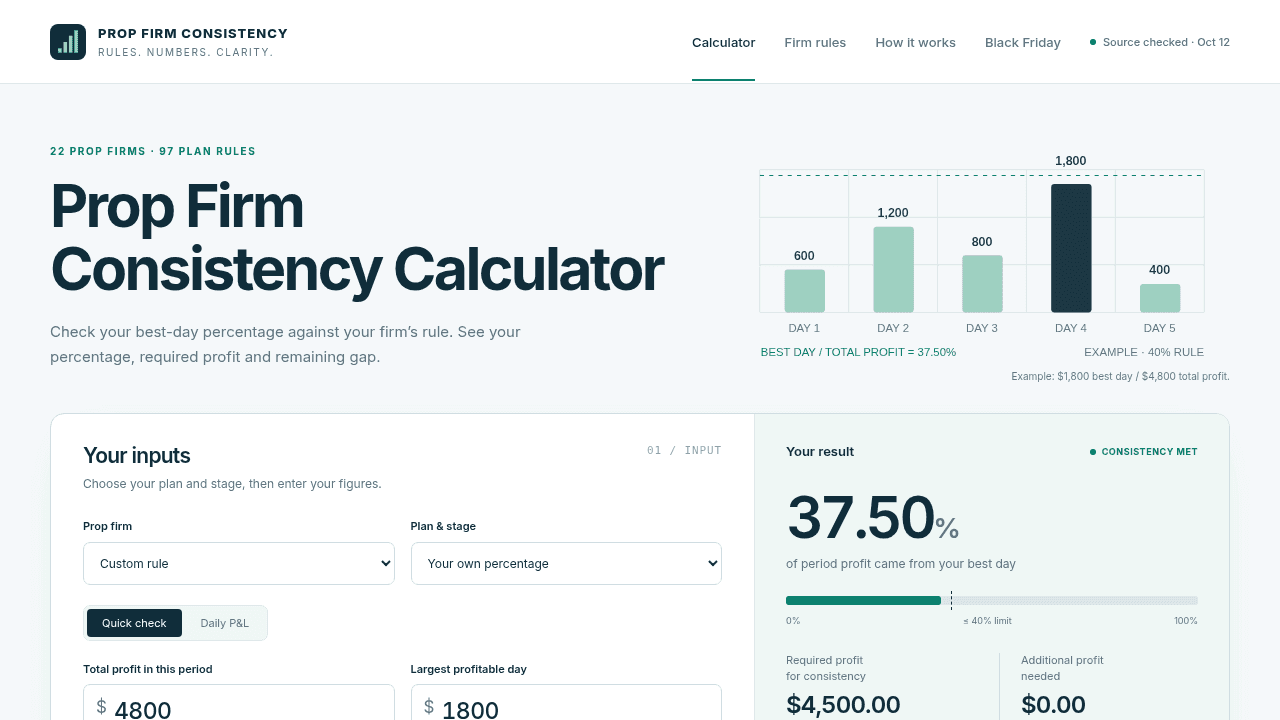
Prop Firm Consistency is a free calculator for funded traders. Enter your daily profits to check your prop firm consistency rule: it calculates your best-day percentage, the total profit required to satisfy the rule and the remaining gap before you can request a payout. Plan-specific presets link to each firm's official rule source, so you can check the exact threshold for your evaluation or funded account instead of guessing.
Key features
- 1Consistency calculator: best-day percentage, required profit and remaining gap from daily P&L.
- 222 prop firms / 97 plan presets with links to each firm's official rule source.
- 3Client-side privacy — figures stay in the browser, no signup or account connection.
- 4'What if?' preview to test hypothetical trading days without changing actual entries.
Target customer profile
Drawn from the product itself, not from a survey.
Demographic
Prop firm traders (futures & forex)
Pain points
Unsure if best-day profit violates consistency rule; risk of payout denial
Primary needs
Quick, accurate consistency percentage check per firm
Demographic
Traders managing multiple prop firm accounts
Pain points
Different rules per firm/plan; manual math is error-prone
Primary needs
Unified calculator with plan-specific presets and source links
Demographic
New funded traders in evaluation phase
Pain points
Confusion over profit denominators and boundary conditions
Primary needs
Clear explanation and guidance on how much more profit is needed
Scout Review
Written by AI from measured evidence, scored out of 100.
Prop Firm Consistency Calculator does one thing and does it well: it turns the anxiety of 'is my best day too big for this firm's rule?' into a percentage, a required-profit figure and a remaining gap. The execution is above-average for an indie tool — fast (97 mobile Lighthouse), zero-signup, client-side privacy, and a genuinely useful 22-firm / 97-rule preset library with official source links. The rough edges are cosmetic and fixable: an unlabeled hero chart, a noisy comparison table, two accessibility audit failures, and missing HSTS/DMARC. It's not trying to be a trading journal or a charting platform, and that focus is its strength. The open question is whether a free calculator can grow into anything more — but as a utility, it earns its place.
Measure by measure
Usability
72No signup, clear input/result split, helpful microcopy, a 'What if?' preview and plan presets linked to official sources. Onboarding is essentially zero-friction for a single-purpose tool.
Design
70Clean card-based calculator with a teal result highlight and a dense but readable 22-firm comparison table. The hero chart's four unlabeled bar colors and repeated 'Some plans: no limit' rows add avoidable noise.
Speed
88Lighthouse mobile 97/100 (LCP 1.5s, CLS 0, TBT 0ms) and desktop 100/100. Client-side calculation keeps the page featherweight with no heavy SPA payload.
Security
72HTTPS enforced with CSP, frame protection and a full header set (9/12 checklist). Missing HSTS and DMARC. No SOC 2 or audit claims, but figures stay client-side with no account connection.
Accessibility
80Lighthouse accessibility 97/100 with a skip link and labeled fields, but two failing audits: insufficient color contrast and visible labels not matching accessible names. English-only, no a11y statement.
Growth
62A real, specific pain — payout-denial anxiety over consistency rules — with a genuine wedge: 22 firms / 97 plan presets linked to official sources that TradingView, Edgewonk and TradeZella don't natively apply.
Improvement areas
- Hero chart lacks a legend; comparison table repeats 'Some plans: no limit' across 22 rows.
- Two failing accessibility audits: insufficient contrast and visible labels not matching accessible names.
- Missing HSTS and DMARC; no published security audit or a11y/WCAG statement.
- No monetization or longevity signal on a brand-new domain — trust ceiling for workflow use.
Design & Usability
The design is competent and purposeful: a two-card calculator (inputs left, teal result right) with a progress bar and percentage callout that answers the question in one glance. The 22-firm comparison table is the real substance, though it drowns in repeated 'Some plans: no limit' cells and a hero chart with four unlabeled colors. Usability is the stronger half — no signup, clear microcopy ('Use the best day from this calculation period'), a 'What if?' preview for hypothetical days, and presets linked to each firm's official rule source. For a single-purpose tool, signup-to-value is basically instant. The weak spots are the dense table and the lack of a guided first-run path for traders who don't yet know their plan's rule.
Speed & Security
Speed is the standout: Lighthouse mobile 97/100 with LCP 1.5s, CLS 0 and TBT 0ms, and a perfect 100 on desktop. The calculator runs client-side, so there's no heavy SPA or server round-trip to slow it down. Security is solid-but-unremarkable: HTTPS enforced with CSP, frame protection, X-Content-Type-Options, Referrer-Policy and Permissions-Policy (9/12 checklist points), but HSTS and DMARC are missing. There are no published audits or SOC 2 claims, which is normal for a free single-purpose tool. The privacy story is genuinely good — figures stay in the browser with no account connection — but the missing HSTS/DMARC are easy fixes left on the table.
Accessibility & Growth
Accessibility scores 97/100 on Lighthouse with a skip link and labeled fields, but two audits fail: insufficient color contrast and visible text labels not matching accessible names. There's no WCAG statement and the site is English-only, so automated coverage flatters it. Growth is the interesting question: the idea targets a real, specific fear — 'will my best day violate the consistency rule and get my payout denied?' — and the wedge is concrete. TradingView, Edgewonk and TradeZella track P&L but don't natively apply firm-specific consistency rules; this tool ships 22 firms and 97 plan presets linked to official sources. That's a defensible niche. The limit is ceiling: it's a free calculator with no obvious monetization or network effect, and the domain is brand new (registered 2026-10-11), so traction is unproven.
Conclusion
If you trade prop firm accounts and have ever squinted at a consistency rule wondering whether your best day just cost you a payout, this is the tool you wanted. It's free, it's fast, it doesn't ask for your email, and it links to the actual rule source instead of guessing. The flaws — contrast, label matching, a cluttered table, missing HSTS/DMARC — are the kind a weekend of polish fixes. The bigger unknown is longevity: a brand-new domain and no monetization signal mean you shouldn't build a workflow around it yet. But for the specific job of checking a consistency percentage before requesting a payout, it's already better than doing the math by hand or trusting a journal that doesn't know your firm's rules.
Suggestions for improvement
- Add a legend to the hero bar chart so the 'best day' bar is visually obvious instead of one of four mystery colors.
- Collapse or filter the 22-firm table by 'has a limit' to cut the repeated 'Some plans: no limit' noise.
- Fix the two failing accessibility audits: raise contrast on muted text and align visible labels with accessible names.
- Set HSTS and add a DMARC record — two quick wins to close the 9/12 security checklist gap.
Alternatives comparison
Named competitors, point by point. Nobody paid to appear here or to be left out.
 Prop Firm Consistency Calculator Prop Firm Consistency Calculator |  TradingView TradingView |  Edgewonk Edgewonk |  TradeZella TradeZella | |
|---|---|---|---|---|
| Prop firm consistency rule calculator | Yes — best-day %, required profit, remaining gap | No — charting and basic risk tools only | No — tracks daily P&L, no firm rule logic | No — performance metrics, no consistency check |
| Firm-specific plan presets with official source links | Yes — 22 firms, 97 plan rules, official links | No | No | No |
| Free / no signup required | Free, no account, client-side | Free tier; paid plans for advanced tools | Paid subscription | Paid subscription |
| Trading journal / performance analytics | No — single-purpose calculator | Charting, limited journaling | Yes — full journal and analytics | Yes — journaling and analytics |
TradingView
Charting platform with basic risk tools but no built-in prop firm consistency calculator.
Edgewonk
Trading journal with analytics; can track daily P&L but doesn't natively apply prop firm consistency rules.
TradeZella
Journaling and analytics for traders; offers performance metrics but not firm-specific consistency checks.
Comparing options? See Prop Firm Consistency Calculator alternatives, scored side by side
More Finance apps
View all Finance
CreateMyCoin
92A no-code Solana token creator that deploys SPL tokens in...

CalcFi
92A free, comprehensive financial calculator platform with ...

Stellar Staff
88A top-rated virtual assistant agency that matches busines...

BringMe Money
88AI invoice follow-up that drafts reminders and tracks next steps.

Receipt Bot
88Automated bookkeeping software that extracts data from re...

OpenBudget
87Connect your bank to AI for real answers about your money.

StockFit API
87A developer-first financial data API providing structured...

HISAB 360
87A Windows Excel add-in that pulls your ledger data into the workbook, reconciles it, and drafts the reports - all in plain English, inside Excel.

Stripdo
87Stripdo is a smart invoicing tool that automatically gene...

Credyt
87Real-time monetization infrastructure for AI products tha...

FX Terminal
87Free browser-based forex research terminal: live charts, economic calendar, COT reports, retail sentiment, strength meter and bond yields. No signup.https://fxterminal.app/

ValueScreener
86Screen stocks using 30+ value disciplines. Receive an email when your investment thesis breaks.


A platform dedicated to providing unbiased reviews of newly launched applications, analyzing everything from their features to their full potential.
info@scoutforge.net© 2026 Scoutforge. All rights reserved.
