Cycling through all six. Tap any point to stop.
Measured on six things
AI CRM of a new generation
Design
30The deployed homepage renders as a nav bar over a blank white page — the fox mascot hero exists only in maker media, not on the live site. German nav against English positioning adds friction.
Screenshots
1 / 1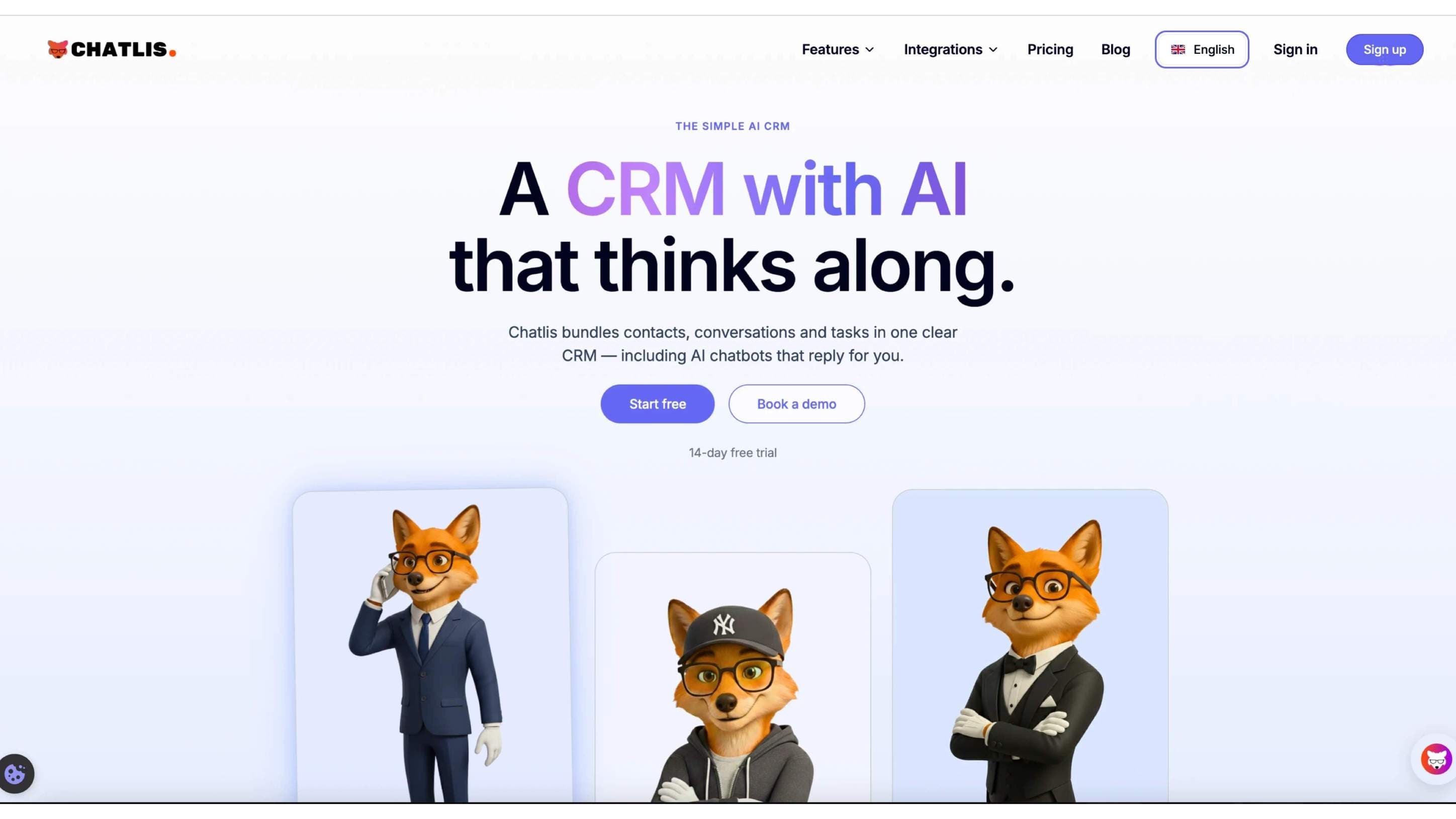
About this app
Chatlis - The Simple AI CRM for Customers & Chatbots The lean AI CRM: Manage contacts, bundle conversations, and optionally deploy AI chatbots. Manage customers and optionally deploy AI chatbots - all in one clear, easy-to-use CRM. Chatlis is the lean AI CRM: Manage contacts, bundle conversations, and optionally deploy AI chatbots. Try it free for 14 days.
Key features
- 1Contact management with bundled conversations in a unified inbox
- 2Optional AI chatbot deployment alongside the CRM
- 314-day free trial aimed at solo founders and small SMB support teams
Target customer profile
Drawn from the product itself, not from a survey.
Demographic
Solo founders and small business owners
Pain points
Too many tools, limited time, messy customer data
Primary needs
Simple contact management and centralized chats
Demographic
Customer support teams (2–10 agents)
Pain points
Scattered conversations and slow response times
Primary needs
Unified inbox with AI chatbot automation
Demographic
Marketing and sales teams in SMBs
Pain points
Manual follow-ups and lack of conversation context
Primary needs
Lightweight CRM with AI-assisted engagement
Scout Review
Written by AI from measured evidence, scored out of 100.
Chatlis pitches itself as the lean AI CRM for solo founders and small SMB support teams — contacts, bundled conversations, and optional AI chatbots in one place, free for 14 days. The idea is coherent and the target customer is specific. The execution is not there yet: the live homepage renders as a nav bar over a blank white page, so none of that positioning is actually visible to a visitor. Lighthouse mobile performance sits at 54/100 with an 11-second LCP, accessibility at 89/100 with unnamed buttons and contrast failures, and security at 8/13 header checklist points with no published compliance. The fox mascot hero in the maker media is genuinely good — it just isn't deployed.
Measure by measure
Usability
38With no content below the nav, there is no visible value prop, feature walkthrough, or onboarding path. The 14-day trial claim lives in copy, not in anything a visitor can actually reach.
Design
30The deployed homepage renders as a nav bar over a blank white page — the fox mascot hero exists only in maker media, not on the live site. German nav against English positioning adds friction.
Speed
44Lighthouse mobile 54/100 with an 11.0s LCP and 362ms TBT; desktop 50/100. CLS is clean at 0.003, but an 11-second largest paint is a bounce-rate machine.
Security
62HTTPS enforced with HSTS, secure cookies, and basic headers in place (8/13 checklist). Missing CSP, frame protection, Permissions-Policy, and SPF. No published SOC 2/ISO or security page found.
Accessibility
70Lighthouse a11y 89/100 with real failures: unnamed ARIA inputs, unnamed buttons, and insufficient contrast. No WCAG statement or language toggle found; German-only nav narrows reach.
Growth
52Real problem (scattered SMB customer data), real bundle (contacts + inbox + optional bots), but the wedge vs HubSpot/Tidio is 'leaner,' which is a feature, not a moat.
Improvement areas
- Live homepage renders blank below the nav — hero and sections are not deployed
- 11.0s mobile LCP and 54/100 Lighthouse performance need real optimization
- Missing CSP, frame protection, and SPF; no published security or compliance page
Design & Usability
The gap between intent and deployment is the whole story here. Maker media shows a confident English hero with a consistent fox mascot system and clear dual CTAs — genuinely decent design work. The live site shows a German nav strip over an empty white viewport. That is not a design critique, it is a broken deploy. Usability inherits the damage: no value prop, no feature explanation, no onboarding cues, just a Register button hovering over nothing. The 14-day trial and the contacts/inbox/chatbot bundle exist in copy, not in anything a visitor can reach. Fix the render and both scores move; leave it and neither matters.
Speed & Security
Speed is the weakest measured dimension: mobile Lighthouse 54/100 with an 11.0s LCP and 362ms TBT, desktop 50/100. CLS at 0.003 is genuinely clean, so the layout is stable — the problem is payload, not jank. An 11-second largest paint will lose most visitors before the hero lands. Security is mid-pack: HTTPS enforced with HSTS, secure cookies, X-Content-Type-Options and Referrer-Policy present (8/13 checklist points), but no CSP, no frame protection, no Permissions-Policy, and SPF missing while DMARC is set. No published SOC 2, ISO, or security page turned up in the collected evidence — normal for this stage, but it caps the score in the low 60s.
Accessibility & Growth
Accessibility lands at 89/100 on Lighthouse with three real failures: ARIA input fields without accessible names, buttons without accessible names, and insufficient color contrast. Those are fixable in an afternoon and worth fixing. No WCAG statement, no language toggle, and German-only navigation narrow the audience. Growth is the interesting one: the problem is real — SMBs with scattered customer data and 2–10 agent support teams genuinely want contacts, conversations, and optional bots in one place. The bundle is coherent. But the stated differentiator against HubSpot and Tidio is 'leaner,' and leanness is copyable. There is no network effect, no data moat, no segment the incumbents structurally cannot serve. A competent, clearly positioned product in a crowded category — 52 is the honest read.
Conclusion
Chatlis has the shape of a useful product: a real problem, a specific audience, and a bundle that makes sense for a five-person support team that does not want to stitch HubSpot and Tidio together. What it does not have is a working front door. Ship the hero, fix the 11-second LCP, name the buttons, and add a CSP — none of that is hard, and all of it is currently standing between the pitch and the buyer. The category is crowded, so the lean angle needs to be sharper than 'smaller than HubSpot' to earn attention. Do the basics first.
Suggestions for improvement
- Fix the live homepage render — the hero, sections, and footer exist in maker media but not on the deployed page.
- Cut LCP from 11.0s toward 2.5s: compress and preload the hero image, defer non-critical JS.
- Add accessible names to ARIA inputs and buttons, and raise contrast on failing text pairs.
- Publish a security page with CSP, frame protection, and SPF, plus a plain-language data-handling note.
Alternatives comparison
Named competitors, point by point. Nobody paid to appear here or to be left out.
 Chatlis CRM Chatlis CRM |  HubSpot HubSpot |  Tidio Tidio | |
|---|---|---|---|
| Contact management | Yes — core feature, lean contact records | Yes — deep contact records with lifecycle stages | Partial — contact profiles tied to chat conversations |
| Unified inbox / conversations | Yes — bundled conversations per contact | Yes — shared inbox across channels | Yes — live chat inbox, core product |
| AI chatbot | Optional add-on chatbot | Yes — HubSpot chatflows and Breeze AI | Yes — core chatbot builder with AI |
| Target segment | Solo founders and SMB teams of 2–10 agents | SMB to enterprise, broad marketing + sales | SMB e-commerce and support teams |
| Free trial | 14-day free trial | Free tier plus paid trials | Free plan available |
HubSpot
A popular CRM with contact management, marketing tools, and chatbots; more feature-rich but heavier than Chatlis.
Tidio
Live chat and chatbot platform with CRM-like contact features, focused on customer communication.
Comparing options? See Chatlis CRM alternatives, scored side by side
More Productivity apps
View all Productivity
Qamarero
92An all-in-one hospitality software for restaurants and ba...

The Stack Newsletter
92A weekly newsletter delivering curated tech jobs, intervi...

EmbedMyReviews
92White-label reputation management software for agencies s...

StoryPad
92Privacy-first open source journal app with a continuous t...

Puzzly – B2B Lead Generation & Sales Intelligence Platform
92Puzzly is an all-in-one B2B lead generation platform that...

Notion
92All-in-one AI workspace for docs, projects, and knowledge...

Vibe Coding Agent Skills
92A free, open-source platform offering 110 AI agent skills...

CC Switch
91Open-source desktop app for switching AI coding providers...

username.md
90One verified handle for your online identity, readable by...

What the GIF
89Frame-perfect video-to-GIF maker that runs entirely in yo...

AuditCloser
89White-label website audits that close deals for digital a...

NudgeWin
89Automated quote follow-up for trades and service businesses.


A platform dedicated to providing unbiased reviews of newly launched applications, analyzing everything from their features to their full potential.
info@scoutforge.net© 2026 Scoutforge. All rights reserved.
