Cycling through all six. Tap any point to stop.
Measured on six things
Never Lose What You Copy Again
Design
34The intended design is clean — consistent orange accent, tidy card-based app UI, bold headline in maker media. But the live homepage renders as near-total blank white space, so visitors see a broken-looking page.
Screenshots
1 / 1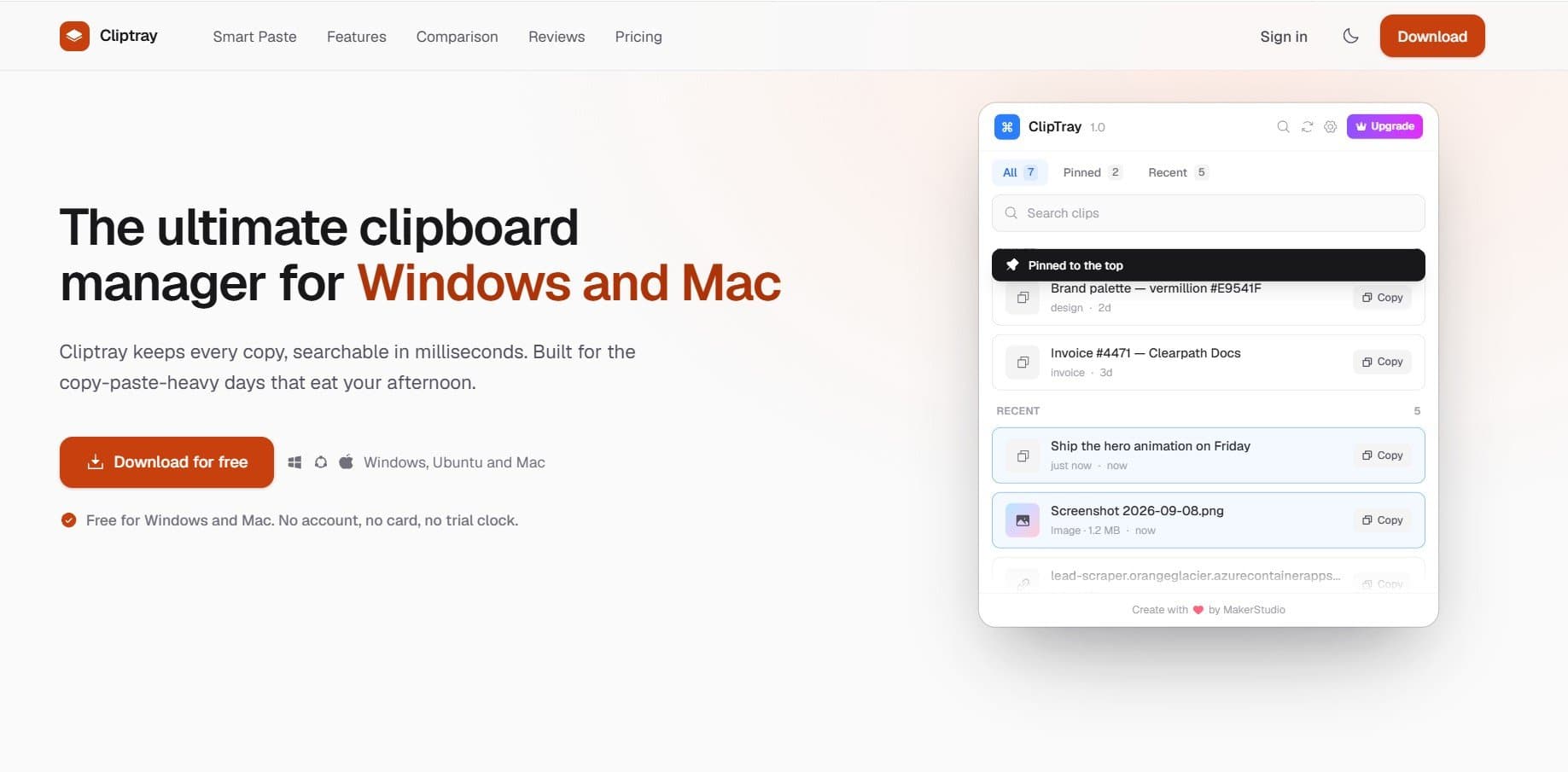
About this app
Cliptray is a free clipboard manager for Windows, macOS, and Linux that saves your clipboard history, lets you instantly search, pin, and organize copied content, and securely syncs it across devices. Copy smarter, work faster, and never lose important text, links, or images again.
Key features
- 1Unlimited clipboard history with instant search, tags, and pinning across Windows, macOS, and Linux
- 2Smart Paste ranks clips by cursor field context entirely on-device, with no server call
- 3End-to-end encrypted multi-device sync plus a Privacy Mode that skips passwords and API keys
Target customer profile
Drawn from the product itself, not from a survey.
Scout Review
Written by AI from measured evidence, scored out of 100.
Cliptray is a free cross-platform clipboard manager with a genuinely thoughtful feature set — unlimited history, instant search, tags, image copy, E2E-encrypted sync, and a Smart Paste engine that ranks clips by field context entirely on-device. The documentation is detailed and the pricing model (free, no account) is frictionless. The measured accessibility score is perfect and desktop performance is excellent. The problems are concrete: the live homepage renders blank, hiding the hero and CTA; mobile LCP is 5.1s; five security headers are missing; and traction is minimal. It's a solid product wearing a broken storefront.
Measure by measure
Usability
58Feature documentation is genuinely thorough — Smart Paste logic, privacy mode, tags, hotkeys all explained. Free with no account lowers friction. But the blank live hero hides the primary download CTA.
Design
34The intended design is clean — consistent orange accent, tidy card-based app UI, bold headline in maker media. But the live homepage renders as near-total blank white space, so visitors see a broken-looking page.
Speed
68Desktop Lighthouse 95/100 is genuinely snappy. Mobile drops to 78 with a 5.1s LCP — the largest paint is slow, though CLS 0 and TBT 185ms keep it from feeling janky once loaded.
Security
52HTTPS and HSTS enforced, SPF and DMARC present, and the product claims E2E encryption plus a privacy mode that skips secrets. But five security headers are missing (6/12 checklist) and no audit or compliance page was found.
Accessibility
80Lighthouse accessibility audit scores a perfect 100/100, and the site covers Windows, macOS, and Linux. No published WCAG statement or a11y docs, so it sits in the upper band on automated evidence alone.
Growth
54A real, universal problem with one sharp differentiator: on-device Smart Paste that ranks clips by field context. But free OS clipboards and entrenched paid managers crowd the category, and traction is tiny.
Improvement areas
- Live homepage hero renders blank — headline, value prop, and download CTA are missing
- Mobile LCP of 5.1s is well above the 2.5s 'good' threshold despite strong desktop performance
- Five security headers missing (CSP, frame protection, X-Content-Type-Options, Referrer-Policy, Permissions-Policy)
Design & Usability
Cliptray's design intent is clear and competent: a consistent orange accent, a tidy card-based tray UI with pinned/recent sections, and a bold headline in the maker media. The problem is delivery — the live homepage renders as near-total blank white space, with no visible headline, value prop, CTA, or product imagery where the nav implies they should be. That single failure drags the design score down hard. Usability is stronger on paper: the site documents Smart Paste's four-signal ranking, privacy mode, tags, hotkeys, and image copy in real detail, and the free-no-account model removes signup friction entirely. But the blank hero hides the primary download CTA, so the first thing a visitor needs is the first thing they can't see.
Speed & Security
Speed is a tale of two devices. Desktop Lighthouse lands at 95/100 — genuinely fast. Mobile sits at 78/100 with a 5.1s LCP, well past the 2.5s 'good' threshold, though CLS 0 and TBT 185ms mean it doesn't feel janky once it paints. Security is a mixed bag: HTTPS and HSTS are enforced, SPF and DMARC are configured, and the product claims end-to-end encryption for synced clips plus a Privacy Mode that skips passwords and API keys before they hit history. Against that, the HTTP probe found five missing headers — no CSP, no frame protection, no X-Content-Type-Options, Referrer-Policy, or Permissions-Policy — landing at 6/12 checklist points. No SOC 2, ISO, pen-test, or bug bounty page was found, which is normal for an indie tool but keeps the score in the middle band.
Accessibility & Growth
Accessibility is the standout measured result: a perfect 100/100 on the Lighthouse axe-core audit, with cross-platform coverage across Windows, macOS, and Linux. There's no published WCAG statement or accessibility documentation, so the score rests on automated evidence — strong, but not the whole picture. Growth is the harder call. The problem Cliptray names is real and universal: native clipboards cap out (Windows at 25 items, macOS at one), and copy-paste-heavy work is genuinely painful. The differentiator is real too — Smart Paste ranks clips by what field your cursor is in, entirely on-device, with no server call. That's a sharper wedge than most clipboard managers offer. But the category is crowded with free OS defaults and entrenched paid tools, and the site's own counter reports 65 users total, 1 today, 2 this week. The idea has room; the execution hasn't found its audience yet.
Conclusion
Cliptray has the bones of something genuinely useful — Smart Paste is a real differentiator, the privacy-first on-device approach is the right call, and the free-no-account model removes every excuse not to try it. What it needs now is execution on the fundamentals: fix whatever is blanking the homepage hero, tighten mobile LCP, add the missing security headers, and publish an accessibility statement to back up that 100/100. The product is better than its website currently suggests. Close that gap and the 65-user counter starts meaning something.
Suggestions for improvement
- Fix the blank homepage hero — the headline, value prop, and download CTA are not rendering on the live site
- Improve mobile LCP from 5.1s toward the 2.5s 'good' threshold; desktop is already at 95
- Add missing security headers: CSP, X-Frame-Options, X-Content-Type-Options, Referrer-Policy, Permissions-Policy
- Publish an accessibility statement and WCAG conformance level to back up the 100/100 automated score
Alternatives comparison
Named competitors, point by point. Nobody paid to appear here or to be left out.
 Cliptray Cliptray |  | |
|---|---|---|
| Clipboard history limit | Unlimited | Not specified |
| Cross-platform support | Windows, macOS, Linux | Not specified |
| Search and tags | Yes — instant search plus tags | Not specified |
| Encrypted sync | End-to-end encrypted | Not specified |
| Pricing | Free, no account required | Not specified |
Comparing options? See Cliptray alternatives, scored side by side
More Productivity apps
View all Productivity
Qamarero
92An all-in-one hospitality software for restaurants and ba...

The Stack Newsletter
92A weekly newsletter delivering curated tech jobs, intervi...

EmbedMyReviews
92White-label reputation management software for agencies s...

StoryPad
92Privacy-first open source journal app with a continuous t...

Puzzly – B2B Lead Generation & Sales Intelligence Platform
92Puzzly is an all-in-one B2B lead generation platform that...

Notion
92All-in-one AI workspace for docs, projects, and knowledge...

Vibe Coding Agent Skills
92A free, open-source platform offering 110 AI agent skills...

CC Switch
91Open-source desktop app for switching AI coding providers...

username.md
90One verified handle for your online identity, readable by...

What the GIF
89Frame-perfect video-to-GIF maker that runs entirely in yo...

AuditCloser
89White-label website audits that close deals for digital a...

NudgeWin
89Automated quote follow-up for trades and service businesses.


A platform dedicated to providing unbiased reviews of newly launched applications, analyzing everything from their features to their full potential.
info@scoutforge.net© 2026 Scoutforge. All rights reserved.
