Cycling through all six. Tap any point to stop.
Measured on six things
Free compound interest calculator for savings & goals.
Security
52HTTPS enforced with HSTS, no accounts and no data stored server-side, which keeps the blast radius tiny. But no CSP, frame protection, Referrer-Policy or Permissions-Policy, and no SPF/DMARC on the domain.
Screenshots
1 / 1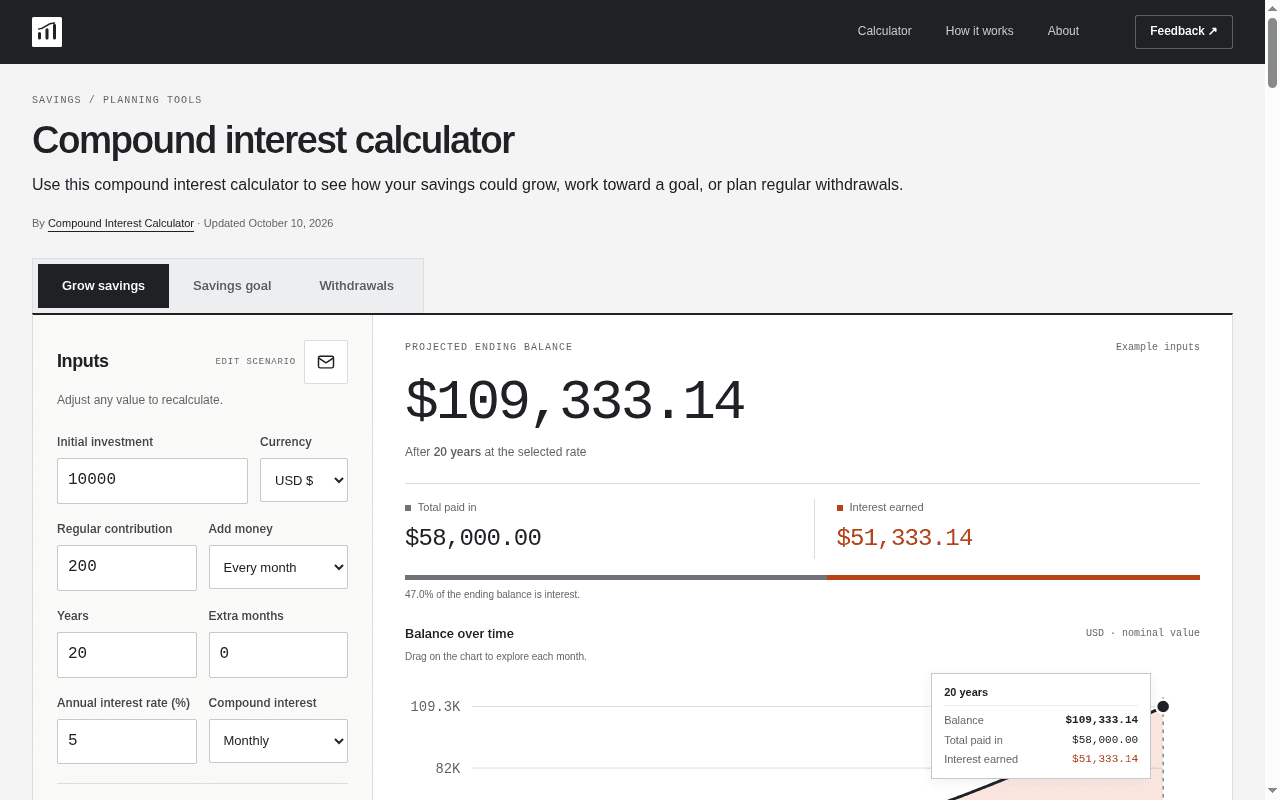
About this app
Free web compound interest calculator with daily/monthly/yearly compounding, contribution goals, withdrawal projections, charts, and CSV export—no account. Maps nominal rate or APY and contribution timing. Hypothetical fixed-rate estimates only—excludes taxes and fees; not investment advice. Built for anyone planning savings growth.
Key features
- 1Three calculation modes: grow savings, hit a savings goal, and model regular withdrawals over time.
- 2Nominal rate vs APY mapping, contribution timing (start/end of period), compounding frequency and optional inflation.
- 3Live chart plus yearly/monthly breakdown table, with Save image, CSV export, shareable links and print.
Target customer profile
Drawn from the product itself, not from a survey.
Demographic
First-time savers and young professionals in their 20s-30s
Pain points
Unsure how much to save monthly or whether small deposits even matter
Primary needs
See how regular contributions compound over time without a financial advisor
Demographic
Mid-career investors and DIY financial planners aged 35-55
Pain points
Comparing APY vs nominal rates and cross-checking calculators against Excel
Primary needs
A transparent, formula-backed tool that matches bank or spreadsheet calculations
Demographic
Pre-retirees and retirees planning withdrawal strategies
Pain points
Uncertain how long savings will last and wary of overspending in early retirement
Primary needs
Model regular withdrawals and spot shortfalls before they happen in real life
Demographic
Students, teachers, and finance learners
Pain points
Textbook formulas are abstract and hard to visualize in practice
Primary needs
A hands-on calculator with worked examples and formula explanations for learning
Scout Review
Written by AI from measured evidence, scored out of 100.
A genuinely well-built free compound interest calculator that beats its listed peers on features and crushes them on speed. The three-mode structure (grow, goal, withdrawals) plus nominal/APY mapping, contribution timing, inflation and CSV/PNG export covers ground that Investor.gov and Calculator.net leave open, and it does it with no account and no signup wall. Design is disciplined and semantic rather than decorative, and the pre-filled example means you see a real projection on arrival. The gaps are unglamorous: security headers are half-finished with no CSP or DMARC, the long article is small grey SEO text, and there's no accessibility statement. It's a strong utility that needs hardening and editing, not a rebuild.
Measure by measure
Usability
74Three clear mode tabs, plainly labelled inputs, nominal-vs-APY and timing toggles, plus CSV/PNG/Share/Print outputs and a period-by-period table. No account, no signup, value visible on load.
Design
71Restrained, data-tool identity: sans headings with monospace figures, semantic grey/rust color carried from summary bar to chart to legend, and a pre-filled live example. Long article text is small and low-contrast.
Speed
88Lighthouse mobile 99/100 (LCP 969ms, CLS 0, TBT 50ms), desktop 100/100. Example result and explanation still render with JavaScript disabled, so the page is useful before scripts finish.
Security
52HTTPS enforced with HSTS, no accounts and no data stored server-side, which keeps the blast radius tiny. But no CSP, frame protection, Referrer-Policy or Permissions-Policy, and no SPF/DMARC on the domain.
Accessibility
79Lighthouse accessibility 100/100, a skip-to-content link, and a JS-disabled fallback that keeps the example and explanation readable. No published WCAG statement or multi-language support.
Growth
63Real, specific problem with a genuine wedge: withdrawal modeling, APY-vs-nominal mapping and CSV export that Investor.gov and Calculator.net don't offer. Category is crowded and free, capping the ceiling.
Improvement areas
- Security headers incomplete: no CSP, frame protection, Referrer-Policy or Permissions-Policy, and no SPF/DMARC.
- Long-form article uses small low-contrast text with repetitive keyword phrasing that hurts readability.
- No accessibility statement or WCAG conformance claim, and no multi-language support despite multi-currency display.
Design & Usability
The design earns its 'data tool' identity honestly: sans headings paired with monospace figures, and a grey/rust palette that means the same thing in the summary bar, the chart fill and the legend. The calculator arrives pre-filled with a live $109,333.14 result, so you understand the product before you touch a field. Usability is where it pulls ahead of the peers — three mode tabs (grow, goal, withdrawals), plainly labelled inputs, and toggles for nominal vs APY, contribution timing and inflation that Investor.gov simply doesn't have. Outputs are equally practical: Save image, CSV, Share, Print, plus a yearly/monthly breakdown table. The weak spot is the long-form article underneath, set in small low-contrast grey and stuffed with repetitive 'compound interest calculator' phrasing that reads as written for crawlers, not savers.
Speed & Security
Speed is the standout measured result: Lighthouse mobile 99/100 with a 969ms LCP, zero cumulative layout shift and 50ms total blocking time; desktop hits 100/100. The page also degrades gracefully — with JavaScript off, the example projection and the explanation still render, which is rarer than it should be. Security is the honest weak link. HTTPS is enforced with HSTS and there are no accounts, so there's no user database to leak, which genuinely limits exposure. But the header probe found no CSP, no frame protection, no X-Content-Type-Options, no Referrer-Policy and no Permissions-Policy, and the domain publishes neither SPF nor DMARC. For a site that asks people to email feedback, missing DMARC means spoofed mail from the domain is easier than it should be. None of this is a breach — it's just an unfinished hardening checklist.
Accessibility & Growth
Accessibility is strong on the measurable parts: a 100/100 Lighthouse audit, a skip-to-calculator link, and a no-JS fallback that keeps the worked example readable. What's missing is the human layer — no WCAG conformance statement, no multi-language support despite five display currencies, and that small grey article text that passes automated contrast but tires real readers. Growth is a judgement on the idea: the problem is real and the target segments are named specifically (first-time savers, DIY planners cross-checking Excel, pre-retirees modeling withdrawals, students). The wedge is concrete — withdrawal projections, APY-vs-nominal mapping, contribution timing, inflation and CSV export are things Investor.gov and Calculator.net don't offer. The limit is structural: the category is free, crowded, and duplicated inside every banking app, so there's no obvious path from 'good free calculator' to something people pay for or return to weekly.
Conclusion
If you want to know what $200 a month turns into over 20 years, or whether your savings will survive 25 years of withdrawals, this does the job faster and more transparently than the government calculator or a spreadsheet you have to build yourself. The math is shown, the assumptions are labelled, and the CSV export means you can check it against Excel. Before it's a finished product rather than a very good page, it needs the security headers completed (CSP, frame protection, Referrer-Policy, DMARC), the article rewritten for humans at a readable size, and a short accessibility statement. Those are days of work, not months — and they'd move this from 'best free option' to 'the one I recommend without caveats.'
Suggestions for improvement
- Add CSP, X-Frame-Options/frame-ancestors, X-Content-Type-Options, Referrer-Policy and Permissions-Policy; publish SPF and DMARC for the domain.
- Rewrite the long-form article at a larger size and higher contrast, cutting the repetitive 'compound interest calculator' keyword phrasing.
- Publish a short accessibility statement naming the WCAG level targeted and how to report a barrier.
- Add a worked 'check this against Excel' example with the exact FV/PMT formulas so DIY planners can verify the output in one step.
Alternatives comparison
Named competitors, point by point. Nobody paid to appear here or to be left out.
 Compound Interest Calculator | Investor.gov Compound Interest Calculator |  Calculator.net Compound Interest Calculator |  Microsoft Excel (FV/PMT) | |
|---|---|---|---|---|
| Withdrawal / drawdown modeling | Yes — dedicated Withdrawals mode | No | No | Possible via custom formulas only |
| Nominal rate vs APY mapping | Yes — toggle plus effective annual yield shown | No | No | Manual (EFFECT/NOMINAL functions) |
| Contribution timing (beginning vs end of period) | Yes — explicit toggle | No | No | Yes — via FV 'type' argument |
| CSV / image export and shareable links | CSV, PNG, share link, print | None | None | Native spreadsheet export |
| Account required | No | No | No | Microsoft account / license required |
| Cost | Free | Free | Free | Paid (Microsoft 365 subscription) |
Investor.gov Compound Interest Calculator
The SEC's official calculator, reliable and government-backed, but limited to basic growth projections without withdrawal or inflation modeling.
Calculator.net Compound Interest Calculator
A popular multi-purpose calculator site with a solid compound interest tool and annual schedule table, though it lacks shareable links and CSV/PNG exports.
Microsoft Excel (FV/PMT)
The spreadsheet gold standard for financial modeling, offering unlimited flexibility but requiring manual formula setup and no built-in visualization.
Comparing options? See Compound Interest Calculator alternatives, scored side by side
More Finance apps
View all Finance
CreateMyCoin
92A no-code Solana token creator that deploys SPL tokens in...

CalcFi
92A free, comprehensive financial calculator platform with ...

Flicker: Crypto & Stock Analysis
90Flicker reads any coin or stock and gives you a verdict, its reasons, and the exit before the entry.

Redstone
89Portfolio optimization and risk metrics for investors.

Receipt Bot
88Automated bookkeeping software that extracts data from re...

Stellar Staff
88A top-rated virtual assistant agency that matches busines...

BringMe Money
88AI invoice follow-up that drafts reminders and tracks next steps.

ArbPlay
88Real-time sure bets scanner for Greek bookmakers, exchang...

Prop Firm Consistency Calculator
88Check your prop firm consistency rule and best-day percen...

Stripdo
87Stripdo is a smart invoicing tool that automatically gene...

OpenBudget
87Connect your bank to AI for real answers about your money.

StockFit API
87A developer-first financial data API providing structured...


A platform dedicated to providing unbiased reviews of newly launched applications, analyzing everything from their features to their full potential.
info@scoutforge.net© 2026 Scoutforge. All rights reserved.
