Cycling through all six. Tap any point to stop.
Measured on six things
All-in-one workspace for creative agencies
Design
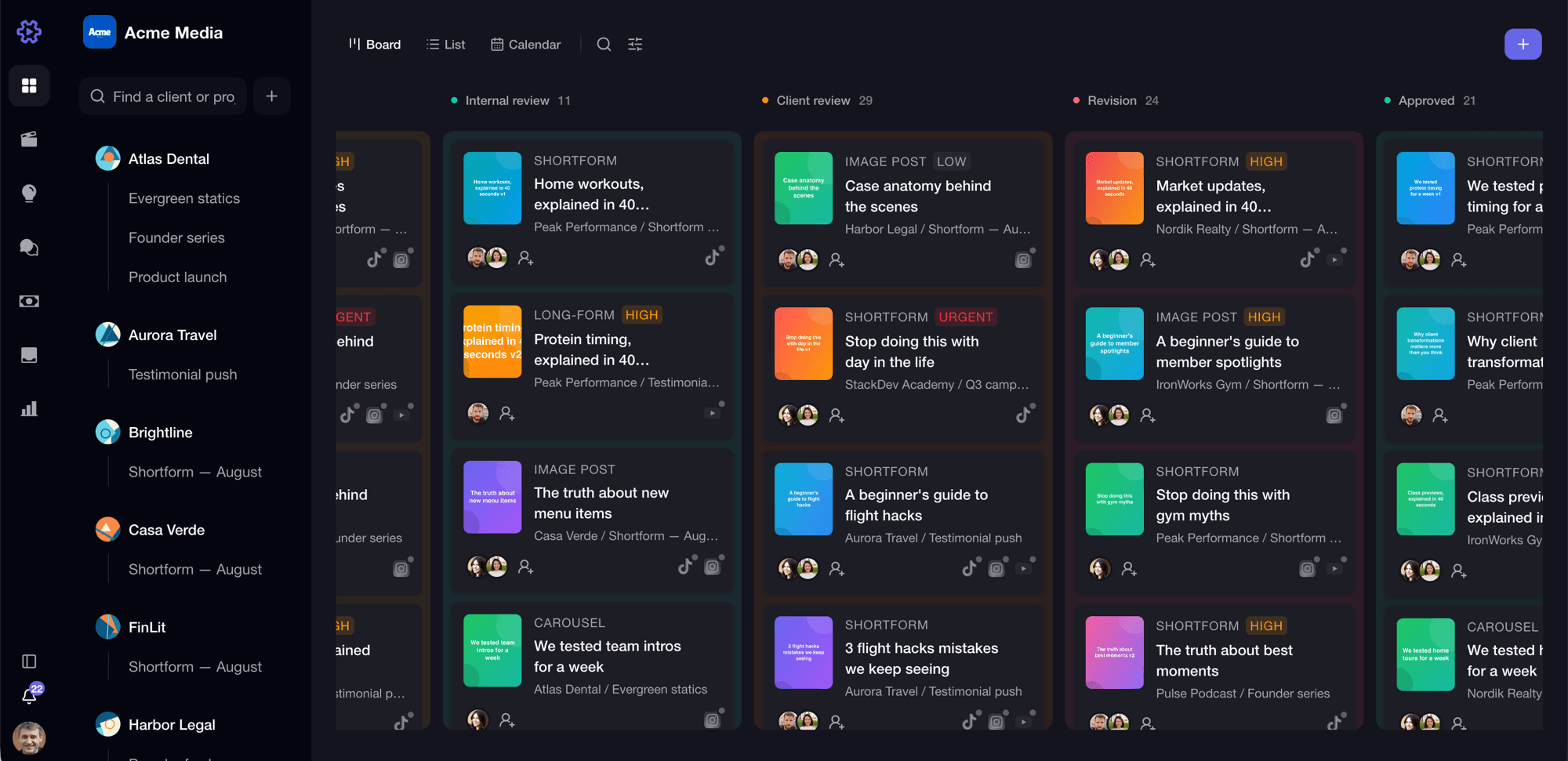
58Consistent dark theme and color-coded Kanban UI in product shots, but homepage hero has excessive black space and cropped screenshots, making it feel unfinished.
Screenshots
1 / 3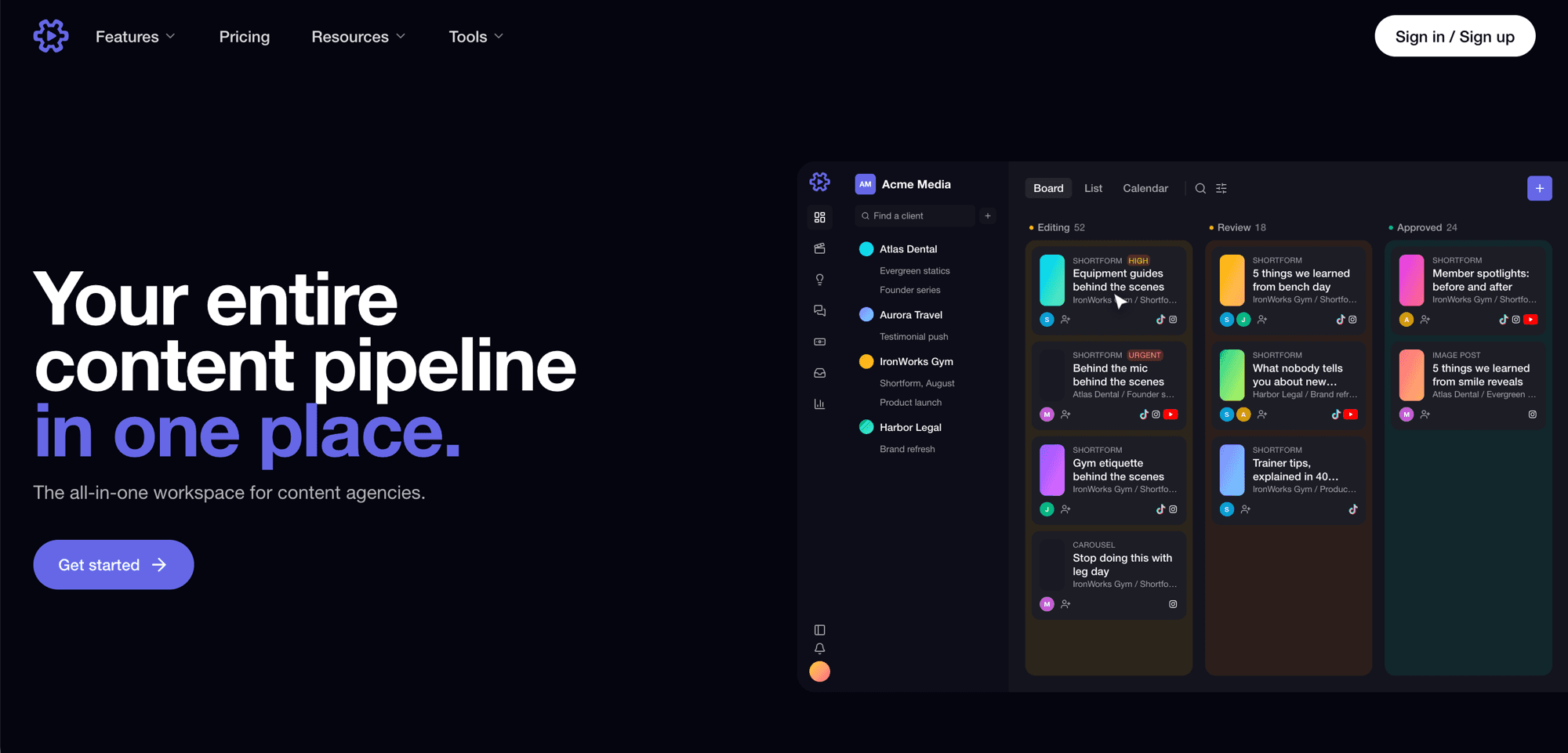
About this app
ContentWorkflow is the all-in-one management tool for creative agencies and content teams juggling multiple clients. Instead of stitching together a project tracker, a review tool, a scheduler and a storage drive, agencies run the entire pipeline in one workspace. The standout is the client review loop: send a review link that clients open with zero logins, and collect frame-accurate, timestamped comments directly on the video. Every plan includes unlimited free client reviewers. Around that sits Kanban stages from scripting to approved, version history, a content calendar with auto-publishing to TikTok, Instagram and YouTube, per-account analytics, and a 4K/RAW media library. Launch pricing starts at $20/month with a 14-day free trial, no card required.
Key features
- 1All-in-one pipeline: Kanban stages, content calendar, and publishing to TikTok, Instagram, YouTube.
- 2Client review links with zero logins, timestamped comments, and version history.
- 3Unlimited free client reviewers on all plans; 4K/RAW media library.
Target customer profile
Drawn from the product itself, not from a survey.
Demographic
Small content agencies (5-20 employees) producing short-form video for TikTok, Instagram Reels, and YouTube Shorts
Pain points
Clients expect high-quality, efficient service, but managing feedback loops and production schedules is overwhelming.
Primary needs
A tool that helps them deliver on client expectations while keeping their own workflow organized.
Demographic
Video editors and content creators who manage their own clients and projects
Pain points
Fragmented workflow: they rely on separate tools for review, storage, scheduling, and communication; clients are frustrated by multiple logins and lack of context; tracking revisions and feedback manually wastes time.
Primary needs
An organized way to handle multiple projects simultaneously; to provide a professional client-facing review process that is seamless and time-stamped; to consolidate all aspects of client management in one accessible place.
Demographic
Social media managers and marketers within businesses that produce content for their own brand or for in-house clients
Pain points
Struggling to keep content production on schedule; having to switch between different tools for planning, collaboration, and publishing; difficulty in providing clients with the latest status updates and getting quick approvals.
Primary needs
To have a centralized system that integrates content planning, team collaboration, and publishing with clear visibility into progress; to offer clients a simple way to give feedback without friction.
Scout Review
Written by AI from measured evidence, scored out of 100.
ContentWorkflow is a promising all-in-one tool for content agencies, offering a unified pipeline from ideation to publishing. Its standout feature is the client review loop with zero-login, timestamped comments, which addresses a real pain point. The product UI is well-designed, though the homepage marketing falls short. Performance and security are solid, with room for improvement in accessibility and transparency. Growth potential is strong given the rising demand for short-form video, but it faces stiff competition from specialized tools. The 14-day free trial and launch pricing make it easy to test. Overall, a competent product with a clear value proposition, but it needs to refine its marketing and build trust through security certifications.
Measure by measure
Usability
72Clear onboarding with 14-day trial, no card; intuitive board/list/calendar views; guides offer practical advice. Client review links with zero logins lower friction significantly.
Design
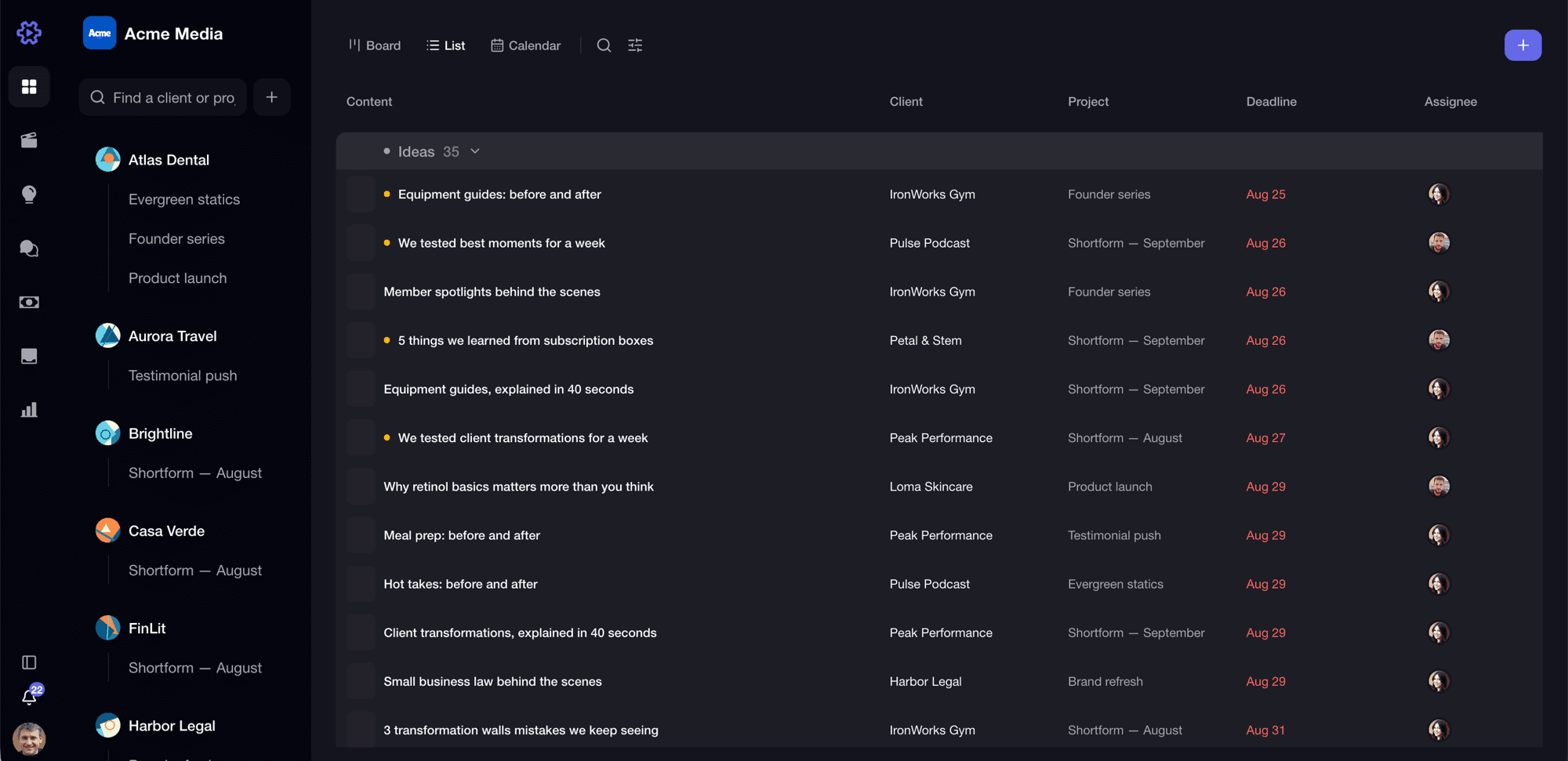
58Consistent dark theme and color-coded Kanban UI in product shots, but homepage hero has excessive black space and cropped screenshots, making it feel unfinished.
Speed
70Lighthouse mobile 81/100 (LCP 3.8s), desktop 97/100. Solid performance, but LCP on mobile could be improved. No user complaints found.
Security
74Strong HTTP security headers (HSTS, CSP, etc.) but DMARC missing. No SOC 2 or pen-test reports found. Privacy policy not prominent.
Accessibility
70Lighthouse accessibility 93/100, but failing audits on ARIA attributes and color contrast. No a11y statement or multi-language support found.
Growth
68Real problem (fragmented agency workflow) with a clear wedge: all-in-one pipeline with client review links and auto-publishing. Category has headroom, but competition is fierce.
Improvement areas
- Homepage design needs polish: excessive empty space and cropped screenshots.
- Security transparency: no SOC 2 or pen-test reports published.
- Accessibility: fix ARIA and contrast issues; add a11y statement.
Design & Usability
ContentWorkflow's design is a mixed bag. The product UI itself—dark theme, color-coded Kanban cards, client sidebar—looks polished and functional. However, the homepage hero is a letdown: excessive black space and awkwardly cropped screenshots make it feel unfinished. Usability is a stronger point: the 14-day free trial without a card is low-friction, and the board/list/calendar views are intuitive. The guides section is a nice touch, offering practical advice that stands alone. The zero-login client review links are a standout feature, removing a major friction point for clients. Overall, the product seems more mature than its marketing suggests.
Speed & Security
Performance is solid: Lighthouse mobile scores 81/100 with a desktop score of 97/100. The LCP of 3.8s on mobile is slightly above the ideal, but TBT and CLS are good. Security is handled well with a comprehensive set of HTTP headers (HSTS, CSP, etc.), though DMARC is missing. No SOC 2 or pen-test reports are published, which is typical for a young product. The lack of a prominent privacy policy is a minor concern. For a tool handling client content, more transparency on data handling would be reassuring, but nothing here raises red flags.
Accessibility & Growth
Accessibility is decent with a Lighthouse score of 93/100, but there are failing audits on ARIA attributes and color contrast. No accessibility statement or multi-language support is evident. Growth potential is promising: the problem of fragmented agency workflows is real, and ContentWorkflow's all-in-one approach with client review links and auto-publishing is a clear differentiator. The category has headroom as short-form video demand grows. However, competition from specialized tools like Frame.io and Later is strong, and the 'all-in-one' pitch may struggle against best-of-breed alternatives. The launch pricing and unlimited free client reviewers are smart moves to attract early adopters.
Conclusion
If you're a small agency drowning in tools and client feedback loops, ContentWorkflow is worth a shot. The free trial is risk-free, and the client review feature alone could save hours. Just don't judge it by the homepage—the real product is better than the pitch. As it matures, adding SOC 2 and improving accessibility will help it compete with the big players. For now, it's a solid choice for teams that want to consolidate their pipeline.
Suggestions for improvement
- Improve homepage hero design: reduce empty space, use full UI screenshots, and add social proof.
- Publish a security page with SOC 2 or pen-test reports to build trust with agencies.
- Add an accessibility statement and fix contrast issues on key CTAs.
- Consider offering a free plan with limited features to attract solo creators.
Alternatives comparison
Named competitors, point by point. Nobody paid to appear here or to be left out.
 ContentWorkflow ContentWorkflow | Frame.io | Notion | monday.com | Later | Hootsuite | |
|---|---|---|---|---|---|---|
| Client review with timestamped comments | Yes, zero-login review links with timestamped comments | Yes, frame-accurate feedback | No, only text comments | No, lacks video review | No, scheduling only | No, not designed for review |
| Content calendar with auto-publishing | Yes, to TikTok, Instagram, YouTube | No | Manual, no auto-publishing | No, lacks publishing | Yes, but only scheduling | Yes, but not content production |
| Client project management | Yes, with clients and projects | Limited, no project management | Yes, but generic | Yes, but not content-specific | No | No |
| Unlimited free client reviewers | Yes, on all plans | No, limited by plan | N/A | No | N/A | N/A |
| 4K/RAW media library | Yes, included | Yes, but storage limits | No, file attachments only | No, limited file storage | No | No |
Frame.io
Frame.io is a video review and collaboration tool that focuses on frame-accurate feedback, similar to ContentWorkflow's video review feature. However, it does not offer content planning, publishing automation, or client project management, leading to a fragmented workflow.
Notion
Notion is a versatile workspace for notes and project management. While it can handle content calendars and task tracking, it lacks built-in tools for video review with timestamped comments, direct publishing to social platforms, and client collaboration, so users have to assemble a separate stack.
monday.com
monday.com is a project management tool that helps organize tasks and clients but does not include video review capabilities, channel publishing, or social automation. ContentWorkflow goes beyond project management to streamline the whole content lifecycle.
Later
Later is a social media scheduler, but it lacks features for content production management, team/client collaboration, and frame-accurate review. It's just a piece of the puzzle, whereas ContentWorkflow includes scheduling among many other features.
Hootsuite
Hootsuite allows social media scheduling and analytics, but it's not designed for content production with asset management. There's no client-facing review system or content pipeline that includes ideation and approval stages.
Comparing options? See ContentWorkflow alternatives, scored side by side
More Productivity apps
View all Productivity
Qamarero
92An all-in-one hospitality software for restaurants and ba...

The Stack Newsletter
92A weekly newsletter delivering curated tech jobs, intervi...

EmbedMyReviews
92White-label reputation management software for agencies s...

StoryPad
92Privacy-first open source journal app with a continuous t...

Puzzly – B2B Lead Generation & Sales Intelligence Platform
92Puzzly is an all-in-one B2B lead generation platform that...

Notion
92All-in-one AI workspace for docs, projects, and knowledge...

Vibe Coding Agent Skills
92A free, open-source platform offering 110 AI agent skills...

CC Switch
91Open-source desktop app for switching AI coding providers...

username.md
90One verified handle for your online identity, readable by...

What the GIF
89Frame-perfect video-to-GIF maker that runs entirely in yo...

AuditCloser
89White-label website audits that close deals for digital a...

NudgeWin
89Automated quote follow-up for trades and service businesses.


A platform dedicated to providing unbiased reviews of newly launched applications, analyzing everything from their features to their full potential.
info@scoutforge.net© 2026 Scoutforge. All rights reserved.
