

A platform dedicated to providing unbiased reviews of newly launched applications, analyzing everything from their features to their full potential.
info@scoutforge.net© 2026 Scoutforge. All rights reserved.
A platform dedicated to providing unbiased reviews of newly launched applications, analyzing everything from their features to their full potential.
info@scoutforge.net© 2026 Scoutforge. All rights reserved.
A platform dedicated to providing unbiased reviews of newly launched applications, analyzing everything from their features to their full potential.
info@scoutforge.net© 2026 Scoutforge. All rights reserved.
Cycling through all six. Tap any point to stop.
Measured on six things
Extract table data from PDF or image directly inside Google Sheets with 1 click
Only 669 users/installs with limited visibility. 5 free monthly credits encourage trials, reasonable premium pricing, and responsive support. Niche appeal but overshadowed by more popular PDF-to-Sheets add-ons with 39K+ users.
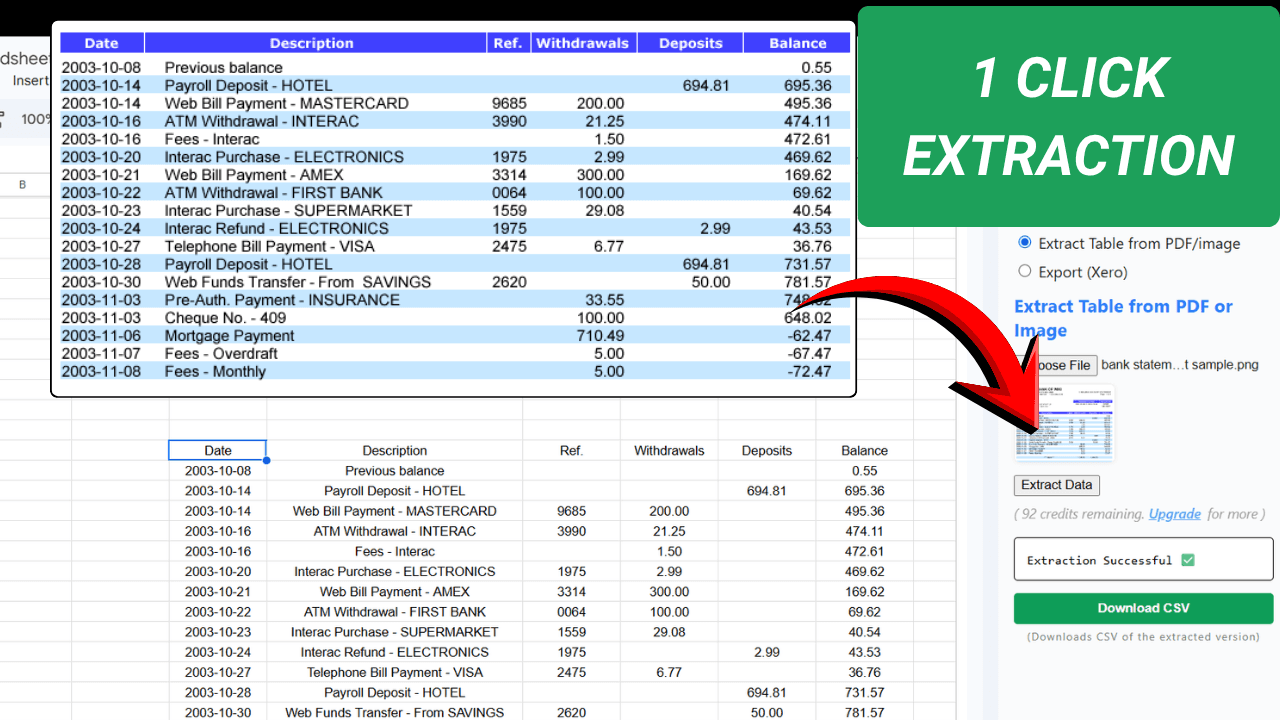
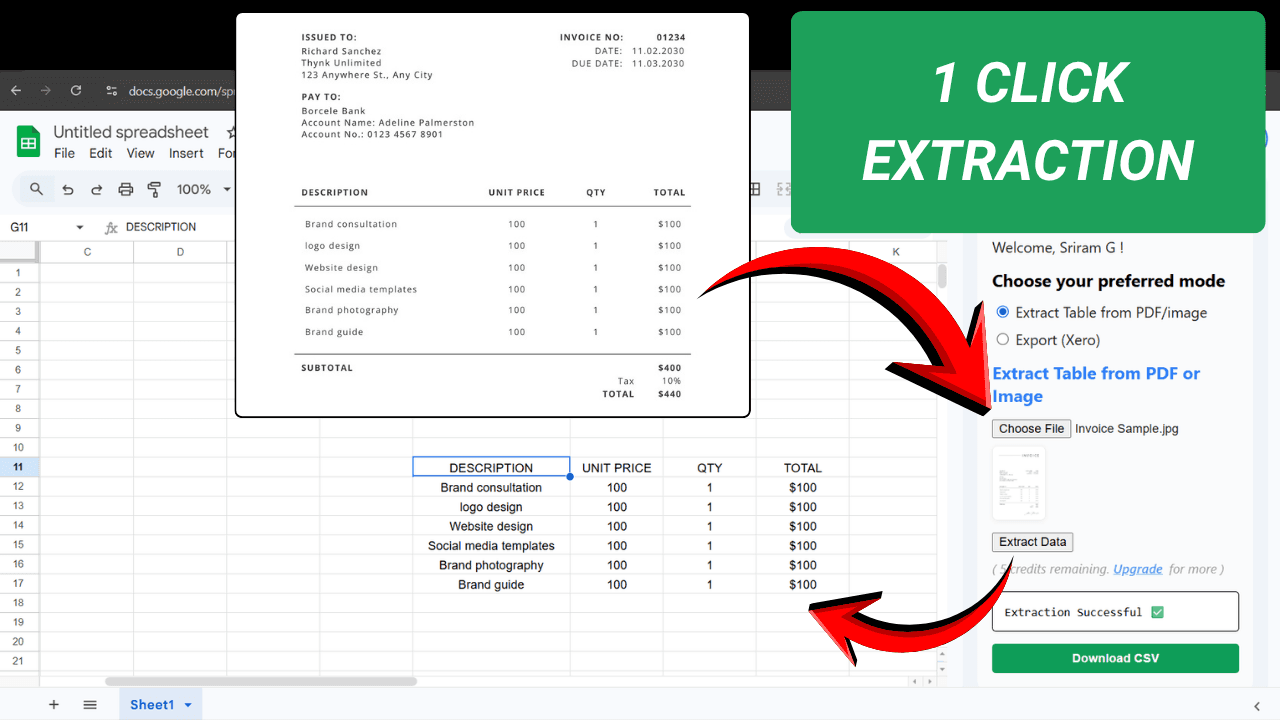
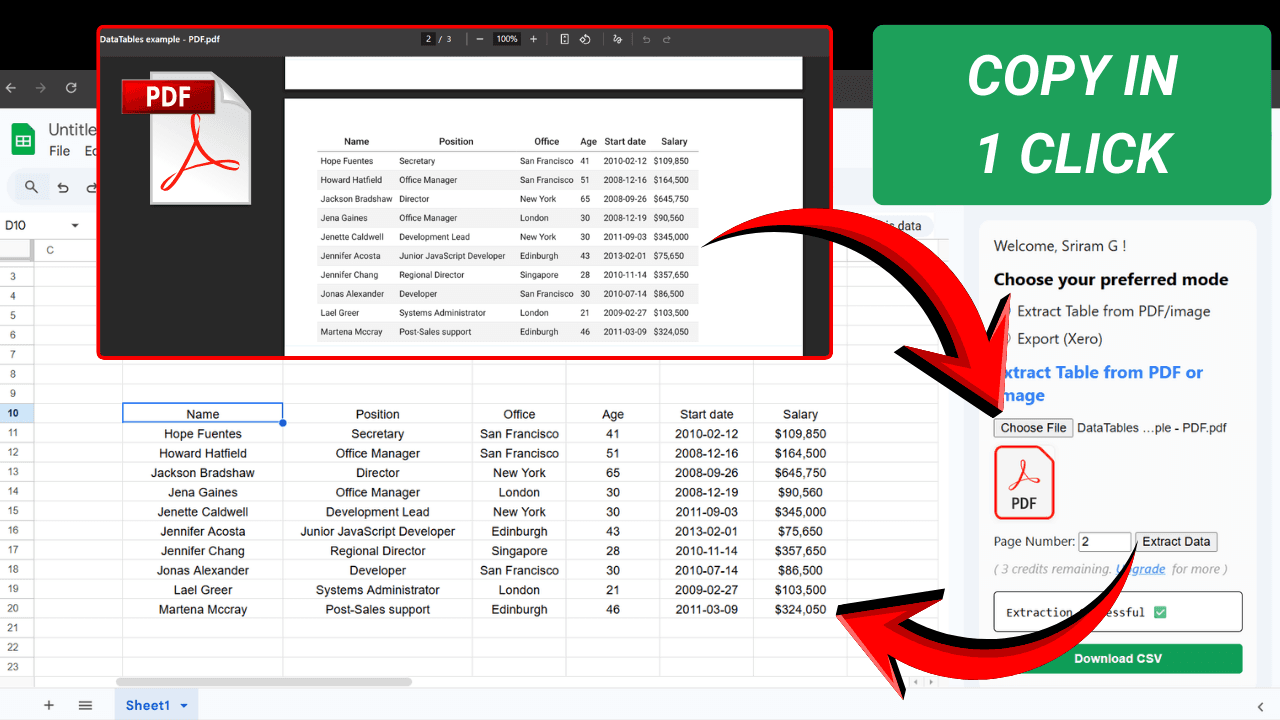
This add-on is a lifesaver for anyone drowning in paper or digital PDFs with tabular data—whether it's bank statements, invoices, or reports. It uses advanced AI to convert PDF or image tables into editable Google Sheets data in one click, preserving rows, columns, and layout. You also get a CSV download option. Perfect for accountants, bookkeepers, small business owners, or anyone who deals with financial documents. The best part? It works right inside Google Sheets, so there's no need to juggle multiple apps. You get 5 free credits monthly, and the premium plans are reasonably priced. The privacy is solid—no permanent data storage. If you've ever manually typed out numbers from a bank statement, this tool will feel like magic.
Drawn from the product itself, not from a survey.
Demographic
Bookkeepers & Accountants
Pain points
Manually entering invoice or bank statement data into spreadsheets is time-consuming and error-prone.
Primary needs
Quick, accurate extraction of tabular data from PDFs and images into editable formats like Google Sheets or CSV.
Demographic
Small Business Owners
Pain points
Limited budget and staff for data entry; need to digitize receipts, bills, and bank statements for financial tracking.
Primary needs
Affordable, easy-to-use tool to convert documents into spreadsheet data without manual typing.
Demographic
Finance Analysts & Auditors
Pain points
Need to analyze data from multiple PDF reports; manual extraction is inefficient and delays insights.
Primary needs
Fast, reliable conversion of structured tables from PDFs into analyzable data within Google Sheets.
Written by AI from measured evidence, scored out of 100.
Convert PDF to Google Sheets™ is a practical, no-nonsense Google Workspace add-on that uses AI to turn tabular PDFs (especially bank statements and invoices) into editable Sheets data quickly. Strengths include seamless integration, layout preservation, privacy focus, and affordable premium plans. It genuinely saves time over manual entry for target users. Weaknesses are limited scale handling, basic interface, small user base, and typical AI accuracy caveats on complex or low-quality documents. Overall a helpful tool that feels like magic after your tenth manual statement—but it's not revolutionary or flawless. Solid for individuals and small teams, less ideal for high-volume enterprise needs.
One-click extraction directly in Google Sheets after install and sign-in. Supports PDF/images, page selection, and CSV download. Simple for basic bank statements and invoices; limitations on multiple tables per page reduce smoothness.
Clean Google Workspace sidebar design with straightforward upload and extract buttons. Functional but generic—no standout visuals, modern polish, or intuitive previews of extracted tables before insertion.
Processing typically under 10 seconds to 1 minute depending on document complexity and AI extraction. Fast enough for occasional use but can vary with file size or server load.
Explicitly states no permanent data storage and full privacy. Uses standard Google Workspace permissions for Sheets access. No major red flags; data is processed transiently.
Works within Google Sheets, which has strong built-in accessibility tools. Sidebar interface is keyboard-friendly in theory, but no specific mentions of screen reader optimization, contrast settings, or alt text for extracted data.
Only 669 users/installs with limited visibility. 5 free monthly credits encourage trials, reasonable premium pricing, and responsive support. Niche appeal but overshadowed by more popular PDF-to-Sheets add-ons with 39K+ users.
This add-on delivers exactly what the description promises: AI-powered table extraction from PDFs and images straight into your Google Sheet with layout preservation and CSV export. The sidebar keeps everything in one tab—no app switching—which is a genuine usability win for accountants and bookkeepers tired of copy-pasting. Design is utilitarian Google Marketplace standard: clean enough, but it lacks table previews, batch processing, or smart column mapping that would make it feel premium. Usability shines for simple, clear bank statements or invoices but stumbles on multi-table documents (only the prominent one extracts automatically) or poor-quality scans. It's a solid 1-click experience until real-world messiness hits.
Speed is respectable—most extractions finish in 10-60 seconds, which beats manual data entry by orders of magnitude. Variability comes from AI model load and document complexity. Security is one of its stronger points: the developer emphasizes no permanent storage and transient processing, aligning with privacy needs for financial docs. It requires Google sign-in and Sheets permissions, which is standard but means trusting the backend. Compared to desktop tools like Tabula (local, no upload) or Adobe (potentially cloud), this strikes a decent balance for cloud convenience without permanent data retention.
Accessibility rides on Google Sheets' robust features (screen readers, shortcuts), but the add-on itself offers no dedicated enhancements like high-contrast modes or ARIA labels mentioned. Growth is modest at ~669 users, suggesting limited marketing or discoverability. The freemium model with 5 monthly credits is smart for hooking small businesses and analysts, and responsive email support helps retention. However, it competes against far more established add-ons with tens of thousands of users, making organic growth an uphill battle without standout differentiation or broader feature expansion.
Conclusion
If you're drowning in PDFs and live in Google Sheets, this add-on is worth the 5 free credits. It won't replace dedicated accounting software, but it'll stop you from wanting to throw your laptop out the window every month-end. Give it a spin on your next bank statement—you'll wonder how you lived without it (until it hits one of its limitations).
Named competitors, point by point. Nobody paid to appear here or to be left out.
 Convert PDF to Google Sheets™, CSV: Bank Statement Convert PDF to Google Sheets™, CSV: Bank Statement |  Tabula Tabula |  Adobe Acrobat Export PDF Adobe Acrobat Export PDF | |
|---|---|---|---|
| Direct Google Sheets Integration | Native sidebar, one-click insert | None (desktop Java app, exports CSV) | Exports to Excel/CSV, manual import to Sheets |
| Pricing Model | 5 free credits/mo + paid plans | Completely free & open source | Paid subscription (Acrobat Pro) |
| Processing Location & Privacy | Cloud AI, no permanent storage | Local desktop, highest privacy | Cloud or desktop, Adobe terms |
| AI-Powered Table Extraction | Yes, preserves layout | Rule-based, manual selection | Advanced but not AI-focused |
| User Base / Popularity | ~669 users | Popular open-source tool | Very large (Acrobat users) |
Tabula
Open-source tool for extracting tables from PDFs, but requires installation and doesn't integrate with Google Sheets.
Adobe Acrobat Export PDF
Converts PDF to Excel or CSV, but is paid and doesn't work directly inside Google Sheets.
Comparing options? See Convert PDF to Google Sheets™, CSV: Bank Statement alternatives, scored side by side
What the review was written against. A verdict with no sources is an opinion.

An all-in-one hospitality software for restaurants and ba...

A weekly newsletter delivering curated tech jobs, intervi...

White-label reputation management software for agencies s...

Privacy-first open source journal app with a continuous t...

Puzzly is an all-in-one B2B lead generation platform that...

All-in-one AI workspace for docs, projects, and knowledge...

A free, open-source platform offering 110 AI agent skills...

Open-source desktop app for switching AI coding providers...

One verified handle for your online identity, readable by...

Frame-perfect video-to-GIF maker that runs entirely in yo...

White-label website audits that close deals for digital a...

Automated quote follow-up for trades and service businesses.
A platform dedicated to providing unbiased reviews of newly launched applications, analyzing everything from their features to their full potential.
info@scoutforge.net© 2026 Scoutforge. All rights reserved.
