

A platform dedicated to providing unbiased reviews of newly launched applications, analyzing everything from their features to their full potential.
info@scoutforge.net© 2026 Scoutforge. All rights reserved.
A platform dedicated to providing unbiased reviews of newly launched applications, analyzing everything from their features to their full potential.
info@scoutforge.net© 2026 Scoutforge. All rights reserved.
A platform dedicated to providing unbiased reviews of newly launched applications, analyzing everything from their features to their full potential.
info@scoutforge.net© 2026 Scoutforge. All rights reserved.
Cycling through all six. Tap any point to stop.
Measured on six things
Smart second Dock with live widgets for Mac.
Prominent CTAs and visual widget proof make the value clear fast, and the changelog shows real iteration. But the docs page is one paragraph and an email — no setup guide, widget reference, or troubleshooting.
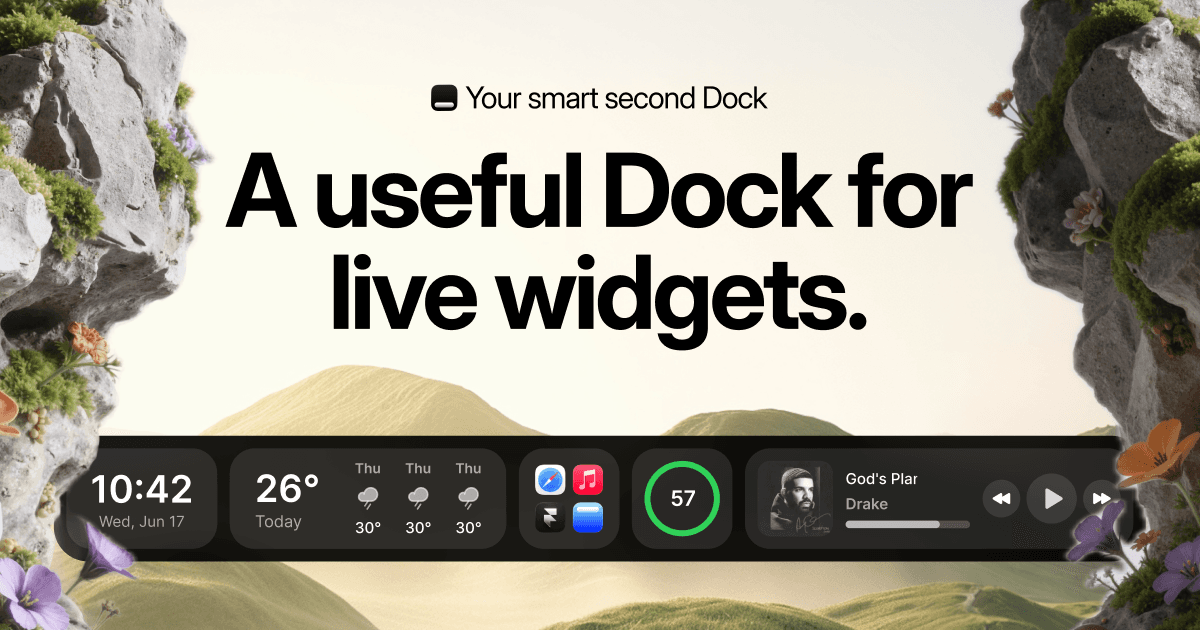
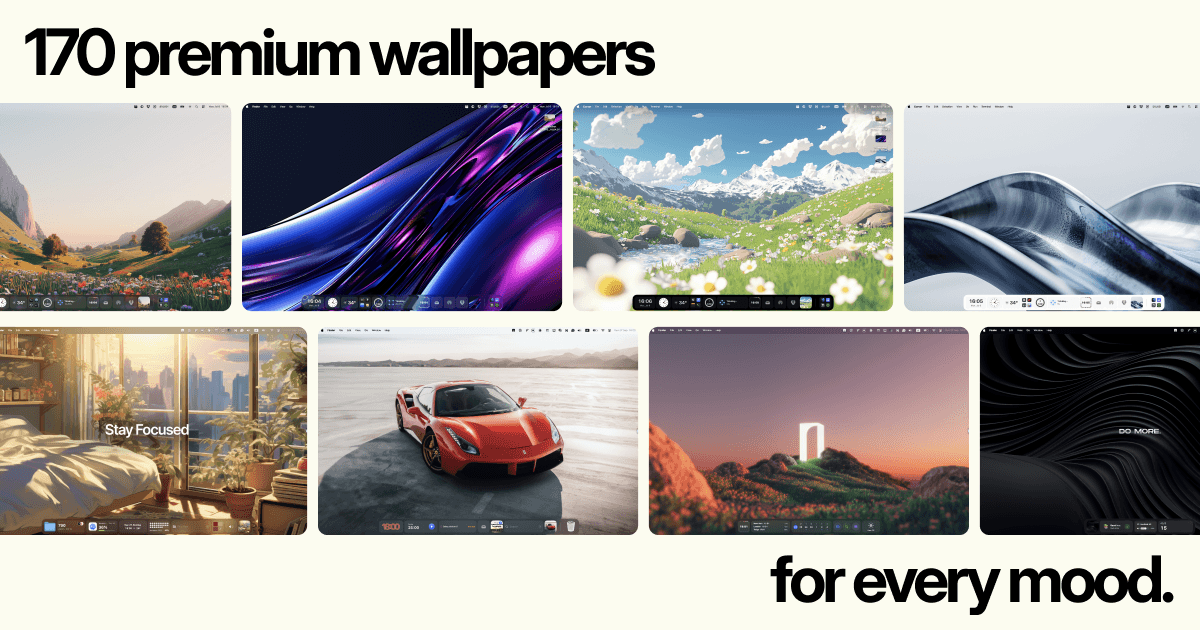
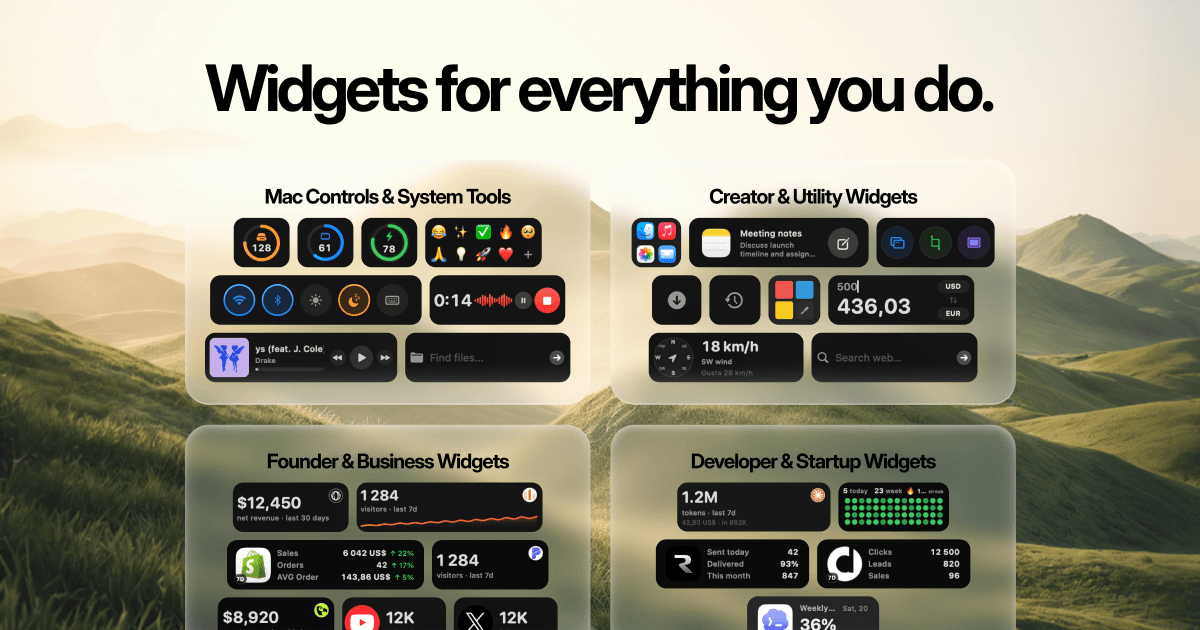
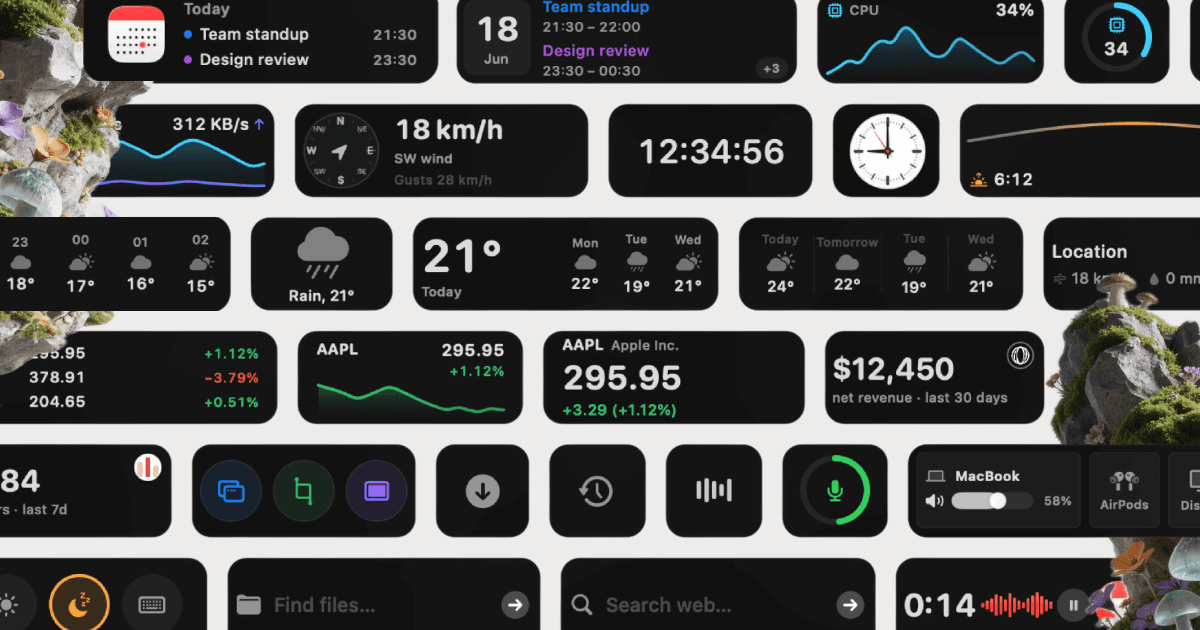
CoolDock is an award-winning second Dock for macOS. It sits beside your original Dock, so nothing about your current setup changes, and gives you a live strip of widgets, apps, folders and quick actions built for the way you actually work. CoolDock brings music, todos, calendar events, weather, search, system stats, quick actions, and more useful widgets into one beautiful live dock. Pick from more than 160 widgets across 20 categories, from clocks and reminders to revenue, AI plan usage, and everyday tools like clipboard, screenshots and AirDrop, and pin the apps, folders and files you reach for most. CoolDock is native, local-first and respects your privacy. It only asks for a macOS permission when a widget needs it. One-time payment, no subscription, 14-day money-back guarantee. Runs on macOS 14 Sonoma or later, on Apple Silicon and Intel.
Drawn from the product itself, not from a survey.
Demographic
Mac-using professionals (designers, developers, writers)
Pain points
Switching between apps disrupts focus; lack of quick access to live info.
Primary needs
Streamlined workflow, instant access to tools and data, customizable interface.
Demographic
Students and knowledge workers
Pain points
Managing deadlines, tasks, and resources efficiently.
Primary needs
Integrated calendar, reminders, and quick notes; distraction-free study environment.
Demographic
Creators and entrepreneurs
Pain points
Monitoring multiple metrics (sales, followers, analytics) across platforms.
Primary needs
At-a-glance business insights, quick actions, and system monitoring.
Written by AI from measured evidence, scored out of 100.
CoolDock is a second macOS dock that sits beside your original one and fills it with live widgets — music, weather, todos, calendar, system stats, revenue, GitHub, analytics, and more across 160 widgets in 20 categories. The pitch is clear and the execution is real: the landing page looks polished, the widget mockups are convincing, and the measured speed is excellent (94 mobile, 100 desktop). Security is competent but unaudited, accessibility aces automated checks without documentation, and the docs page is essentially empty. The growth story is the strongest angle — live information widgets are a genuine differentiator against uBar, Sidebar, and DockFix, which all focus on window management. At 0.1 years old with a one-time payment model and a 14-day money-back guarantee, it's an early-stage product with a real idea and a thin support layer.
Prominent CTAs and visual widget proof make the value clear fast, and the changelog shows real iteration. But the docs page is one paragraph and an email — no setup guide, widget reference, or troubleshooting.
High-fidelity widget mockups that genuinely look like macOS dark mode, clean typography and spacing. Hero's surreal rock landscape and tiny award badges undercut an otherwise polished, product-led page.
Lighthouse mobile 94/100 (LCP 2.6s, CLS 0, TBT 0ms), desktop 100/100. Native macOS app with dedicated performance releases in v2.0.8 and v2.1.0 claiming lower CPU and memory use.
HTTPS enforced with HSTS, frame protection, secure cookies, and DMARC (10/13 header checks). No CSP or SPF, and no SOC 2, ISO, or security page — but local-first design and permission-on-demand is a reasonable privacy stance for an indie Mac app.
Lighthouse accessibility audit scores 100/100 with responsive layout and readable contrast. No WCAG statement, accessibility page, or multi-language support — automated checks pass but the commitment isn't documented.
Clear wedge: live information widgets (revenue, GitHub, analytics) that uBar, Sidebar, and DockFix don't offer. Specific segments named per widget category. Early-stage (domain 0.1 years) but the idea has room.
CoolDock's landing page is genuinely well-crafted: the widget mockups look like real macOS dark-mode UI, typography is disciplined, and the hero CTA is impossible to miss. The visual audit flagged the surreal rock landscape as disconnected from the product and the award badges as too small to read, but the core design work is strong. Usability is where it stumbles — the docs page is a single paragraph and a support email, which is thin for a product with 160 widgets across 20 categories. The changelog shows real iteration (v2.0.7 through v2.1.0 in under two months), and the homepage does a good job showing rather than telling. But a new user hunting for how to configure a specific widget or set up profiles will find nothing beyond the marketing page.
Speed is CoolDock's strongest measured dimension: Lighthouse mobile 94/100 with LCP 2.6s, CLS 0, and TBT 0ms; desktop hits 100/100. The changelog backs this up with dedicated performance releases — v2.0.8 explicitly targets large-dock responsiveness and v2.1.0 claims 'much lower CPU and memory use.' As a native macOS app rather than a web wrapper, it has a structural advantage. Security is solid but unremarkable: HTTPS enforced, HSTS, frame protection, secure cookies, and DMARC give it 10/13 header checks, but CSP and SPF are missing and there's no SOC 2, ISO, or security page. The 'local first, privacy first' positioning and permission-on-demand model are reasonable for an indie Mac tool, but they're marketing claims, not audited controls.
Accessibility scores 100/100 on Lighthouse's automated axe-core audit, with a responsive layout and readable contrast throughout. That's a strong automated result, but the site publishes no WCAG statement, no accessibility page, and no multi-language support — so the commitment is unverified beyond the automated checks. Growth is the more interesting story: CoolDock's wedge is live information widgets (revenue, GitHub, Supabase, analytics, social followers) that the listed alternatives — uBar, Sidebar, DockFix — simply don't offer. Those competitors focus on window management and app grouping; CoolDock is a dashboard disguised as a dock. It names specific segments per widget category (founders, developers, creators, students), which is more targeting than most indie Mac tools bother with. The domain is 0.1 years old and traction is early, but the idea itself has room: the category is crowded with window managers and empty of live-info docks.
Conclusion
CoolDock is worth a look if you've ever wished your Mac dock showed you something useful instead of just launching apps. The live widget concept is genuinely differentiated, the speed is measured and excellent, and the one-time payment model is refreshing in a subscription-saturated market. But go in knowing the docs are a paragraph and an email, there's no security audit, and the product is months old. The 14-day money-back guarantee is your safety net — use it. If the widget library covers your workflow, this could replace a handful of menu-bar apps. If it doesn't, you'll know within a week.
Named competitors, point by point. Nobody paid to appear here or to be left out.
 CoolDock CoolDock |  uBar uBar |  Sidebar Sidebar | DockFix | |
|---|---|---|---|---|
| Live information widgets (weather, music, todos, revenue, system stats) | Yes — 160+ widgets across 20 categories including revenue, GitHub, analytics, weather, music, todos | No — window management and app switching only | No — window previews and app grouping only | No — focuses on window management, not live widgets |
| Window management and app switching | Partial — App Switcher widget and window previews, but not the core focus | Yes — core feature with window management and app switching | Yes — window previews and app grouping | Yes — groups apps and windows, window management focus |
| System stats and quick actions (clipboard, screenshots, toggles) | Yes — System Stats, Quick Toggles, Clipboard, Screenshots, Audio Controls, Voice Memo | No — no integrated system stats or quick-action widgets | No — no integrated system stats | No — window management focus, no system stats widgets |
| Customization (profiles, layouts, wallpapers) | Yes — multiple dock profiles, floating layouts, wallpapers from Backgrounds.Supply, flexible styling | Limited — dock replacement with basic customization | Yes — customizable dock with app grouping | Limited — focuses on window management rather than customization |
| Pricing model | One-time payment, no subscription, 14-day money-back guarantee | One-time purchase (uBar pricing varies by version) | One-time purchase | One-time purchase |
| Platform and OS requirements | macOS 14 Sonoma or later; Apple Silicon and Intel | macOS (version requirements vary) | macOS (version requirements vary) | macOS (version requirements vary) |
uBar
A dock replacement for Mac that offers window management and app switching, but lacks live widgets and modern customization.
Sidebar
Customizable dock for Mac with window previews and app grouping, but no live widgets or integrated system stats.
DockFix
A dock alternative that groups apps and windows, but focuses on window management rather than live information widgets.
Comparing options? See CoolDock alternatives, scored side by side

An all-in-one hospitality software for restaurants and ba...

A weekly newsletter delivering curated tech jobs, intervi...

White-label reputation management software for agencies s...

Privacy-first open source journal app with a continuous t...

Puzzly is an all-in-one B2B lead generation platform that...

All-in-one AI workspace for docs, projects, and knowledge...

A free, open-source platform offering 110 AI agent skills...

Open-source desktop app for switching AI coding providers...

One verified handle for your online identity, readable by...

Frame-perfect video-to-GIF maker that runs entirely in yo...

White-label website audits that close deals for digital a...

Automated quote follow-up for trades and service businesses.
A platform dedicated to providing unbiased reviews of newly launched applications, analyzing everything from their features to their full potential.
info@scoutforge.net© 2026 Scoutforge. All rights reserved.
