

A platform dedicated to providing unbiased reviews of newly launched applications, analyzing everything from their features to their full potential.
info@scoutforge.net© 2026 Scoutforge. All rights reserved.
A platform dedicated to providing unbiased reviews of newly launched applications, analyzing everything from their features to their full potential.
info@scoutforge.net© 2026 Scoutforge. All rights reserved.
A platform dedicated to providing unbiased reviews of newly launched applications, analyzing everything from their features to their full potential.
info@scoutforge.net© 2026 Scoutforge. All rights reserved.
Cycling through all six. Tap any point to stop.
Measured on six things
Convert MSG files to PDF with attachments, batch mode, an...
Lighthouse mobile 42/100 with LCP 6.6s, FCP 5.7s, TBT 842ms; desktop 75/100. Mobile visitors wait through a heavy, slow first paint before reaching any download button.
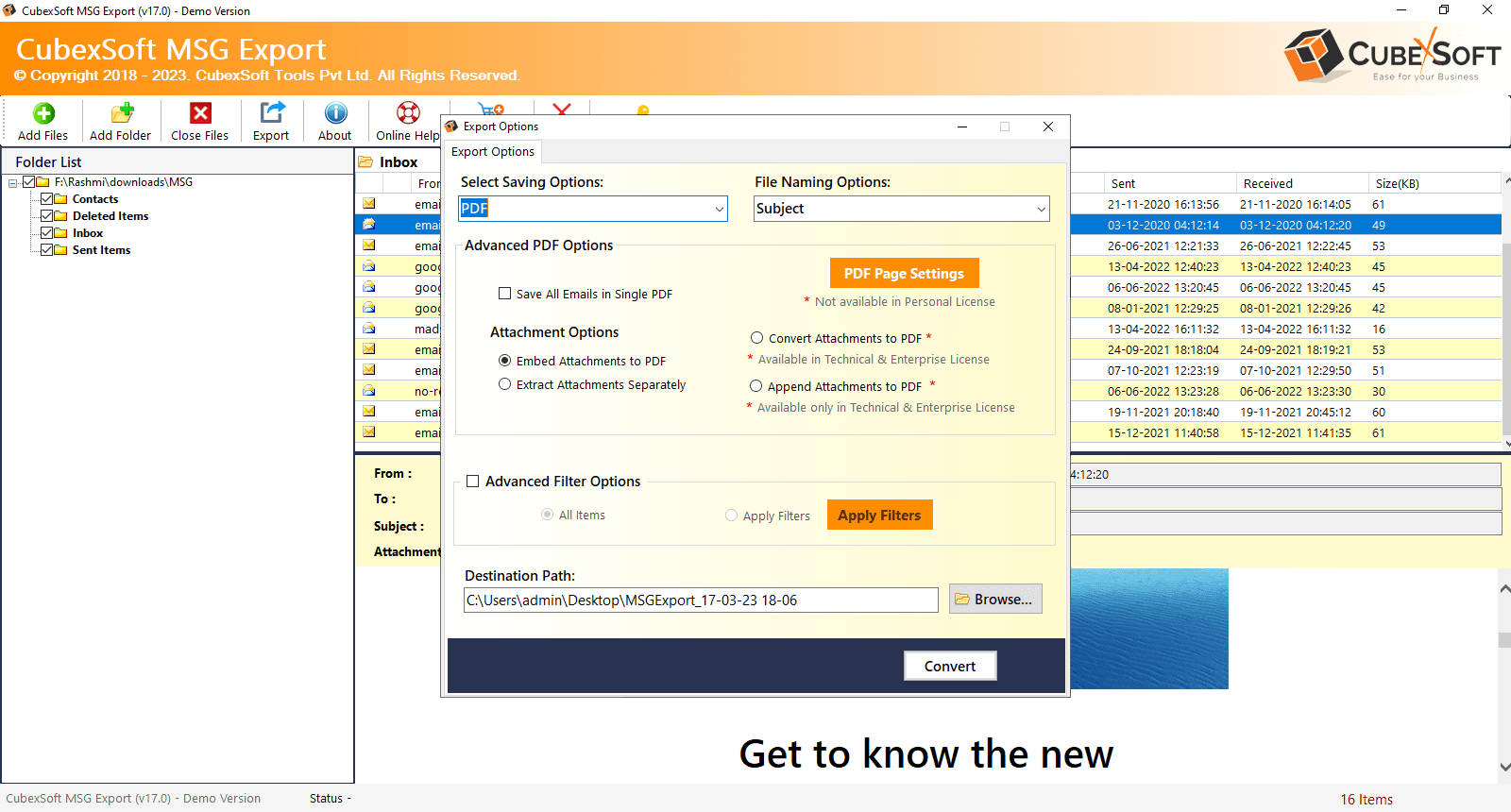
MSG to PDF Converter is a specialized tool designed to convert Outlook MSG files into PDF format efficiently. It supports batch conversion, allowing users to process multiple MSG files simultaneously, and offers options to merge all MSG files into a single PDF or save them individually. The software preserves the original formatting, attachments, and metadata, ensuring data integrity. Advanced features include filters for selective conversion based on date, sender, recipient, or subject, and multiple naming options for organized output. It also provides PDF page settings, Bates numbering, and the ability to save attachments separately. The tool operates without requiring Microsoft Outlook installation and is compatible with all versions of Windows and Mac OS. With a user-friendly interface, the software also offers a free trial version that allows users to convert up to 25 items per folder.
Drawn from the product itself, not from a survey.
Demographic
Legal professionals
Pain points
Need to preserve email evidence in a secure, non-editable format for court submissions and client records.
Primary needs
Batch convert MSG files to PDF with Bates numbering and attachments for legal documentation.
Demographic
IT administrators
Pain points
Managing large volumes of Outlook emails for archiving and compliance, with varying formats and attachments.
Primary needs
Efficiently convert and consolidate MSG files to PDF for long-term storage and easy retrieval.
Demographic
Business professionals
Pain points
Sharing email threads and attachments with clients or colleagues who may not have Outlook installed.
Primary needs
Convert individual or groups of MSG files to PDF for universal accessibility and professional presentation.
Demographic
Researchers and historians
Pain points
Preserving email correspondence in a stable, readable format for future reference and analysis.
Primary needs
Convert MSG files to PDF while maintaining original metadata and attachments for archival purposes.
Written by AI from measured evidence, scored out of 100.
CubexSoft MSG to PDF Converter is a competent, narrowly focused desktop utility with a dated website and a real job to do. The conversion feature set is genuinely strong for legal and IT archiving: batch processing, single-PDF merge, Bates numbering, filters, naming options, attachment handling, and no Outlook dependency. The free trial (25 items per folder) is enough to validate output quality before buying. The problems are presentation and performance: a 2010s corporate design, dense scrolling, crowded navigation, and a mobile Lighthouse score of 42 with a 6.6-second LCP. Security headers are better than expected at 10/12, though DMARC and published audits are missing. Accessibility is 89/100 with contrast and landmark issues. Against Softaken, the feature set is competitive; the buying decision will come down to output fidelity and price, not website polish. If you need MSG to PDF with Bates numbering and can tolerate the UI, it does the job.
Clear repeated download CTAs, free trial (25 items/folder), and documented filters/naming options help. But dense scrolling, crowded nav dropdowns, and dated desktop UI slow first-time users.
Dated early-2010s corporate look: navy/orange/green palette, thin orange feature-card borders, cramped text, and a legacy Windows app UI. Functional but visually behind modern converter peers.
Lighthouse mobile 42/100 with LCP 6.6s, FCP 5.7s, TBT 842ms; desktop 75/100. Mobile visitors wait through a heavy, slow first paint before reaching any download button.
Strong header hygiene: HTTPS enforced, HSTS, CSP, frame protection, X-Content-Type-Options, Referrer-Policy; 10/12 checklist points. DMARC and Permissions-Policy missing; no published audits.
Lighthouse a11y 89/100, but failing audits include insufficient color contrast, mismatched aria-* roles, and no main landmark. No WCAG statement or multi-language support found.
Real, specific problem (MSG to PDF for legal/IT archiving) with concrete differentiators: Bates numbering, batch merge, filters, no Outlook needed. Niche is narrow and Softaken already sits in it.
CubexSoft MSG to PDF Converter looks and feels like a utility built by engineers who care about output fidelity, not first impressions. The homepage is dense: navy hero, orange product box, three thin-bordered feature cards, then a wall of green checkmarks and small body text. The actual app screenshot shows a classic Windows menu bar, folder tree, and export dialog — honest, but dated. Usability is better than the visuals suggest. Download CTAs repeat clearly, the free trial converts up to 25 items per folder, and the workflow (add folder, filter, choose naming, export) is documented in plain language. The friction is density: crowded nav dropdowns, heavy scrolling, and a trial cap that lets you test but not finish a real archive job. For legal and IT users who need the output more than the polish, it works. For anyone comparing landing pages, it loses the beauty contest before the demo starts.
Speed is the weak spot. Lighthouse mobile performance lands at 42/100 with LCP 6.6s, FCP 5.7s, and TBT 842ms — a slow first paint on phones that will cost downloads from mobile visitors. Desktop is a different story at 75/100, so the site is usable on a laptop but punishing on a phone. Security is surprisingly strong for a small vendor: HTTPS enforced, HSTS, CSP, frame protection, X-Content-Type-Options, and Referrer-Policy all present, scoring 10/12 on the header checklist. The gaps are DMARC (missing) and Permissions-Policy (not set). No SOC 2, ISO, or pen-test report is published, which is normal for this tier but worth noting for legal buyers who may need vendor security documentation. For a desktop conversion tool handling sensitive email evidence, the header hygiene is a good sign; the missing DMARC and absent audit trail are the items to ask about before deploying at scale.
Accessibility scores 89/100 on Lighthouse, but the failing audits matter: insufficient color contrast, aria-* attributes that do not match their roles, and no main landmark. There is no WCAG conformance statement and no multi-language support mentioned, though Windows and Mac editions are both claimed. For a desktop-first tool, the website is the main accessibility surface, and it is decent but not clean. Growth is a judgement on the idea: converting MSG to PDF for legal evidence, IT archiving, and cross-platform sharing is a real, specific problem. The differentiators are concrete — Bates numbering, batch merge into a single PDF, date/sender/recipient/subject filters, attachment handling, and no Outlook installation required. The limit is the niche: Softaken already occupies the same space, and the addressable market is professionals who still work with MSG files. That is a durable niche, not a rocket. The domain dates to 2016 and social profiles exist, which shows staying power, but the idea's ceiling is replacing a competitor, not creating a category.
Conclusion
The honest verdict: this is a tool you buy for the output, not the experience. If your workflow involves Outlook MSG files, legal evidence, or compliance archiving, the feature list — batch merge, Bates numbering, filters, attachment options, no Outlook required — is exactly what that job needs. Download the free trial, convert 25 items, and inspect the PDFs for formatting, metadata, and attachment fidelity. That test will tell you more than any landing page. If the output holds up and the price beats Softaken, the dated design and slow mobile site are tolerable annoyances. If you need vendor security documentation for a legal or enterprise deployment, ask CubexSoft directly for their DMARC setup and any audit reports before you commit. For everyone else, it is a specialized utility that does one thing well enough to keep around.
Named competitors, point by point. Nobody paid to appear here or to be left out.
 CubexSoft MSG to PDF Converter CubexSoft MSG to PDF Converter |  Softaken MSG to PDF Converter Softaken MSG to PDF Converter | |
|---|---|---|
| Batch conversion of multiple MSG files to PDF | Yes — batch mode with folder selection and single-PDF merge option | Yes — batch conversion supported |
| Preserves attachments and metadata | Yes — embeds, saves separately, or appends attachments; preserves formatting and metadata | Yes — attachment preservation supported |
| Bates numbering and PDF page settings | Yes — Bates number format, position, margins, date stamp, continue series | Not specified in available description |
| Selective conversion filters (date, sender, recipient, subject) | Yes — date range, to, from, and subject filters | Not specified in available description |
| Requires Microsoft Outlook installation | No — works without Outlook installed | Not specified in available description |
| Free trial limitation | Free trial converts up to 25 items per folder | Not specified in available description |
Comparing options? See CubexSoft MSG to PDF Converter alternatives, scored side by side

An all-in-one hospitality software for restaurants and ba...

A weekly newsletter delivering curated tech jobs, intervi...

White-label reputation management software for agencies s...

Privacy-first open source journal app with a continuous t...

Puzzly is an all-in-one B2B lead generation platform that...

All-in-one AI workspace for docs, projects, and knowledge...

A free, open-source platform offering 110 AI agent skills...

Open-source desktop app for switching AI coding providers...

One verified handle for your online identity, readable by...

Frame-perfect video-to-GIF maker that runs entirely in yo...

White-label website audits that close deals for digital a...

Automated quote follow-up for trades and service businesses.
A platform dedicated to providing unbiased reviews of newly launched applications, analyzing everything from their features to their full potential.
info@scoutforge.net© 2026 Scoutforge. All rights reserved.
