Cycling through all six. Tap any point to stop.
Measured on six things
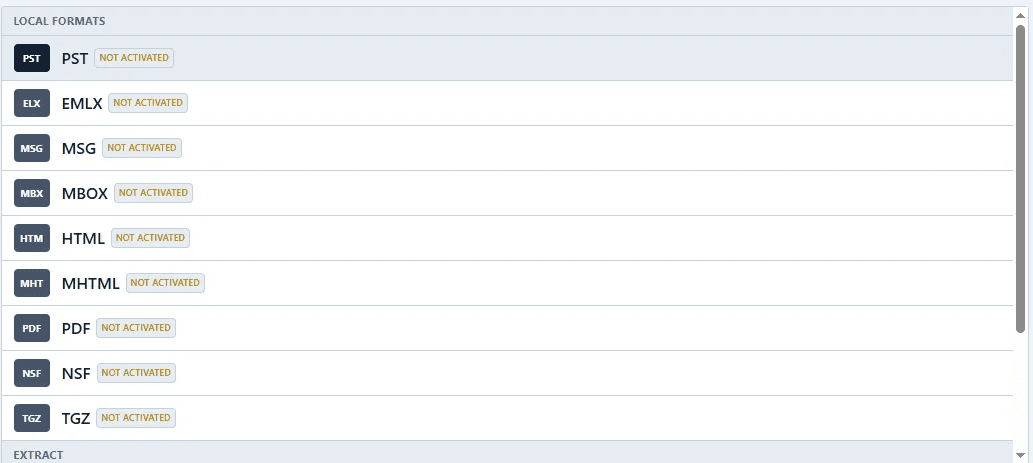
Download IMAP server emails to PST, EML, MBOX, PDF, etc.
Security
38HTTPS enforced but missing HSTS, CSP, frame protection, and secure cookies. No SOC 2/ISO claims. Privacy policy exists. Security headers are weak.
Screenshots
1 / 6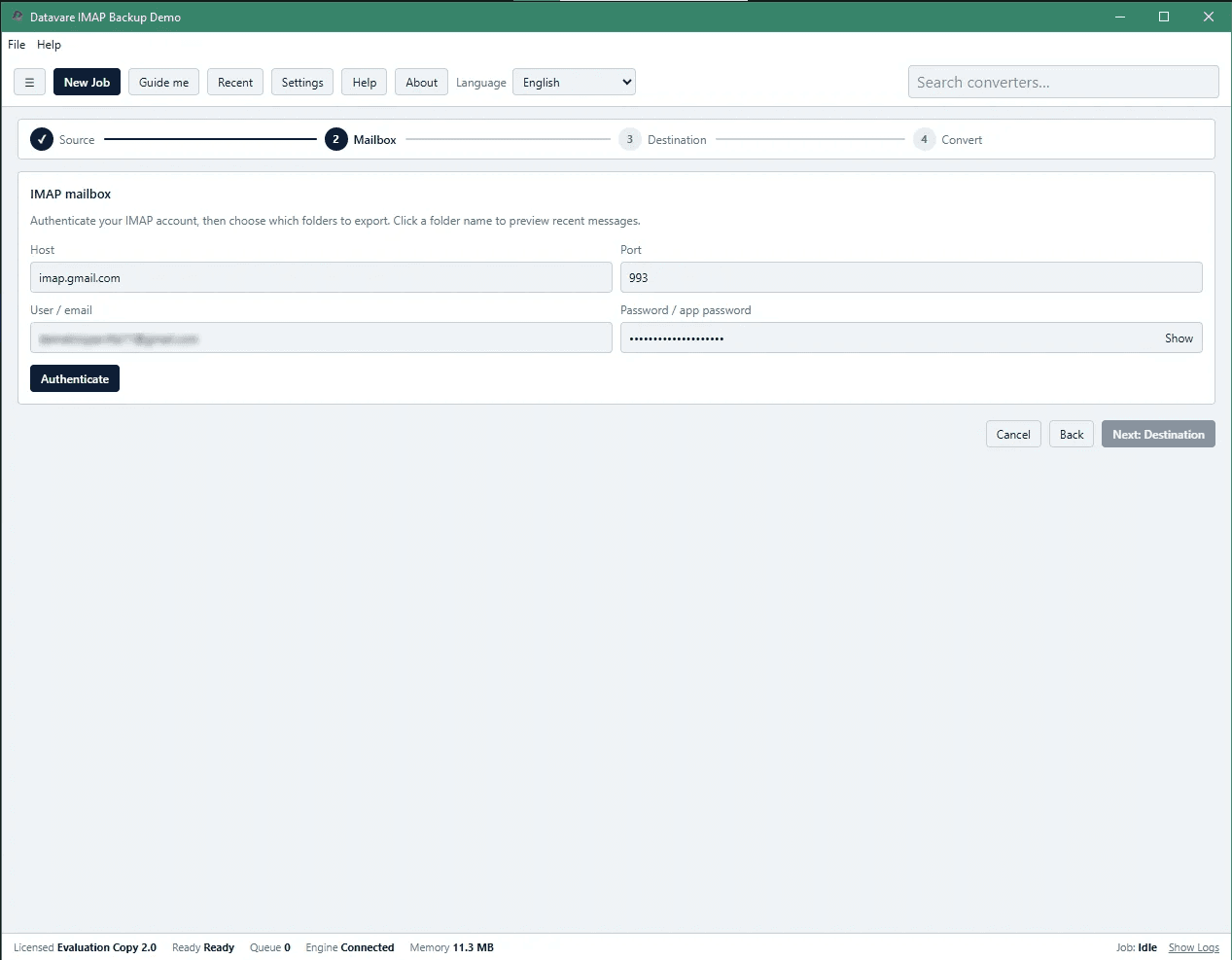
About this app
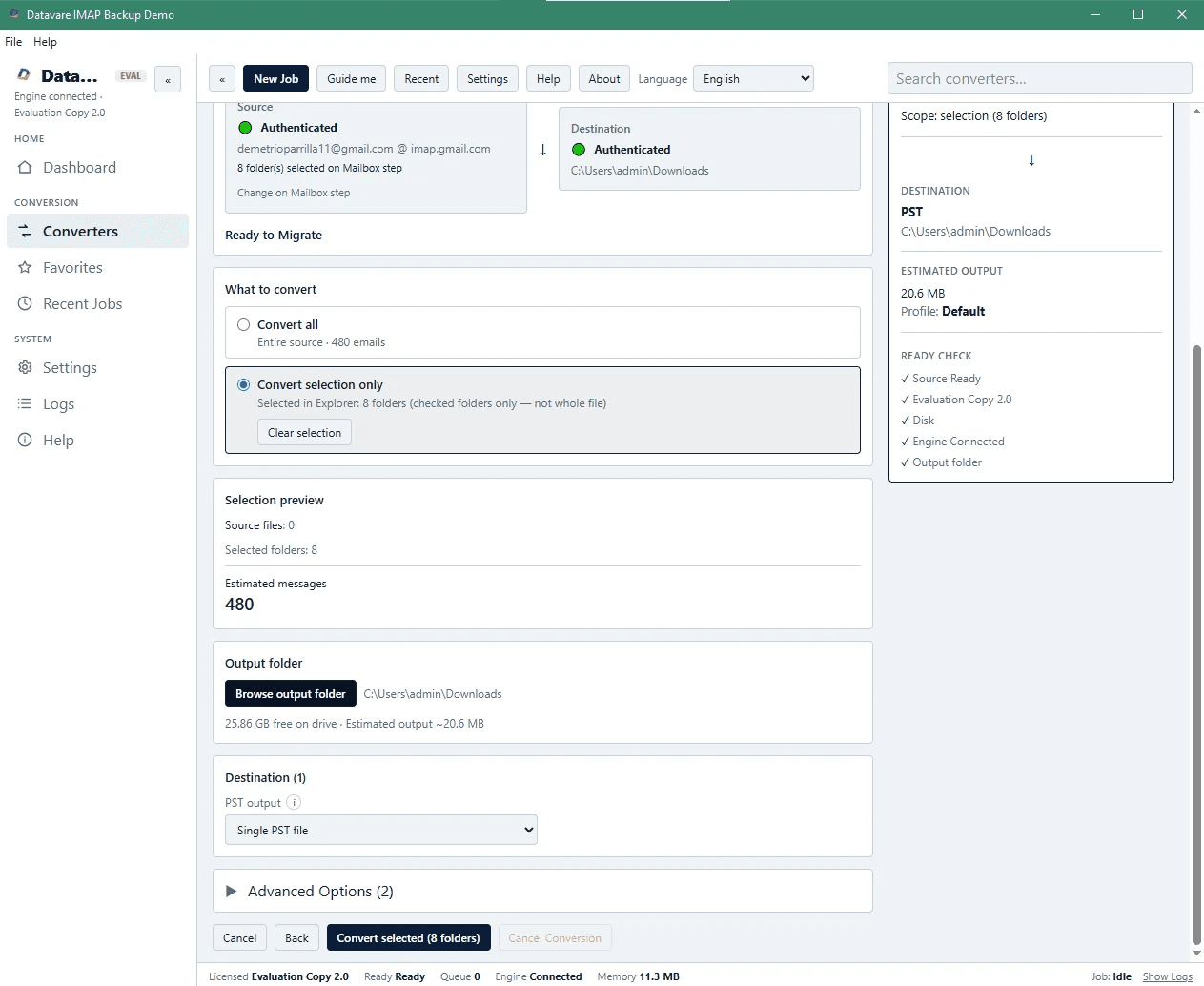
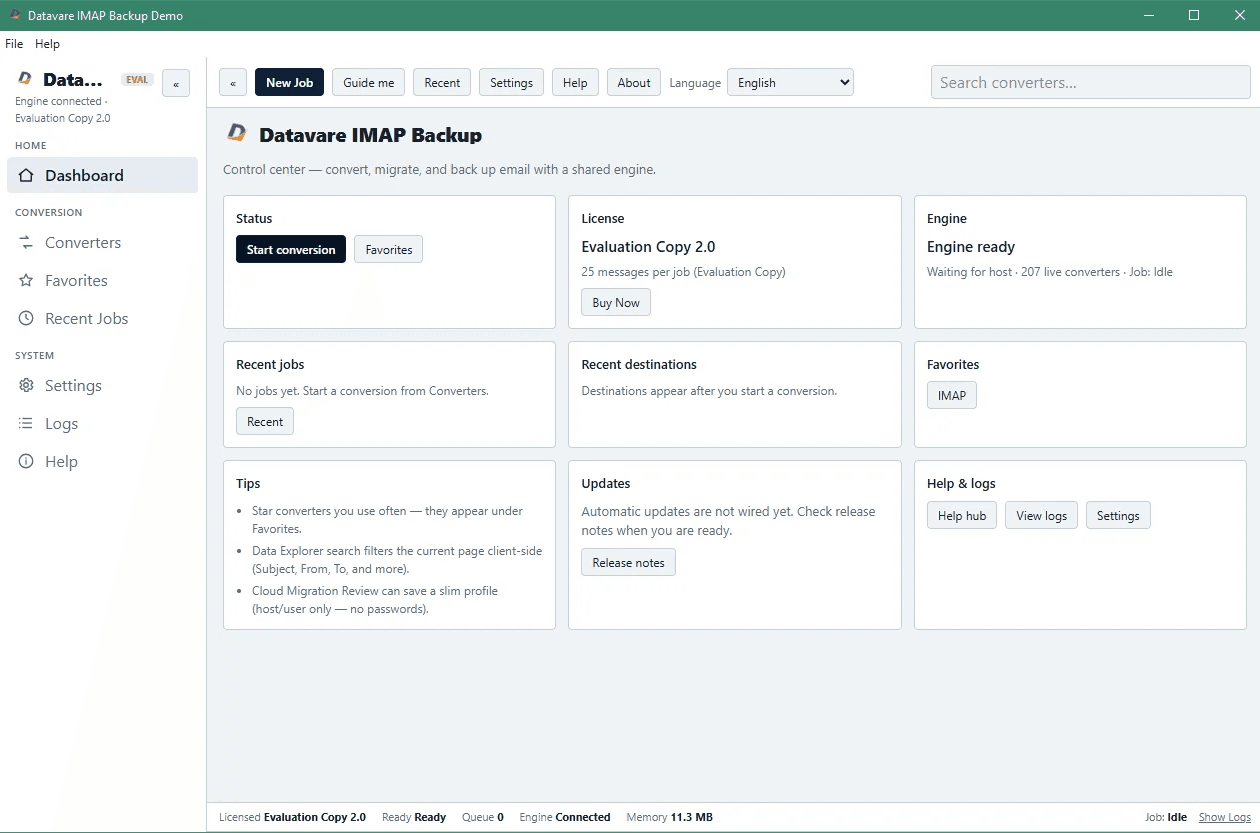
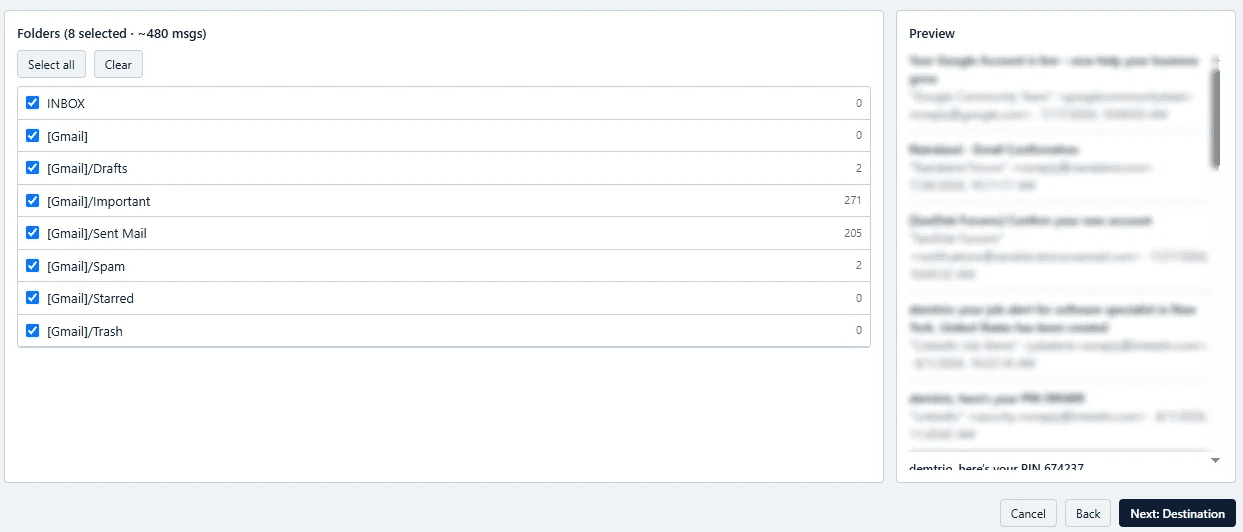
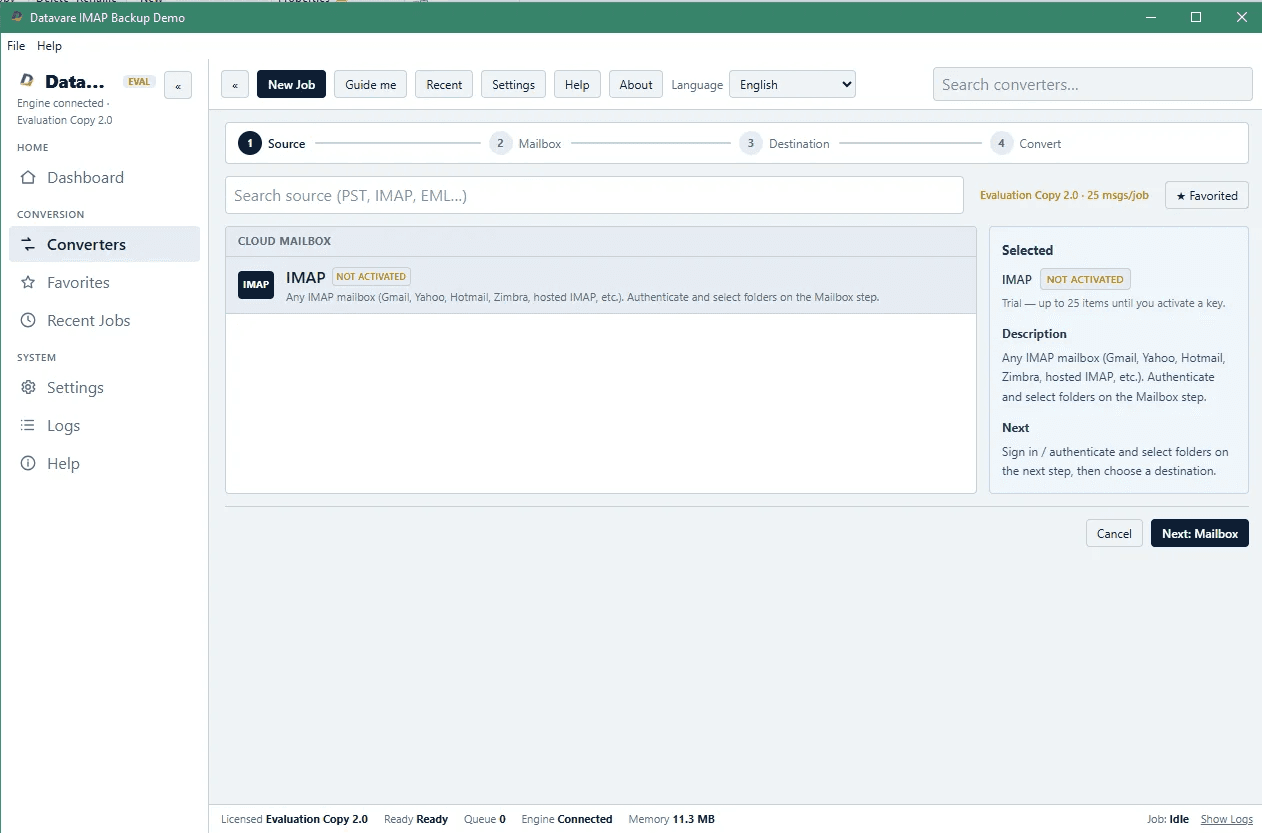
Datavare IMAP Backup is a reliable and secure way to download and back up emails from any IMAP server to your local machine. It works with Gmail, Office 365, Yahoo, iCloud, Google Workspace or any other supporting IMAP Server. The advanced software is built to help take backups of any IMAP Accounts into multiple popular formats, including PST, MSG, EML, MBOX, HTML, PDF, and more. The intuitive interface makes it easy for even non-technical users to back up entire mailboxes or select specific folders, with attachments included. It preserves the original email structure and metadata. It also provides a full preview of the IMAP Mailbox items before starting the process. Moreover,r the backup software works efficiently and smoothly in all versions of Windows OS.
Key features
- 1Batch export IMAP emails to PST, MSG, EML, MBOX, HTML, PDF, and more.
- 2Selective folder export with attachments and metadata preservation.
- 3Works with Gmail, Office 365, Yahoo, iCloud, and any IMAP server; no Outlook required.
Target customer profile
Drawn from the product itself, not from a survey.
Demographic
IT professionals managing email servers for small to medium businesses.
Pain points
Need a reliable way to backup, archive, or migrate email data without downtime or data loss; often juggle multiple email accounts and formats.
Primary needs
Automated backup features, support for multiple formats, ease of use, and data security.
Demographic
Home users who rely on webmail services and want offline access or a personal archive of important emails.
Pain points
Fear of losing emails due to account issues, hacking, or service shutdowns; limited technical expertise.
Primary needs
Simple wizard, ability to save emails in readable formats like PDF or PST, and no requirement for additional software.
Demographic
Data migration specialists or companies transitioning from one email platform to another.
Pain points
Accurately export emails from a server without altering data; need to support various client formats for the destination platform.
Primary needs
Batch processing, selective folder export, and compatibility with Outlook, Thunderbird, and other email clients.
Demographic
Lawyers, accountants, or professionals in regulated industries who must retain emails for compliance.
Pain points
Need tamper-proof, organized backups with metadata; often require accessible formats for legal or audit purposes.
Primary needs
Preservation of email properties, generation of searchable PDFs, and reliable archiving.
Scout Review
Written by AI from measured evidence, scored out of 100.
Datavare IMAP Backup is a functional, fast tool for backing up IMAP emails to multiple formats. It excels in speed and offers a clear wizard for basic use. However, the dated design, thin documentation, and weak security headers hold it back. For SMBs and compliance users needing batch exports to PST/MBOX without Outlook, it's a viable option, but free alternatives may suffice for personal use. Overall, a solid but unremarkable product in a crowded niche.
Measure by measure
Usability
62Wizard is straightforward for basic backups, but docs are thin (just a video link) and linear flow punishes mistakes. 24/7 support is a plus.
Design
46Dated 2010s design: cluttered layout, inconsistent cards, low-contrast panels, empty screenshot placeholder. Clear wizard UI but visually behind modern peers.
Speed
70Fast site: Lighthouse mobile 88, desktop 97. LCP 3.2s is acceptable, CLS 0, TBT 3ms. No lag complaints found.
Security
38HTTPS enforced but missing HSTS, CSP, frame protection, and secure cookies. No SOC 2/ISO claims. Privacy policy exists. Security headers are weak.
Accessibility
68Lighthouse a11y 94/100, but fails on button names and heading order. English-only, no a11y statement. Keyboard nav not documented.
Growth
58Real problem, clear differentiators (batch, formats, no Outlook), but crowded market with free alternatives. Niche but viable for SMBs and compliance.
Improvement areas
- Modernize the UI and fix the empty screenshot placeholder on the homepage.
- Strengthen security with HSTS, CSP, and secure cookie flags.
- Expand documentation with written guides and multi-language support.
Design & Usability
Design is dated—cluttered homepage with inconsistent cards and a broken-looking screenshot placeholder. The app itself is a classic Windows wizard: functional but visually behind modern standards. Usability is decent for basic tasks: clear steps, prominent CTAs, and 24/7 support. However, docs are thin (just a video), and the linear wizard is unforgiving if credentials fail. For non-technical users, the wizard is approachable, but power users will hit limits.
Speed & Security
Speed is a strong point: Lighthouse mobile 88, desktop 97, with minimal layout shift and blocking time. Security is the weak link: HTTPS is enforced, but missing HSTS, CSP, and frame protection headers. No SOC 2/ISO claims found. Privacy policy exists, but the security posture is basic for a tool handling email credentials. Users should weigh the risk of storing IMAP passwords with a vendor lacking robust security certifications.
Accessibility & Growth
Accessibility is above average (Lighthouse 94) but has real gaps: unnamed buttons and heading order issues. No a11y statement or multi-language support. Growth potential is moderate: the problem is real, and batch export to multiple formats (PST, MBOX, PDF) without Outlook is a differentiator. However, free alternatives like MailStore Home and Gmvault exist, and the market is crowded. The wedge is compliance-focused users needing reliable, format-flexible backups.
Conclusion
If you need a no-frills, reliable IMAP backup with format flexibility, Datavare gets the job done—just don't expect modern polish or enterprise-grade security. The 15-minute delivery and 24/7 support are nice touches. For personal use, explore free options first; for business compliance, it's worth a trial. Just remember to change your IMAP password afterward, because those security headers aren't protecting much.
Suggestions for improvement
- Add a free trial or demo mode to let users test the wizard before purchasing.
- Improve documentation with written step-by-step guides and troubleshooting FAQs.
- Implement HSTS, CSP, and secure cookies to strengthen security posture.
- Modernize the UI with a cleaner layout and replace the empty screenshot placeholder.
Alternatives comparison
Named competitors, point by point. Nobody paid to appear here or to be left out.
 Datavare IMAP Backup Software Datavare IMAP Backup Software |  MailStore Home MailStore Home |  Spinbackup for Gmail Spinbackup for Gmail |  Gmvault Gmvault | |
|---|---|---|---|---|
| Export formats | PST, MSG, EML, EMLX, MBOX, HTML, PDF, MHTML | Limited in free edition; PST/MBOX export requires paid version | Cloud-based, primarily Gmail; limited format options | Primarily MBOX format; no GUI |
| IMAP server support | Any IMAP server (Gmail, Office 365, Yahoo, iCloud, etc.) | Supports various IMAP servers | Gmail and G Suite only | Gmail only (unofficial for others) |
| GUI and ease of use | Wizard-based GUI, easy for non-technical users | User-friendly GUI | Cloud-based, web interface | Command-line only, no GUI |
| Batch processing | Yes, batch mode for multiple accounts | Limited in free version | Yes, for Gmail accounts | No, single account at a time |
| Pricing model | Paid software (one-time license) | Free for personal use; paid for professional | Subscription-based | Free and open-source |
MailStore Home
A popular free email archiving tool for personal use, but lacks some advanced export options like PST and MBOX in the free edition.
Spinbackup for Gmail
A cloud-based backup solution specifically for Gmail and G Suite, but may not support other IMAP providers as comprehensively.
Gmvault
An open-source backup tool for Gmail, but lacks a GUI and official support for other IMAP servers.
Comparing options? See Datavare IMAP Backup Software alternatives, scored side by side
More Productivity apps
View all Productivity
Qamarero
92An all-in-one hospitality software for restaurants and ba...

The Stack Newsletter
92A weekly newsletter delivering curated tech jobs, intervi...

EmbedMyReviews
92White-label reputation management software for agencies s...

StoryPad
92Privacy-first open source journal app with a continuous t...

Puzzly – B2B Lead Generation & Sales Intelligence Platform
92Puzzly is an all-in-one B2B lead generation platform that...

Notion
92All-in-one AI workspace for docs, projects, and knowledge...

Vibe Coding Agent Skills
92A free, open-source platform offering 110 AI agent skills...

CC Switch
91Open-source desktop app for switching AI coding providers...

username.md
90One verified handle for your online identity, readable by...

What the GIF
89Frame-perfect video-to-GIF maker that runs entirely in yo...

AuditCloser
89White-label website audits that close deals for digital a...

NudgeWin
89Automated quote follow-up for trades and service businesses.


A platform dedicated to providing unbiased reviews of newly launched applications, analyzing everything from their features to their full potential.
info@scoutforge.net© 2026 Scoutforge. All rights reserved.
