Cycling through all six. Tap any point to stop.
Measured on six things
Merge multiple Outlook PST files into one without size li...
Security
40HTTPS is enforced and SPF is set, but HSTS, CSP, frame protection, Referrer-Policy and DMARC are all missing — 3/13 on the header checklist. No SOC 2, ISO or bug bounty page found; privacy and cookie policies are linked.
Screenshots
1 / 2
About this app
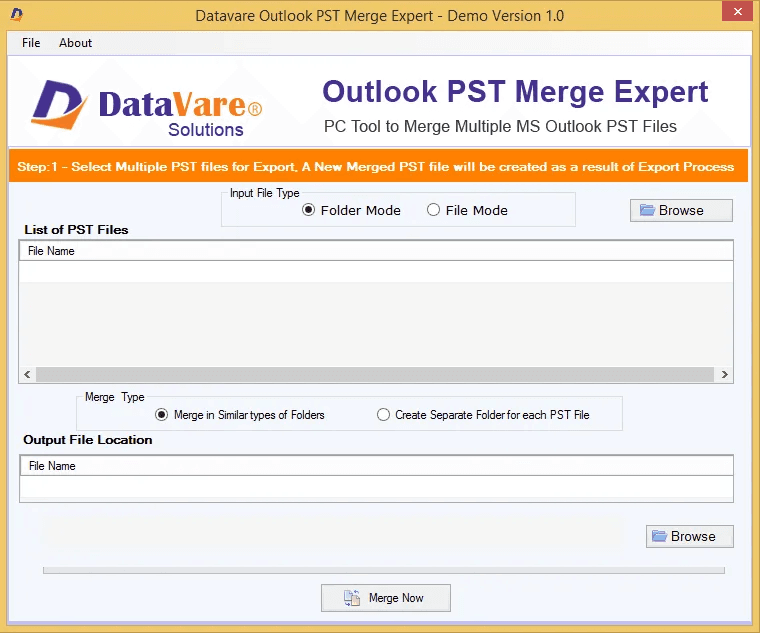
DataVare PST Merge Expert is the best solution to merge several PST files into a single unified file with ease. The tool is totally self-contained and has a simple user interface that allows for a quick merging procedure for users of any technical experience. It provides a fast merging process so users can merge huge-sized data simply and securely with no data loss and 100% safe operation. Features Advanced Options: (Optional) Clean combined inbox, ignore empty folders, and include or ignore deleted stuff. Data Integrity: The tool creates a new PST file and maintains the integrity of file and organizational hierarchies and information. Compatibility & Support: Support to merge Unicode & enormous size data; no installation of Outlook necessary, high-level compatibility with Outlook 2021 & lower versions. OS Support: Supports Windows 11, 10, 8.1, 8, 7, and other OS. Use the free trial version now and experience seamless and dependable PST consolidation firsthand.
Key features
- 1Merge multiple ANSI and Unicode PST files into one, with optional selective folder merging (Inbox, Contacts, Calendars).
- 2No Microsoft Outlook installation required; supports Outlook 2021 and lower, Windows 11/10/8.1/8/7.
- 3Free trial available; saves merged PST to a user-chosen local location with folder hierarchy preserved.
Target customer profile
Drawn from the product itself, not from a survey.
Demographic
IT administrators and support technicians
Pain points
Managing multiple PST files from various users, risk of data corruption during manual merges
Primary needs
Efficient, accurate merging of large PST files without data loss
Demographic
Small business owners and office managers
Pain points
Email clutter, difficulty in backing up and archiving scattered PST files
Primary needs
Consolidate emails and contacts into a single file for easier management
Demographic
Individual users with multiple email accounts
Pain points
Multiple PST files taking up space, slow Outlook performance
Primary needs
Merge PST files to reduce clutter and improve Outlook speed
Scout Review
Written by AI from measured evidence, scored out of 100.
DataVare Outlook PST Merge Expert is a competent, dated utility for a real but narrowing problem. The site is fast and the trial is free, but the empty screenshots section, a docs page with no steps, and a thin security header profile hold it back. Against SysTools and Aryson it competes on price and trial, not on anything structurally distinct.
Measure by measure
Usability
54Free trial, Windows/Mac downloads and a four-question FAQ are present, and the tool claims no Outlook install is needed. But the docs page is a heading with no steps, and the 10-bullet hero plus dense paragraphs make first-time orientation harder than it should be.
Design
44Dated WinForms-style app UI and a homepage that stacks box art, a 10-bullet list and three download buttons above the fold. The Screenshots section is an empty white placeholder, which is a bad look for a tool whose whole pitch is 'see how easy it is'.
Speed
78Lighthouse mobile 90/100 and desktop 98/100 with LCP 3.1s, CLS 0.001 and TBT 0ms — a genuinely snappy marketing site. No user complaints about app or page lag surfaced in the collected evidence.
Security
40HTTPS is enforced and SPF is set, but HSTS, CSP, frame protection, Referrer-Policy and DMARC are all missing — 3/13 on the header checklist. No SOC 2, ISO or bug bounty page found; privacy and cookie policies are linked.
Accessibility
70Lighthouse accessibility 94/100, but two real failures: buttons without accessible names and headings out of sequential order. English-only interface, no WCAG statement, and the empty screenshot placeholder adds nothing for screen readers.
Growth
52A real, narrow pain point — consolidating scattered PST files — but the pitch is interchangeable with SysTools and Aryson. No wedge beyond price and a free trial, and the legacy-Outlook category is shrinking, not growing.
Improvement areas
- Empty Software Screenshots section and a docs page with no actual steps — the two places buyers look first.
- Security header profile at 3/13 (no HSTS, CSP, DMARC, Referrer-Policy) for a tool handling email archives.
- Two Lighthouse accessibility failures (unnamed buttons, out-of-order headings) and English-only interface.
Design & Usability
The homepage does the functional job — product art, rating, download buttons, feature grid — but the visual audit calls it dated and the empty Screenshots section undercuts the 'simple interface' pitch. Usability is middling: a free trial and a four-question FAQ help, but the docs page is a heading with no steps, and the hero's ten-bullet list plus dense paragraphs make orientation harder than it needs to be. For a utility aimed at IT admins and non-technical office managers alike, the onboarding story should be the strongest part and it isn't.
Speed & Security
Speed is the standout: Lighthouse mobile 90/100 and desktop 98/100, LCP 3.1s, CLS 0.001, TBT 0ms — the marketing site is genuinely fast and there are no lag complaints in the collected evidence. Security is the weak flank: HTTPS and SPF are in place, but HSTS, CSP, frame protection, Referrer-Policy and DMARC are all absent (3/13 on the header checklist), and there's no SOC 2, ISO or bug bounty page. For a tool that handles email archives, that gap is worth closing.
Accessibility & Growth
Accessibility scores 94/100 on Lighthouse but fails on unnamed buttons and out-of-order headings, and the interface is English-only with no WCAG statement — solid automated numbers, real gaps underneath. Growth is the harder question: merging PST files is a genuine pain point for IT admins and small businesses, but the feature set is essentially identical to SysTools and Aryson, with no wedge beyond a free trial. The category is legacy-Outlook-shaped and shrinking, which caps how far this can travel even with clean execution.
Conclusion
If you're an IT admin with a pile of PST files and no appetite for manual merges, the free trial is a low-risk way to test whether the tool handles your data cleanly. Just don't expect the site to show you what you're buying — the screenshots section is empty, and the docs won't walk you through it. Try before you buy, and keep a backup of the originals.
Suggestions for improvement
- Populate the Software Screenshots section with real UI captures — the empty placeholder is the first thing visitors see and it reads as unfinished.
- Replace the docs heading-only page with actual step-by-step merge instructions and a short video walkthrough.
- Add HSTS, CSP, X-Content-Type-Options, Referrer-Policy and DMARC — the header checklist is at 3/13 for a tool handling email archives.
- Fix the two Lighthouse accessibility failures: give buttons accessible names and put headings in sequential order.
Alternatives comparison
Named competitors, point by point. Nobody paid to appear here or to be left out.
 DataVare Outlook PST Merge Expert Tool DataVare Outlook PST Merge Expert Tool |  SysTools PST Merge SysTools PST Merge |  Aryson PST Merge Aryson PST Merge | |
|---|---|---|---|
| Merge multiple PST files into one | Yes — merges multiple PST files, ANSI and Unicode | Yes — join, combine or consolidate folders | Yes — merges multiple PST files into one |
| Selective folder merging | Yes — merge only contacts, inbox or chosen folders | Yes — folder-level selection supported | Yes — selective folder merging |
| Outlook installation required | No — standalone tool | No — standalone | No — standalone |
| Password-protected PST support | Not stated on site | Not confirmed from collected evidence | Yes — handles password-protected files |
| Free trial | Yes — free trial version advertised | Typically offered (not verified in evidence) | Typically offered (not verified in evidence) |
| Platform support | Windows 11/10/8.1/8/7/XP/Vista; Mac download button present | Windows (per product page) | Windows (per product page) |
SysTools PST Merge
A popular tool to merge Outlook PST files with options to join, combine, or consolidate folders.
Aryson PST Merge
Allows merging of multiple PST files into one, including selective folder merging and password-protected files.
Comparing options? See DataVare Outlook PST Merge Expert Tool alternatives, scored side by side
More Productivity apps
View all Productivity
Qamarero
92An all-in-one hospitality software for restaurants and ba...

The Stack Newsletter
92A weekly newsletter delivering curated tech jobs, intervi...

EmbedMyReviews
92White-label reputation management software for agencies s...

StoryPad
92Privacy-first open source journal app with a continuous t...

Puzzly – B2B Lead Generation & Sales Intelligence Platform
92Puzzly is an all-in-one B2B lead generation platform that...

Notion
92All-in-one AI workspace for docs, projects, and knowledge...

Vibe Coding Agent Skills
92A free, open-source platform offering 110 AI agent skills...

CC Switch
91Open-source desktop app for switching AI coding providers...

username.md
90One verified handle for your online identity, readable by...

What the GIF
89Frame-perfect video-to-GIF maker that runs entirely in yo...

AuditCloser
89White-label website audits that close deals for digital a...

NudgeWin
89Automated quote follow-up for trades and service businesses.


A platform dedicated to providing unbiased reviews of newly launched applications, analyzing everything from their features to their full potential.
info@scoutforge.net© 2026 Scoutforge. All rights reserved.
