Cycling through all six. Tap any point to stop.
Measured on six things
Switch monitor inputs and transfer text and files between Linux, macOS, and Windows computers.
Design
44Dated WordPress-era layout with placeholder 'Coming soon!' reviews and an unreadable product thumbnail. Consistent pink-and-navy palette and a clear toggle hero metaphor are the bright spots.
Screenshots
1 / 1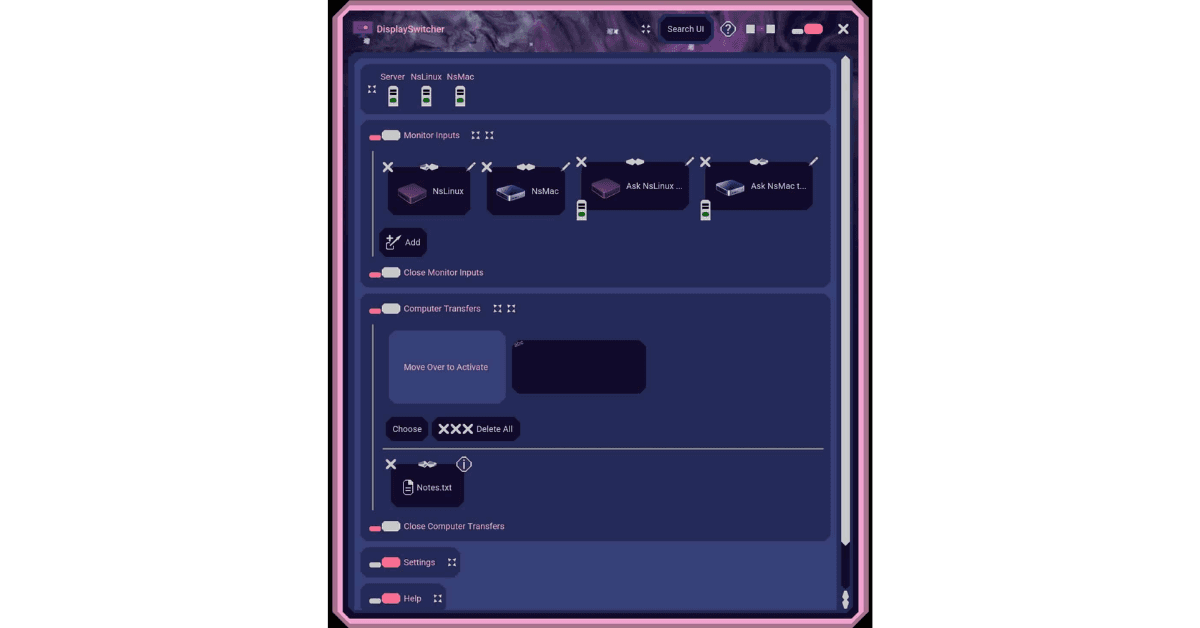
About this app
DisplaySwitcher is a desktop application for Linux, macOS, and Windows that combines monitor input switching with text and file transfers between computers. Switch a monitor’s video input with a software button instead of reaching for its physical controls. If one computer cannot switch the monitor directly, another connected computer capable of switching it can act. Transfer text and files between computers using cut-and-paste, drag-and-drop, or file browsing, including across different operating systems. No network or firewall configuration is necessary. DisplaySwitcher is designed for people working with multiple computers, including developers, IT professionals, and home office users. It costs $5.95 per month and includes a one-month free trial.
Key features
- 1One-click monitor video input switching via DDC/CI from Linux, macOS, or Windows.
- 2Cross-OS text and file transfer via cut-and-paste, drag-and-drop, or file browsing — no network config.
- 3Relay switching: a computer that can't switch the monitor can ask one that can.
- 4One-month free trial with self-service cancellation from the account page.
Target customer profile
Drawn from the product itself, not from a survey.
Demographic
Remote and hybrid workers with a single desk shared by work and personal computers
Pain points
Reaching under the monitor to change inputs; inconsistent KVM software support across OSes
Primary needs
One-click monitor input switching and quick clipboard/file transfer between machines
Demographic
Software developers and IT pros running Windows, macOS, and Linux side by side
Pain points
Mixed-OS setups where vendor utilities only support one platform; repetitive manual switching
Primary needs
Cross-platform reliability, scriptable/relay switching, and seamless file sharing
Demographic
Designers and content creators with dual workstations and high-res monitors
Pain points
Frequent switching between machines for rendering or editing; slow USB-drive file moves
Primary needs
Fast drag-and-drop transfers and instant video source toggling without cable swaps
Scout Review
Written by AI from measured evidence, scored out of 100.
DisplaySwitcher is a genuinely useful idea — one software button to switch your monitor's input, plus cross-OS clipboard and file transfer, filling a real gap between DDC/CI tools and software KVMs. The site is fast (99 mobile, 100 desktop Lighthouse) and mechanically secure (12/13 headers, HSTS, CSP, DMARC). But the presentation undercuts it: a dated layout, placeholder reviews, an unreadable product thumbnail, and no published compliance or accessibility statements. At $5.95/month against free open-source alternatives, the value case rests entirely on the trial. The product may well work; the page doesn't yet make you believe it.
Measure by measure
Usability
58Price and free trial are visible without scrolling, and Download/Install/Videos/Documents buttons give a clear setup path. But the long description has no in-page nav, so finding install details means scrolling a wall of text.
Design
44Dated WordPress-era layout with placeholder 'Coming soon!' reviews and an unreadable product thumbnail. Consistent pink-and-navy palette and a clear toggle hero metaphor are the bright spots.
Speed
88Lighthouse mobile 99/100 (LCP 2.0s, CLS 0, TBT 0ms) and desktop 100/100. The site is genuinely fast — static-feeling, no heavy SPA weight, no lag complaints found.
Security
74Strong header hygiene: HTTPS enforced, HSTS, CSP, frame protection, secure cookies, SPF and DMARC all present (12/13 checklist). Permissions-Policy missing; no SOC 2 or audit claims published.
Accessibility
80Lighthouse accessibility 100/100 with one failing audit on mismatched accessible names. No WCAG statement or multi-language support found, but automated checks and responsive layout are solid.
Growth
62Real, specific pain (monitor input switching + cross-OS file transfer) with a genuine wedge over Synergy/Barrier and Monitorian. Category has headroom, but the $5.95/mo subscription for a utility is a hard sell.
Improvement areas
- Placeholder review cards ('Coming soon!', '"future quote"') undermine trust on a paid page.
- Product screenshot is an unreadable thumbnail; no legible UI view on the homepage.
- No published security/compliance page (SOC 2, pen-test, data handling) and missing Permissions-Policy header.
- Long description lacks in-page navigation; small low-contrast body text on dark background.
Design & Usability
The homepage has a recognizable identity — pink toggles, navy background, a hero that communicates 'switch inputs' at a glance — but it's wrapped in a dated WordPress-era shell. Two of three 'reviews' are literal placeholders ('Coming soon!', '"future quote"'), the product screenshot is an unreadable thumbnail, and body copy is small and low-contrast. Usability is better than design: price and free trial are visible without scrolling, and Download/Install/Videos/Documents buttons give a clear setup path. But the long description has no in-page navigation, so finding install details means scrolling a dense document. The bones are fine; the presentation is stuck in 2014.
Speed & Security
Speed is the standout: Lighthouse mobile 99/100 (LCP 2.0s, CLS 0, TBT 0ms) and desktop 100/100, with no lag complaints found. The site loads instantly and stays stable. Security is solid on the mechanical side — HTTPS enforced, HSTS, CSP, frame protection, secure cookies, SPF and DMARC all present, 12/13 checklist points. The gap is Permissions-Policy and the absence of any published compliance signal: no SOC 2, no ISO, no pen-test, no security page. For a desktop app that moves files between machines, that's the missing piece — headers protect the marketing site, not the product.
Accessibility & Growth
Accessibility scores 100/100 on Lighthouse with one failing audit on mismatched accessible names, and the site is responsive. But there's no WCAG statement, no multi-language support, and keyboard navigation wasn't independently verified — automated checks cover only part of the picture. Growth is the most interesting dimension: the problem is real and specific (monitor input switching plus cross-OS clipboard/file transfer for multi-computer desks), and the wedge over the listed alternatives is genuine — Synergy and Barrier do KVM but not input switching, Monitorian does input but not file sharing. The category has headroom. The limit is the pricing model: $5.95/month for a utility that competes with free open-source tools is a tough sell, and the one-month trial is doing a lot of work.
Conclusion
If you're juggling two or three machines on one desk and you're tired of reaching under the monitor, DisplaySwitcher is worth the one-month trial — the DDC/CI switching plus cross-OS file transfer is a combination the free tools don't offer in one package. Just go in knowing the site is a rough storefront for what may be a solid utility: verify DDC/CI compatibility with your specific monitor and cable during the trial, and treat the subscription as a real recurring cost against free alternatives like Monitorian and Barrier. The idea earns the trial; the execution has to earn the renewal.
Suggestions for improvement
- Replace the two placeholder 'Coming soon!' / '"future quote"' review cards with real testimonials or remove them until you have them.
- Swap the unreadable product thumbnail for a full-width, legible screenshot or a short looping demo of the actual UI.
- Add in-page navigation or a summary box to the long description so install, pricing, and requirements are findable without scrolling.
- Publish a security/compliance page (SOC 2 status, data handling, pen-test) and set the missing Permissions-Policy header.
Alternatives comparison
Named competitors, point by point. Nobody paid to appear here or to be left out.
 DisplaySwitcher |  Monitorian (or similar DDC/CI tools) | Synergy / Barrier / Deskflow | Barrier |  Microsoft Garage Mouse without Borders | |
|---|---|---|---|---|---|
| Monitor video input switching (DDC/CI) | Yes — core feature, one-click software button | Yes — adjusts brightness and inputs via DDC/CI | No — shares keyboard/mouse, not video input | No — keyboard/mouse and clipboard only | No — keyboard/mouse and clipboard only |
| Cross-OS clipboard sharing | Yes — cut-and-paste across Linux/macOS/Windows | No | Yes — clipboard sharing over network | Yes — clipboard sharing over network | Yes — Windows-only clipboard sharing |
| Cross-OS file drag-and-drop transfer | Yes — drag-and-drop and file browsing | No | Partial — file drag-and-drop in some builds | No — no built-in file drag-and-drop | Yes — Windows-only file sharing |
| Platform support | Linux, macOS, Windows | Windows (primarily) | Windows, macOS, Linux | Windows, macOS, Linux | Windows only |
| Pricing | $5.95/month, 1-month free trial | Free / open source | Paid license (one-time/perpetual options) | Free / open source | Free |
Monitorian (or similar DDC/CI tools)
Free/open-source utilities that adjust monitor brightness and inputs via DDC/CI, but generally lack cross-OS file and clipboard sharing.
Synergy / Barrier / Deskflow
Software KVM for sharing one keyboard and mouse across computers over a network; some builds also support clipboard sharing, but they don't switch the monitor's video input.
Barrier
Open-source software KVM for sharing keyboard/mouse and clipboard across machines; no monitor input switching or built-in file drag-and-drop across OSes.
Microsoft Garage Mouse without Borders
Windows-only tool to control up to four PCs with one keyboard/mouse and share clipboard/files; not cross-platform and doesn't switch monitor inputs.
Comparing options? See DisplaySwitcher alternatives, scored side by side
More Productivity apps
View all Productivity
Puzzly – B2B Lead Generation & Sales Intelligence Platform
92Puzzly is an all-in-one B2B lead generation platform that...

Qamarero
92An all-in-one hospitality software for restaurants and ba...

EmbedMyReviews
92White-label reputation management software for agencies s...

StoryPad
92Privacy-first open source journal app with a continuous t...

Notion
92All-in-one AI workspace for docs, projects, and knowledge...

The Stack Newsletter
92A weekly newsletter delivering curated tech jobs, intervi...

Vibe Coding Agent Skills
92A free, open-source platform offering 110 AI agent skills...

QRBliss
91Branded QR codes with AI Brand Sync, 15 free dynamic code...

Gerty
91Private, local AI assistant for Mac that runs offline

Strukchad Property Management
91Property management for Kenyan letting agents: rent invoices raised every month, M-Pesa rent prompts to tenants, arrears tracking and landlord statements.

CC Switch
91Open-source desktop app for switching AI coding providers...

PitchWhip
90AI cold call scripts & direct dials from LinkedIn


A platform dedicated to providing unbiased reviews of newly launched applications, analyzing everything from their features to their full potential.
info@scoutforge.net© 2026 Scoutforge. All rights reserved.
