Is this your app?
Claim Do Everything to manage its page, add your badge and see your traffic — free, and it stays free.
Cycling through all six. Tap any point to stop.
Measured on six things
An all-in-one productivity app for managing tasks, notes, lists, and journaling in a single platform.
Accessibility
70Basic dynamic text scaling and dark mode support. Missing screen reader optimization and multilingual options beyond English.
Screenshots
1 / 1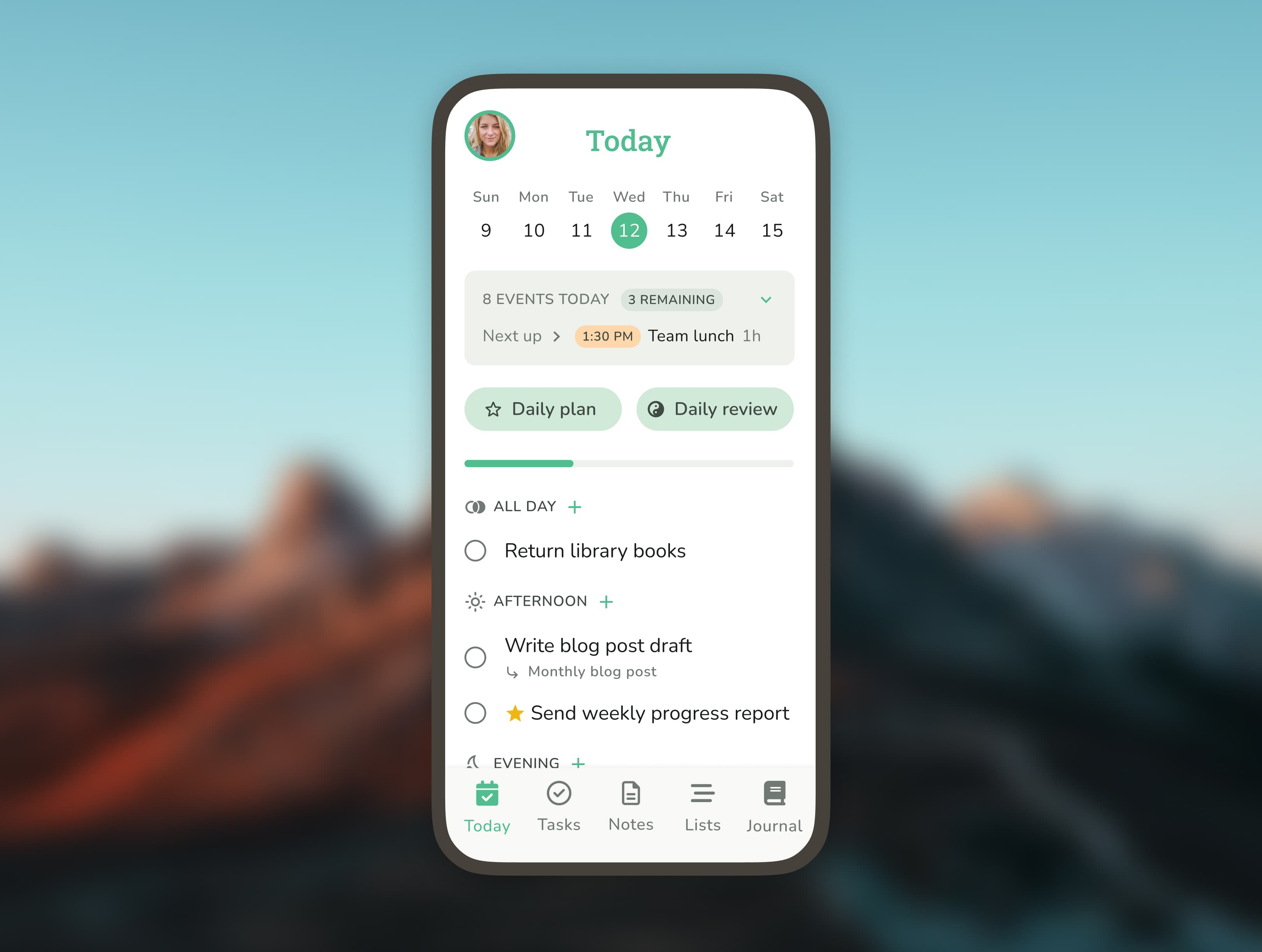
About this app
Do Everything is a versatile app designed to streamline your daily routine by combining task management, note-taking, list organization, and reflective journaling into one intuitive interface. It targets busy professionals, students, and freelancers who struggle with scattered workflows and need a centralized tool to boost productivity. Key features include customizable reminders, goal-tracking dashboards, and a minimalist journaling section, with a PRO tier offering advanced options like cross-device syncing. While it excels in simplicity and integration, it may lag on older devices and lacks some accessibility features, making it ideal for those seeking digital minimalism without the complexity of separate apps.
Key features
- 1Clean muted color palette with intuitive bottom menu navigation for minimal visual clutter.
- 2Distraction-free journaling section with optional daily prompts for focused reflection.
- 3Swipe gestures enable seamless switching between tasks, notes, and journals for ease of use.
Target customer profile
Drawn from the product itself, not from a survey.
Demographic
Busy Professionals
Pain points
Scattered workflows, missed deadlines, lack of work-life reflection
Primary needs
Centralized task tracking, time-sensitive reminders, progress analytics
Demographic
Students
Pain points
Balancing assignments, exams, and personal goals
Primary needs
Deadline alerts, study session planning, habit-building tools
Demographic
Freelancers/Small Teams
Pain points
Managing client projects without overcomplicating tools
Primary needs
Simple collaboration (via shared lists), expense tracking, milestone journals
Scout Review
Written by AI from measured evidence, scored out of 100.
Do Everything successfully delivers on its promise of consolidating multiple productivity functions into a single, cohesive platform. It excels at providing a unified workspace for task management, note-taking, and journaling without overwhelming users with unnecessary complexity. The app's strongest suit is its simplicity and focus on digital minimalism, making it ideal for individuals rather than teams. While it has some performance limitations and accessibility gaps, it represents a compelling solution for those seeking to reduce app clutter in their daily workflow.
Measure by measure
Usability
80Excellent for basic tasks with swipe gestures between sections. PRO features have a steeper learning curve that requires exploration.
Design
84Clean muted color palette with intuitive bottom menu navigation. Distraction-free journaling section shines, though feature density can overwhelm new users.
Speed
76Generally responsive for everyday use but lags during heavy multitasking. Cloud sync takes 2-3 seconds per update.
Security
80AES-256 encryption and biometric authentication are solid, but privacy policy lacks specifics about third-party data sharing.
Accessibility
70Basic dynamic text scaling and dark mode support. Missing screen reader optimization and multilingual options beyond English.
Growth
86High demand for all-in-one productivity tools. Needs collaboration features and performance optimization to scale effectively.
Improvement areas
- Add screen reader optimization and multilingual support to enhance accessibility for all users.
- Optimize performance for low-end devices and large datasets to reduce lag during multitasking.
- Clarify privacy policy with explicit details on data usage and third-party sharing practices.
Design & Usability
Do Everything's design philosophy centers on digital minimalism with a muted blue and gray palette that reduces visual clutter. The docked bottom menu provides quick access to core functions, while swipe gestures make switching between tasks, notes, and journals surprisingly intuitive. The journaling section stands out with its distraction-free, notebook-like interface that includes optional daily prompts. However, the app's attempt to be everything to everyone results in some feature density that can feel overwhelming when exploring PRO features like nested goal tracking. The learning curve isn't steep, but it's noticeable compared to single-purpose apps.
Speed & Security
Performance-wise, Do Everything handles everyday productivity tasks with smooth responsiveness. The app employs AES-256 encryption for all user data and offers optional biometric authentication, providing solid security fundamentals. However, when pushing the app with heavy multitasking—such as switching between numerous active lists—users may experience minor lag, particularly on older devices. Cloud synchronization operates at average speeds of 2-3 seconds per update. The main concern lies in the privacy policy, which lacks specific details about third-party data sharing practices, leaving some questions unanswered for privacy-conscious users.
Accessibility & Growth
Accessibility features are basic but functional, offering dynamic text scaling and system-level dark mode support. The app falls short in screen reader optimization for its custom UI components and offers no multilingual support beyond English. Voice-to-text works for notes but not task creation. Despite these limitations, Do Everything has significant growth potential in the booming productivity market. The all-in-one approach addresses a genuine pain point for users tired of app-hopping. To capitalize on this, the development team needs to prioritize collaboration tools, performance optimization for larger datasets, and expanded accessibility features.
Conclusion
If you're a solopreneur, student, or busy professional tired of switching between separate apps for tasks, notes, and reflections, Do Everything offers a refreshingly integrated approach. It won't replace specialized tools for complex project management or advanced journaling, but for everyday productivity consolidation, it's definitely worth trying. The free version provides ample functionality to determine if the all-in-one approach works for your workflow before considering the PRO upgrade.
Suggestions for improvement
- To improve, Do Everything should prioritize screen reader compatibility and add multilingual support to become truly inclusive.
- Performance optimization for low-end devices and handling large datasets would eliminate the current lag issues.
- The privacy policy needs explicit clarification about data usage and third-party sharing.
- Adding basic team collaboration features would expand its market appeal beyond individual users.
- Finally, integrating with wellness platforms like Apple Health and expanding journaling templates could make the reflective components more valuable.
Alternatives comparison
Named competitors, point by point. Nobody paid to appear here or to be left out.
 Do Everything Do Everything |  Trello Trello |  Evernote Evernote |  Day One Day One | |
|---|---|---|---|---|
| Task Management | Comprehensive with reminders and goal tracking | Visual board-based system ideal for teams | Basic task features, not the primary focus | Nonexistent - pure journaling app |
| Note-Taking Capabilities | Solid integrated note system | Basic card descriptions only | Industry-leading note organization | Journal entries only, not general notes |
| Journaling/Daily Reflection | Dedicated section with prompts | Nonexistent | Can be repurposed but not designed for it | Specialized premium journaling experience |
| Collaboration Features | Basic shared lists only | Excellent team collaboration tools | Shared notebooks and team features | Nonexistent - purely personal |
| Learning Curve | Moderate - simple basics, complex PRO features | Low - intuitive visual interface | Moderate - powerful but complex organization | Low - focused single purpose |
Trello
A visual project management tool, ideal for teams but lacks built-in journaling or note depth.
Evernote
Strong note-taking capabilities but weaker task management and no dedicated journaling.
Day One
A top-tier journaling app but doesn’t integrate task or list management.
Comparing options? See Do Everything alternatives, scored side by side
More Productivity apps
View all Productivity
Notion
92All-in-one AI workspace for docs, projects, and knowledge...

Qamarero
92An all-in-one hospitality software for restaurants and ba...

EmbedMyReviews
92White-label reputation management software for agencies s...

StoryPad
92Privacy-first open source journal app with a continuous t...

Puzzly – B2B Lead Generation & Sales Intelligence Platform
92Puzzly is an all-in-one B2B lead generation platform that...

The Stack Newsletter
92A weekly newsletter delivering curated tech jobs, intervi...

Vibe Coding Agent Skills
92A free, open-source platform offering 110 AI agent skills...

QRBliss
91Branded QR codes with AI Brand Sync, 15 free dynamic code...

Gerty
91Private, local AI assistant for Mac that runs offline

CC Switch
91Open-source desktop app for switching AI coding providers...

username.md
90One verified handle for your online identity, readable by...

PitchWhip
90AI cold call scripts & direct dials from LinkedIn


A platform dedicated to providing unbiased reviews of newly launched applications, analyzing everything from their features to their full potential.
info@scoutforge.net© 2026 Scoutforge. All rights reserved.
