Cycling through all six. Tap any point to stop.
Measured on six things
Free browser-based tools for PDF, images, audio, and more.
Security
42HTTPS enforced and SPF present, but zero of the six browser hardening headers (no HSTS, CSP, frame protection, nosniff, Referrer-Policy, Permissions-Policy) and no DMARC. Checklist 3/12. The in-browser processing claim is a real privacy plus, but self-asserted with no audit.
Screenshots
1 / 3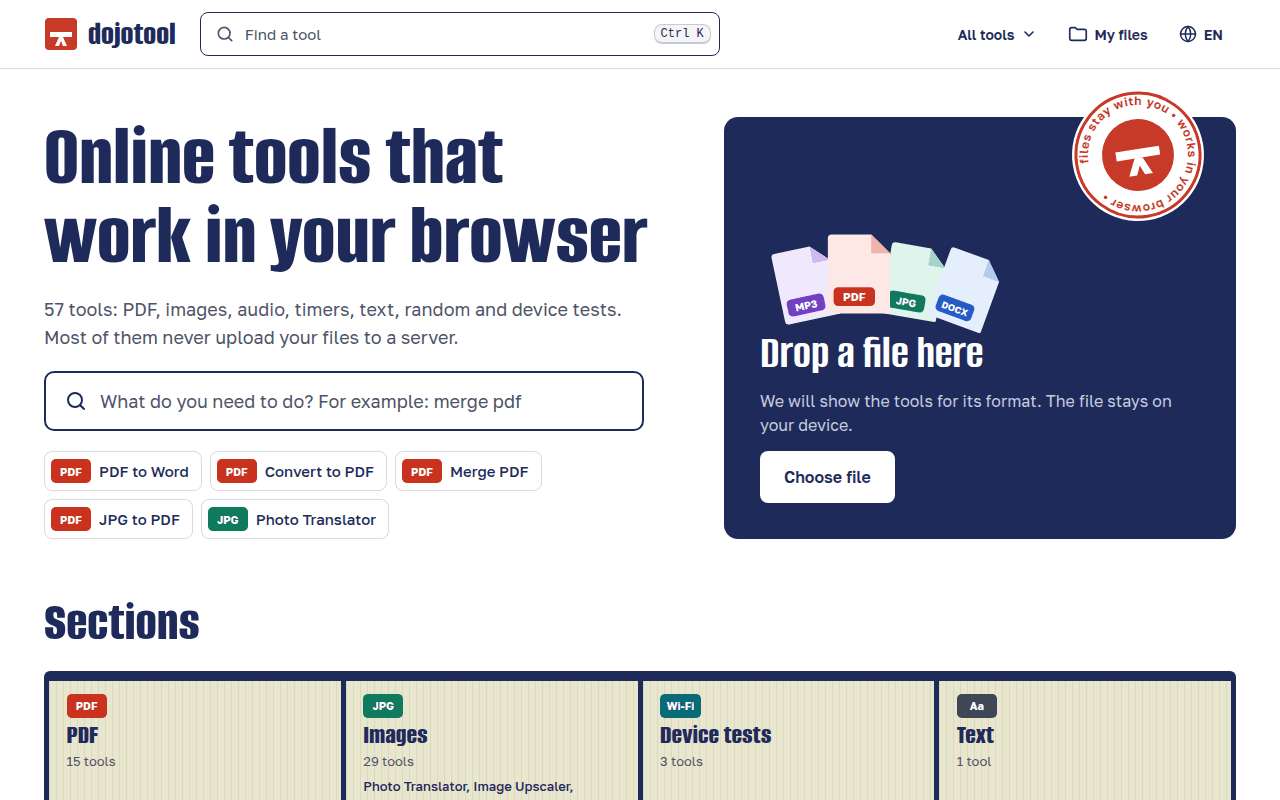
About this app
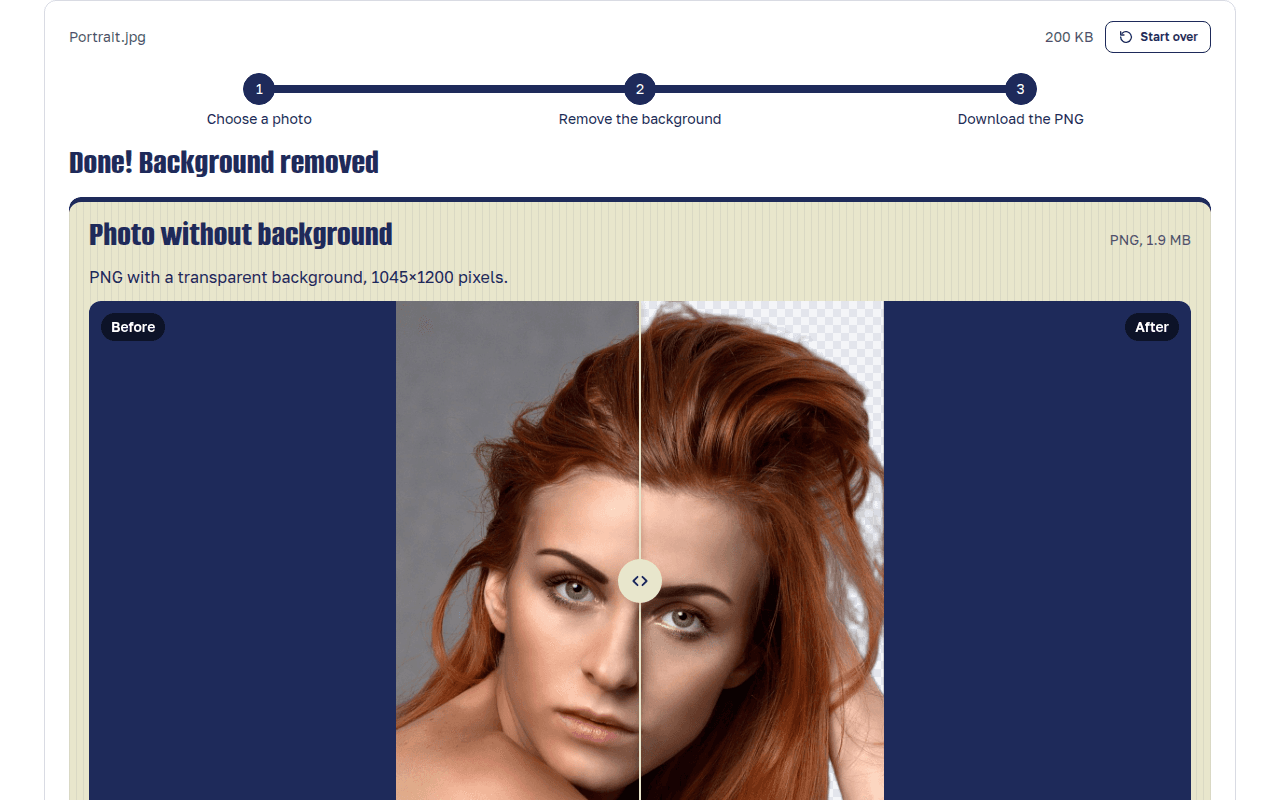
dojotool is a free set of online tools for images, PDF, audio and everyday tasks. Every tool processes your files in the browser, so they are not uploaded to a server. You don't need an account, and results have no watermark. The background remover runs an AI model on your device, with WebGPU when available and on the CPU otherwise. It keeps the person, animal or object and makes the rest transparent. You get a PNG at the original size. The browser downloads the model on first use and keeps it for later visits. Other tools: merge, split, compress, rotate and translate PDF; PDF to Word and JPG; Word to PDF; OCR for images and scanned PDFs; compress, resize, crop and convert images (HEIC, WebP, JFIF and PNG to JPG); remove objects, text and watermarks from photos; image upscaler; vocal remover; MP3 cutter; QR code generator and scanner; camera, microphone and CPS tests; timers. The site is available in 11 languages.
Key features
- 1On-device AI background remover using WebGPU or CPU, returning a full-resolution PNG with transparency and no watermark.
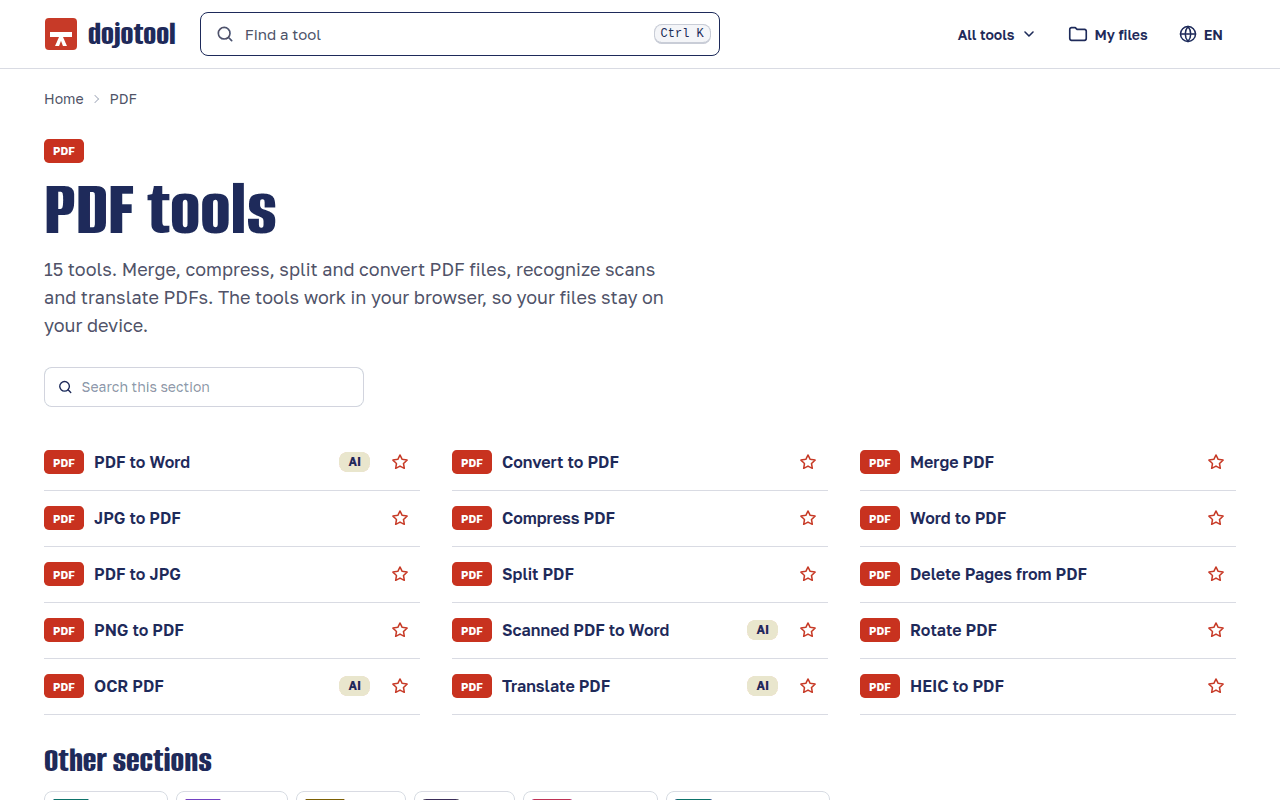
- 257 browser-based tools across PDF (merge, split, compress, OCR, translate, PDF↔Word/JPG), images, audio, text, timers and device tests.
- 3No account required, files processed locally where possible, and the interface available in 11 languages.
Target customer profile
Drawn from the product itself, not from a survey.
Demographic
Office workers and administrative staff
Pain points
Need quick PDF edits without installing software or paying for subscriptions.
Primary needs
Merge, compress, convert, and split PDFs efficiently and securely.
Demographic
Students and educators
Pain points
Limited budgets and access to essential document and image editing tools.
Primary needs
Free, easy-to-use tools for converting files, removing backgrounds, and OCR.
Demographic
Content creators and social media managers
Pain points
Require fast image and audio editing without complex software.
Primary needs
Background removal, image upscaling, audio cutting, and translation tools.
Scout Review
Written by AI from measured evidence, scored out of 100.
dojotool is a free, 57-tool browser-based utility suite spanning PDF, images, audio, text, timers and device tests, with on-device AI for background removal, upscaling, OCR and PDF translation. It requires no account and adds no watermark. The engineering is genuinely impressive where it's measurable — a perfect Lighthouse performance score and a perfect automated accessibility score — and the design has more personality than the category norm. Security hardening is the clear gap: 3 of 12 header checklist points, no DMARC, no audit. Growth depends on whether an on-device AI wedge can out-compete two incumbents who own the search results.
Measure by measure
Usability
68Three fast entry points above the fold (Ctrl K search, format-routing drop zone, quick-action chips) plus tool counts per section. No signup, no watermark. Held back by small, light secondary text in cards and footer and no visible help center or docs.
Design
71Distinctive poster-like identity: heavy condensed navy headline, coherent navy/tomato/cream palette, format badges carried across hero, grid and list. Drop-zone card earns its above-the-fold spot. Undone by a misaligned before/after slider and an illegible hero stamp.
Speed
88Lighthouse 100/100 on both mobile and desktop: LCP 1.2s, CLS 0, TBT 0ms. Essentially a perfect lab result for the homepage. The on-device AI model download on first background-removal use is a real cost the homepage score doesn't capture.
Security
42HTTPS enforced and SPF present, but zero of the six browser hardening headers (no HSTS, CSP, frame protection, nosniff, Referrer-Policy, Permissions-Policy) and no DMARC. Checklist 3/12. The in-browser processing claim is a real privacy plus, but self-asserted with no audit.
Accessibility
79Lighthouse accessibility 100/100 with no failing axe-core audits, 11-language support, and a responsive layout that renders on mobile and desktop. No published accessibility statement or documented keyboard-navigation support, so the score sits at the top of the automated band rather than above it.
Growth
58Real, specific problem (free, no-account, no-watermark file tools) with a genuine wedge: on-device AI for background removal, upscaling, OCR and PDF translation. Broad 57-tool surface and 11 languages. But it competes head-on with Smallpdf and iLovePDF, who own the search results.
Improvement areas
- Security headers are largely absent (3/12 checklist points, no DMARC) despite a privacy-first pitch — the biggest credibility gap.
- No documentation, help center or accessibility statement; the perfect automated a11y score is undocumented.
- Visual defects on the flagship feature: the background-removal before/after slider renders with an empty 'Before' half.
- No account or email capture means no retention loop and no visible monetization path against well-funded incumbents.
Design & Usability
dojotool's homepage has an actual point of view, which is rare for a utility site. A heavy condensed navy headline, a navy/tomato/cream palette and color-coded format badges carry consistently from hero to section grid to the Popular list. The drop-zone card earns its above-the-fold position, and the Ctrl K search plus quick-action chips give three separate ways to start a task without scrolling. Usability follows through: sections are labeled with tool counts (PDF 15, Images 29, All 57), the background-removal flow shows step and filename with a clear Start over, and nothing requires an account. The deductions are real though — the before/after slider renders with an empty 'Before' half, the circular hero stamp's curved text is illegible, and secondary text in the section cards is small and light enough to hurt on lower-resolution screens.
Speed & Security
Speed is the standout: Lighthouse reports 100/100 on both mobile and desktop with LCP 1.2s, CLS 0 and TBT 0ms. That is a genuinely excellent lab result and there is no evidence of lag complaints. The one caveat is architectural rather than measurable here — the AI background remover downloads a model on first use and runs it on-device via WebGPU or CPU, so the heaviest operation in the product isn't reflected in the homepage score. Security is the weak flank. HTTPS is enforced and SPF is published, but the probe found no HSTS, no CSP, no frame protection, no X-Content-Type-Options, no Referrer-Policy, no Permissions-Policy and no DMARC — 3 of 12 checklist points. The in-browser processing claim is a genuine privacy advantage over Smallpdf and iLovePDF, but it's self-asserted with no audit, no security page and no bug bounty behind it.
Accessibility & Growth
Accessibility is strong on the measurable side: Lighthouse scores 100/100 with no failing axe-core audits, the layout is responsive, and the site ships in 11 languages — well ahead of most free utility suites. What's missing is the human layer: no accessibility statement, no documented keyboard-navigation support, and the visual audit flagged illegible micro-text in the hero stamp. Growth is a judgement on the idea. The problem is real and specific — office workers, students and creators who need a quick PDF merge or background removal without a subscription or an account — and the wedge is concrete: on-device AI for background removal, upscaling, OCR and PDF translation, with no watermark and no signup. That's a genuine differentiator against Smallpdf and iLovePDF. The limit is distribution: those two own the category's search real estate, and 57 tools with no account means no email list, no retention loop and no obvious monetization path.
Conclusion
If you need to merge a PDF or strip a background right now, dojotool does the job faster and more privately than the incumbents, and it won't ask you to make an account first. The on-device AI is the part worth watching — it's a real technical moat that Smallpdf and iLovePDF can't trivially copy without shipping model weights to users. What holds it back from a higher score is the unglamorous stuff: security headers left at defaults, no accessibility statement, no docs, and a before/after slider that shipped half-empty. None of those are hard to fix. Fix them and this moves from 'impressive side project' to 'actual alternative'.
Suggestions for improvement
- Add the missing security headers — HSTS, CSP, X-Content-Type-Options, Referrer-Policy, Permissions-Policy — and publish a DMARC record. This is a few hours of work for the biggest score gain available.
- Fix the background-removal before/after slider so both halves render, and replace the illegible curved hero stamp text with something readable at normal size.
- Publish a short docs/help section and an accessibility statement covering keyboard navigation — the automated a11y score is perfect, so document it.
- Raise the contrast and size of secondary text in the section cards and footer; the striped cream texture is fighting the small grey copy.
Alternatives comparison
Named competitors, point by point. Nobody paid to appear here or to be left out.
 dojotool |  Smallpdf |  ILovePDF |  Canva | |
|---|---|---|---|---|
| Free tier without an account | Yes — no account, no watermark, all 57 tools free | Limited — free tier caps daily tasks, account pushed | Yes — free, no account for most tools, file size limits | No — account required, background removal is Pro |
| Files processed locally in the browser | Yes — most tools run client-side, AI models on-device | No — files uploaded to servers | No — files uploaded to servers | No — cloud-based editing |
| AI background removal | Yes — on-device model, full-resolution PNG, free | No — PDF-focused suite | No — PDF-focused suite | Yes — server-side, Pro subscription required |
| PDF tool depth (merge, split, compress, OCR, translate) | 15 PDF tools including AI OCR and AI PDF translation | Extensive — 20+ PDF tools, the category benchmark | Extensive — 25+ PDF tools, free and no account | Minimal — PDF import/export only, not an editor |
| Multi-language interface | 11 languages | 20+ languages | 25+ languages | 100+ languages |
| Published security compliance (SOC 2 / ISO / audit) | None published; 3/12 header checklist points | ISO 27001 and GDPR compliance published | GDPR compliance and security page published | SOC 2, ISO 27001, GDPR published |
Smallpdf
A popular online suite for PDF conversion and editing with both free and paid plans.
ILovePDF
Free online PDF tools for merging, splitting, compressing, and converting PDFs.
Canva
Design platform with background removal and image editing features, though mostly paid.
Comparing options? See dojotool alternatives, scored side by side
More Productivity apps
View all Productivity
Puzzly – B2B Lead Generation & Sales Intelligence Platform
92Puzzly is an all-in-one B2B lead generation platform that...

Qamarero
92An all-in-one hospitality software for restaurants and ba...

EmbedMyReviews
92White-label reputation management software for agencies s...

StoryPad
92Privacy-first open source journal app with a continuous t...

Notion
92All-in-one AI workspace for docs, projects, and knowledge...

The Stack Newsletter
92A weekly newsletter delivering curated tech jobs, intervi...

Vibe Coding Agent Skills
92A free, open-source platform offering 110 AI agent skills...

QRBliss
91Branded QR codes with AI Brand Sync, 15 free dynamic code...

Gerty
91Private, local AI assistant for Mac that runs offline

Strukchad Property Management
91Property management for Kenyan letting agents: rent invoices raised every month, M-Pesa rent prompts to tenants, arrears tracking and landlord statements.

CC Switch
91Open-source desktop app for switching AI coding providers...

PitchWhip
90AI cold call scripts & direct dials from LinkedIn


A platform dedicated to providing unbiased reviews of newly launched applications, analyzing everything from their features to their full potential.
info@scoutforge.net© 2026 Scoutforge. All rights reserved.
