Cycling through all six. Tap any point to stop.
Measured on six things
Convert CorelDRAW CDR files to 11+ formats without needin...
Growth
58Real, specific pain — CDR files without a CorelDRAW license — with batch/preview/offline as a genuine wedge over Zamzar. But it's a narrow utility with a ceiling.
Screenshots
1 / 1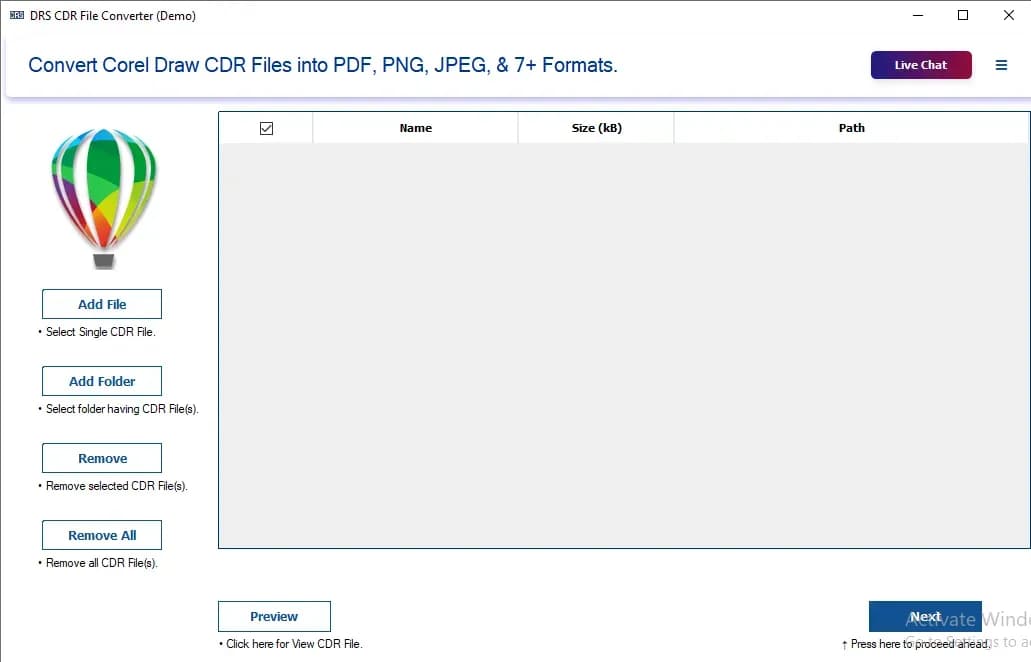
About this app
DRS Softech CDR Converter is a specialized utility designed to open, view, and convert CorelDRAW (CDR) files into a wide array of standard formats such as PDF, JPEG, PNG, SVG, TIFF, and HTML. Its standout feature is the ability to perform these tasks without requiring a licensed installation of CorelDRAW, making it an accessible tool for non-designers, IT teams, and businesses that frequently receive CDR files but lack the native software. The application supports both single and batch conversion, handles large files efficiently, and includes a preview feature to verify content before conversion. It is compatible with both Windows and Mac operating systems and supports CDR files from all major CorelDRAW versions. The tool offers a free version with basic functionality and a paid version that unlocks watermark-free output and additional features, positioning it as a cost-effective solution for file format interoperability.
Key features
- 1Convert CDR to PDF, JPEG, PNG, SVG, TIFF, HTML, WEBP, BMP and more without CorelDRAW installed.
- 2Batch conversion of multiple CDR files in a single operation with custom save location.
- 3Built-in preview to verify CDR content before converting; supports large files and all major CorelDRAW versions.
Target customer profile
Drawn from the product itself, not from a survey.
Demographic
Graphic Designers and Print Professionals
Pain points
Need to convert large, complex CDR files for print or client review without slowing down systems or losing quality.
Primary needs
High-quality, batch conversion to print-ready formats like TIFF and PDF, with support for large files and preview accuracy.
Demographic
IT Managers and Non-Design Staff
Pain points
Receive CDR files from clients or colleagues but lack CorelDRAW licenses or design expertise to access the content.
Primary needs
A simple, reliable tool to view and convert CDR files into common formats like PDF and JPEG for internal sharing and presentations.
Demographic
Small Business Owners and Operations Teams
Pain points
Frequent need to handle legacy or client-provided CDR files for marketing materials or product designs without investing in expensive software.
Primary needs
An affordable, cross-platform solution with a free tier for occasional use and a paid version for watermark-free, unlimited conversions.
Scout Review
Written by AI from measured evidence, scored out of 100.
DRS Softech CDR Converter is a focused utility that does one thing clearly: open, preview, and convert CorelDRAW files to PDF, JPEG, PNG, SVG, TIFF, HTML and more without a CorelDRAW license. The pitch is coherent and the target customer — IT teams and non-designers who receive .cdr files — is well defined. The marketing site is fast (98 mobile Lighthouse) and reasonably secure on headers (10/12), with real documentation and a free tier. Weaknesses: no live demo, self-reported-only credibility metrics, missing SPF/DMARC, no published compliance or accessibility statements, and a narrow use case that limits how big this can get. It's a competent, honest niche tool rather than a category leader.
Measure by measure
Usability
60A Software Guide/User Manual tab exists and the free download lowers the barrier, but there's no live demo or web trial — you must install to evaluate. Competent, not exceptional.
Design
62Dense but organized marketing page with feature cards, screenshot tabs, and spec tables. Functional and clear, but visually generic template-SaaS styling with no distinctive brand craft.
Speed
88Lighthouse mobile 98/100 (LCP 1.2s, TBT 127ms, CLS 0.051) and desktop 99/100. Genuinely fast, lightweight marketing site with no bloat.
Security
76Strong header hygiene — HSTS, CSP, frame protection, and 10/12 checklist items. But SPF and DMARC are missing and there's no published SOC 2, ISO, or pen-test evidence.
Accessibility
70Lighthouse a11y 94/100, but failing touch-target sizing, a missing main landmark, and role conflicts remain. No WCAG statement published. Solid automated score, real gaps underneath.
Growth
58Real, specific pain — CDR files without a CorelDRAW license — with batch/preview/offline as a genuine wedge over Zamzar. But it's a narrow utility with a ceiling.
Improvement areas
- No live demo or browser trial — evaluation requires installing the desktop app.
- SPF and DMARC missing; no published SOC 2, ISO, pen-test, or security/data-handling page.
- No WCAG accessibility statement; Lighthouse flags missing main landmark and touch-target sizing.
Design & Usability
The site is a workmanlike long-form product page: feature cards, screenshot and spec tabs, a Software Guide, and a clear free-download/purchase split. It's organized and legible but visually generic — template-SaaS styling with no distinctive craft, and the credibility numbers (12K+ downloads, 4.7 from 2422 reviews, 45+ awards) are all self-reported on-site. Usability is competent: documentation exists and the free tier lowers the entry barrier, but there's no live demo or browser trial, so evaluating the tool means installing it first. For a utility aimed at IT staff and non-designers, that's a real friction point — the people most likely to need it are the least likely to want to install unknown software to test it.
Speed & Security
Speed is the standout: Lighthouse mobile 98/100 with LCP 1.2s, TBT 127ms and CLS 0.051, desktop 99/100. The marketing site is lightweight and snappy with no bloat — though that measures the website, not the desktop converter's actual conversion throughput, which isn't benchmarked anywhere. Security is above average on transport: HTTPS enforced with HSTS, CSP, frame protection, X-Content-Type-Options, Referrer-Policy and Permissions-Policy all present, 10 of 12 checklist items. The gaps are SPF and DMARC, meaning email spoofing protection isn't configured, and there's no published SOC 2, ISO certification, pen-test report, or bug bounty. For a tool that handles client design files, a security or data-handling page would build more trust than another award badge.
Accessibility & Growth
Accessibility scores 94/100 on the automated Lighthouse audit, but the failing checks are real: insufficient touch-target size and spacing, a missing main landmark, and role=none/presentation conflicts. There's no WCAG conformance statement or accessibility page, so the 94 is a floor, not a guarantee. Growth is the more interesting question. The product names a genuinely specific pain — receiving CDR files with no CorelDRAW license — and its wedge over Zamzar is concrete: batch conversion, preview, large-file handling, and offline desktop operation rather than an upload-to-a-server web form. Against CorelDRAW itself it wins on price and simplicity. But it's a narrow, occasional-use utility, and the ceiling is set by how often people actually receive .cdr files. The ~4.9-year-old domain and self-reported 12K+ downloads suggest steady niche traction rather than breakout potential.
Conclusion
If you regularly get CDR files you can't open, this is a sensible, affordable answer — cheaper than a CorelDRAW license and more capable than a free web converter for batch work. Go in expecting a solid utility, not a design suite: verify the free version's watermark limits before buying, and treat the on-site review counts as marketing until you've tested the output quality yourself on your own files.
Suggestions for improvement
- Add a browser-based demo or sample-file converter so people can test output quality before installing anything.
- Publish SPF and DMARC records and add a security/data-handling page to back up the strong header setup.
- Add a WCAG conformance statement and fix the missing main landmark and touch-target sizing flagged by Lighthouse.
- Publish independent benchmarks for large-file conversion speed and output fidelity, not just site performance.
Alternatives comparison
Named competitors, point by point. Nobody paid to appear here or to be left out.
 DRS Softech CDR Converter |  CorelDRAW |  Zamzar | |
|---|---|---|---|
| Price to convert CDR files | Free tier with watermark; paid version for watermark-free output | Full paid license, significant investment | Free for occasional small files; paid plans for more |
| Batch conversion | Yes — multiple CDR files in one operation | Yes, via native export/batch tools | Limited; primarily single-file web conversion |
| Preview before conversion | Yes — built-in preview of CDR content | Yes — full editing canvas | No preview of source content |
| Requires CorelDRAW installed | No | It is CorelDRAW | No — cloud-based |
| Platform / offline use | Windows and Mac desktop app, offline | Windows and Mac desktop, offline | Browser-based, requires upload |
| Large-file support | Claimed unlimited large-file handling | Yes, native handling | File size limits on free tier |
CorelDRAW
The industry-standard vector graphics editor that natively handles CDR files. It offers full design and editing capabilities but requires a significant investment and is overkill for simple file conversion needs.
Zamzar
A free online file conversion service that supports CDR to PDF, JPEG, and other formats. It's convenient for occasional, small files but lacks batch processing, preview features, and may have file size limitations.
Comparing options? See DRS Softech CDR Converter alternatives, scored side by side
More Productivity apps
View all Productivity
Notion
92All-in-one AI workspace for docs, projects, and knowledge...

Qamarero
92An all-in-one hospitality software for restaurants and ba...

EmbedMyReviews
92White-label reputation management software for agencies s...

StoryPad
92Privacy-first open source journal app with a continuous t...

Puzzly – B2B Lead Generation & Sales Intelligence Platform
92Puzzly is an all-in-one B2B lead generation platform that...

The Stack Newsletter
92A weekly newsletter delivering curated tech jobs, intervi...

Vibe Coding Agent Skills
92A free, open-source platform offering 110 AI agent skills...

QRBliss
91Branded QR codes with AI Brand Sync, 15 free dynamic code...

Gerty
91Private, local AI assistant for Mac that runs offline

CC Switch
91Open-source desktop app for switching AI coding providers...

username.md
90One verified handle for your online identity, readable by...

PitchWhip
90AI cold call scripts & direct dials from LinkedIn


A platform dedicated to providing unbiased reviews of newly launched applications, analyzing everything from their features to their full potential.
info@scoutforge.net© 2026 Scoutforge. All rights reserved.
