Cycling through all six. Tap any point to stop.
Measured on six things
Convert CorelDRAW CDR files to PDF and 10+ formats withou...
Design
44Dated WinForms-era app UI with a 60% empty file list and no hierarchy, plus a cramped homepage stacking 12-bullet lists, stats and logos with no breathing room. Real enterprise logos are the one bright spot.
Screenshots
1 / 1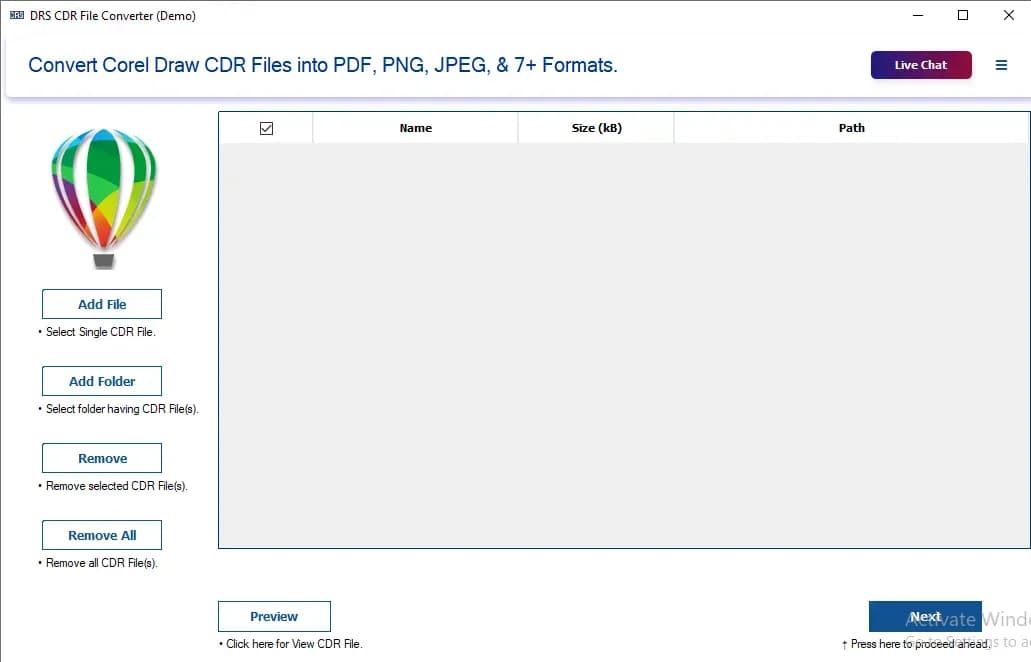
About this app
DRS Softech CDR to PDF Converter is a standalone desktop utility for Windows and Mac that converts CorelDRAW (.cdr) files into PDF, JPEG, PNG, TIFF, BMP, GIF, WEBP, SVG, HTML, and PSD without requiring a CorelDRAW license or installation. It handles bulk and folder-level conversion, offers a built-in preview to verify designs before processing, has no file-size limits, and preserves vector graphics, text, layout, and color profiles with zero loss to the original file. It supports CDR files from all CorelDRAW versions and includes a custom destination path, a remove-file option, and a free watermarked trial. Target users include design agencies receiving vendor CDR files, legal and compliance teams archiving contractor artwork, and print production shops handling large high-resolution CDR files. Drawbacks worth noting: the free version watermarks output, the vendor's own FAQ recommends temporarily disabling antivirus and Windows Defender during install, and the interface is dated com...
Key features
- 1Converts CDR to PDF, JPEG, PNG, TIFF, BMP, GIF, WEBP, SVG, HTML and PSD without a CorelDRAW license or installation.
- 2Batch and folder-level conversion with a built-in preview to verify designs before processing.
- 3No file-size limits and support for CDR files from all CorelDRAW versions, with custom destination paths.
Target customer profile
Drawn from the product itself, not from a survey.
Demographic
Graphic designers and design agencies (25-45) receiving vendor CDR files
Pain points
Cannot open client/vendor CDR files without a CorelDRAW license; slow manual one-by-one conversion
Primary needs
Fast batch CDR-to-PDF conversion with preview and accurate design fidelity
Demographic
Legal and compliance officers (30-55) archiving contractor artwork
Pain points
Need secure, non-destructive conversion of CDR files for audits and documentation
Primary needs
Read-only processing that leaves originals untouched and produces accurate PDFs
Demographic
Print production and prepress teams (28-50) handling high-res CDR files
Pain points
Large, complex CDR files slow down or degrade in other converters; version incompatibilities
Primary needs
No file-size limits, all CorelDRAW version support, print-ready PDF/TIFF output
Demographic
Freelancers and small business owners (22-45) without design software budgets
Pain points
CorelDRAW subscription cost is prohibitive for occasional CDR access
Primary needs
Affordable standalone converter with a free trial to test before buying
Scout Review
Written by AI from measured evidence, scored out of 100.
DRS Softech CDR to PDF Converter does one job and does it competently: turn CorelDRAW files into PDF and a dozen other formats without a CorelDRAW license. The measured speed is genuinely good, the security headers are solid, and the feature list — batch conversion, preview, all-version support, no size limits — maps to real workflows for agencies, legal teams and prepress shops. Where it stumbles is presentation and trust: a dated WinForms interface, a cramped homepage, ambiguous CTAs, and a vendor FAQ that tells you to disable antivirus during install. The free watermarked trial is the right way to test it. If you need occasional CDR access and don't want a CorelDRAW subscription, this is a reasonable buy — just go in with your eyes open on the install instructions.
Measure by measure
Usability
58Core workflow (add files, preview, convert, set destination) is present and the free trial lowers risk, but the file list lacks sorting or drag-and-drop and the Preview button reads as disabled. Equal-weight Download/Purchase CTAs blur the first step.
Design
44Dated WinForms-era app UI with a 60% empty file list and no hierarchy, plus a cramped homepage stacking 12-bullet lists, stats and logos with no breathing room. Real enterprise logos are the one bright spot.
Speed
72Lighthouse desktop 99/100 and mobile 87/100 with a 1.2s LCP and 78ms TBT — genuinely snappy. The one blemish is CLS 0.238, well past the 0.1 'good' line, so the mobile page visibly jumps as it loads.
Security
71Strong header hygiene — HSTS, CSP, frame protection and Permissions-Policy all present (10/12 probe points) — but no SPF/DMARC and no published SOC 2, ISO or pen-test. The vendor's own advice to disable antivirus during install is a real trust flag.
Accessibility
70Lighthouse a11y 94/100 with keyboard-friendly structure, but touch targets are undersized, the page lacks a main landmark, and there are role=presentation conflicts. No accessibility statement or multi-language support found; Windows and Mac coverage is solid.
Growth
60A real, specific pain — opening vendor CDR files without a CorelDRAW license — with batch, preview and all-version support as a genuine wedge over Inkscape and free web converters. Niche, but the niche is real and underserved.
Improvement areas
- Dated WinForms interface with an empty file list, no sorting or drag-and-drop, and a disabled-looking Preview button.
- Vendor FAQ recommends disabling antivirus/Windows Defender during install; no SPF/DMARC and no published security audits.
- Homepage is cramped and dense, with equal-weight Download/Purchase CTAs and a CLS 0.238 mobile layout shift.
Design & Usability
Design and usability are where this tool shows its age. The homepage is a wall of dense text, stats and 12-bullet lists crammed together with no spacing discipline, and the actual app screenshot reveals a classic WinForms layout where the file list eats 60% of the window and sits empty. The workflow itself is sound — add files or a folder, preview, pick a format, set a destination, convert — and the free trial means you can test before paying. But the file list offers no sorting or drag-and-drop, the Preview button looks disabled and hides below the main actions, and the Download and Purchase CTAs carry identical weight so the first step is ambiguous. Functional, not pleasant.
Speed & Security
Speed is the strongest measured dimension: Lighthouse desktop 99/100, mobile 87/100, LCP 1.2s and TBT 78ms, so the site loads fast and the marketing pages feel snappy. The one crack is CLS 0.238 on mobile, meaning the layout visibly shifts as it loads. Security is a mixed bag. The header probe is genuinely good — HTTPS enforced, HSTS, CSP, frame protection, Permissions-Policy, 10 of 12 checklist points — but SPF and DMARC are missing, and there are no published SOC 2, ISO or pen-test results. The bigger flag is the vendor's own FAQ recommending you temporarily disable antivirus and Windows Defender during install, which sits awkwardly against the 'enterprise-grade, authenticated, read-safe' language on the homepage.
Accessibility & Growth
Accessibility scores 94/100 on Lighthouse, which is respectable, but the failing audits are the ones users feel: undersized touch targets, no main landmark, and role=presentation conflicts. There's no accessibility statement and no multi-language support visible, though Windows and Mac coverage is solid. Growth is a judgement on the idea, not the traction. The problem is real and specific — you've received a .cdr file and you don't own a CorelDRAW license — and the product names its segments clearly: agencies, legal/compliance archiving, prepress shops, freelancers. Its wedge over the listed alternatives is concrete: batch and folder conversion, a preview step, all-version support, no file-size limits, and a fraction of a CorelDRAW subscription. That's enough to justify a business. The limit is that the moat is a file-format parser in a dated desktop shell; a competent web converter or Corel itself could erode it.
Conclusion
The honest verdict: this is a utility, not a platform, and it's priced and positioned like one. It solves a narrow, real problem for people who receive CDR files and can't open them. The measured numbers back the speed and header claims; the design and the antivirus advice are the parts that need work. Try the free trial on your actual files before you pay — that's the only test that matters for a converter.
Suggestions for improvement
- Publish SPF and DMARC records for drssoftech.com to close the email-spoofing gap the header probe found.
- Remove the 'disable antivirus during install' advice and ship a properly signed installer instead — it's the single biggest trust flag.
- Add column sorting and drag-and-drop to the file list, and make the Preview button visually primary rather than disabled-looking.
- Fix the CLS 0.238 mobile layout shift and add a <main> landmark plus larger touch targets to clear the remaining a11y audits.
Alternatives comparison
Named competitors, point by point. Nobody paid to appear here or to be left out.
 DRS Softech CDR to PDF Converter |  CorelDRAW |  Adobe Acrobat / Free Online CDR Converters |  Inkscape | |
|---|---|---|---|---|
| Requires a CorelDRAW license | No — standalone, no CorelDRAW needed | Yes — paid license or subscription required | No for PDF tools; free web converters vary | No — free and open source |
| Batch / folder-level conversion | Yes — bulk files and whole folders in one pass | Yes — via batch export in the suite | Limited — free web converters are typically one file at a time | No — one file at a time |
| Built-in preview before conversion | Yes — preview panel to verify content first | Yes — full editing canvas | Varies — usually no preview for CDR input | Yes — opens the file in a vector editor |
| CDR version coverage and complex-file fidelity | Claims all CorelDRAW versions, no size limits, zero loss | Native — full fidelity across all versions | Weak — general PDF tools, limited CDR support | Limited — struggles with complex or newer CDR versions |
| Output format range | PDF, JPEG, PNG, TIFF, BMP, GIF, WEBP, SVG, HTML, PSD | Broad export set via the authoring suite | PDF-centric; limited image export | PDF, PNG, SVG and others via export |
| Cost model | One-time purchase with free watermarked trial | Paid license or subscription | Subscription; free web converters ad-supported | Free and open source |
CorelDRAW
The native authoring suite that opens and exports CDR files directly, but requires a paid license or subscription and is overkill for simple conversion tasks.
Adobe Acrobat / Free Online CDR Converters
General PDF tools and free web-based CDR converters can handle occasional files, but typically lack batch processing, preview, version coverage, and security guarantees for sensitive design files.
Inkscape
Free open-source vector editor with limited CDR import support and PDF export; works for simple files but often struggles with complex or newer CDR versions.
Comparing options? See DRS Softech CDR to PDF Converter alternatives, scored side by side
More Productivity apps
View all Productivity
Notion
92All-in-one AI workspace for docs, projects, and knowledge...

Qamarero
92An all-in-one hospitality software for restaurants and ba...

EmbedMyReviews
92White-label reputation management software for agencies s...

StoryPad
92Privacy-first open source journal app with a continuous t...

Puzzly – B2B Lead Generation & Sales Intelligence Platform
92Puzzly is an all-in-one B2B lead generation platform that...

The Stack Newsletter
92A weekly newsletter delivering curated tech jobs, intervi...

Vibe Coding Agent Skills
92A free, open-source platform offering 110 AI agent skills...

QRBliss
91Branded QR codes with AI Brand Sync, 15 free dynamic code...

Gerty
91Private, local AI assistant for Mac that runs offline

CC Switch
91Open-source desktop app for switching AI coding providers...

username.md
90One verified handle for your online identity, readable by...

PitchWhip
90AI cold call scripts & direct dials from LinkedIn


A platform dedicated to providing unbiased reviews of newly launched applications, analyzing everything from their features to their full potential.
info@scoutforge.net© 2026 Scoutforge. All rights reserved.
