Cycling through all six. Tap any point to stop.
Measured on six things
Convert, back up, and migrate Outlook OST files to PST an...
Design
46Dated, template-built homepage: stacked blue bands, repeated card grids, and an unreadable app screenshot. The Demo-vs-Full table and clear hero buttons are the only real craft on show.
Screenshots
1 / 1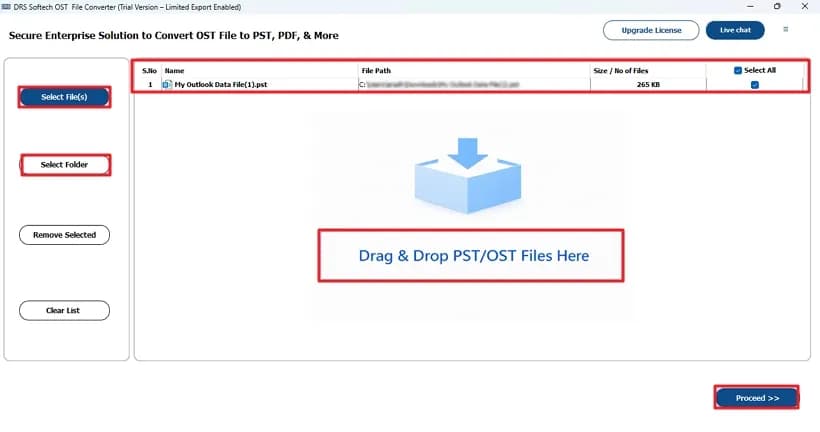
About this app
DRS Softech OST to PST Converter is a Windows and Mac utility built for one job: getting your Outlook OST data out of a dead-end offline file and into something usable. It handles emails, calendars, tasks, contacts, and more, converting OST to PST or exporting to MBOX, MSG, EML, EMLX, HTML, CSV, TXT, DOCX, and even vCard for contacts. The standout feature for anyone with years of Outlook buildup is batch conversion—feed it multiple OST files and it chews through them at speed while keeping folder hierarchy intact. There's also built-in duplicate removal, attachment exclusion, selective folder picking from a tree view, and a date-range filter, so you're not dragging along years of junk you don't need. Beyond plain conversion, the tool doubles as a migration bridge: push OST data straight into Gmail, Office 365, Yahoo, Thunderbird, Zoho, AOL, Yandex, or generic IMAP. The interface is genuinely beginner-friendly, and preview gives you a look before you commit. Version 23.9 (April 2024)...
Key features
- 1Batch OST-to-PST conversion with folder hierarchy preserved and duplicate removal.
- 2Export to 10+ formats (PST, MBOX, MSG, EML, EMLX, HTML, CSV, TXT, DOCX, vCard).
- 3Direct migration to Gmail, Office 365, Yahoo, Thunderbird, Zoho, AOL, Yandex, and IMAP.
Target customer profile
Drawn from the product itself, not from a survey.
Demographic
IT admins managing Exchange to cloud migrations
Pain points
Orphaned OST files after mailbox moves; manual conversion is slow and risky
Primary needs
Bulk OST-to-PST conversion with folder structure preserved and duplicate cleanup
Demographic
Small business owners leaving on-prem Exchange
Pain points
Outlook OST data locked to a server; no easy path to Office 365 or Gmail
Primary needs
One-click migration of mail, contacts, and calendars to a new email platform
Demographic
Individual Outlook users with corrupted or offline OST files
Pain points
OST won't open in Outlook; losing years of email and attachments
Primary needs
Reliable recovery into PST plus export to readable formats like EML or MSG
Demographic
Legal, compliance, and e-discovery teams
Pain points
Need to archive or share mailbox data in non-proprietary formats
Primary needs
Export to PDF, HTML, CSV, or vCard with date-range filtering and attachment control
Scout Review
Written by AI from measured evidence, scored out of 100.
DRS Softech OST to PST Converter is a competent, feature-complete utility wrapped in a dated, template-built marketing site. The converter itself claims the right things — batch processing, folder-tree selection, duplicate removal, attachment exclusion, date-range filtering, 10+ export formats, and migration to 9+ email clients — and the site backs those claims with a clear Demo-vs-Full table. The measured site is fast (Lighthouse mobile 92, desktop 97) and secure on headers (10/12, missing SPF and DMARC). Accessibility is 98/100 with one missing main landmark. The weak spots are design (stacked blue bands, unreadable screenshots, dense SEO copy) and growth (crowded category against Stellar, Kernel, and SysTools). If you need the job done and can look past the landing page, it's a reasonable pick; if you need enterprise procurement paperwork, ask for it directly.
Measure by measure
Usability
58Feature set is genuinely useful — batch conversion, folder tree, duplicate removal, attachment exclusion, 10+ formats, 9+ migration targets. But the site buries it under dense SEO copy and a tiny OS toggle.
Design
46Dated, template-built homepage: stacked blue bands, repeated card grids, and an unreadable app screenshot. The Demo-vs-Full table and clear hero buttons are the only real craft on show.
Speed
79Lighthouse mobile 92/100 (LCP 1.8s, CLS 0.002, TBT 211ms) and desktop 97/100 — the marketing site is genuinely snappy. No published conversion benchmarks to verify the 'lightning speed' claim.
Security
70Strong header hygiene — HTTPS, HSTS, CSP, frame protection, Referrer and Permissions policies all set (10/12). But no SPF or DMARC, and no SOC 2, ISO, or bug bounty page found.
Accessibility
82Lighthouse accessibility 98/100 with one failing audit (missing main landmark). No WCAG statement published, English-only, but Windows and Mac coverage is confirmed.
Growth
58Real, specific pain (orphaned OST, Exchange-to-cloud migration) with concrete differentiators — batch, dedupe, 9+ migration targets. But it's a crowded field against Stellar, Kernel, and SysTools.
Improvement areas
- Missing SPF and DMARC DNS records — a real spoofing exposure for an email-data tool.
- No published SOC 2, ISO 27001, or bug bounty page for enterprise buyers.
- Dated, template-built homepage with an unreadable app screenshot and tiny OS toggle.
Design & Usability
The homepage is the weak link. It's built from stacked blue bands, repeated card grids, and long SEO paragraphs, with an app screenshot too small to read and red annotation boxes fighting the actual UI. What does work: the Demo-vs-Full comparison table is scannable, and the hero's filled 'Purchase Now' versus outlined 'Free Download' makes the buy path obvious. Usability is stronger than the design suggests — the feature list is real and specific: batch conversion, folder-tree selection, duplicate removal, attachment exclusion, date-range filtering, 10+ export formats, and migration to 9+ clients. The problem is discoverability: the Windows/Mac toggle is a tiny radio control, and the download button doesn't visibly change with the selection. Dense copy in narrow columns makes the page harder to skim than it needs to be.
Speed & Security
Speed is the standout measured result: Lighthouse mobile 92/100 with LCP 1.8s, CLS 0.002, and TBT 211ms; desktop hits 97/100. The marketing site is genuinely fast. The 'lightning speed' claim for the converter itself is unverified — no published benchmarks in the collected evidence. Security is solid on headers: HTTPS enforced, HSTS, CSP, frame protection, X-Content-Type-Options, Referrer-Policy, and Permissions-Policy all present, 10 of 12 checklist points. The gaps are SPF and DMARC, which are missing — a real email-spoofing exposure for a company selling email-data tooling. No SOC 2, ISO 27001, penetration-test report, or bug bounty page was found, so enterprise buyers will have to take data-handling on faith.
Accessibility & Growth
Accessibility scores 98/100 on Lighthouse with a single failing audit: the page lacks a main landmark. That's a one-line fix and the only automated ding. There's no published WCAG conformance statement, and the site is English-only, but Windows and Mac coverage is confirmed. Growth is a judgement on the idea: the problem is real and specific — orphaned OST files after mailbox moves, Exchange-to-cloud migrations, e-discovery exports — and the product names concrete differentiators (batch conversion, duplicate removal, attachment exclusion, 9+ migration targets, 10+ formats). But the category is crowded: Stellar, Kernel, and SysTools all offer comparable feature sets with stronger brand recognition. The wedge is real; the moat is thin. Domain registered 2021-12-22 is context, not a score driver.
Conclusion
Buy it if you have orphaned OST files, a migration deadline, and no appetite for PowerShell scripts. The feature set is genuinely broad, the site is fast, and the security headers are better than most indie tools. Skip it if you need published compliance certifications or a design-forward experience — neither is here. The category is crowded, so compare against Stellar, Kernel, and SysTools on price and support before committing. The product earns its place; the marketing site undersells it.
Suggestions for improvement
- Add SPF and DMARC DNS records — a security tool selling email-data handling shouldn't be spoofable.
- Publish a WCAG conformance statement and add the missing <main> landmark; the 98/100 is one line from 100.
- Replace the tiny carousel screenshot with a full-width, readable UI shot — the current one is illegible at page scale.
- Make the Windows/Mac toggle a prominent segmented control that visibly changes the download button.
Alternatives comparison
Named competitors, point by point. Nobody paid to appear here or to be left out.
 DRS Softech OST to PST Converter |  Stellar Converter for OST |  Kernel for OST to PST Converter |  SysTools OST to PST Converter | |
|---|---|---|---|---|
| Batch conversion of multiple OST files | Yes | Yes | Yes | Yes |
| Direct migration to Office 365 / Gmail / IMAP | Yes (9+ clients) | Yes (Office 365) | Yes | Yes (Office 365) |
| Duplicate removal during conversion | Yes | Yes | Yes | Yes |
| Export to 10+ formats (PST, MBOX, MSG, EML, EMLX, HTML, CSV, TXT, DOCX, vCard) | Yes | Yes (broad format support) | Yes | Yes |
| Windows and Mac support | Yes (both) | Windows (Mac via separate tool) | Windows | Windows (Mac via separate tool) |
| Published security certifications (SOC 2 / ISO) | Not found | Not verified | Not verified | Not verified |
Stellar Converter for OST
Well-known OST to PST converter with a similar feature set, including mailbox recovery and migration to Office 365; strong brand trust and broad format support.
Kernel for OST to PST Converter
Long-standing OST conversion tool from Lepide, offering batch conversion, preview, and export to multiple formats with a comparable interface.
SysTools OST to PST Converter
Popular competitor with bulk conversion, duplicate removal, and direct migration to Office 365 and other clients; frequently compared to DRS Softech's tool.
Comparing options? See DRS Softech OST to PST Converter alternatives, scored side by side
More Productivity apps
View all Productivity
Puzzly – B2B Lead Generation & Sales Intelligence Platform
92Puzzly is an all-in-one B2B lead generation platform that...

Qamarero
92An all-in-one hospitality software for restaurants and ba...

EmbedMyReviews
92White-label reputation management software for agencies s...

StoryPad
92Privacy-first open source journal app with a continuous t...

Notion
92All-in-one AI workspace for docs, projects, and knowledge...

The Stack Newsletter
92A weekly newsletter delivering curated tech jobs, intervi...

Vibe Coding Agent Skills
92A free, open-source platform offering 110 AI agent skills...

QRBliss
91Branded QR codes with AI Brand Sync, 15 free dynamic code...

Gerty
91Private, local AI assistant for Mac that runs offline

Strukchad Property Management
91Property management for Kenyan letting agents: rent invoices raised every month, M-Pesa rent prompts to tenants, arrears tracking and landlord statements.

CC Switch
91Open-source desktop app for switching AI coding providers...

PitchWhip
90AI cold call scripts & direct dials from LinkedIn


A platform dedicated to providing unbiased reviews of newly launched applications, analyzing everything from their features to their full potential.
info@scoutforge.net© 2026 Scoutforge. All rights reserved.
