Cycling through all six. Tap any point to stop.
Measured on six things
Convert Outlook PST emails to PDF with attachments and me...
Design
44Dated Windows-era visual language: cluttered homepage stacked with badges, stat boxes and repeated green-checkmark lists. The app UI itself is a plain form. Functional but visually behind peers.
Screenshots
1 / 1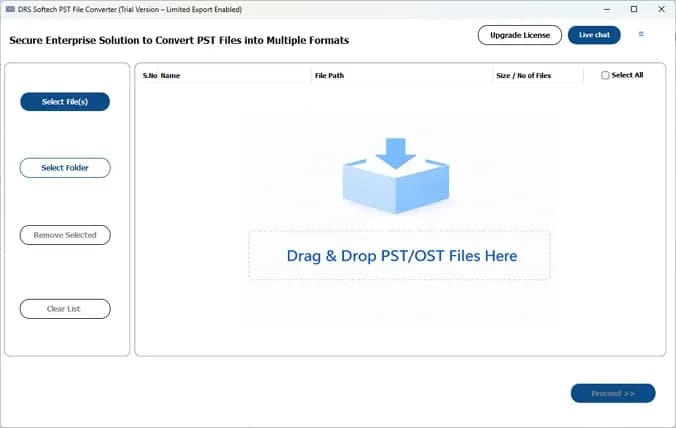
About this app
DRS Softech PST to PDF Converter is a Windows utility that transforms Outlook PST files into universally accessible PDFs. It preserves email properties, attachments, and folder hierarchy, and supports bulk conversion, date filters, and duplicate removal. The tool is designed for professionals and organizations needing reliable email archiving, legal compliance, and simplified data sharing.
Key features
- 1Bulk PST to PDF conversion preserving email properties, attachments and folder hierarchy.
- 2Date filter and duplicate-removal options for selective, clean exports.
- 3Flexible attachment handling: embed in PDF or save to separate folders.
- 4Preview pane to verify message count, sender, subject and attachments before conversion.
Target customer profile
Drawn from the product itself, not from a survey.
Demographic
Legal & Compliance Officers
Pain points
Need to preserve email evidence in a secure, readable format for audits or litigation.
Primary needs
Accurate conversion with metadata and attachments, and the ability to filter by date.
Demographic
IT Administrators
Pain points
Managing large volumes of PST files for backup or migration, with tight deadlines.
Primary needs
Bulk conversion, duplicate removal, and support for all Outlook versions.
Demographic
Small Business Owners
Pain points
Sharing email records with clients or teams who don't have Outlook installed.
Primary needs
Easy-to-use interface, affordable pricing, and output in a universal format like PDF.
Scout Review
Written by AI from measured evidence, scored out of 100.
DRS Softech PST to PDF Converter is a workmanlike Windows utility with a dated marketing site. The product claims are specific and credible — bulk conversion, date filters, duplicate removal, metadata and attachment preservation — and the documentation tabs suggest real depth. The website is the weak link: visually noisy, slow on mobile (8.7s LCP), and carrying accessibility gaps that the 86 Lighthouse score papers over. Security headers are genuinely strong apart from missing SPF/DMARC. It's a competent niche tool competing against established names, priced and positioned for the same buyers.
Measure by measure
Usability
62Clear hero CTAs, a visible drag-and-drop entry point, and dedicated Features/Screenshots/Specification/User Manual tabs. Dense stacked sections and a phone number in the nav add clutter for newcomers.
Design
44Dated Windows-era visual language: cluttered homepage stacked with badges, stat boxes and repeated green-checkmark lists. The app UI itself is a plain form. Functional but visually behind peers.
Speed
46Desktop Lighthouse 96/100 but mobile 56/100 with an 8.7s LCP and 4.5s FCP. Desktop visitors are fine; mobile visitors wait nearly nine seconds for the main content.
Security
76Strong header hygiene: HTTPS enforced with HSTS, CSP, frame protection and full policy set (10/12 probe points). SPF and DMARC records are missing, and no SOC 2/ISO/pen-test claim is published.
Accessibility
58Lighthouse 86/100, but images lack alt text, several links have no discernible name, touch targets are undersized, and there's no main landmark. Automated score flatters a site with real gaps.
Growth
54A real, specific job — PST-to-PDF archiving for legal and IT — with concrete differentiators (date filter, duplicate removal, attachment handling). But it's a crowded utility niche against SysTools and Aid4Mail.
Improvement areas
- Mobile performance: 8.7s LCP and 56/100 Lighthouse score.
- Accessibility: missing alt text, unnamed links, undersized touch targets, no main landmark.
- Homepage design: repeated feature lists and badge clutter create visual noise.
- Email authentication: SPF and DMARC records absent for a compliance-focused vendor.
Design & Usability
The site wears its age openly. The homepage stacks review badges, stat boxes, award counts and three near-identical green-checkmark feature lists into one long scroll, and the embedded app screenshot shows a plain Windows form with a dashed drop zone. Usability is better than design: the hero CTAs are clear, the drag-and-drop entry point is obvious, and there are dedicated Features, Screenshots, Specification and User Manual tabs. But the density works against first-time visitors, and a phone number wedged into the top nav adds clutter rather than confidence. Competent, dated, and louder than it needs to be.
Speed & Security
Speed splits hard by device. Desktop Lighthouse lands at 96/100, but mobile is 56/100 with an 8.7s LCP and 4.5s FCP — mobile visitors stare at a blank page for most of a coffee break. Security is the stronger story: HTTPS enforced with HSTS, CSP, frame protection, X-Content-Type-Options, Referrer-Policy and Permissions-Policy, scoring 10/12 on the header probe. The two misses are SPF and DMARC, which matter for a vendor selling compliance tooling, and there's no published SOC 2, ISO or pen-test report to back the 'secure' language.
Accessibility & Growth
Accessibility scores 86/100 on Lighthouse, but the failing audits are the ones that actually hurt: images without alt text, links with no discernible name, undersized touch targets, no main landmark, and role=presentation conflicts. That's a site that looks fine and reads badly to assistive tech. Growth is a judgement on the idea: PST-to-PDF archiving for legal, compliance and IT is a real, specific job with concrete features behind it — bulk conversion, date filters, duplicate removal, attachment handling. The limit is the category: SysTools and Aid4Mail already own this niche, and nothing here is structurally hard for them to copy.
Conclusion
If you need PST files turned into readable PDFs for an audit or a departing employee's mailbox, this does the job and the feature list is honest about what it covers. Go in expecting a dated interface and a slow mobile site, not a polished SaaS experience. Compare it directly against SysTools and Aid4Mail on price and batch limits before committing — the feature sets overlap heavily, and the deciding factor will be support and licensing, not capability.
Suggestions for improvement
- Fix mobile performance: an 8.7s LCP is costing you visitors before they ever see the download button.
- Add alt text to images and discernible names to links — the failing Lighthouse audits are quick wins.
- Publish SPF and DMARC records; a compliance vendor with spoofable email undermines its own pitch.
- Collapse the three duplicate green-checkmark feature lists into one clear section to cut homepage noise.
Alternatives comparison
Named competitors, point by point. Nobody paid to appear here or to be left out.
 DRS Softech PST to PDF Converter DRS Softech PST to PDF Converter |  SysTools PST to PDF Converter SysTools PST to PDF Converter |  Aid4Mail Aid4Mail | |
|---|---|---|---|
| Bulk PST to PDF conversion | Yes — multiple PST files at once | Yes — batch conversion supported | Yes — high-volume mailbox conversion |
| Preserves attachments and metadata | Yes — attachments and email properties preserved | Yes — attachments and metadata preserved | Yes — full fidelity conversion |
| Date range filter | Yes — start/end date selection | Yes — filter options included | Yes — date-based filtering |
| Duplicate email removal | Yes — remove duplicates by To/From/Subject/Bcc/Body | Not a headline feature | Deduplication available in conversion workflows |
| Multi-format / multi-client conversion | Yes — PST to other formats and email clients | Focused on PST to PDF | Yes — broad multi-format support |
| Platform coverage | Windows (site also lists Mac/Linux) | Windows | Windows |
SysTools PST to PDF Converter
A similar tool that converts PST files to PDF while preserving attachments and metadata. It offers batch conversion and filter options.
Aid4Mail
A powerful email conversion tool that supports PST to PDF among many other formats. It's known for its speed and ability to handle large mailboxes.
Comparing options? See DRS Softech PST to PDF Converter alternatives, scored side by side
More Productivity apps
View all Productivity
Qamarero
92An all-in-one hospitality software for restaurants and ba...

The Stack Newsletter
92A weekly newsletter delivering curated tech jobs, intervi...

EmbedMyReviews
92White-label reputation management software for agencies s...

StoryPad
92Privacy-first open source journal app with a continuous t...

Puzzly – B2B Lead Generation & Sales Intelligence Platform
92Puzzly is an all-in-one B2B lead generation platform that...

Notion
92All-in-one AI workspace for docs, projects, and knowledge...

Vibe Coding Agent Skills
92A free, open-source platform offering 110 AI agent skills...

CC Switch
91Open-source desktop app for switching AI coding providers...

username.md
90One verified handle for your online identity, readable by...

What the GIF
89Frame-perfect video-to-GIF maker that runs entirely in yo...

AuditCloser
89White-label website audits that close deals for digital a...

NudgeWin
89Automated quote follow-up for trades and service businesses.


A platform dedicated to providing unbiased reviews of newly launched applications, analyzing everything from their features to their full potential.
info@scoutforge.net© 2026 Scoutforge. All rights reserved.
