Cycling through all six. Tap any point to stop.
Measured on six things
AI-powered tool to extract text from images and PDFs inst...
Accessibility
65Web-based so accessible across devices. Supports camera for mobile use and translation for language learners. Lacks explicit WCAG mentions, screen reader optimizations, or high-contrast modes in available info.
Screenshots
1 / 2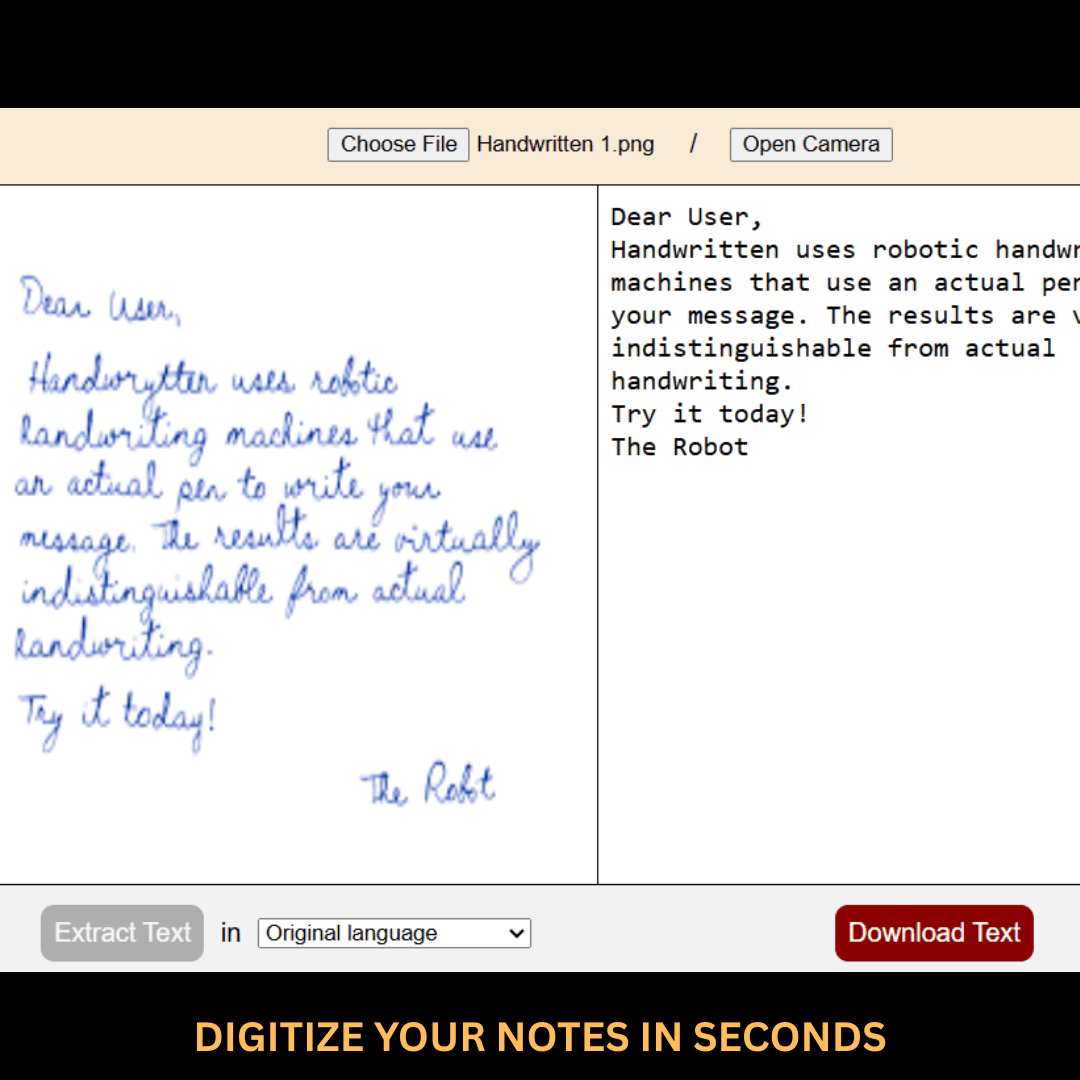
About this app
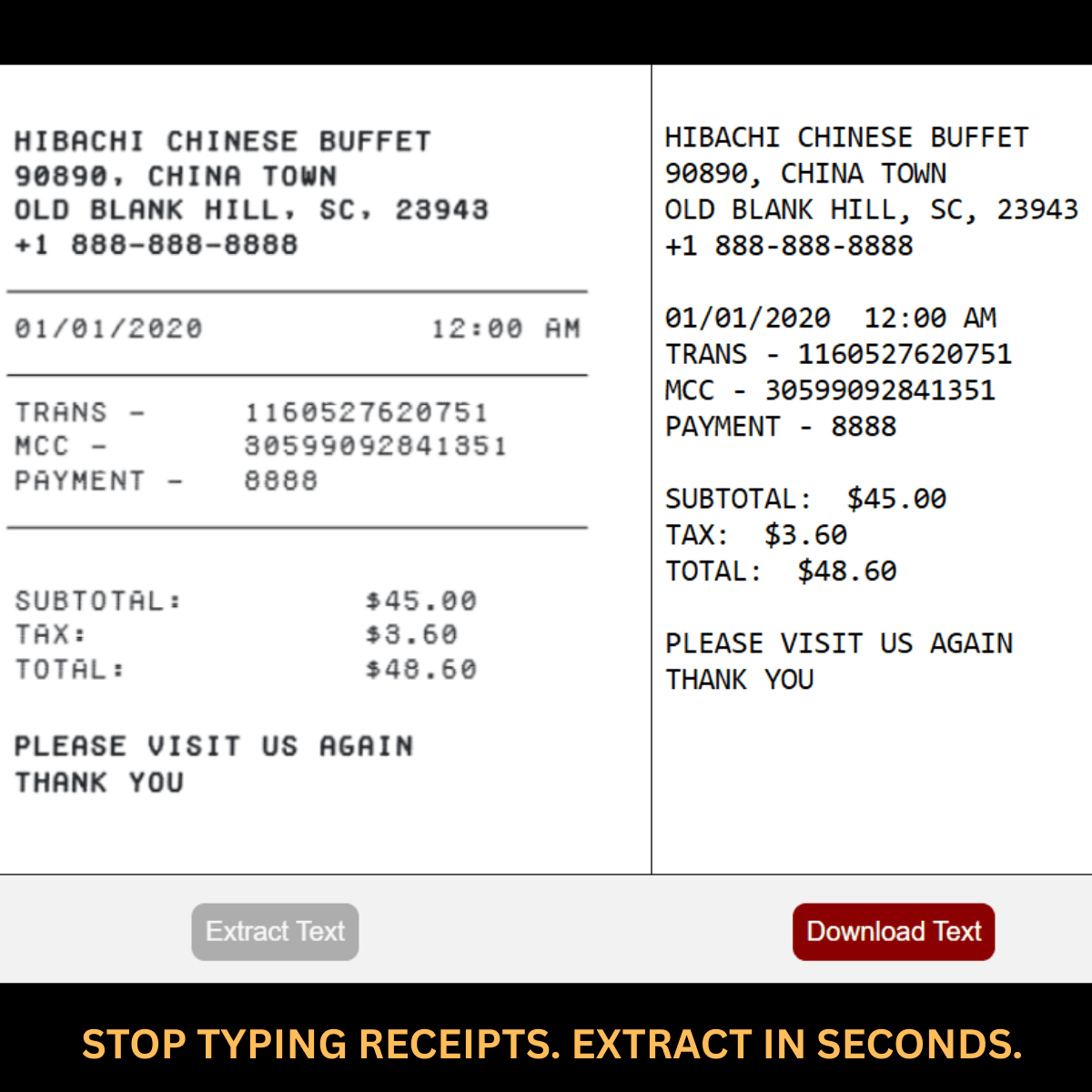
As someone who's constantly dealing with scanned documents and image-based text, I found Easy Image to Text to be a real lifesaver. It's an AI-powered converter that lets you copy text from PDFs or images in just one click, boasting 99% accuracy. What I love most is the neatly formatted output—no more messy copy-pasting. It's completely ad-free and prioritizes your privacy, so you don't have to worry about your data being misused. Plus, it supports camera capture and instant translations in over 100 languages, making it perfect for travelers or multilingual workers. Whether you're a student digitizing notes, a professional extracting data from invoices, or just someone who hates manual typing, this tool makes the process seamless and fast.
Key features
- 1One-click AI OCR extraction from images, scanned PDFs, and camera input with 99% claimed accuracy
- 2Preserves original formatting for clean, editable output instead of messy text walls
- 3Instant translation to/from 100+ languages, ad-free, privacy-focused experience
Target customer profile
Drawn from the product itself, not from a survey.
Demographic
Students and researchers
Pain points
Need to extract text from scanned PDFs or book images for citations and notes
Primary needs
Accurate and quick text extraction with proper formatting
Demographic
Office professionals and admin staff
Pain points
Manual typing of data from printed documents or image-based invoices
Primary needs
Efficient OCR tool to digitize documents and reduce manual work
Demographic
Travelers and language learners
Pain points
Difficulty reading signs, menus, or documents in foreign languages
Primary needs
Instant text extraction and translation to understand content quickly
Scout Review
Written by AI from measured evidence, scored out of 100.
Easy Image to Text is a solid, privacy-conscious OCR tool that excels at quick, accurately formatted text extraction from images and PDFs with translation support. It outperforms Google Keep in PDF and language features while being lighter and cheaper than Adobe Acrobat. Scores reflect a capable but not revolutionary app—great for students, office staff, and travelers who value simplicity and ad-free experience over enterprise bells and whistles. Real accuracy hovers around the 95%+ mark for clear documents, matching industry claims.
Measure by measure
Usability
80One-click text extraction with preserved formatting, camera capture, and instant copy. Supports 100+ languages for translation. Extremely straightforward for students and professionals needing quick PDF/image to text conversion.
Design
75Clean, minimalist web interface focused on one-click upload for images/PDFs with camera support. Neatly formatted text output is a highlight, but the site relies on JavaScript and lacks visual flair or modern polish compared to competitors.
Speed
78Claims instant processing and fast extraction. Real-world similar AI OCR tools deliver results in seconds for typical documents. No heavy desktop install required.
Security
68Emphasizes privacy and ad-free experience with no data misuse. However, as a web-based tool, uploads go to servers. No specific mentions of encryption, SOC2, or on-device processing.
Accessibility
65Web-based so accessible across devices. Supports camera for mobile use and translation for language learners. Lacks explicit WCAG mentions, screen reader optimizations, or high-contrast modes in available info.
Growth
70Targets students, researchers, office workers, and travelers effectively. Strong value in accurate formatting and multilingual support. Limited visibility on user growth, updates, or community momentum.
Improvement areas
- Add offline/on-device processing mode for true privacy and travel use
- Publish third-party accuracy benchmarks and support for handwritten text edge cases
- Improve accessibility compliance and add power features like batch processing
- Provide clearer technical details on security practices and data retention
Design & Usability
Easy Image to Text delivers exactly what its name promises: a straightforward, no-nonsense web tool for extracting formatted text from images, scanned PDFs, and camera shots. The one-click workflow and clean output formatting stand out for students citing sources or professionals digitizing invoices. It beats Google Keep by adding proper PDF support and translation across 100+ languages. Usability is excellent for the target users—upload, extract, copy. Design is functional and minimal but won't blow anyone away. Overall, it feels purpose-built rather than over-engineered.
Speed & Security
Processing is quick for typical documents, aligning with 'instant' claims seen in similar AI OCR tools. Security and privacy are marketed heavily (ad-free, no data misuse), which is refreshing, but as a server-side web app there's inherent upload risk compared to fully offline solutions. It strikes a good balance for most consumers who want speed without installing heavy software like Adobe Acrobat. Not the fastest or most secure in the absolute sense, but reliable for everyday academic and office use.
Accessibility & Growth
Mobile camera support and multilingual translation make it genuinely useful for travelers and language learners. Growth is helped by solving real pain points—manual typing from printed docs or foreign signs—without subscriptions. Accessibility is decent via web but could improve with better standards compliance. It has strong product-market fit for researchers and admins, though competition from free giants like Google tools and professional suites like Adobe keeps it in a practical mid-tier position.
Conclusion
If you're tired of messy copy-paste or expensive subscriptions, this tool is worth trying. It won't replace Adobe for power users, but for most daily needs it's refreshingly effective. Solid pick for productivity without the headache.
Suggestions for improvement
- Add on-device processing option for better privacy and offline use
- Implement clear WCAG accessibility standards and keyboard navigation
- Provide usage analytics dashboard or batch processing for professionals
- Publish independent accuracy benchmarks and regular model updates
Alternatives comparison
Named competitors, point by point. Nobody paid to appear here or to be left out.
 Easy Image to Text Easy Image to Text |  Google Keep Google Keep |  Adobe Acrobat Reader Adobe Acrobat Reader | |
|---|---|---|---|
| PDF Support & OCR | Full PDF + images, one-click formatted output | Images only, basic OCR, no dedicated PDF support | Robust PDF OCR with editing, but heavy app |
| Translation Support | Instant translation in 100+ languages | None built-in (requires copy to Translate) | Limited, requires subscription add-ons |
| Pricing & Ads | Ad-free, privacy-focused (likely freemium) | Completely free, tied to Google account | Free Reader; advanced OCR needs paid subscription |
| Formatting & Usability | Neat, preserved formatting, very simple UI | Basic text output, note-focused | Excellent but complex interface |
Google Keep
Free OCR for images, but lacks PDF support and translation features.
Adobe Acrobat Reader
Robust PDF OCR but can be heavy and requires subscription for advanced features.
Comparing options? See Easy Image to Text alternatives, scored side by side
Sources
What the review was written against. A verdict with no sources is an opinion.
- apps.apple.com×4
- adobe.com×4
- reddit.com×2
- uwarp.design
- easyimagetotext.com
- trustpilot.com
- lynote.ai
- quora.com
- fotor.com
- cloud.google.com
- easy-image-to-text.tenereteam.com
- youtube.com
- facebook.com
- smallpdf.com
- myengineeringbuddy.com
- imgtotext.net
- play.google.com
- g2.com
- apps.microsoft.com
- guides.library.illinois.edu
- imagetotext.io
- pdf.wondershare.com
- techcommunity.microsoft.com
More Productivity apps
View all Productivity
Qamarero
92An all-in-one hospitality software for restaurants and ba...

The Stack Newsletter
92A weekly newsletter delivering curated tech jobs, intervi...

EmbedMyReviews
92White-label reputation management software for agencies s...

StoryPad
92Privacy-first open source journal app with a continuous t...

Puzzly – B2B Lead Generation & Sales Intelligence Platform
92Puzzly is an all-in-one B2B lead generation platform that...

Notion
92All-in-one AI workspace for docs, projects, and knowledge...

Vibe Coding Agent Skills
92A free, open-source platform offering 110 AI agent skills...

CC Switch
91Open-source desktop app for switching AI coding providers...

username.md
90One verified handle for your online identity, readable by...

What the GIF
89Frame-perfect video-to-GIF maker that runs entirely in yo...

AuditCloser
89White-label website audits that close deals for digital a...

NudgeWin
89Automated quote follow-up for trades and service businesses.


A platform dedicated to providing unbiased reviews of newly launched applications, analyzing everything from their features to their full potential.
info@scoutforge.net© 2026 Scoutforge. All rights reserved.
