Cycling through all six. Tap any point to stop.
Measured on six things
AI PDF editor: rewrite text in the original font, then convert, compress, sign and more.
Security
52HTTPS enforced, SPF and DMARC present, AES-256 claims and short retention windows are good. But HSTS, CSP, frame protection and most hardening headers are missing (4/12 checklist).
Screenshots
1 / 1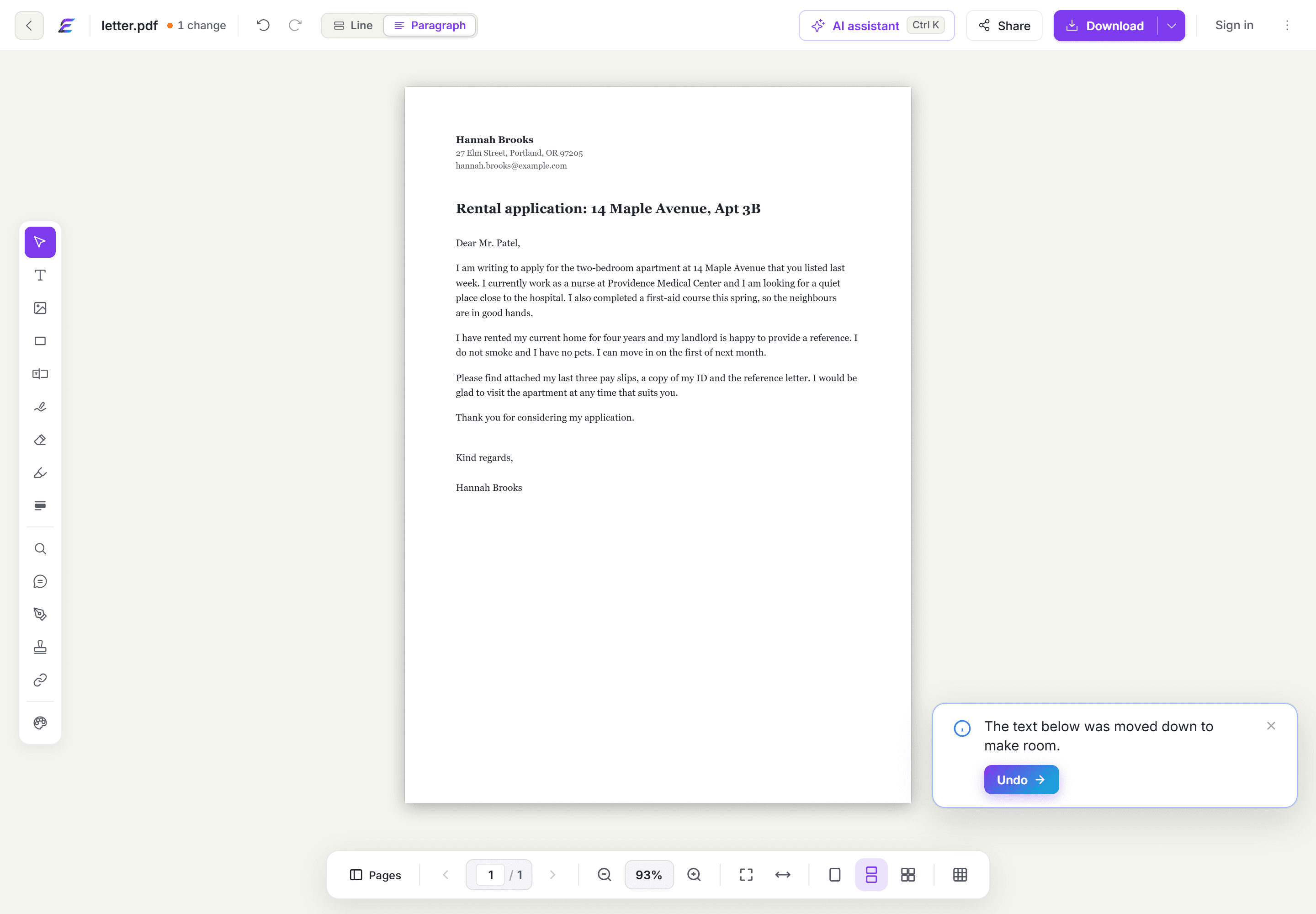
About this app
EasyPDF is a versatile, AI-powered PDF editor that lets you edit text directly on the page, fill and sign forms, convert to/from various formats, compress, merge, split, and more, all within your browser. With 44 tools in one tab, it's designed for students, freelancers, HR, legal professionals, and anyone who works with PDFs regularly. The standout feature is true text editing: click any sentence and rewrite it in the original font, rather than overlaying a white box. It also offers AI capabilities like chatting with a PDF and summarizing documents. EasyPDF is accessible via web, Windows app, Chrome/Edge/Firefox extensions, and even integrates with ChatGPT and Claude. Privacy is a priority: files are encrypted with AES-256, and most are not retained after processing. No installation, no ads, and a free tier make it a compelling alternative to Adobe Acrobat and other PDF tools.
Key features
- 1True in-place text editing that preserves the original font, size and color — not a white-box overlay.
- 244 tools in one tab: edit, fill and sign, convert, organize, compress, translate, compare, chat with PDF.
- 3Cross-platform: browser, Windows app, Chrome/Edge/Firefox extensions, plus ChatGPT and Claude connectors.
Target customer profile
Drawn from the product itself, not from a survey.
Demographic
Students
Pain points
Need to annotate lecture notes, merge PDF chapters, and submit assignments in specific formats.
Primary needs
Merge, convert PDF to Word, compress files for upload.
Demographic
Freelancers
Pain points
Fixing invoices, getting quotes signed, and sending lightweight files via email.
Primary needs
Edit text, sign documents, compress PDFs.
Demographic
HR and Admin
Pain points
Filling out forms, generating certificates from CSV data, and managing paperwork.
Primary needs
Fill and sign, bulk generation, form filling.
Demographic
Legal Professionals
Pain points
Comparing contract versions, protecting sensitive files, and extracting information quickly.
Primary needs
Compare PDFs, password protection, chat with PDF for quick answers.
Scout Review
Written by AI from measured evidence, scored out of 100.
EasyPDF is a competent, well-designed PDF toolkit with one genuinely sharp feature: editing the actual text in a PDF in its original font, not pasting a white box over it. The free tier is generous, the cross-platform reach is impressive, and the editor UI is clean. Where it stumbles is density (44 tools, a crowded toolbar), mobile speed (6s LCP), and security hardening (4/12 headers). Against Smallpdf, iLovePDF and Acrobat, it's a credible indie contender that needs to sharpen its story and its headers.
Measure by measure
Usability
68Free tier with no card, clear 3-step flow, and 44 tools in one tab make onboarding easy. Cross-platform reach (web, Windows, extensions, ChatGPT, Claude) is a real plus.
Design
71Polished, consistent purple-accented UI with a clean centered editor and clear hierarchy. Homepage repetition and a dense 12+ icon sidebar keep it from the top of the band.
Speed
58Lighthouse mobile 73/100 with a 6.0s LCP — the hero is heavy. Desktop 80/100 and CLS 0.008 are solid, but mobile first paint is the weak link.
Security
52HTTPS enforced, SPF and DMARC present, AES-256 claims and short retention windows are good. But HSTS, CSP, frame protection and most hardening headers are missing (4/12 checklist).
Accessibility
80Lighthouse a11y 96/100 with only contrast, heading-order and label-name issues remaining. EN/FR support helps; no public WCAG statement found.
Growth
62Real wedge — true in-place text editing with font preservation — aimed at a huge, crowded PDF market. Multi-surface distribution helps, but free incumbents and Acrobat cap the ceiling.
Improvement areas
- Security hardening: add HSTS, CSP, frame protection and the missing headers (currently 4/12).
- Mobile performance: 6.0s LCP needs hero compression and lazy-loading below the fold.
- Accessibility polish: fix contrast, heading order and accessible-name failures flagged by Lighthouse.
- Positioning: lead with font-preserving text editing instead of burying it under '44 tools'.
Design & Usability
EasyPDF's interface is genuinely well-made: a consistent purple accent, a centered editor that keeps the document the star, and a homepage that walks you from drop-file to download in three clear steps. The free tier needs no card and the same account works across browser, Windows, extensions, ChatGPT and Claude — that's a lot of surface for one tool. The cracks are in density: 44 tools crammed into one tab, a left toolbar with a dozen-plus tiny icons, and homepage sections that repeat the same purple CTA until it stops meaning anything. Usable and pleasant, but it asks you to hunt a little more than it should.
Speed & Security
Speed is a tale of two devices. Desktop Lighthouse lands at 80/100 with a tight CLS of 0.008, but mobile sits at 73/100 with a 6.0-second LCP — the hero is doing too much work before anything paints. Security is the bigger gap: HTTPS is enforced and SPF/DMARC are set, and the AES-256 and short-retention claims are welcome, but the header probe found HSTS, CSP, frame protection and most hardening headers missing — 4 of 12 checklist points. For a tool that handles contracts and HR paperwork, that's a thin shield.
Accessibility & Growth
Accessibility is a strength: Lighthouse scores 96/100, with only contrast, heading-order and label-name issues left to clean up, plus EN/FR support. Growth is the interesting question. The category is brutally crowded — Smallpdf and iLovePDF give away merging and conversion, Adobe owns the premium mind. EasyPDF's real wedge is true in-place text editing that preserves the original font, which is a genuine differentiator worth leading with. The multi-surface distribution (Windows, extensions, ChatGPT, Claude) widens the funnel. But the pitch buries that wedge under '44 tools' and a purple gradient, and the domain is barely months old — early, with a real idea and a scattered story.
Conclusion
If you live in PDFs and hate the white-box-overlay trick, EasyPDF's text editing alone is worth a look — the free tier costs nothing to try. Just don't expect Acrobat-grade compliance or a featherweight mobile load. It's a promising, well-built tool that's early, honest about its limits, and one good security pass and a tighter pitch away from being genuinely great.
Suggestions for improvement
- Add HSTS, CSP, frame protection and the missing hardening headers — 4/12 is the easiest win on the board.
- Cut mobile LCP from 6.0s: compress the hero, lazy-load below-fold sections, and preload the main font.
- Fix the three Lighthouse a11y fails: contrast, heading order, and accessible names on labeled controls.
- Lead the homepage with the font-preserving text edit — it's the one thing competitors can't easily copy.
Alternatives comparison
Named competitors, point by point. Nobody paid to appear here or to be left out.
 EasyPDF EasyPDF |  Smallpdf Smallpdf |  iLovePDF iLovePDF |  Adobe Acrobat Adobe Acrobat | |
|---|---|---|---|---|
| True in-place text editing (original font preserved) | Yes — core differentiator | Limited / overlay-based | No — conversion/merge focus | Yes — full text editing |
| Free tier without card | Yes — daily free files, 50 MB | Yes — with usage limits | Yes — free tools | Limited free tier |
| Entry paid price | $8/mo Starter, $20/mo Pro | Subscription-based | Freemium with premium tier | Higher — premium pricing |
| AI features (chat with PDF, summarize) | Yes — AI Studio, Chat PDF | Yes — AI assistant | Limited | Yes — AI Assistant |
| Desktop app & browser extensions | Windows app + Chrome/Edge/Firefox | Web + desktop app | Web + desktop app | Full desktop + extensions |
Smallpdf
A popular online PDF toolkit with editing, conversion, and compression features, but with usage limits and a subscription model.
iLovePDF
Free online PDF tools for merging, splitting, compressing, and converting, with a clean interface and no installation.
Adobe Acrobat
The industry-standard PDF editor with advanced features, but expensive and often overkill for casual users.
Comparing options? See EasyPDF alternatives, scored side by side
More Productivity apps
View all Productivity
Qamarero
92An all-in-one hospitality software for restaurants and ba...

The Stack Newsletter
92A weekly newsletter delivering curated tech jobs, intervi...

EmbedMyReviews
92White-label reputation management software for agencies s...

StoryPad
92Privacy-first open source journal app with a continuous t...

Puzzly – B2B Lead Generation & Sales Intelligence Platform
92Puzzly is an all-in-one B2B lead generation platform that...

Notion
92All-in-one AI workspace for docs, projects, and knowledge...

Vibe Coding Agent Skills
92A free, open-source platform offering 110 AI agent skills...

CC Switch
91Open-source desktop app for switching AI coding providers...

username.md
90One verified handle for your online identity, readable by...

What the GIF
89Frame-perfect video-to-GIF maker that runs entirely in yo...

AuditCloser
89White-label website audits that close deals for digital a...

NudgeWin
89Automated quote follow-up for trades and service businesses.


A platform dedicated to providing unbiased reviews of newly launched applications, analyzing everything from their features to their full potential.
info@scoutforge.net© 2026 Scoutforge. All rights reserved.
