Cycling through all six. Tap any point to stop.
Measured on six things
State EOC grade calculator for Florida, Georgia, Texas, a...
Security
41HTTPS is enforced and SPF is present, but HSTS, CSP, frame protection, X-Content-Type-Options, Referrer-Policy, and DMARC are all missing. Only 3/12 security checklist points. No compliance or audit claims found.
Screenshots
1 / 1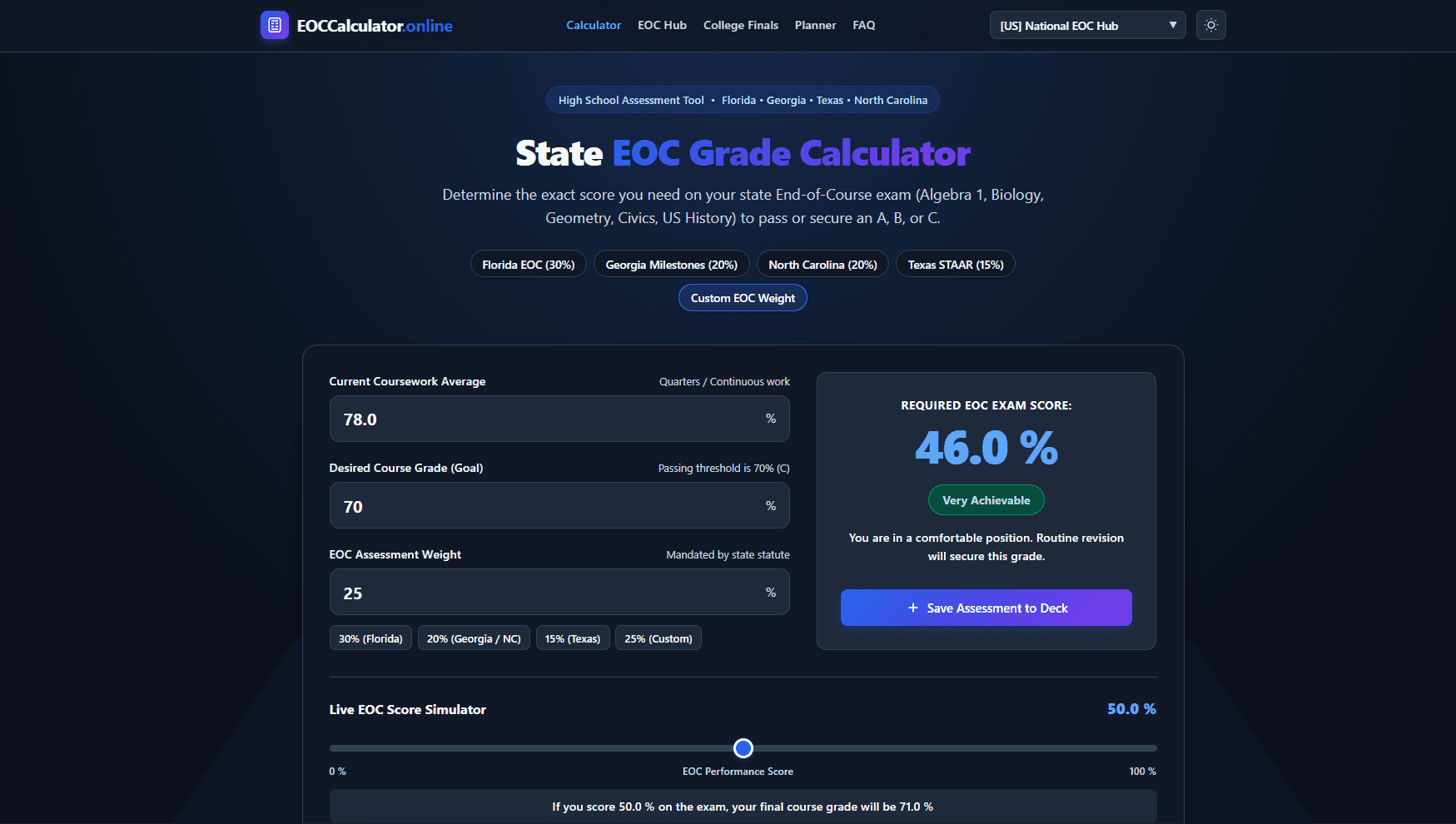
About this app
EOC Calculator is a free online tool designed to help high school students in Florida, Georgia, Texas, and North Carolina determine the exact score they need on their End-of-Course (EOC) exams to achieve their desired final course grade. The calculator supports state-specific weighting rules: Florida's 30% rule, Georgia and North Carolina's 20%, and Texas's 15%. Students input their current coursework average, desired final grade, and the EOC weight, and the tool instantly computes the required EOC exam score. It also includes a live simulator to see how different EOC scores affect the final grade. The site offers dedicated pages for each state, a final grade calculator, and international grade tools for UK, Australia, Germany, Switzerland, France, Spain, and Quebec. With a clean interface, auto-save feature, and printable PDFs, it's a practical resource for students and educators planning exam strategies.
Key features
- 1State-specific EOC weightings: Florida 30%, Georgia 20%, North Carolina 20%, Texas 15%, plus custom weight.
- 2Live EOC Score Simulator shows how different exam scores affect final course grade in real time.
- 3Auto-save assessment planner with printable PDFs for organizing multiple EOC scenarios.
Target customer profile
Drawn from the product itself, not from a survey.
Demographic
High school students in Florida, Georgia, Texas, and North Carolina
Pain points
Uncertainty about how EOC scores impact final grades; difficulty calculating required exam scores manually.
Primary needs
A reliable tool to determine target EOC scores to pass or achieve desired grades.
Demographic
Parents of high school students
Pain points
Lack of clear understanding of state-specific EOC weightings and their child's academic standing.
Primary needs
Simple, accessible calculator to help monitor and support their child's academic progress.
Demographic
High school teachers and academic counselors
Pain points
Time-consuming manual calculations; need to provide students with accurate grade projections.
Primary needs
Efficient tool to quickly compute EOC score requirements and simulate outcomes for multiple students.
Scout Review
Written by AI from measured evidence, scored out of 100.
EOC Calculator is a focused, well-executed tool for a real problem: high school students in Florida, Georgia, Texas, and North Carolina need to know exactly what EOC score they need to hit their target grade. The site handles state-specific weightings (FL 30%, GA/NC 20%, TX 15%) that generic calculators ignore, and adds a live simulator, auto-save planner, and printable PDFs. The design is clean, speed is excellent (Lighthouse 92 mobile, 99 desktop), and accessibility scores a perfect 100. But security headers are largely missing (3/12 checklist points), the planner is empty with no onboarding, and the international tool sprawl dilutes the core value. It's a solid free tool that could be great with tighter focus and basic security hardening.
Measure by measure
Usability
68Clear labeled inputs, inline passing thresholds, and a prominent save CTA make the core flow easy. Navigation mixes state and international tools without clear separation, and the empty planner offers no onboarding cue.
Design
71Clean, modern interface with strong visual hierarchy and color-coded state badges. The empty planner table and unfocused international footer grid drag down an otherwise polished landing page.
Speed
82Lighthouse mobile 92/100 and desktop 99/100 with CLS 0 and TBT 15ms. LCP of 3.3s on mobile is the only soft spot; otherwise the site is snappy and lightweight.
Security
41HTTPS is enforced and SPF is present, but HSTS, CSP, frame protection, X-Content-Type-Options, Referrer-Policy, and DMARC are all missing. Only 3/12 security checklist points. No compliance or audit claims found.
Accessibility
79Lighthouse accessibility audit scores a perfect 100/100. Multi-language support via regional pages is a plus. No a11y statement or WCAG mention found, which keeps it from the top of the band.
Growth
58A real problem with a specific wedge: state-specific EOC weightings that generic calculators ignore. The live simulator and planner add stickiness, but the international tool sprawl dilutes focus.
Improvement areas
- Security headers are largely missing (3/12 checklist points); add HSTS, CSP, X-Content-Type-Options, Referrer-Policy, and DMARC.
- EOC Assessment Planner renders empty with no example rows or onboarding, making it unclear how saved assessments will appear.
- Navigation mixes state EOC tools with international grade converters, diluting focus and confusing the core audience.
Design & Usability
The design is clean and modern, with a strong hero section and a high-contrast result card that makes the required score pop. State-specific weight badges are compact and editable. Usability is solid for the core flow: labeled inputs, inline thresholds, and a prominent save button. But the EOC Assessment Planner renders as a completely empty table with no example rows, and the navigation mixes state and international tools without clear separation. The footer grid of 12 international calculators feels unfocused for a state-EOC product. The empty planner state gives no visual cue of how saved assessments will appear, which hurts onboarding. Overall, the product looks good and works, but the planner and navigation need polish to match the quality of the calculator itself.
Speed & Security
Speed is a clear strength: Lighthouse mobile 92/100, desktop 99/100, CLS 0, TBT 15ms. The only soft spot is a 3.3s LCP on mobile, but the site feels snappy and lightweight overall. Security is the weak link. HTTPS is enforced and SPF is present, but HSTS, CSP, frame protection, X-Content-Type-Options, Referrer-Policy, and DMARC are all missing. The security checklist scores only 3/12. No SOC 2, ISO, or bug bounty claims were found. For a free tool handling student data, this is a gap. Adding basic headers and a privacy policy with data handling details would be a quick win. The speed is excellent; the security needs work.
Accessibility & Growth
Accessibility scores a perfect 100/100 on Lighthouse automated audits, which is excellent. Multi-language support via regional pages is a plus. However, there is no a11y statement or WCAG mention on the site, which keeps it from the top of the band. Growth potential is solid: the product targets a real, specific problem — state-specific EOC weightings that generic calculators like Calculator.net and RogerHub ignore. The live simulator, auto-save planner, and printable PDFs add stickiness. But the international tool sprawl dilutes focus and may confuse the core audience. The domain is brand new (registered 2026-10-11), so traction is minimal. The idea has room to grow if the team doubles down on the state-EOC niche and builds community or school partnerships.
Conclusion
For a free tool, EOC Calculator delivers real value. Students can stop guessing and start planning. The state-specific weightings are accurate and clearly explained, and the simulator is genuinely useful for 'what-if' scenarios. The main gaps are security headers and the empty planner state. If the team adds basic security headers, an a11y statement, and some example rows in the planner, this could be a go-to resource for students and teachers. As it stands, it's a competent, fast, accessible calculator that does one thing well — and that's more than most free tools manage.
Suggestions for improvement
- Add basic security headers (HSTS, CSP, X-Content-Type-Options, Referrer-Policy) and a DMARC record to harden the site.
- Populate the EOC Assessment Planner with example rows or a demo assessment so users understand how saved items will appear.
- Publish an accessibility statement and WCAG conformance level to back up the perfect Lighthouse score.
- Tighten navigation by separating state EOC tools from international grade converters into distinct sections or a dropdown.
Alternatives comparison
Named competitors, point by point. Nobody paid to appear here or to be left out.
 EOC Calculator EOC Calculator |  Calculator.net Grade Calculator Calculator.net Grade Calculator |  RogerHub Final Grade Calculator RogerHub Final Grade Calculator | |
|---|---|---|---|
| State-specific EOC weighting support | Yes — FL 30%, GA 20%, NC 20%, TX 15%, plus custom weight | No — generic weight input only, no state presets | No — generic final exam calculator, no state-specific EOC rules |
| Live score simulator | Yes — interactive slider shows final grade impact in real time | No — static calculation only | No — static calculation only |
| Auto-save planner and printable PDFs | Yes — browser auto-save, planner table, print/PDF export | No — no save or export features | No — no save or export features |
| International grade scale support | Yes — UK, Australia, Germany, Switzerland, France, Spain, Quebec | No — US grading scale only | No — US grading scale only |
| Accessibility audit score | 100/100 Lighthouse accessibility score | Not measured in this review | Not measured in this review |
Calculator.net Grade Calculator
A general-purpose grade calculator that can compute needed exam scores based on current grades and weights.
RogerHub Final Grade Calculator
Popular tool for calculating final exam scores needed, but not tailored to state-specific EOC weightings.
Comparing options? See EOC Calculator alternatives, scored side by side
More Education apps
View all Education
The Stack Newsletter
92A weekly newsletter delivering curated tech jobs, intervi...

Startup Science
88A unified platform replacing 12-20 disconnected tools for...

TranscriptYou
88Free YouTube transcript generator with timestamps and AI ...

Coloring Pages Pro
87A massive collection of free printable coloring pages for...

RBQ Exam
87Online practice for the RBQ contractor licence exams in Québec: original questions, timed mock exams and lessons, in French or English.

HireVue Practice
85AI-powered HireVue practice with timed mock interviews, role-specific questions, transcripts, scoring, and actionable feedback.

Case Cub
85AI-powered law school study platform with 20,000+ case br...

Ciroexam
84All-in-one CIRO exam prep for CIRE and 8 other exams, wit...

Aptitude Test Prep
84Free timed practice for SHL, numerical, and logical tests...

PageCub
84Custom illustrated children's books created around your c...

WellWired
84AI explained simply for older adults, with safety lessons...

Timix - A Modern Timer
84Turn timers into powerful routines with automation, widge...


A platform dedicated to providing unbiased reviews of newly launched applications, analyzing everything from their features to their full potential.
info@scoutforge.net© 2026 Scoutforge. All rights reserved.
