Cycling through all six. Tap any point to stop.
Measured on six things
Event lead capture app for conferences & trade shows
Design
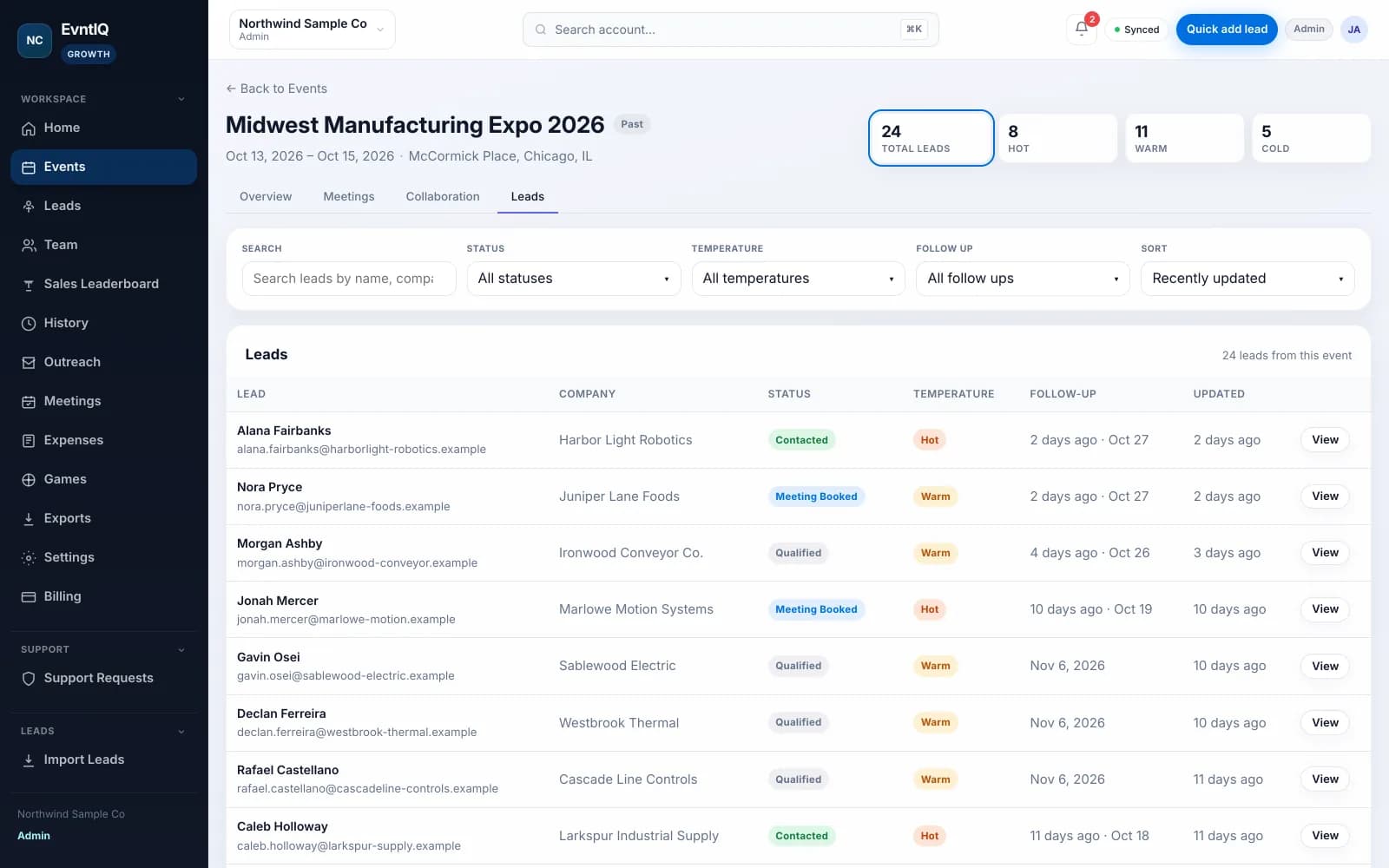
57Judging the app UI plus store material: dark app screens have disciplined hierarchy and clear urgency coding, but the light marketing site clashes with the dark app, and the homepage has staggered cards and an orphan grid row.
Screenshots
1 / 2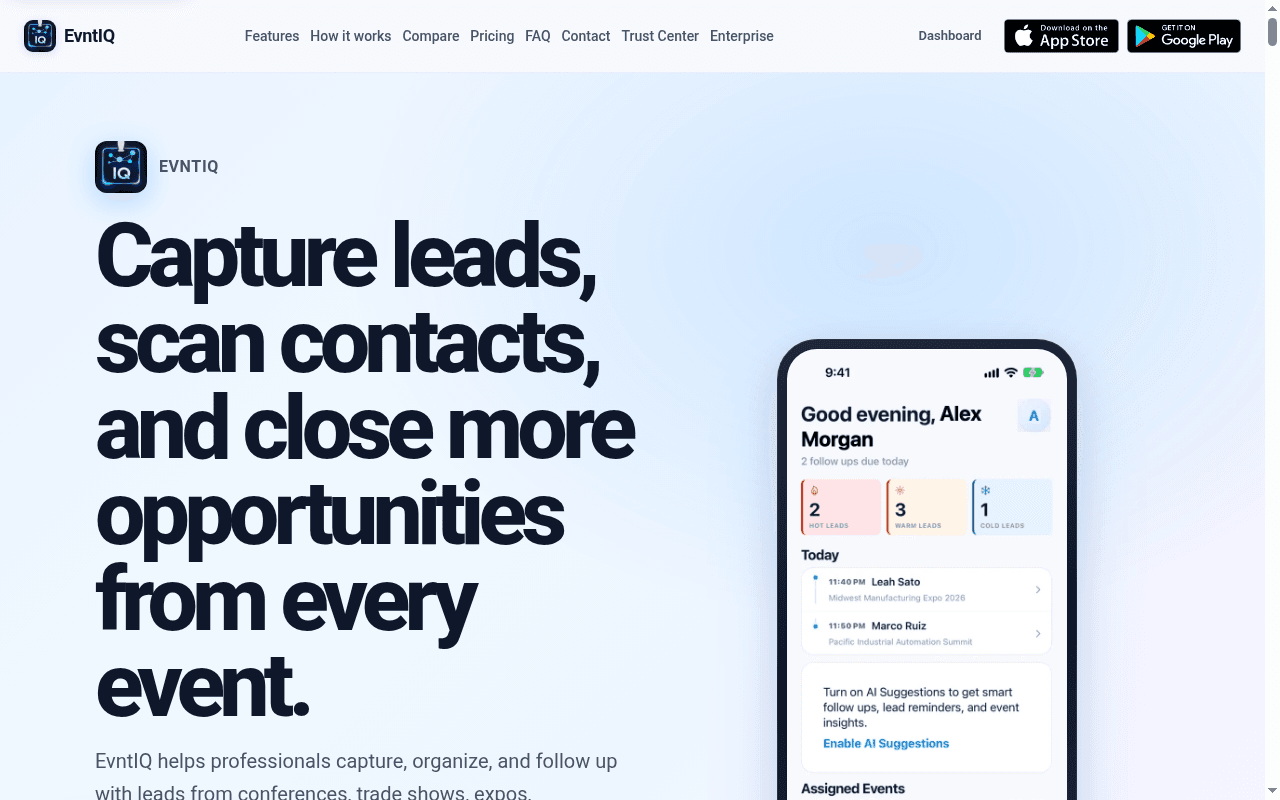
About this app
EvntIQ is a mobile-first event lead capture app and networking CRM for conferences, trade shows, expos, networking events, and business meetings. Capture contacts with badge scanning, business card scanning, QR capture, or manual entry, even offline. Organize leads by event, status, and priority, schedule follow-up reminders, track event analytics, and export CSV/Excel for Salesforce and HubSpot. Available on iOS and Android, free to start, with team plans for sales and booth teams.
Key features
- 1Offline-first lead capture via badge OCR, business card scanning, QR codes, and manual entry.
- 2Event-scoped organization with status, priority, notes, and follow-up reminders tied to each contact.
- 3CSV/Excel export for Salesforce and HubSpot, plus event expense tracking and team analytics.
Target customer profile
Drawn from the product itself, not from a survey.
Demographic
Sales reps and B2B sales teams attending trade shows
Pain points
Leads lost after events, messy spreadsheets, no offline capture
Primary needs
Fast badge/card scanning, CRM-ready exports, follow-up reminders
Demographic
Founders and entrepreneurs networking at conferences
Pain points
Scattered contacts, generic follow-ups, forgotten conversation details
Primary needs
Event-based organization, notes capture, QR contact sharing
Demographic
Recruiters and talent teams at hiring events
Pain points
Candidate context lost, follow-up timing slips, no event tracking
Primary needs
Event-scoped candidate tracking, follow-up calendar, exports
Demographic
Event managers and booth vendors tracking ROI
Pain points
No spend visibility, unproven event ROI, team accountability gaps
Primary needs
Expense tracking, team analytics, manager dashboards
Scout Review
Written by AI from measured evidence, scored out of 100.
EvntIQ is a mobile-first event lead capture app and networking CRM built for trade shows, conferences, and expos. The core workflow is well-conceived: scan a badge, card, or QR code (even offline), organize leads by event and priority, schedule follow-ups, track event spend, and export to CSV/Excel for Salesforce and HubSpot. The app UI is the strongest part — dark-mode screens with clear hierarchy, labeled tabs, and overdue follow-ups surfaced in red. The website is the weak link: a light marketing theme that clashes with the dark app, a seven-line hero headline, staggered cards, and an orphan grid row. Speed is excellent (desktop 100, mobile 87). Security headers are strong (11/12) but no compliance certifications are published. Accessibility is 95/100 with two fixable contrast and skip-link issues. Growth potential is real but the product is early.
Measure by measure
Usability
68App UI is genuinely well-organized: five labeled tabs, overdue follow-ups flagged red at the top of Today, offline-first capture, and CRM-ready exports. Onboarding docs and help center depth are not verifiable from collected evidence.
Design
57Judging the app UI plus store material: dark app screens have disciplined hierarchy and clear urgency coding, but the light marketing site clashes with the dark app, and the homepage has staggered cards and an orphan grid row.
Speed
71Lighthouse desktop 100/100 and mobile 87/100 with CLS 0 and TBT 83ms — a genuinely fast site. Mobile LCP of 2.9s is the one soft spot, likely the hero image. No user lag complaints in collected evidence.
Security
74Strong header hygiene: HTTPS enforced, HSTS, CSP, frame protection, Referrer-Policy, SPF and DMARC all present (11/12 checks). Permissions-Policy is missing and no SOC 2, ISO, or pen-test claims appear in collected evidence.
Accessibility
79Lighthouse accessibility 95/100 with only two failing audits: insufficient color contrast and non-focusable skip links. Localized in just one language and no published a11y statement, which caps it below the top of the band.
Growth
63A real, specific problem (leads dying in spreadsheets after trade shows) with concrete differentiators — offline-first capture, event-scoped organization, expense tracking. Early stage: domain 0.6 years old, no store ratings yet.
Improvement areas
- No published security/trust page or compliance certifications (SOC 2, ISO, pen-test) despite storing sales data.
- Marketing site visual language clashes with the dark app UI; hero headline and grid layout need tightening.
- Two Lighthouse accessibility failures (contrast, skip links) and single-language localization limit reach.
Design & Usability
EvntIQ's app UI is the stronger half of this product. The dark-mode screens show disciplined hierarchy — large greeting, numeric stat tiles, red-for-overdue urgency coding — and the five-tab bar with labeled icons makes navigation unambiguous. The Home screen putting overdue follow-ups at the top of Today is a genuinely thoughtful decision for a rep checking their phone between booths. The marketing site is where it falls apart: a pale-gradient light theme that shares nothing with the dark app, a hero headline that wraps to seven lines and pushes the CTAs below the fold, staggered 'How it works' cards that read as a layout bug, and a 'Product ecosystem' grid ending in an orphan row. The store screenshots are dense but legible, with realistic sample data that makes the flow easy to follow.
Speed & Security
Speed is a clear strength. Lighthouse desktop scores 100/100 and mobile 87/100 with a CLS of 0 and TBT of 83ms — the site is genuinely snappy. The one soft spot is mobile LCP at 2.9s, likely the hero image, which is worth compressing. Security is solid on the transport and header layer: HTTPS enforced, HSTS, CSP, frame protection, X-Content-Type-Options, Referrer-Policy, plus SPF and DMARC, hitting 11 of 12 checklist points. The missing Permissions-Policy header is a minor fix. The bigger gap is compliance posture: no SOC 2, ISO 27001, pen-test summary, or bug bounty is claimed anywhere in the collected site content. For an app storing sales contacts, notes, and event spend, a security or trust page would meaningfully raise confidence for team buyers.
Accessibility & Growth
Accessibility scores 95/100 on the Lighthouse audit, which is strong, but the two failing checks are real: insufficient background/foreground contrast and skip links that aren't focusable. Both are quick fixes and both affect actual users. The app is localized in only one language, which limits reach for international trade show teams, and no accessibility statement is published. On growth: the problem EvntIQ names is real and specific — leads captured at events dying in spreadsheets, no offline capture on convention-center Wi-Fi, follow-ups forgotten after the show. The differentiators are concrete: offline-first capture, event-scoped organization, expense tracking, and QR contact sharing. Against CamCard (card OCR only), HubSpot Mobile (desktop-first CRM), and iCapture (badge retrieval), EvntIQ's wedge is the full workflow from scan to follow-up to expense. The category has headroom, but the product is early — domain registered April 2026, iOS listing released May 2026, no store ratings yet.
Conclusion
EvntIQ is worth a look if you're a sales rep or booth team who has watched leads evaporate into a spreadsheet after a trade show. The offline-first capture and event-scoped follow-up workflow are the right answers to a real problem, and the app UI shows someone thought about how a rep actually uses a phone on a show floor. What it needs next: fix the two accessibility failures, add a Permissions-Policy header, publish a security/trust page (even a lightweight one), and bring the marketing site into visual alignment with the app. The product is early — no store ratings yet — so the next few months of execution will tell whether the wedge holds against iCapture and HubSpot Mobile.
Suggestions for improvement
- Fix the two Lighthouse accessibility failures: contrast ratios and focusable skip links — both are quick wins.
- Publish a security/trust page with data handling, encryption, and any compliance roadmap (SOC 2, pen-test).
- Align the marketing site's visual language with the dark app UI so the brand reads as one product.
- Tighten the hero headline to 2-3 lines and compress the mobile hero image to improve the 2.9s LCP.
Alternatives comparison
Named competitors, point by point. Nobody paid to appear here or to be left out.
 EvntIQ | CamCard |  HubSpot Mobile | iCapture | |
|---|---|---|---|---|
| Badge / business card / QR scanning | Badge OCR, business card, QR, and manual entry — all offline-capable | Business card OCR scanning; no badge or QR event capture | Card scanning inside HubSpot CRM; requires HubSpot account | Badge scanning and lead retrieval for trade shows |
| Offline capture | Yes — offline-first capture with sync on reconnect | Limited; primarily online card digitization | Depends on HubSpot sync; not event-floor optimized | Event lead retrieval; offline support varies by deployment |
| Event-scoped organization & follow-up reminders | Leads tied to events with status, priority, notes, and calendar reminders | Contact groups; not event-centric | Tasks and sequences in HubSpot; desktop-first setup | Event lead retrieval with follow-up workflows |
| CRM export (Salesforce / HubSpot) | CSV/Excel export for Salesforce and HubSpot | CSV export; CRM integrations limited | Native HubSpot CRM; Salesforce via integration | CRM integrations for enterprise lead retrieval |
| Event expense tracking | Log meals, travel, booths, supplies, mileage per event | Not offered | Not offered | Not a core feature |
| Pricing model | Free to start; team plans for sales and booth teams | Freemium with premium subscription | Free app; requires paid HubSpot CRM tiers for full features | Enterprise / event-based pricing |
CamCard
Business card scanner and contact management app focused on digitizing cards with OCR.
HubSpot Mobile
Mobile CRM app for HubSpot users to scan cards and manage contacts, but built around desktop-first CRM workflows.
iCapture
Event lead capture app for trade shows and conferences with badge scanning and lead retrieval.
Comparing options? See EvntIQ alternatives, scored side by side
More Productivity apps
View all Productivity
Puzzly – B2B Lead Generation & Sales Intelligence Platform
92Puzzly is an all-in-one B2B lead generation platform that...

Qamarero
92An all-in-one hospitality software for restaurants and ba...

EmbedMyReviews
92White-label reputation management software for agencies s...

StoryPad
92Privacy-first open source journal app with a continuous t...

Notion
92All-in-one AI workspace for docs, projects, and knowledge...

The Stack Newsletter
92A weekly newsletter delivering curated tech jobs, intervi...

Vibe Coding Agent Skills
92A free, open-source platform offering 110 AI agent skills...

QRBliss
91Branded QR codes with AI Brand Sync, 15 free dynamic code...

Gerty
91Private, local AI assistant for Mac that runs offline

Strukchad Property Management
91Property management for Kenyan letting agents: rent invoices raised every month, M-Pesa rent prompts to tenants, arrears tracking and landlord statements.

CC Switch
91Open-source desktop app for switching AI coding providers...

PitchWhip
90AI cold call scripts & direct dials from LinkedIn


A platform dedicated to providing unbiased reviews of newly launched applications, analyzing everything from their features to their full potential.
info@scoutforge.net© 2026 Scoutforge. All rights reserved.
