Is this your app?
Claim FlashPrompt to manage its page, add your badge and see your traffic — free, and it stays free.
Cycling through all six. Tap any point to stop.
Measured on six things
A Chrome extension for managing AI prompts across platforms like ChatGPT, Claude, and Gemini, boosting productivity with local storage.
Accessibility
40Minimal features - no screen reader support, high-contrast mode, or multilingual interface currently available.
Screenshots
1 / 4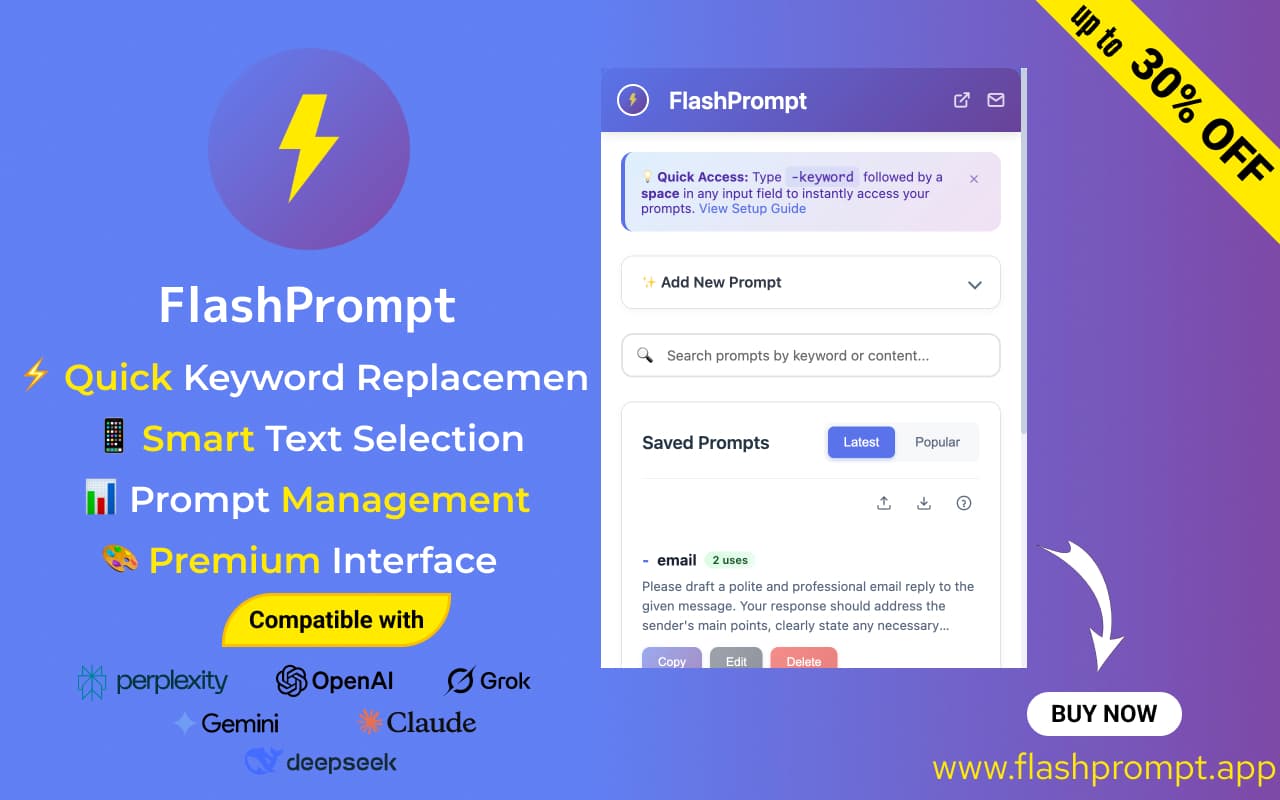
About this app
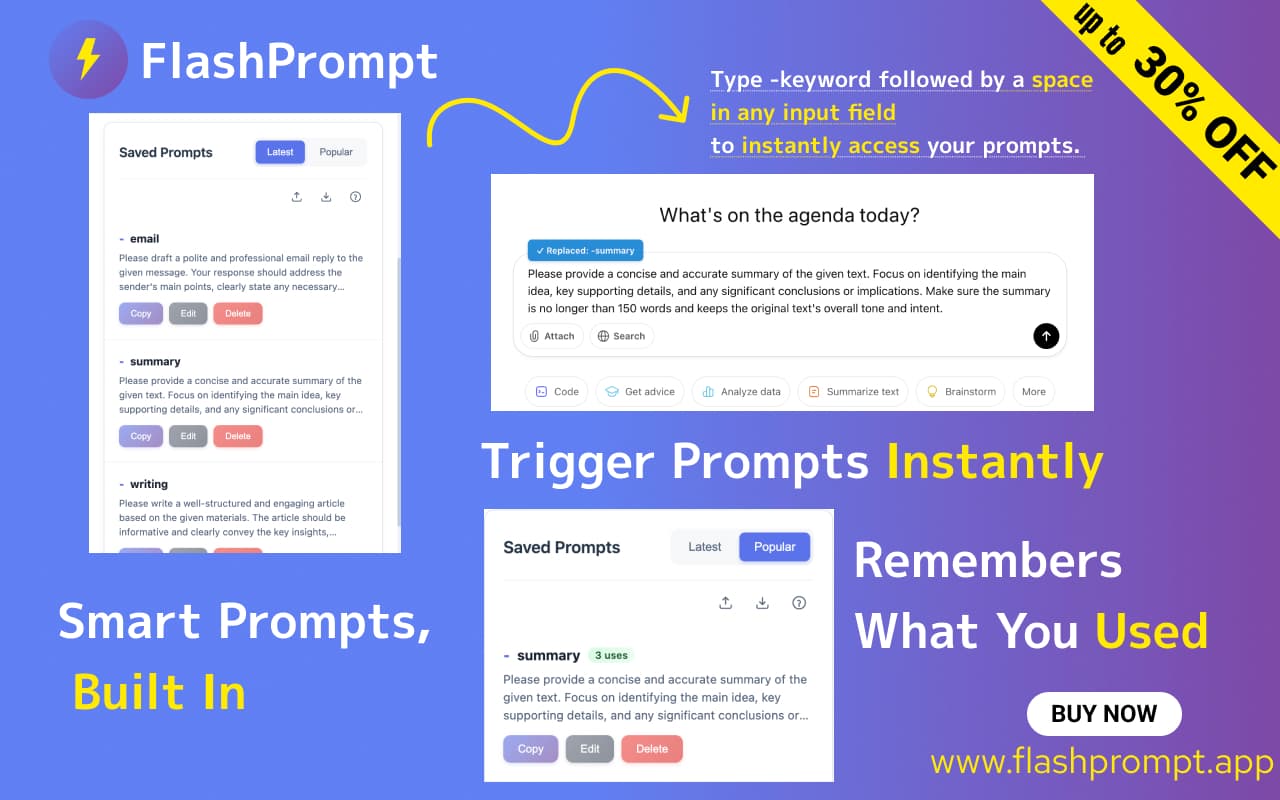
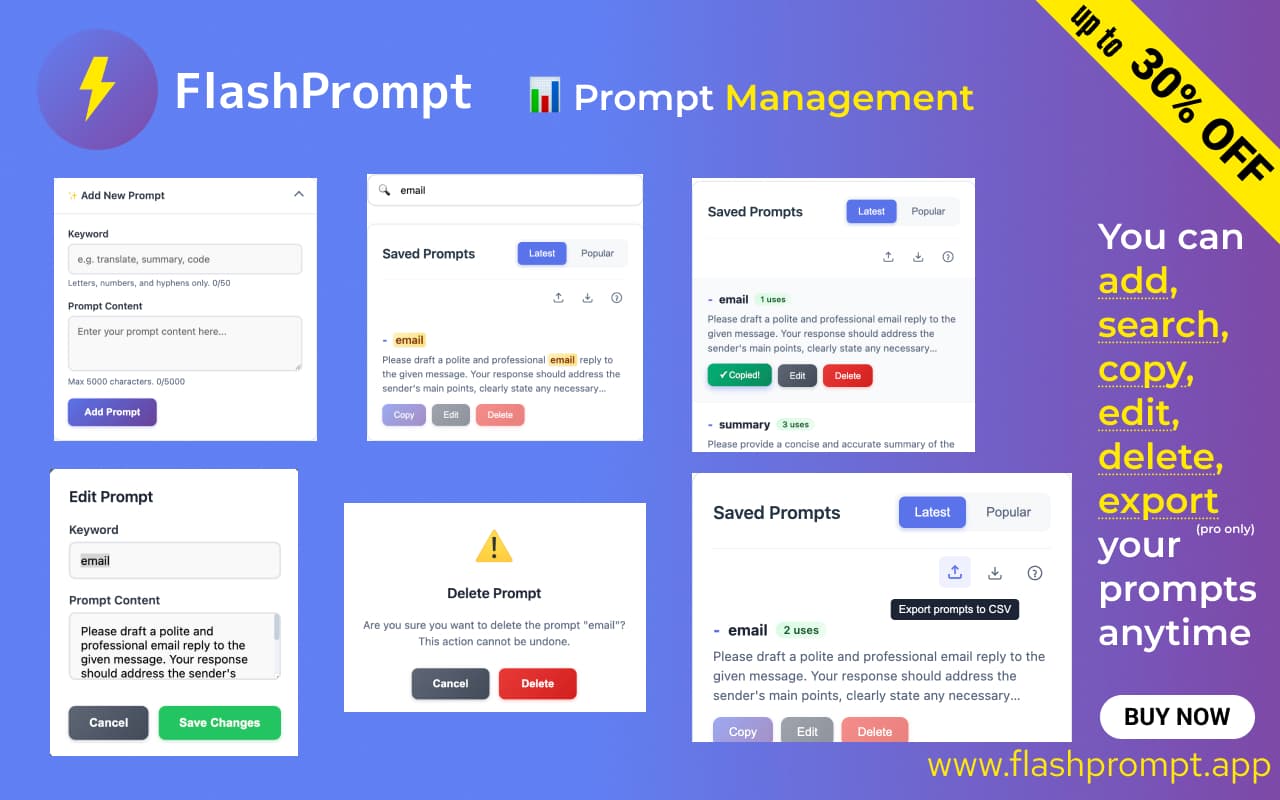
FlashPrompt is a game-changer for anyone tired of retyping the same prompts in AI tools. As a tech enthusiast, I've found it to be a secret weapon for efficiency, offering keyword shortcuts that expand into full templates instantly. It stores everything locally for security and speed, with recent Pro features like export/import for team sharing. Ideal for AI power users, content creators, and developers, it saves hours each week by centralizing prompts and ensuring cross-platform compatibility. While it excels in usability and performance, it could improve in accessibility and encryption options. Overall, it's a must-try for anyone deep into AI workflows.
Key features
- 1Instant keyword replacement and smart search for efficient prompt management.
- 2Local storage ensures data security and high speed with no browser impact.
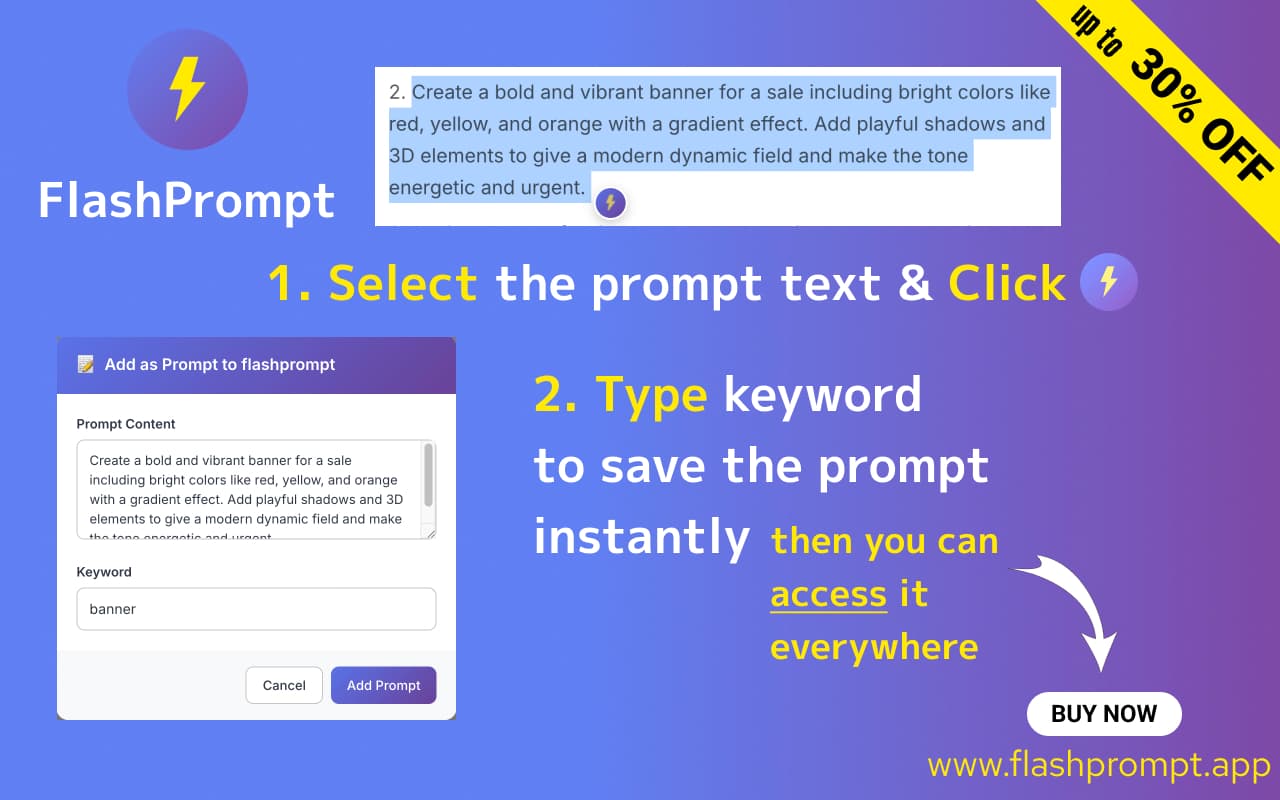
- 3Intuitive three-panel layout and save text selection feature enhance usability.
Target customer profile
Drawn from the product itself, not from a survey.
Demographic
AI Power Users
Pain points
Constant prompt retyping, fragmented workflows across multiple AI platforms
Primary needs
Centralized prompt library, cross-platform compatibility
Demographic
Content Creators/Bloggers
Pain points
Time wasted recreating writing frameworks, inconsistent outputs
Primary needs
Quick-access templates, version control for prompts
Demographic
Developers/Tech Teams
Pain points
Sharing prompts via messy docs, lack of standardization
Primary needs
Import/export functionality, collaboration features
Scout Review
Written by AI from measured evidence, scored out of 100.
FlashPrompt delivers exceptional value for AI power users tired of repetitive prompt management. Its killer combination of instant keyword expansion, local storage security, and cross-platform compatibility makes it indispensable for anyone regularly using multiple AI tools. While accessibility features need attention and visual design could use polish, the core functionality works so well that these feel like secondary concerns. The recent addition of export/import capabilities in the Pro version unexpectedly transforms it into a collaboration tool, demonstrating thoughtful evolution beyond its original scope.
Measure by measure
Usability
94Exceptional workflow with instant keyword replacement, intuitive navigation, and brilliant 'save text selection' feature.
Design
70Minimalist Chrome extension with functional three-panel layout, smart search, and clean organization but lacks visual polish.
Speed
100Near-instant keyword replacement and search with zero browser impact even with large prompt libraries.
Security
80Local storage prevents external server exposure but lacks explicit encryption options for sensitive data.
Accessibility
40Minimal features - no screen reader support, high-contrast mode, or multilingual interface currently available.
Growth
90Strong potential with desktop version, collaboration features, and mobile app expansion opportunities.
Improvement areas
- Add accessibility features like screen reader support and high-contrast mode.
- Implement encryption options for better security of sensitive data.
- Expand language support and develop a mobile app for broader accessibility.
Design & Usability
FlashPrompt's design philosophy prioritizes function over flash, delivering a minimalist Chrome extension that gets out of your way. The three-panel layout (categories, prompts, preview) creates an intuitive workflow that feels immediately familiar. Smart search functionality stands out as a killer feature, filtering results in real-time as you type - essential when managing extensive prompt libraries. The 'save text selection' feature demonstrates thoughtful UX design; simply highlight text in ChatGPT and click the extension icon to archive instantly. While the interface lacks visual polish, every element serves a clear purpose, making prompt management surprisingly enjoyable rather than chore-like.
Speed & Security
Performance is where FlashPrompt truly excels. Keyword replacement triggers near-instantly without any noticeable lag, and the lightweight architecture ensures zero impact on browser speed even with hundreds of stored prompts. Security benefits from local storage implementation - your prompts never touch external servers, providing peace of mind for sensitive workflows. However, the absence of explicit encryption options might concern enterprise users handling confidential data. The extension's responsiveness feels magical compared to cloud-based alternatives, delivering immediate results without the typical web service latency.
Accessibility & Growth
Accessibility represents FlashPrompt's most significant area for improvement. The extension currently lacks fundamental features like screen reader optimization, high-contrast mode, or multilingual support. While the simple interface benefits users experiencing cognitive overload, those with physical accessibility needs will find limited accommodations. Growth potential, however, is substantial. The core functionality provides a solid foundation for desktop applications, mobile companions, and collaboration features that could dominate the prompt management niche. The one-time payment model also positions it favorably against subscription-based competitors in an increasingly crowded market.
Conclusion
If you spend more than 30 minutes daily crafting prompts across ChatGPT, Claude, and Gemini, FlashPrompt will feel like discovering extra hours in your week. Content creators, developers, and AI enthusiasts will particularly appreciate how it streamlines workflows and eliminates context switching. The one-time payment model is refreshing in a subscription-saturated market. Give this a try if you're tired of digging through documents for that perfect prompt structure - just remember it's Chrome-only for now, but that limitation feels minor compared to the productivity gains.
Suggestions for improvement
- Implement basic accessibility features including high-contrast mode and screen reader support to make the tool inclusive.
- Add optional end-to-end encryption for enterprise users handling sensitive data.
- Develop a mobile companion app for prompt access and management on-the-go.
- Create prompt version history to track iterations and improvements over time.
- Expand language support beyond English to serve global users.
- Consider adding a dark mode option for extended usage sessions.
- These enhancements would transform FlashPrompt from excellent to indispensable.
Alternatives comparison
Named competitors, point by point. Nobody paid to appear here or to be left out.
 FlashPrompt FlashPrompt | |
|---|---|
| Pricing Model | One-time payment |
| Cross-Platform AI Support | ChatGPT, Claude, Gemini |
| Keyword Expansion | Instant replacement |
| Data Storage | Local only |
| Collaboration Features | Export/import (Pro) |
Comparing options? See FlashPrompt alternatives, scored side by side
More Productivity apps
View all Productivity
Notion
92All-in-one AI workspace for docs, projects, and knowledge...

Qamarero
92An all-in-one hospitality software for restaurants and ba...

EmbedMyReviews
92White-label reputation management software for agencies s...

StoryPad
92Privacy-first open source journal app with a continuous t...

Puzzly – B2B Lead Generation & Sales Intelligence Platform
92Puzzly is an all-in-one B2B lead generation platform that...

The Stack Newsletter
92A weekly newsletter delivering curated tech jobs, intervi...

Vibe Coding Agent Skills
92A free, open-source platform offering 110 AI agent skills...

QRBliss
91Branded QR codes with AI Brand Sync, 15 free dynamic code...

Gerty
91Private, local AI assistant for Mac that runs offline

CC Switch
91Open-source desktop app for switching AI coding providers...

username.md
90One verified handle for your online identity, readable by...

PitchWhip
90AI cold call scripts & direct dials from LinkedIn


A platform dedicated to providing unbiased reviews of newly launched applications, analyzing everything from their features to their full potential.
info@scoutforge.net© 2026 Scoutforge. All rights reserved.
