Cycling through all six. Tap any point to stop.
Measured on six things
AI-powered video cutter that removes fluff and keeps only...
Security
52HTTPS enforced with a couple of sane headers, but no HSTS, CSP, frame protection, SPF or DMARC, and no security page or compliance claims. Checkout is delegated to Gumroad, which helps.
Screenshots
1 / 1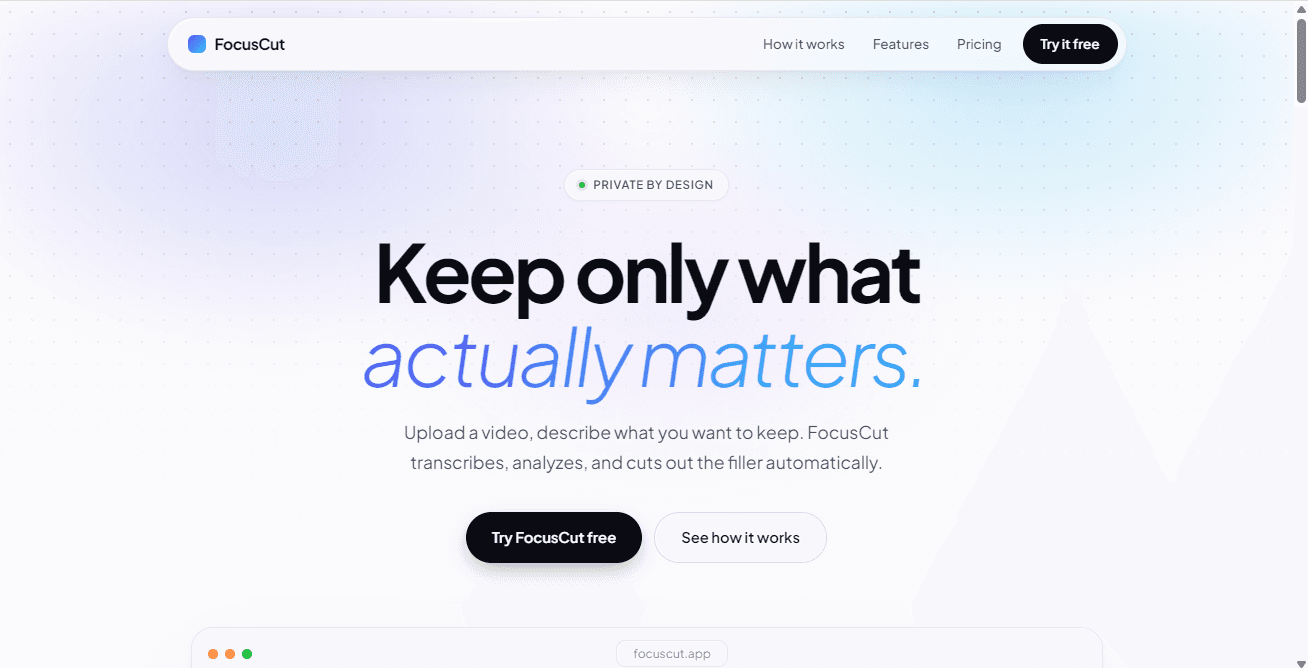
About this app
FocusCut is an AI-driven video editing tool that automatically transcribes, analyzes, and cuts out filler content from long videos based on a simple text description of what you want to keep. It's designed for power users who need to extract value from lectures, tutorials, and other long-form content quickly. The tool offers transparent AI decision-making with editable segments, fast server-side processing, and clean MP4 output. With a lifetime deal of $39 and a free tier for one video, it's a cost-effective alternative to manual editing or existing AI clipping tools.
Key features
- 1Natural-language 'keep' instructions: type what you want and FocusCut cuts the rest.
- 2Per-segment keep/cut decisions with a stated reason, all editable before download.
- 3Free first video with no account or card; $39 one-time lifetime license via Gumroad.
Target customer profile
Drawn from the product itself, not from a survey.
Demographic
Content creators and YouTubers
Pain points
Hours spent manually editing long recordings to remove filler and keep engaging content.
Primary needs
Fast, automated video editing that preserves key moments and exports clean, high-quality MP4 files.
Demographic
Educators and online course creators
Pain points
Long lecture recordings with off-topic discussions and admin content that waste students' time.
Primary needs
Efficient extraction of core educational content with transparent AI reasoning and editable decisions.
Demographic
Podcasters and interviewers
Pain points
Large audio/video files with rambling intros and tangents that require extensive editing.
Primary needs
AI that understands natural language goals to cut out fluff and produce concise, shareable content quickly.
Scout Review
Written by AI from measured evidence, scored out of 100.
FocusCut is a focused, honestly priced tool with a clear promise and a low-friction free trial. The keep/cut timeline with reasons is the best part of the product and the site explains it well. The gaps are execution detail (broken hero video, unfinished-looking highlights), thin documentation, a weak security header posture, and a wedge that incumbents could absorb. For a one-person project at $39 lifetime, it is a reasonable bet for anyone who regularly trims long lectures or talks.
Measure by measure
Usability
68Free first video with no account or card is a genuinely low-friction trial, and the three-step flow plus per-cut reasons is clear. Docs beyond the FAQ are thin and the flow is single-video oriented.
Design
70Bold hero, a clear yellow spot color, and a keep/cut timeline that explains the product in one glance. Undone by a broken hero video showing a Dutch error and transcript highlights that look like markup.
Speed
68Lighthouse desktop 94 and mobile 77, with CLS near zero. Mobile LCP and FCP both 3.2s and TBT 389ms keep it from feeling instant on a phone; the claimed sub-3-minute processing is unverified.
Security
52HTTPS enforced with a couple of sane headers, but no HSTS, CSP, frame protection, SPF or DMARC, and no security page or compliance claims. Checkout is delegated to Gumroad, which helps.
Accessibility
80Lighthouse accessibility 97/100 with only contrast and label-matching failures. No WCAG statement or a11y page, so the strong automated score is the main signal.
Growth
58A real problem (scrubbing hour-long lectures) with a specific wedge — natural-language 'keep' instructions and a $39 one-time price against subscription clippers. Narrow but real.
Improvement areas
- Broken hero demo video showing a Dutch error message undermines the first impression.
- Security headers incomplete (no HSTS, CSP, frame protection, SPF, DMARC).
- Documentation is limited to a FAQ; no guides, API, or workflow docs.
Design & Usability
FocusCut's homepage does the hard part well: the hero states the promise ('turn a 1-hour video into the 20 minutes you need'), the yellow spot color is consistent, and the keep/cut timeline with per-segment reasons makes an abstract AI feature concrete. The problem is execution detail — the hero demo video is broken and shows a Dutch browser error, and the yellow transcript highlights read as unfinished markup. Usability is the stronger half: a free first video with no account or card is about as low-friction as a trial gets, the three-step flow is clear, and every cut carries a reason you can flip. Beyond the FAQ there is little documentation, and the product is built around one video at a time.
Speed & Security
Speed is solid but not exceptional: Lighthouse desktop 94 and mobile 77, with near-zero layout shift, but mobile LCP and FCP both at 3.2s and TBT at 389ms mean the landing page is not instant on a phone — an awkward look for a product selling speed. The claimed sub-3-minute processing of a 30-minute video is plausible for server-side work but unverified. Security is the weakest dimension: HTTPS is enforced and a couple of headers are set, but there is no HSTS, CSP, frame protection, SPF or DMARC, and no security page or compliance claims anywhere. Delegating checkout to Gumroad removes card handling from the product, which is the main mitigating factor.
Accessibility & Growth
Accessibility scores well on automated checks (97/100) with only contrast and label-matching failures — no WCAG statement, but the basics hold. Growth is a judgement call: the problem is real and specific (students, developers, indie hackers, teachers, teams all named with example prompts), and the $39 one-time price is a genuine differentiator against Descript and Opus Clip subscriptions. The wedge is narrow, though — 'type what to keep' is a feature incumbents could copy, and there is no network effect or data advantage that compounds with adoption. It is a competent, clearly positioned tool in a crowded category.
Conclusion
If you cut long recordings weekly and hate scrubbing, the free first video is a fair test — upload something real and see whether the cuts match your intent. If you need team features, deep docs, or compliance paperwork, look at Descript instead. The $39 lifetime price is the strongest argument; the broken demo video is the strongest reason to be skeptical until you try it yourself.
Alternatives comparison
Named competitors, point by point. Nobody paid to appear here or to be left out.
 FocusCut FocusCut |  Descript Descript |  Opus Clip Opus Clip | |
|---|---|---|---|
| Pricing model | $39 one-time lifetime; first video free | Subscription tiers (free plan available) | Subscription with free tier limits |
| Core editing approach | Type what to keep; AI cuts the rest with reasons | Text-based transcript editing with multi-track timeline | Auto-clips highlights into short viral segments |
| Output format | Clean MP4 download | MP4 export plus studio sound and multi-track | Short vertical clips for social platforms |
| Target user | Students, developers, teachers, teams trimming long recordings | Podcasters and professional editors | Creators repurposing long video into shorts |
| Account requirement | No account for first video; license key via Gumroad | Account required | Account required |
Descript
AI-powered audio and video editing tool that transcribes and allows text-based editing, similar to FocusCut but with more advanced multi-track and studio sound features.
Opus Clip
AI video repurposing tool that automatically clips long videos into short, viral-ready segments, focusing on highlights rather than user-defined cuts.
Comparing options? See FocusCut alternatives, scored side by side
More Productivity apps
View all Productivity
Qamarero
92An all-in-one hospitality software for restaurants and ba...

The Stack Newsletter
92A weekly newsletter delivering curated tech jobs, intervi...

EmbedMyReviews
92White-label reputation management software for agencies s...

StoryPad
92Privacy-first open source journal app with a continuous t...

Puzzly – B2B Lead Generation & Sales Intelligence Platform
92Puzzly is an all-in-one B2B lead generation platform that...

Notion
92All-in-one AI workspace for docs, projects, and knowledge...

Vibe Coding Agent Skills
92A free, open-source platform offering 110 AI agent skills...

CC Switch
91Open-source desktop app for switching AI coding providers...

username.md
90One verified handle for your online identity, readable by...

What the GIF
89Frame-perfect video-to-GIF maker that runs entirely in yo...

AuditCloser
89White-label website audits that close deals for digital a...

NudgeWin
89Automated quote follow-up for trades and service businesses.


A platform dedicated to providing unbiased reviews of newly launched applications, analyzing everything from their features to their full potential.
info@scoutforge.net© 2026 Scoutforge. All rights reserved.
