Cycling through all six. Tap any point to stop.
Measured on six things
See every app and what it's using in plain English, and end or slow down the one that's hogging your Mac. Opens with Control Shift Escape, as on Windows.
Security
44HTTPS enforced and the app is signed and notarized by Apple, but only 3/12 security headers present: no HSTS, CSP, frame protection, Referrer-Policy or DMARC. No compliance or audit claims.
Screenshots
1 / 1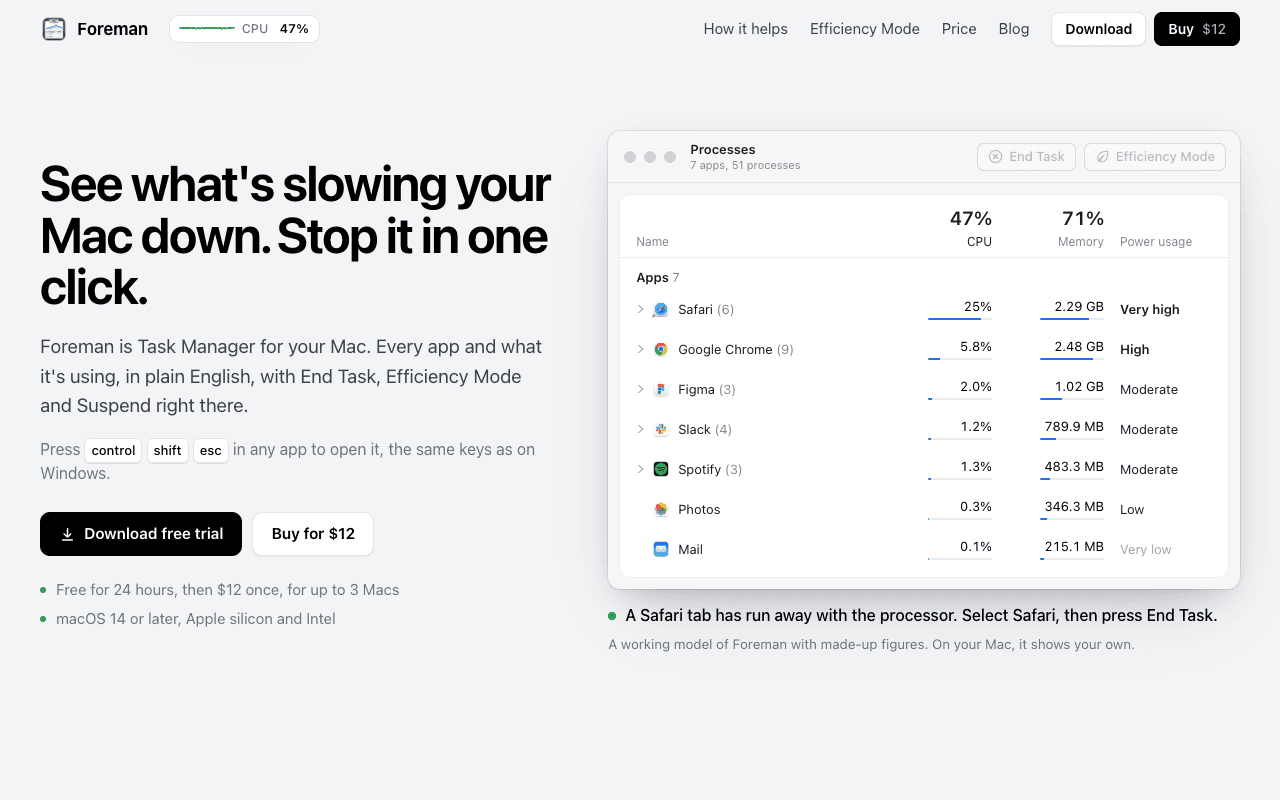
About this app
Foreman is a Windows-style Task Manager for the Mac. Press Control Shift Escape in any app to open it and see every app and what it's using, in plain English, with End Task, Efficiency Mode and Suspend right there. Six pages in the sidebar: Processes, Performance with live graphs for CPU, memory, disk, Wi-Fi and GPU, App History, Startup Apps (including leftovers of deleted apps), Details and Services. System processes get a plain description beside their real name. Efficiency Mode lets an app you need open run slowly in the background, on the efficiency cores of Apple silicon, and at full speed again when you switch to it. A live readout sits in the menu bar. Free for 24 hours, then $12 once for up to 3 Macs. macOS 14 or later, Apple silicon and Intel.
Key features
- 1Windows-style Control-Shift-Escape hotkey opens a Task Manager equivalent on macOS with End Task, Efficiency Mode and Suspend.
- 2Plain-English descriptions beside real process names (mds_stores → 'Spotlight indexing'), with helpers folded under their parent app.
- 3Efficiency Mode pins background apps to Apple silicon efficiency cores at a quarter of the CPU, restoring full speed on focus.
Target customer profile
Drawn from the product itself, not from a survey.
Scout Review
Written by AI from measured evidence, scored out of 100.
Foreman is a well-executed indie Mac utility with a sharper pitch than most: it takes the Windows Task Manager mental model — including the Control-Shift-Escape hotkey — and rebuilds it for macOS with plain-English process names and an Efficiency Mode that parks background apps on Apple silicon's efficiency cores. The marketing site is genuinely good, using an interactive mockup and five real scenarios instead of feature bullets. Speed is excellent on desktop and solid on mobile. The weak points are security headers (3/12, no CSP or HSTS) and two real accessibility failures around contrast and color-only links. At $12 once for three Macs with a 24-hour trial, the value proposition is easy to test and easy to justify — provided you test it during a day when something actually misbehaves.
Measure by measure
Usability
68Clear value proposition, hotkey explained up front, six sidebar pages documented, FAQ covers Windows-to-Mac expectations. Free 24-hour trial and seven-day refunds lower the try-it risk.
Design
74Polished, modern landing page with an interactive Task Manager mockup and five scenario walkthroughs. Consistent branding, disciplined typography, and real product windows instead of stock screenshots.
Speed
72Desktop Lighthouse 97/100 and mobile 79/100 with CLS 0 and TBT 93ms. Mobile LCP of 4.0s is the weak spot, but the 4.1 MB download points to a lean native app.
Security
44HTTPS enforced and the app is signed and notarized by Apple, but only 3/12 security headers present: no HSTS, CSP, frame protection, Referrer-Policy or DMARC. No compliance or audit claims.
Accessibility
70Lighthouse accessibility 94/100, but two real failures: insufficient color contrast and links distinguishable only by color. No WCAG statement or a11y documentation on the site.
Growth
58Real, specific problem with a clear wedge: plain-English process names, Windows hotkey muscle memory, and Efficiency Mode on Apple silicon. Niche but genuinely underserved.
Improvement areas
- Security headers: only 3/12 present — no HSTS, CSP, frame protection, Referrer-Policy or DMARC.
- Accessibility: Lighthouse 94/100 but failing contrast ratio and color-only link distinction audits.
- Trial length: 24 hours is too short to catch intermittent slowdowns; no live app demo beyond the simulated window.
Design & Usability
Foreman's site does the hard part well: it shows the product instead of describing it. The hero is an interactive Task Manager window, followed by five concrete scenarios — a runaway Safari tab, Photos catching up, a video call, battery drain, ghost startup items — each tied to a specific Foreman page. That's better marketing than most indie Mac utilities manage. The plain-English process naming (mds_stores → 'Spotlight indexing') is explained with a real table, and the FAQ preempts the obvious Windows comparison. Usability is strong on paper: the Control-Shift-Escape hotkey is stated immediately, all six sidebar pages are documented, and the 24-hour trial plus seven-day refund keeps the try-it risk low. The main friction is that 24 hours is a short window to evaluate a utility you may only need when something goes wrong, and there's no live demo of the actual app beyond the simulated window.
Speed & Security
Speed is a genuine strength. Desktop Lighthouse lands at 97/100 and mobile at 79/100 with a perfect CLS of 0 and TBT of 93ms — the mobile LCP of 4.0s is the one soft number, likely a hero image or font. The 4.1 MB download size strongly suggests a native Swift app rather than an Electron wrapper, which matters for a tool whose entire job is measuring other apps' resource use. Security is the weak flank. HTTPS is enforced and the app is signed and notarized by Apple, which is the baseline users should expect. But the HTTP probe found only 3 of 12 checklist items: no HSTS, no CSP, no frame protection, no X-Content-Type-Options, no Referrer-Policy, no Permissions-Policy, and no DMARC record. For a marketing site with a download and a checkout link, missing CSP and HSTS is a real gap, not just a checkbox. No SOC 2, ISO, pen-test or bug bounty claims exist, which is normal for an indie utility but leaves nothing to offset the header findings.
Accessibility & Growth
Accessibility scores 94/100 on Lighthouse, which is above average, but the two failing audits are substantive rather than cosmetic: insufficient background/foreground contrast and links that rely on color alone to be distinguishable. Those hit low-vision users directly, and there's no accessibility statement or WCAG conformance claim anywhere on the site to show the gap is being tracked. Keyboard navigation and responsive layout appear sound, and the content is English-only. Growth is the most interesting dimension. The problem Foreman names is real and specific — macOS gives you Activity Monitor, which is accurate but hostile to anyone who didn't learn UNIX process names. Foreman's wedge is threefold: plain-English descriptions beside real process names, the Windows Control-Shift-Escape muscle memory for switchers, and Efficiency Mode that pins background apps to Apple silicon's efficiency cores. That last one is a genuine technical differentiator most competitors don't offer. The limit is audience size: this is a utility for Mac users who think in Windows terms, a real but finite segment, and the one-time $12 price caps revenue per user. The domain is only months old, so traction is unproven — but the idea itself has a defensible niche.
Conclusion
Foreman earns its place by solving a problem Apple has left open for two decades: Activity Monitor tells you the truth but not in a language most people speak. The plain-English process naming and Efficiency Mode are real differentiators, not marketing garnish. What holds it back from a higher score is execution discipline on the web side — missing security headers and contrast failures are fixable in an afternoon and would move both scores meaningfully. The 24-hour trial is the right instinct but the wrong length; a seven-day trial would let users actually catch a runaway process in the wild. If you're a Mac user who still reaches for Control-Shift-Escape out of habit, this is the tool you've been waiting for. If you're comfortable in Activity Monitor, you're not the customer, and that's fine.
Suggestions for improvement
- Add HSTS, CSP, X-Content-Type-Options, Referrer-Policy and a DMARC record — these are low-effort fixes that would lift the security score substantially.
- Fix the two Lighthouse accessibility failures: raise text/background contrast and add underlines or another non-color cue to links.
- Extend the trial from 24 hours to at least seven days so users can catch an intermittent slowdown before deciding.
- Publish a short accessibility statement and a security page describing data handling, even if no formal audit exists yet.
Alternatives comparison
Named competitors, point by point. Nobody paid to appear here or to be left out.
 Foreman Foreman |  | |
|---|---|---|
| Plain-English process descriptions | Yes — describes each system process in plain English with the real name beside it | Not applicable — no alternative details provided |
| Windows-style hotkey (Control-Shift-Escape) | Yes — opens Foreman from any app | Not applicable — no alternative details provided |
| Efficiency Mode on Apple silicon efficiency cores | Yes — background apps run at a quarter CPU on efficiency cores, full speed on focus | Not applicable — no alternative details provided |
| Pricing model | $12 one-time for up to 3 Macs; 24-hour free trial; seven-day refunds | Not applicable — no alternative details provided |
| Menu bar live readout | Yes — graph, figures or icon, with End Task per app | Not applicable — no alternative details provided |
Comparing options? See Foreman alternatives, scored side by side
More Productivity apps
View all Productivity
Qamarero
92An all-in-one hospitality software for restaurants and ba...

The Stack Newsletter
92A weekly newsletter delivering curated tech jobs, intervi...

EmbedMyReviews
92White-label reputation management software for agencies s...

StoryPad
92Privacy-first open source journal app with a continuous t...

Puzzly – B2B Lead Generation & Sales Intelligence Platform
92Puzzly is an all-in-one B2B lead generation platform that...

Notion
92All-in-one AI workspace for docs, projects, and knowledge...

Vibe Coding Agent Skills
92A free, open-source platform offering 110 AI agent skills...

CC Switch
91Open-source desktop app for switching AI coding providers...

username.md
90One verified handle for your online identity, readable by...

What the GIF
89Frame-perfect video-to-GIF maker that runs entirely in yo...

AuditCloser
89White-label website audits that close deals for digital a...

NudgeWin
89Automated quote follow-up for trades and service businesses.


A platform dedicated to providing unbiased reviews of newly launched applications, analyzing everything from their features to their full potential.
info@scoutforge.net© 2026 Scoutforge. All rights reserved.
