Cycling through all six. Tap any point to stop.
Measured on six things
Convert EML files to Outlook PST with attachments
Security
41HTTPS enforced and SPF present, but HSTS, CSP, frame protection, X-Content-Type-Options, Referrer-Policy and Permissions-Policy are all missing, and DMARC is absent. No compliance or audit claims found.
Screenshots
1 / 3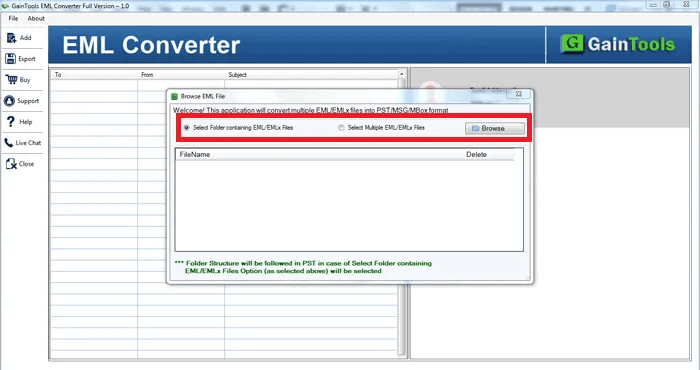
About this app
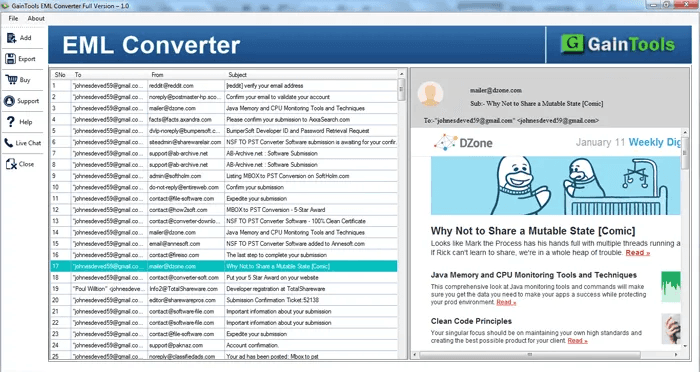
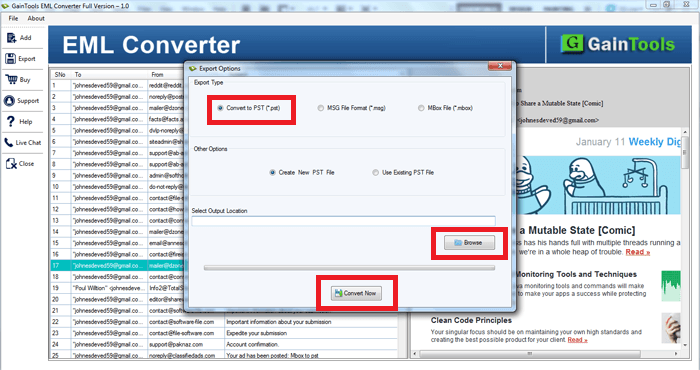
GainTools EML to PST Converter is a secure solution to export EML email messages into PST files for Microsoft Outlook. It is designed for users who need to combine stored emails for faster access, archiving, and organization. With the utility, users can specify certain files or folders and process multiple files simultaneously. Additional features include email preview, attachment management and selection of the output destination. It is useful to convert archived conversations from email programs such as Mozilla Thunderbird, Windows Live Mail, Apple Mail or Outlook Express to a format compatible with Outlook. The software works with various Windows and Outlook environments, assisting users in preparing email data for personal and business use. The trial edition allows users to evaluate the software by exporting up to 10 items per folder before purchase.
Key features
- 1Batch conversion of multiple EML files into a single or existing Outlook PST file
- 2File filter support to search and select specific EML files from any folder
- 3Preserves original folder hierarchy, email structure and attachments during migration
- 4Free trial exporting up to 10 items per folder; $29 lifetime license with 30-day money back
Target customer profile
Drawn from the product itself, not from a survey.
Demographic
Individual users migrating from Windows Live Mail or Thunderbird to Outlook
Pain points
Manual migration is time-consuming and risks data loss or corruption
Primary needs
A reliable, easy-to-use tool that preserves email structure and attachments
Demographic
IT professionals and system administrators in small to medium businesses
Pain points
Need to migrate multiple user mailboxes efficiently without downtime
Primary needs
Batch conversion support and compatibility with various Windows versions
Demographic
Corporate users and enterprises with large volumes of EML files
Pain points
Limited time and resources for manual email migration; need for secure, error-free conversion
Primary needs
Scalable solution with license options for multiple systems and lifetime validity
Scout Review
Written by AI from measured evidence, scored out of 100.
GainTools EML to PST Converter is a competent, narrowly-scoped Windows utility for moving EML mail into Outlook PST files. It does the job it advertises: batch conversion, file filtering, output to existing or new PST, a 10-item free trial and a $29 lifetime license. The site is fast — Lighthouse mobile 100/100 — and accessibility checks come back at 95/100. The problems are elsewhere. The design is visibly dated, with a shareware-era homepage and a legacy WinForms interface. Security headers are largely absent and no compliance or audit evidence exists. And the market it serves is a shrinking one, competing against a crowd of identical converters with no clear differentiator. It's a working tool for a specific, narrowing need — not a product with a story.
Measure by measure
Usability
58Step-by-step guide, FAQs, video and a 10-item trial make evaluation possible, and 24/7 support is claimed. But the multi-step file flow shows no progress indicators and CTAs sit under a wall of text.
Design
44Dated early-2010s shareware aesthetic: 3D box render, dark navy header, cramped comparison boxes and low-contrast body text. The desktop UI itself is legacy WinForms with thick borders.
Speed
88Lighthouse mobile 100/100 (LCP 1.1s, CLS 0, TBT 85ms) and desktop 99/100. A 3.77 MB download with no registration. Genuinely fast for a page this text-heavy.
Security
41HTTPS enforced and SPF present, but HSTS, CSP, frame protection, X-Content-Type-Options, Referrer-Policy and Permissions-Policy are all missing, and DMARC is absent. No compliance or audit claims found.
Accessibility
80Lighthouse accessibility 95/100, with only two failing audits around button accessible names. No WCAG statement or multi-language support found, and the product is Windows-only.
Growth
44A real but shrinking problem: EML-to-PST migration for Thunderbird/WLM/Apple Mail users moving to Outlook. The niche is narrow, the category is crowded with near-identical converters, and nothing here differentiates it.
Improvement areas
- Dated visual design: 3D box art, cramped comparison boxes and low-contrast body text
- Thin security posture: no HSTS, CSP, DMARC, security page or compliance evidence
- No clear differentiator against a crowded field of near-identical EML-to-PST converters
- Conversion flow lacks progress indicators; primary CTAs buried below a wall of marketing text
Design & Usability
GainTools EML to PST Converter looks and feels like a product from a different decade, and the visual audit confirms it: a 3D software box render, a dark navy header, six cramped comparison boxes and body text light enough to strain against. The desktop UI shown in the maker's own screenshots is classic WinForms — thick borders, modal file pickers, a blue-header data grid with a sidebar ad panel. On usability the picture is better: there's a step-by-step guide, an FAQ, a video, a 10-item free trial and a claimed 24/7 support line, so evaluating the tool is genuinely possible without buying. The friction is in the flow itself — screenshots show a multi-step file selection with no visible progress indicators, and the primary CTAs sit below a wall of marketing text. Functional, but not friendly.
Speed & Security
Speed is where this product actually shines. Google Lighthouse measured mobile performance at a perfect 100/100 with an LCP of 1.1s, CLS of 0 and TBT of 85ms; desktop scored 99/100. The download is a modest 3.77 MB and requires no registration. For a page this dense with text and comparison tables, that's an unusually clean result. Security is the weak flank. The HTTP probe found HTTPS enforced and SPF configured, but HSTS, CSP, frame protection, X-Content-Type-Options, Referrer-Policy and Permissions-Policy are all absent, DMARC is missing, and the checklist lands at 3/13. There is no security page, no SOC 2 or ISO claim, no bug bounty and no published audit. For a tool that handles email archives — often containing sensitive business correspondence — that thinness is worth noting, even if it's typical for a small Windows utility.
Accessibility & Growth
Accessibility scores well on automated checks: Lighthouse returned 95/100, with only two failing audits, both about buttons lacking accessible names. There's no WCAG statement, no multi-language support and the product is Windows-only, so the ceiling is real, but the baseline is solid. Growth is the harder question. The problem GainTools names — migrating EML files from Thunderbird, Windows Live Mail, Apple Mail or Outlook Express into Outlook PST — is real but structurally shrinking. The target user is specific (individuals and small IT teams doing mailbox migrations), and the site does list concrete features like batch conversion, file filtering and saving into existing or new PST files. But the category is crowded with near-identical converters at near-identical prices, and nothing in the material explains why a buyer picks this one over the next result. The 9.5-year-old domain and five social profiles show staying power, not momentum.
Conclusion
If you have a folder of EML files and an Outlook PST that needs them, this will do it, and the 10-item trial lets you confirm that before spending $29. The lifetime license and 30-day money-back guarantee lower the risk further. But go in with clear expectations: you're buying a functional converter, not a modern piece of software. The UI is dated, the security posture is thin, and the category is full of tools that do the same thing at the same price. Compare at least two or three before committing — the differentiator here isn't features or polish, it's just that it works.
Suggestions for improvement
- Modernize the homepage: drop the 3D box render, raise body-text contrast, and cut the six comparison boxes down to three clear ones.
- Add a security page with HSTS, CSP, DMARC and at least a stated data-handling policy — email archives are sensitive.
- Fix the two failing accessibility audits by giving buttons proper accessible names; it's a small change for a 95→100 jump.
- Show a real progress indicator in the conversion flow and surface the free trial CTA above the fold instead of under the text wall.
Alternatives comparison
Named competitors, point by point. Nobody paid to appear here or to be left out.
 GainTools EML to PST Converter GainTools EML to PST Converter | ||
|---|---|---|
| Price | $29 lifetime license; free trial limited to 10 items per folder | Not provided in app details |
| Platform support | Windows only (10, 8, XP, Vista); outputs PST for Outlook 2019–2010 | Not provided in app details |
| Batch conversion | Yes — multiple EML files converted simultaneously into one PST | Not provided in app details |
| Free trial restrictions | Exports up to 10 items per folder before purchase | Not provided in app details |
| Security / compliance disclosures | HTTPS enforced; no HSTS, CSP, DMARC, SOC 2 or ISO claims found | Not provided in app details |
Comparing options? See GainTools EML to PST Converter alternatives, scored side by side
More Productivity apps
View all Productivity
StoryPad
92Privacy-first open source journal app with a continuous t...

Puzzly – B2B Lead Generation & Sales Intelligence Platform
92Puzzly is an all-in-one B2B lead generation platform that...

Qamarero
92An all-in-one hospitality software for restaurants and ba...

Notion
92All-in-one AI workspace for docs, projects, and knowledge...

EmbedMyReviews
92White-label reputation management software for agencies s...

The Stack Newsletter
92A weekly newsletter delivering curated tech jobs, intervi...

Vibe Coding Agent Skills
92A free, open-source platform offering 110 AI agent skills...

CC Switch
91Open-source desktop app for switching AI coding providers...

username.md
90One verified handle for your online identity, readable by...

What the GIF
89Frame-perfect video-to-GIF maker that runs entirely in yo...

AuditCloser
89White-label website audits that close deals for digital a...

NudgeWin
89Automated quote follow-up for trades and service businesses.


A platform dedicated to providing unbiased reviews of newly launched applications, analyzing everything from their features to their full potential.
info@scoutforge.net© 2026 Scoutforge. All rights reserved.
