Cycling through all six. Tap any point to stop.
Measured on six things
Trusted iPhone data recovery software with free scan, pre...
Speed
46Lighthouse mobile 55/100 with a brutal 14.4s LCP and 358ms TBT; desktop fares better at 74/100. CLS is a clean 0, but the mobile hero is clearly too heavy.
Screenshots
1 / 3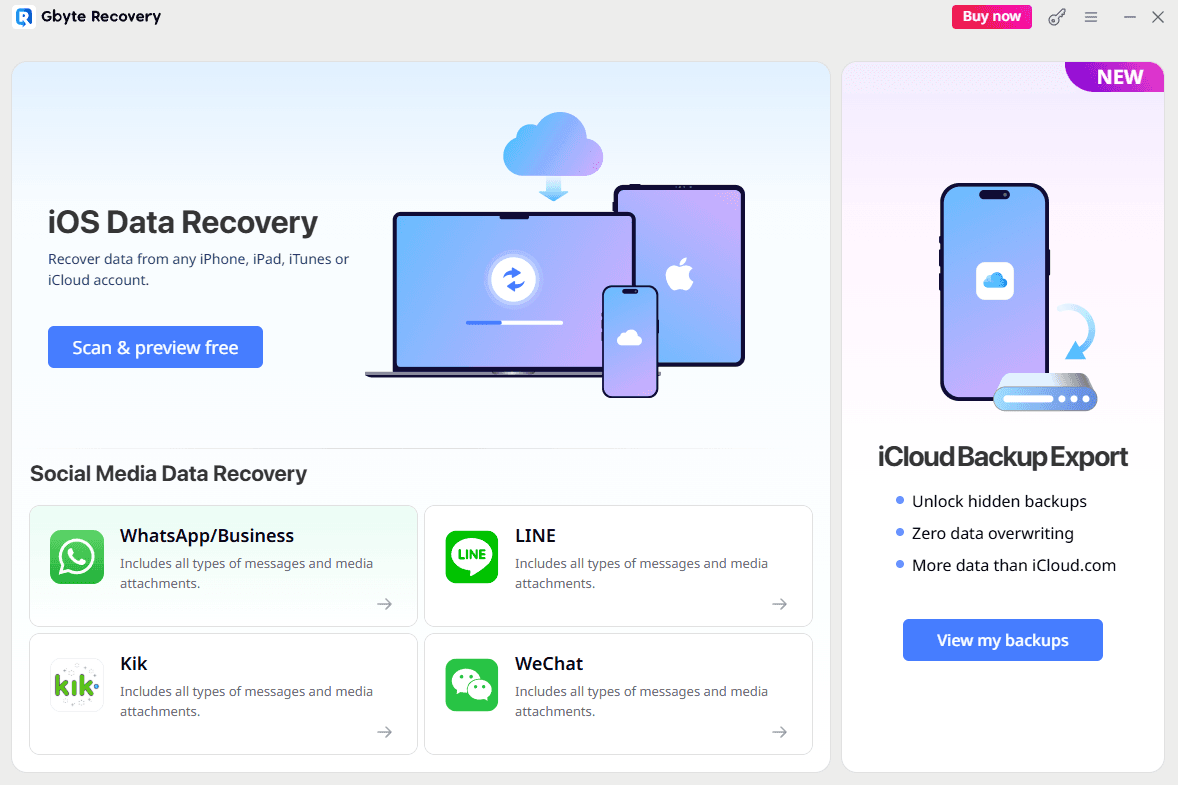
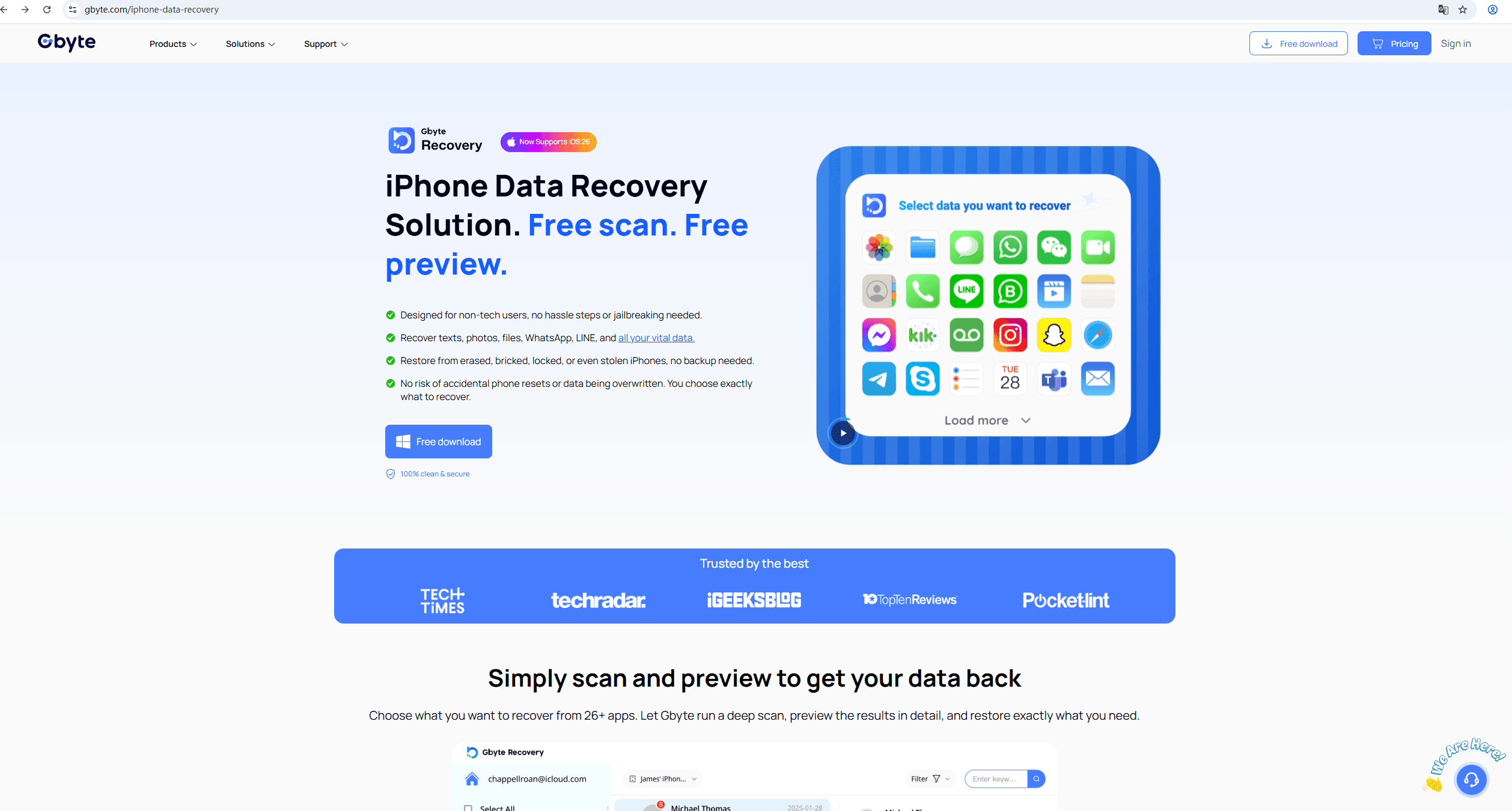
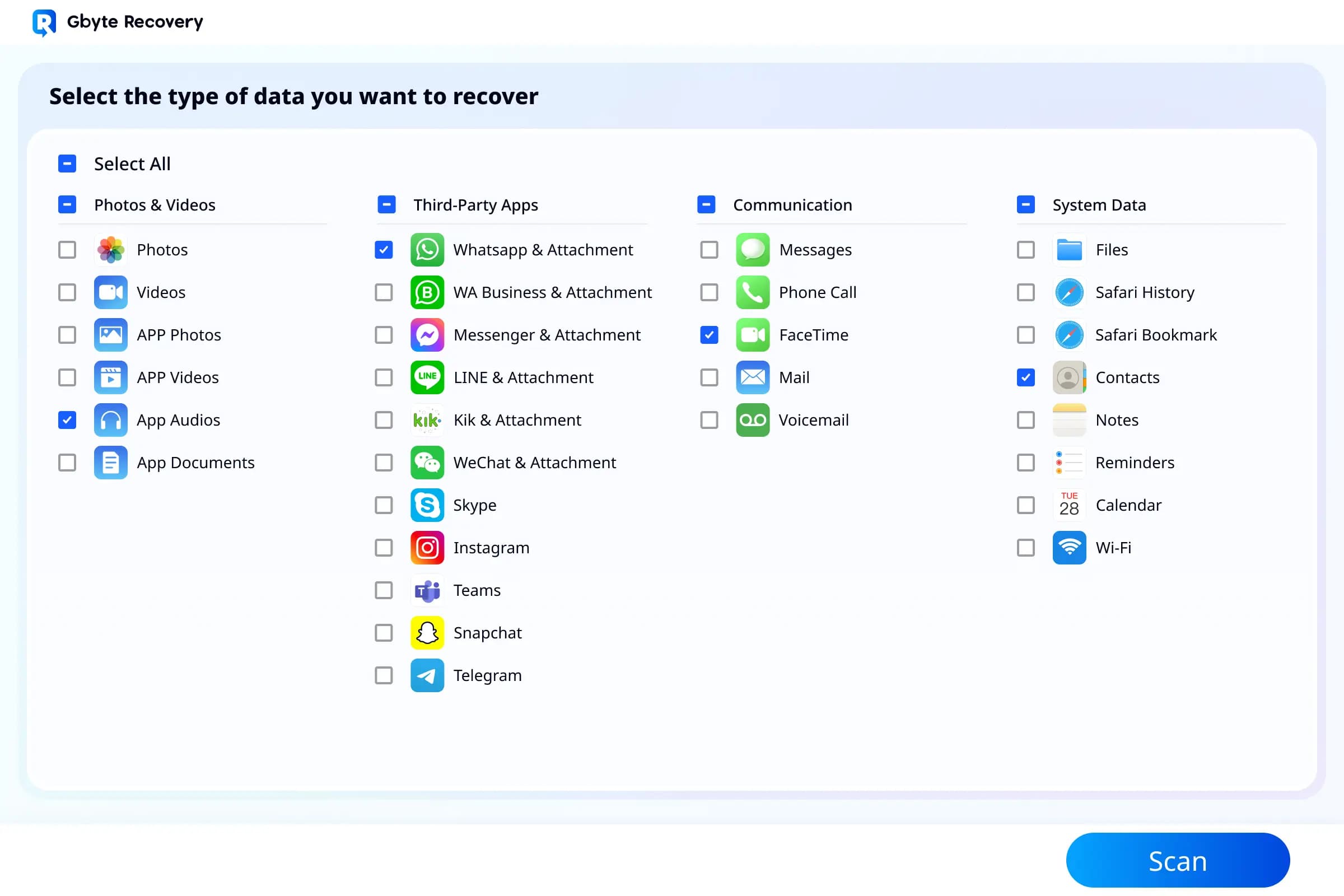
About this app
Gbyte Recovery is a powerful iOS data recovery tool that helps you retrieve lost or deleted data from iPhone, iPad, and iPod touch. With a free scan and preview, you can see what's recoverable before committing. It supports 20+ data types including photos, videos, messages, WhatsApp, LINE chats, and documents. The software works in various scenarios: accidental deletion, factory reset, system crashes, water damage, or even stolen devices. It offers three recovery modes: direct device scan, iTunes backup extraction, and iCloud backup recovery. No jailbreaking required, and it's designed for non-tech users. Security is a top priority with end-to-end encryption and two-factor authentication. Gbyte has two decades of enterprise experience, now bringing enterprise-level recovery to personal users at an affordable price. Compatible with all iOS versions including iOS 26 and all iPhone models up to iPhone 17.
Key features
- 1Free scan and preview: see recoverable data before paying, across 20+ data types and 26+ apps
- 2Three recovery modes: direct device scan, iTunes backup extraction, and iCloud backup recovery
- 3No jailbreak required; supports iOS 26 and iPhone 17, with end-to-end encryption and 2FA claims
Target customer profile
Drawn from the product itself, not from a survey.
Demographic
Individuals who accidentally deleted important data
Pain points
Lost photos, messages, or contacts with no backup
Primary needs
Quick and easy recovery without technical skills
Demographic
Users who experienced system failures or updates
Pain points
Data loss due to iOS update failure or system crash
Primary needs
Reliable recovery even when device is bricked or stuck
Demographic
People with damaged or stolen iPhones
Pain points
Physical damage or theft leading to data inaccessibility
Primary needs
Recover data from iCloud backups without device
Scout Review
Written by AI from measured evidence, scored out of 100.
Gbyte Recovery is a competent iOS data recovery tool with a polished landing page, a genuinely useful free scan/preview model, and clear documentation. It handles the table stakes well: HTTPS, secure cookies, SPF/DMARC, a 2-3 minute install flow, and support for 26+ apps and 20+ data types. Where it stumbles is speed (14.4s mobile LCP), security header hygiene (no HSTS, CSP, or frame protection despite handling Apple ID credentials), and accessibility (unnamed buttons, contrast failures, no main landmark). The bigger issue is differentiation: against Dr.Fone, UltData, and PhoneRescue, Gbyte's pitch is essentially 'same features, lower price, free preview.' That's a real wedge, but a thin one. For a user who just wants their photos back and doesn't want to pay $60 upfront, Gbyte is a reasonable choice. For anyone comparing feature-for-feature, it's a coin flip.
Measure by measure
Usability
63Free scan and preview reduce commitment risk, and the guide documents install in 2-3 minutes with clear step-by-step flows. No live demo or interactive trial, and the 26+ app selector packs options without grouping.
Design
70Polished, consistent blue-accented landing page with clear hierarchy, trust logos, and scannable stat cards. Repetitive 'Free download' CTAs and a clashing 'Buy now' in the app screenshot dilute focus.
Speed
46Lighthouse mobile 55/100 with a brutal 14.4s LCP and 358ms TBT; desktop fares better at 74/100. CLS is a clean 0, but the mobile hero is clearly too heavy.
Security
52HTTPS enforced with secure cookies, SPF, DMARC, and X-Content-Type-Options; 7/13 header checklist. Missing HSTS, CSP, frame protection, and Permissions-Policy. Claims E2E encryption and 2FA but no audit page.
Accessibility
58Lighthouse a11y 85/100, but failing audits include unnamed buttons, insufficient contrast, broken list markup, and no main landmark. No accessibility statement or WCAG claim published.
Growth
58Real, painful problem with a clear wedge: free scan/preview, no jailbreak, iCloud recovery without a computer. But the pitch is interchangeable with Dr.Fone and UltData on everything except price.
Improvement areas
- Mobile performance: 14.4s LCP and 55/100 Lighthouse score need asset compression and CDN caching
- Security headers: missing HSTS, CSP, frame protection, and Permissions-Policy despite handling Apple ID credentials
- Accessibility: unnamed buttons, contrast failures, broken list markup, and no main landmark per Lighthouse
Design & Usability
Gbyte's landing page is genuinely well-built: consistent blue accent, bold headlines, a trust bar with TechRadar and iGeeksBlog logos, and a scannable 3x2 stat grid. The visual hierarchy works. The problem is repetition — four identical 'Free download' buttons create banner blindness, and the app screenshot embeds a 'Buy now' button inside a 'free scan' pitch, which muddies the value prop. On usability, the free scan and preview model is smart: users see what's recoverable before paying, which is the right call for a trust-sensitive category. The guide page documents install in 2-3 minutes with step-by-step flows for device, PC, and iCloud recovery, and the 26+ app support list is concrete. What's missing is a live demo or interactive trial, and the checkbox grid for data types packs too many options without visual grouping. Solid execution, unremarkable differentiation.
Speed & Security
Speed is the weak spot. Lighthouse mobile performance lands at 55/100 with a 14.4-second LCP and 358ms TBT — that's a hero section that takes longer to paint than most people will wait. Desktop is a respectable 74/100, and CLS is a clean 0, so the layout is stable; the problem is asset weight on mobile. For a product whose entire pitch is 'quick and easy,' a 14-second mobile load is a credibility problem. Security is a mixed bag: HTTPS is enforced, cookies are secure, SPF and DMARC are configured, and X-Content-Type-Options and Referrer-Policy are present — 7 of 13 checklist points. But HSTS, CSP, frame protection, and Permissions-Policy are all missing. The site claims end-to-end encryption, 2FA, and that iCloud credentials are never stored, which is the right language, but there's no SOC 2, ISO, or pen-test page to back it up. For a tool that handles Apple ID credentials, the header hygiene should be tighter.
Accessibility & Growth
Accessibility scores 85/100 on Lighthouse, which sounds good until you read the failing audits: buttons without accessible names, insufficient color contrast, lists that aren't real lists, and no main landmark. Those are foundational issues, not edge cases. There's no accessibility statement or WCAG conformance claim anywhere on the site, which suggests a11y wasn't a design constraint. On growth, the idea is sound: iOS data loss is a real, painful, high-intent problem, and the free scan/preview model plus no-jailbreak iCloud recovery is a legitimate wedge. The problem is the competitive set. Dr.Fone, Tenorshare UltData, and iMobie PhoneRescue all offer the same three recovery modes, the same data type coverage, and the same 'no jailbreak' promise. Gbyte's differentiation is essentially price and a free preview — both copyable. The enterprise-to-consumer pivot narrative is nice color, and the 1995 domain registration plus 2M+ user claim suggest some scale, but nothing in the product material explains why a user picks Gbyte over the incumbents beyond cost.
Conclusion
If you've lost data and want to see what's recoverable before paying, Gbyte's free scan and preview is the right entry point, and the no-jailbreak iCloud recovery is a genuine convenience. Just don't expect it to load fast on mobile, and don't expect the security page to name an audit. It's a solid mid-tier option in a crowded category — worth trying, not worth evangelizing.
Suggestions for improvement
- Fix the 14.4s mobile LCP: compress hero media, lazy-load below-fold assets, and consider a CDN with edge caching.
- Add HSTS, CSP, and frame protection headers — table stakes for a tool that handles Apple ID and iCloud credentials.
- Publish a security page with SOC 2, ISO 27001, or a third-party pen-test summary to back up the encryption claims.
- Fix the accessibility failures: name the buttons, raise contrast, use real list markup, and add a main landmark.
Alternatives comparison
Named competitors, point by point. Nobody paid to appear here or to be left out.
 Gbyte Recovery Gbyte Recovery |  Dr.Fone Dr.Fone |  Tenorshare UltData Tenorshare UltData |  iMobie PhoneRescue iMobie PhoneRescue | |
|---|---|---|---|---|
| Free scan and preview before purchase | Yes — free scan and preview across 20+ data types | Yes — free scan and preview available | Yes — free scan and preview available | Yes — free scan and preview available |
| Recovery modes (device, iTunes, iCloud) | Three modes: direct device, iTunes backup, iCloud backup | Three modes plus transfer and system repair toolkit | Three modes with high success rate claims | Three modes with user-friendly interface focus |
| No jailbreak required | Yes — explicitly no jailbreak needed | Yes — no jailbreak required | Yes — no jailbreak required | Yes — no jailbreak required |
| iCloud recovery without computer connection | Yes — preview iCloud backups directly on iPhone, no computer needed | Yes — iCloud recovery supported | Yes — iCloud recovery supported | Yes — iCloud recovery supported |
| Security claims (encryption, 2FA, audits) | Claims E2E encryption and 2FA; no published audit or SOC 2 | Privacy policy and encryption claims; no public SOC 2 | Privacy policy and encryption claims; no public SOC 2 | Privacy policy and encryption claims; no public SOC 2 |
Dr.Fone
Comprehensive toolkit for iOS data recovery, including transfer and repair.
Tenorshare UltData
iOS data recovery software with high success rate and multiple recovery modes.
iMobie PhoneRescue
Recover lost data from iOS devices and backups with a user-friendly interface.
Comparing options? See Gbyte Recovery alternatives, scored side by side
More Productivity apps
View all Productivity
Qamarero
92An all-in-one hospitality software for restaurants and ba...

The Stack Newsletter
92A weekly newsletter delivering curated tech jobs, intervi...

EmbedMyReviews
92White-label reputation management software for agencies s...

StoryPad
92Privacy-first open source journal app with a continuous t...

Puzzly – B2B Lead Generation & Sales Intelligence Platform
92Puzzly is an all-in-one B2B lead generation platform that...

Notion
92All-in-one AI workspace for docs, projects, and knowledge...

Vibe Coding Agent Skills
92A free, open-source platform offering 110 AI agent skills...

CC Switch
91Open-source desktop app for switching AI coding providers...

username.md
90One verified handle for your online identity, readable by...

What the GIF
89Frame-perfect video-to-GIF maker that runs entirely in yo...

AuditCloser
89White-label website audits that close deals for digital a...

NudgeWin
89Automated quote follow-up for trades and service businesses.


A platform dedicated to providing unbiased reviews of newly launched applications, analyzing everything from their features to their full potential.
info@scoutforge.net© 2026 Scoutforge. All rights reserved.
