Cycling through all six. Tap any point to stop.
Measured on six things
Fix 150+ iOS issues at home without data loss.
Security
54HTTPS enforced with secure cookies, SPF, DMARC, and X-Content-Type-Options. No HSTS, CSP, frame protection, or Permissions-Policy; no SOC 2/ISO page found.
Screenshots
1 / 2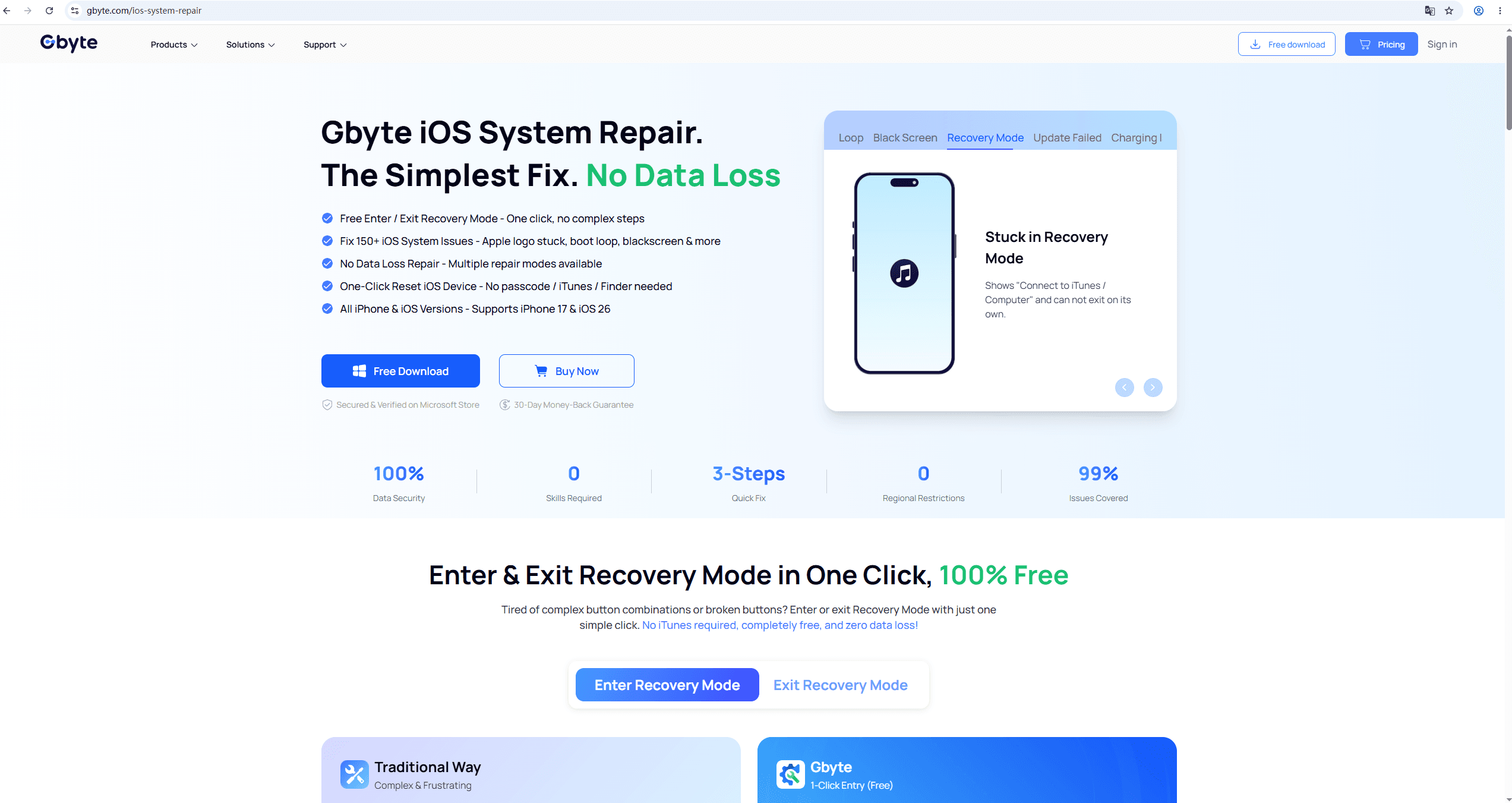
About this app
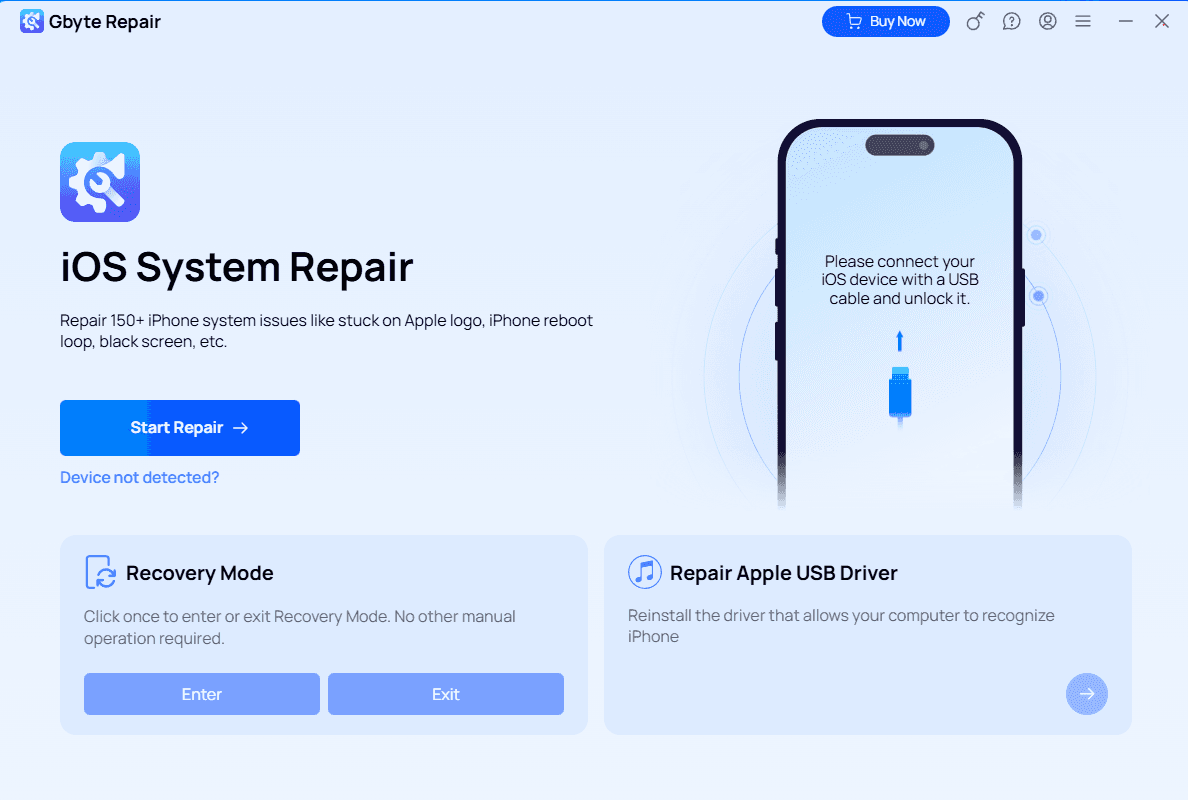
Gbyte iOS System Repair is a Windows and macOS tool that fixes over 150 iOS system issues, including stuck on Apple logo, boot loops, black screens, and recovery mode loops. It offers three repair modes: Standard Repair (no data loss), Deep Repair, and DFU Repair (for severe issues). The software supports all iPhone models up to iPhone 17 and iOS versions up to iOS 26. Key features include one-click enter/exit recovery mode (free), no technical skills required, and a 3-step process: connect, choose mode, and fix. It's trusted by over 1 million users with a 98.6% success rate and offers 24/7 support and a 30-day money-back guarantee.
Key features
- 1Free one-click enter/exit Recovery Mode — no iTunes, no button combos, no data loss
- 2Three repair modes: Standard (no data loss), Deep (full iOS reinstall), and DFU (extreme failures)
- 3Fixes 150+ iOS issues including stuck Apple logo, boot loop, black/white screen, and update failures
Target customer profile
Drawn from the product itself, not from a survey.
Demographic
Non-technical iPhone users
Pain points
Frustrated by complex repair processes and fear of data loss.
Primary needs
Simple, one-click solution to fix common iOS issues without technical knowledge.
Demographic
Busy professionals
Pain points
No time to visit repair shops and risk of losing important work data.
Primary needs
Quick, at-home repair that preserves data and saves time.
Demographic
Photographers and content creators
Pain points
Risk of losing valuable photos and videos due to iOS system failures.
Primary needs
Reliable repair that ensures no data loss, even in severe cases.
Scout Review
Written by AI from measured evidence, scored out of 100.
Gbyte Repair is a Windows/macOS tool that fixes 150+ iOS system issues across three modes — Standard (no data loss), Deep, and DFU — with a genuinely free one-click enter/exit recovery mode as the hook. The site is well-organized, the docs are real, and the 3-step flow is honest about what it does. Lighthouse desktop performance is 75/100 with a 1.2s LCP, and accessibility sits at 85/100 with real contrast and link-naming failures. Security is the soft spot: 7 of 13 headers, no HSTS, no CSP, no SOC 2 or ISO page, and trust is carried by an 'McAfee-certified' badge rather than an audit. The pricing page renders plan figures as '——', which is a real conversion problem. Growth is limited by a feature set that mirrors ReiBoot and Fixppo almost exactly. It works, it's polished enough, and it's not differentiated enough to stand out in its category.
Measure by measure
Usability
68Genuinely free recovery-mode toggle, a real 3-step flow, and a docs page with per-feature walkthroughs. Pricing page renders plan prices as '——', which is a real friction point.
Design
71Clean blue/white system with green accents, clear repair-mode cards, and a strong comparison table. Held back by placeholder-looking '0' stats and a dense hero feature list.
Speed
68Lighthouse desktop 75/100 with LCP 1.2s and CLS 0 — genuinely fast paint. TBT 512ms shows scripts blocking the main thread, so it's snappy but not clean.
Security
54HTTPS enforced with secure cookies, SPF, DMARC, and X-Content-Type-Options. No HSTS, CSP, frame protection, or Permissions-Policy; no SOC 2/ISO page found.
Accessibility
58Lighthouse a11y 85/100 with real failures: low contrast, unnamed links, malformed list markup. 13-language support is a genuine strength; no WCAG statement found.
Growth
58Real problem, real audience, real free hook (recovery mode). But the feature set is near-identical to ReiBoot and Fixppo — the wedge is thin in a crowded category.
Improvement areas
- Pricing page renders plan figures as '——' — publish real prices for monthly, annual, and lifetime tiers
- Security headers at 7/13 with no HSTS, CSP, or frame protection; no SOC 2/ISO page to back trust claims
- Lighthouse a11y failures: insufficient color contrast, links without discernible names, malformed list markup
Design & Usability
Gbyte Repair's site is competently built: a two-column hero with a bold headline, green accent on 'No Data Loss', and a right-side iPhone mockup. The three repair-mode cards (Standard, Deep, DFU) use colored badges and matching illustrations to communicate severity at a glance, and the comparison table against iTunes and repair shops is a smart conversion play. The problems are credibility and polish: the stats bar shows '0 Skills Required' and '0 Regional Restrictions', which read as placeholder copy rather than real metrics, and the hero feature list runs long enough to require scanning. Usability is stronger — the free one-click enter/exit recovery mode is genuinely free, the docs page walks through install, recovery mode, standard repair, deep repair, unlock, and transfer step by step, and the 3-step flow (connect, choose mode, fix) is honest. The real friction is the pricing page, where the monthly, annual, and lifetime plan figures render as '——' in the fetched content, leaving buyers without a number to anchor on.
Speed & Security
Speed is a mixed bag. Lighthouse desktop performance lands at 75/100 with an excellent LCP of 1.2s, zero cumulative layout shift, and a 465ms first contentful paint — the page paints fast. But total blocking time sits at 512ms, meaning scripts are hogging the main thread after the paint, which will show up as jank on slower machines. No published benchmarks or user lag complaints surfaced in the collected evidence. Security is the weaker half: HTTPS is enforced, secure cookies are set, and SPF, DMARC, X-Content-Type-Options, and Referrer-Policy are all present — that's 7 of 13 checklist points. Missing are HSTS, Content-Security-Policy, frame protection, and Permissions-Policy. The homepage leans on 'McAfee-certified, 100% malware-free' and 'Your data never leaves your device' as trust signals, but no SOC 2, ISO, pen-test report, security page, or bug bounty program was found. For a tool that asks users to plug in a bricked phone and download firmware, that's a thin compliance story.
Accessibility & Growth
Accessibility scores 85/100 on Lighthouse, which sounds strong until you read the failing audits: insufficient color contrast between background and foreground, links without discernible names, and list markup that uses <li> elements outside proper <ul>/<ol> parents. Those are real WCAG failures, not theoretical ones — a screen reader user will hit unnamed links on the homepage. On the plus side, the pricing page ships in 13 languages (English, Japanese, Spanish, French, Portuguese, German, Italian, Chinese, Russian, Korean, Dutch, Turkish, Polish, Swedish), which is a genuine internationalization effort, and the site is responsive. No accessibility statement or WCAG conformance claim was found. Growth is a judgement call on the idea: the problem is real and recurring — bricked iPhones, boot loops, data-loss fear — and the target customer (non-technical users who don't want a repair shop) is specific. The free recovery-mode toggle is a legitimate hook. But the category is crowded: ReiBoot and Fixppo offer near-identical feature sets, and nothing in Gbyte's own material explains why a user should pick it over either. The wedge is thin, and the 31-year-old domain is context, not a moat.
Conclusion
If your iPhone is stuck on the Apple logo and you want a one-click fix without a repair shop, Gbyte Repair will probably do the job — the free recovery-mode toggle alone is worth the download, and the 30-day money-back guarantee lowers the risk. But go in knowing the trade-offs: you're buying from a site that hides its prices behind '——', runs on 7 of 13 security headers, and offers a feature set you can get from ReiBoot or Fixppo. Compare the three on price and support before you commit, and check whether the free recovery-mode tool solves your problem before paying for anything. For a bricked device with no backup, the no-data-loss Standard mode is the right first move — just don't expect the site to tell you what it costs until you're further down the funnel.
Suggestions for improvement
- Publish actual prices on the pricing page — the '——' placeholders are a real conversion killer and erode trust before checkout.
- Add HSTS, Content-Security-Policy, and frame protection; publish a security page or SOC 2/ISO report to back the 'McAfee-certified' claim.
- Fix the Lighthouse a11y failures: color contrast, link names, and list markup — they're cheap wins that widen the addressable audience.
- Sharpen the differentiator vs ReiBoot and Fixppo: lead with the free recovery-mode toggle and no-data-loss Standard mode, not a generic feature list.
Alternatives comparison
Named competitors, point by point. Nobody paid to appear here or to be left out.
 Gbyte Repair Gbyte Repair |  Tenorshare ReiBoot Tenorshare ReiBoot |  iMyFone Fixppo iMyFone Fixppo | |
|---|---|---|---|
| Free recovery mode toggle | Yes — one-click enter/exit, 100% free | Yes — enter/exit recovery mode offered | Yes — enter/exit recovery mode offered |
| Repair modes available | Standard (no data loss), Deep, DFU | Standard and Advanced repair modes | Standard and Advanced modes (some erase data) |
| Data loss guarantee | Standard mode: no data loss; Deep/DFU may erase | Standard mode: no data loss | Standard mode: no data loss; Advanced may erase |
| Money-back guarantee | 30-day money-back guarantee | 30-day money-back guarantee | 30-day money-back guarantee |
| Supported devices / OS | All iPhone models up to iPhone 17, iOS up to 26 | All iPhone models, latest iOS versions | All iPhone models, latest iOS versions |
| Support availability | 24/7 chat & email support | 24/7 support with priority options | 24/7 support with priority options |
Tenorshare ReiBoot
A popular iOS system repair tool that can fix various issues without data loss. It offers similar features like entering/exiting recovery mode and repairing system problems.
iMyFone Fixppo
An iOS system recovery tool that fixes iPhone stuck on Apple logo, black screen, and other issues. It provides standard and advanced modes, though some may erase data.
Comparing options? See Gbyte Repair alternatives, scored side by side
More Productivity apps
View all Productivity
Qamarero
92An all-in-one hospitality software for restaurants and ba...

The Stack Newsletter
92A weekly newsletter delivering curated tech jobs, intervi...

EmbedMyReviews
92White-label reputation management software for agencies s...

StoryPad
92Privacy-first open source journal app with a continuous t...

Puzzly – B2B Lead Generation & Sales Intelligence Platform
92Puzzly is an all-in-one B2B lead generation platform that...

Notion
92All-in-one AI workspace for docs, projects, and knowledge...

Vibe Coding Agent Skills
92A free, open-source platform offering 110 AI agent skills...

CC Switch
91Open-source desktop app for switching AI coding providers...

username.md
90One verified handle for your online identity, readable by...

What the GIF
89Frame-perfect video-to-GIF maker that runs entirely in yo...

AuditCloser
89White-label website audits that close deals for digital a...

NudgeWin
89Automated quote follow-up for trades and service businesses.


A platform dedicated to providing unbiased reviews of newly launched applications, analyzing everything from their features to their full potential.
info@scoutforge.net© 2026 Scoutforge. All rights reserved.
