Cycling through all six. Tap any point to stop.
Measured on six things
Recast any video with your own people, pets or products: motion transfer and object swap from a reference clip.
Security
52HTTPS enforced with SPF and DMARC in place, but zero of the modern browser-hardening headers (HSTS, CSP, frame protection, Referrer-Policy, Permissions-Policy) and no SOC 2/ISO claim. Standard early-stage posture, nothing alarming, nothing reassuring.
Screenshots
1 / 1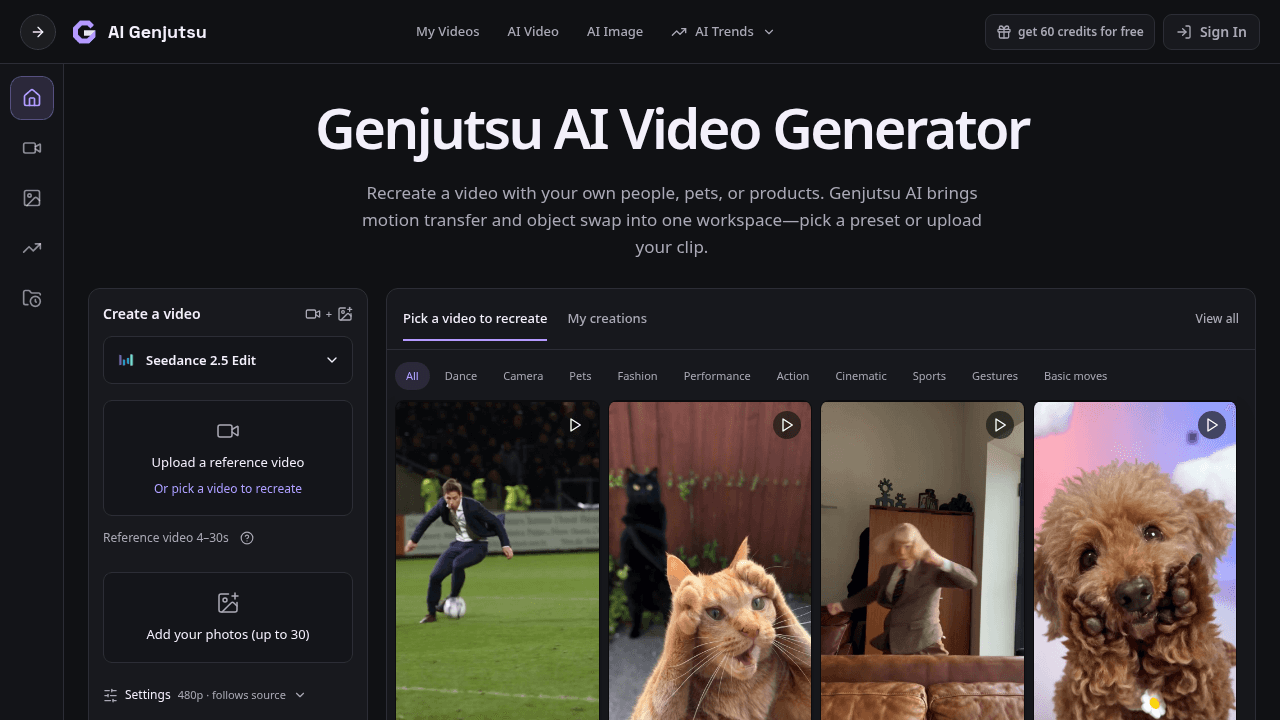
About this app
Genjutsu AI is a browser-based video generation workspace that specializes in motion transfer and object swap. It lets you recreate existing clips with your own cast—people, pets, or products—by using a reference video to guide the action and your photos to define the replacements. You can start from a community preset (like dance trends or cinematic scenes) or upload your own 4–30 second clip, add up to 30 reference photos, and then generate. The platform supports multiple underlying models (including Seedance and Kling) with controls for resolution, audio, and aspect ratio. It also includes an image generator, a trends library, and generation history. Pricing is credit-based, with a free tier offering 18 signup credits plus weekly check-in rewards, and paid plans ranging from $8.3/month to $49.9/month (billed yearly). While results are AI interpretations and may not preserve every detail, Genjutsu AI provides a focused, model-agnostic environment for creative video remixing and ra...
Key features
- 1Motion transfer and object swap from a 4-30s reference video plus up to 30 photos
- 2Multi-model support: Seedance 2.5, Kling 3.0, Wan 2.2, GPT Image 2, Nano Banana Pro and more
- 3Trends library of ~24 named presets (Dance, Pets, Camera) plus an image generator and generation history
- 4Credit-based pricing: 18 free signup credits, paid tiers from $8.3/mo to $49.9/mo yearly
Target customer profile
Drawn from the product itself, not from a survey.
Demographic
Content creators and social media influencers
Pain points
Struggling to create engaging, trend-driven videos quickly without expensive shoots or editing skills.
Primary needs
Fast, template-based motion transfer to insert themselves into viral trends and boost audience engagement.
Demographic
Small business owners and e-commerce sellers
Pain points
Lack of budget for professional product videos and difficulty showcasing products in dynamic scenes.
Primary needs
Object swap to place their products into appealing video contexts without hiring videographers.
Demographic
Digital marketers and creative agencies
Pain points
High costs and long turnaround for creating multiple video ad variations with different models or products.
Primary needs
Scalable, credit-based video generation with multi-model support to produce A/B test variations efficiently.
Scout Review
Written by AI from measured evidence, scored out of 100.
Genjutsu AI is a focused motion-transfer and object-swap workspace with a coherent dark UI, a genuinely useful example grid, and a create flow that puts everything in one panel. Pricing is transparent and credit-based, the FAQ is unusually detailed, and accessibility scores a perfect 100. The problems are execution gaps: a 13.6-second mobile LCP, a homepage that goes dark below the fold, missing security headers, and a sidebar dense enough to intimidate first-timers. The idea is differentiated; the polish isn't there yet.
Measure by measure
Usability
63Create flow is front and center with model picker, upload, photo adder and Generate all in one panel. Pricing page spells out credits per tier and the FAQ covers file formats and clip lengths. Sidebar density and unclear credit costs hold it back.
Design
58Cohesive dark theme with purple accent and a genuinely useful example grid that shows the motion-transfer use case. Undermined by a near-empty below-fold render, no footer or secondary CTAs, and a cramped low-contrast sidebar.
Speed
57Lighthouse mobile 65/100 with a brutal 13.6s LCP; desktop 57/100. CLS is a clean 0 and TBT is modest at 221ms, but the largest content takes over thirteen seconds to paint on mobile — that's a first-impression problem.
Security
52HTTPS enforced with SPF and DMARC in place, but zero of the modern browser-hardening headers (HSTS, CSP, frame protection, Referrer-Policy, Permissions-Policy) and no SOC 2/ISO claim. Standard early-stage posture, nothing alarming, nothing reassuring.
Accessibility
79Lighthouse accessibility audit scores a perfect 100/100, with one failing audit around visible text labels lacking matching accessible names. No WCAG statement or multi-language support found, but the automated baseline is genuinely strong.
Growth
62Motion transfer plus object swap in one model-agnostic workspace is a real, differentiated wedge against Higgsfield, Runway and Pika. Credit pricing from $8.3/mo targets creators and small sellers. Early stage, but the idea has room.
Improvement areas
- Mobile LCP of 13.6s — the single biggest first-impression problem
- Missing security headers (HSTS, CSP, frame protection) and no security/trust page
- Homepage ends below the fold with no footer, pricing teaser or secondary CTAs
- Sidebar packs too many controls into a narrow, low-contrast column
Design & Usability
The design language is coherent — dark canvas, purple accent, a hero that actually shows the product doing its thing with a grid of motion-transfer examples. The sidebar create flow is the smartest decision here: model picker, upload, photo adder, settings and Generate all visible without a scroll. But the page dies below the fold. No footer, no pricing teaser, no secondary CTAs, just black. Sidebar typography is cramped and low-contrast enough that 'Reference video 4-30s' reads like a whisper. Usability is solid where it counts — the pricing page is unusually honest about credit math, and the FAQ covers file formats and clip lengths per model. The gap is onboarding: nothing explains what a credit costs before you commit, and the dense sidebar assumes you already know what Seedance 2.5 Edit means.
Speed & Security
Speed is the weak spot. Lighthouse mobile scores 65/100 with a 13.6-second LCP — the hero takes longer to paint than most people will wait. Desktop is 57/100. The good news: CLS is a clean 0 and TBT is only 221ms, so once content arrives it's stable and responsive. The fix is asset weight and delivery, not architecture. Security is early-stage standard: HTTPS enforced, SPF and DMARC configured, but HSTS, CSP, frame protection, Referrer-Policy and Permissions-Policy are all missing — 4 of 12 checklist points. No SOC 2, ISO or pen-test claim anywhere. For a tool that asks users to upload personal photos and reference videos, the absence of a security page is a real gap, not just a checkbox. The refund policy and credit-expiry rules are at least spelled out clearly.
Accessibility & Growth
Accessibility is the surprise strength: Lighthouse scores a perfect 100/100, with one failing audit around visible text labels lacking matching accessible names. No WCAG statement or multi-language support, so the automated score is carrying the whole claim — but a 100 is a 100. Growth is the interesting question. Motion transfer plus object swap in one model-agnostic workspace is a genuine differentiator against Higgsfield Genjutsu, Runway and Pika, and the credit pricing from $8.3/mo is aimed squarely at creators and small e-commerce sellers who can't afford shoots. The trends library of ~24 named presets is a smart acquisition hook. The limit: the category is crowded and moving fast, and the product's own homepage doesn't yet make the case for why you'd pick it over Higgsfield's version of the same idea.
Conclusion
If you're a creator who wants to drop yourself or your product into a trending clip without a shoot, Genjutsu AI gives you the controls to try it for 18 free credits. Just don't judge it by the first thirteen seconds — the page takes that long to load, and the homepage stops trying right after the thumbnail grid. Fix the LCP, add a footer with pricing and a security page, and this becomes a serious contender in a crowded category.
Suggestions for improvement
- Cut mobile LCP from 13.6s — compress hero assets, lazy-load the thumbnail grid, and serve images through a CDN
- Add HSTS, CSP and frame protection headers; publish a short security page covering data handling for uploaded photos
- Extend the homepage below the fold with pricing, a security/trust section and a footer — the current render ends in black
- Show a credit estimate before Generate in the sidebar so users know what a run costs before they commit
Alternatives comparison
Named competitors, point by point. Nobody paid to appear here or to be left out.
 Genjutsu AI Genjutsu AI |  Higgsfield Genjutsu Higgsfield Genjutsu |  Runway ML Runway ML |  Pika Labs Pika Labs | |
|---|---|---|---|---|
| Motion transfer from a reference video | Yes — core feature, 4-30s reference clips | Yes — Genjutsu-branded motion transfer | Yes — motion transfer and video-to-video | Yes — video-to-video transformations |
| Object swap / product replacement | Yes — with replacement photos and custom prompt | Yes — object swap supported | Yes — via inpainting and video editing | Partial — via video editing tools |
| Multi-model support | Yes — Seedance, Kling, Wan, GPT Image, Nano Banana +13 | Yes — multiple underlying models | Proprietary Gen models primarily | Proprietary models |
| Free tier | 18 signup credits + weekly check-in rewards, watermarked | Limited free credits on signup | Free tier with limited credits | Free tier with limited generations |
| Entry paid price | $8.3/mo billed yearly (Starter) | Subscription tiers, higher entry point | Higher entry pricing for pro tools | Mid-tier subscription pricing |
Higgsfield Genjutsu
A similar AI video generation tool focused on motion transfer and object swap; Genjutsu AI is an independent service with different models and controls.
Runway ML
A comprehensive AI video editing platform with motion transfer and object swap capabilities, often used by professionals.
Pika Labs
AI video generation tool that allows text-to-video and video-to-video transformations, including motion transfer.
Comparing options? See Genjutsu AI alternatives, scored side by side
More Productivity apps
View all Productivity
Qamarero
92An all-in-one hospitality software for restaurants and ba...

The Stack Newsletter
92A weekly newsletter delivering curated tech jobs, intervi...

EmbedMyReviews
92White-label reputation management software for agencies s...

StoryPad
92Privacy-first open source journal app with a continuous t...

Puzzly – B2B Lead Generation & Sales Intelligence Platform
92Puzzly is an all-in-one B2B lead generation platform that...

Notion
92All-in-one AI workspace for docs, projects, and knowledge...

Vibe Coding Agent Skills
92A free, open-source platform offering 110 AI agent skills...

CC Switch
91Open-source desktop app for switching AI coding providers...

username.md
90One verified handle for your online identity, readable by...

What the GIF
89Frame-perfect video-to-GIF maker that runs entirely in yo...

AuditCloser
89White-label website audits that close deals for digital a...

NudgeWin
89Automated quote follow-up for trades and service businesses.


A platform dedicated to providing unbiased reviews of newly launched applications, analyzing everything from their features to their full potential.
info@scoutforge.net© 2026 Scoutforge. All rights reserved.
