

A platform dedicated to providing unbiased reviews of newly launched applications, analyzing everything from their features to their full potential.
info@scoutforge.net© 2026 Scoutforge. All rights reserved.
A platform dedicated to providing unbiased reviews of newly launched applications, analyzing everything from their features to their full potential.
info@scoutforge.net© 2026 Scoutforge. All rights reserved.
A platform dedicated to providing unbiased reviews of newly launched applications, analyzing everything from their features to their full potential.
info@scoutforge.net© 2026 Scoutforge. All rights reserved.
Cycling through all six. Tap any point to stop.
Measured on six things
Get any YouTube transcript as text: free web tool, Chrome extension with AI Q&A, and a REST API + MCP server.
HTTPS enforced with SPF and DMARC, but zero security headers (no HSTS, CSP, frame protection, Referrer-Policy) and no SOC 2, ISO, or pen-test claims. 4/13 on the header checklist — below category norm.
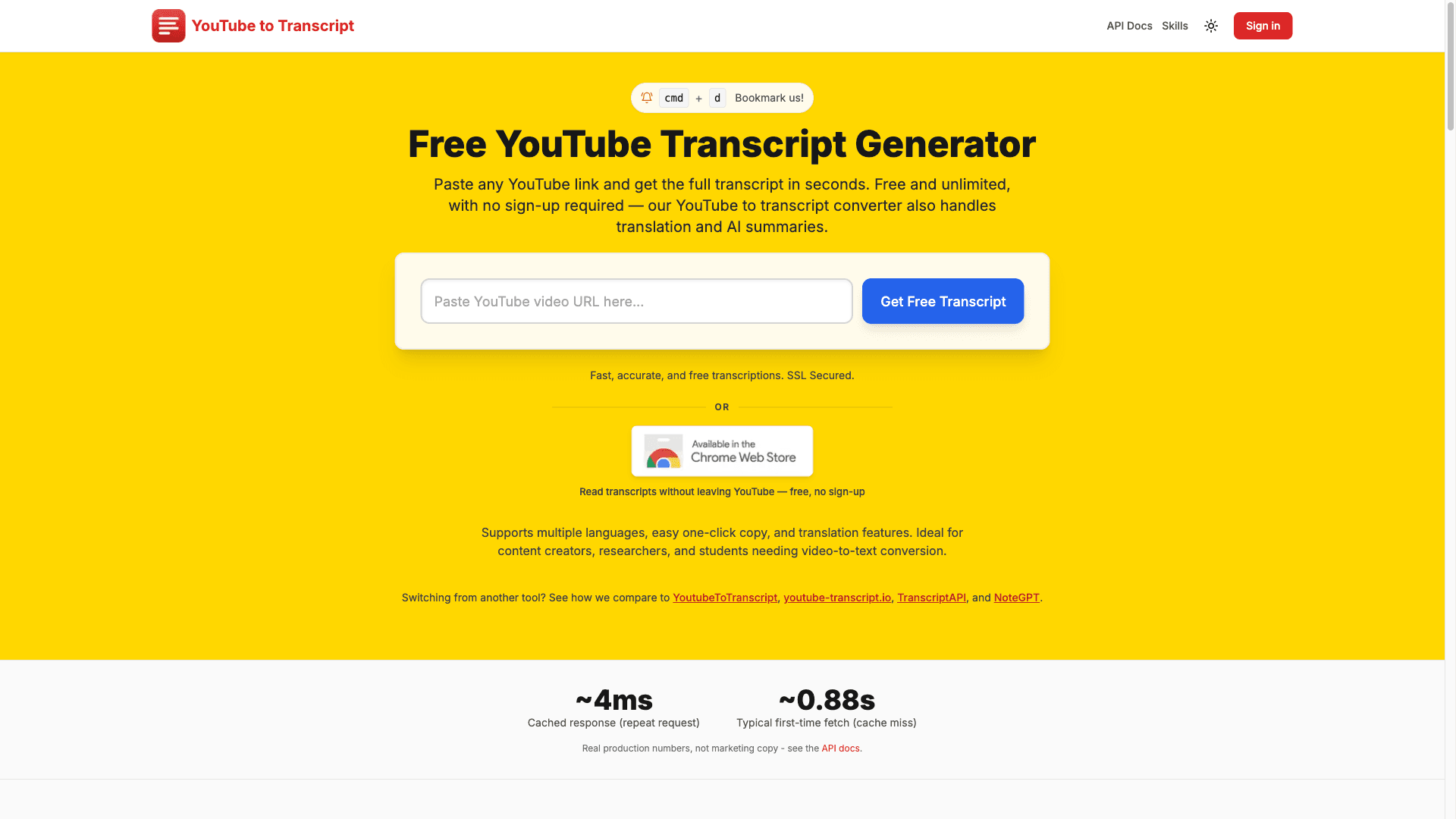
GetYouTubeTranscript turns any YouTube video into text, three ways. The free web tool needs no sign-up: paste a link and read, copy or download the full transcript, or translate and summarize it with AI. The Chrome extension shows the transcript next to the video on YouTube and lets you ask AI questions about it. Developers get a REST API for transcripts with title, channel, thumbnail and word count, plus YouTube search, playlist videos and channel lookups (no Google API key), a remote MCP server so Claude, ChatGPT and Cursor can read YouTube videos, and an n8n node. The web tool is free; the API has a free plan with 100 credits and paid plans from $5/month.
Drawn from the product itself, not from a survey.
Demographic
Content Creators & Podcasters
Pain points
Manual transcription is time-consuming and expensive.
Primary needs
Quickly convert videos to blog posts or social media content.
Demographic
Students & Researchers
Pain points
Difficulty searching and citing video content.
Primary needs
Easily extract text for notes and citations.
Demographic
Marketers & Professionals
Pain points
Analyzing competitor videos and webinars is inefficient.
Primary needs
Extract insights and quotes from video content.
Written by AI from measured evidence, scored out of 100.
GetYouTubeTranscript is a competent, multi-surface YouTube transcript tool: free no-signup web app, Chrome extension, REST API, MCP server, and n8n node. The API docs are genuinely good, the MCP integration is a smart bet on where AI assistants are heading, and the free tier (100 credits, no card) lowers the barrier to trying it. The problems are execution-level, not idea-level: mobile LCP of 7.7s, a near-empty security header set with no compliance claims, accessibility failures that a 91 Lighthouse score papers over, and a landing page that reads like SEO copy rather than a product. Against its listed alternatives it's on par on the web tool and ahead on the developer surface. It's a solid indie tool with a real wedge — it just needs to stop looking like a side project.
No-signup web tool, Chrome extension, MCP server, n8n node, and genuinely detailed API docs with curl examples. Onboarding to first transcript is fast; API docs are above indie-tool average.
Functional, text-heavy landing page with a clear hero and embedded tool, but generic branding and dense stacked sections. On par with indie transcript-tool peers, not ahead of them.
Lighthouse desktop 94 but mobile 74 with a brutal 7.7s LCP. CLS 0 and TBT 163ms are fine; the mobile largest-contentful-paint is the problem. Middle of the pack for the category.
HTTPS enforced with SPF and DMARC, but zero security headers (no HSTS, CSP, frame protection, Referrer-Policy) and no SOC 2, ISO, or pen-test claims. 4/13 on the header checklist — below category norm.
Lighthouse a11y 91/100 with real failures: contrast, heading order, color-only links, SVG alt text. No WCAG statement or language switcher. Solid automated score, unaddressed manual issues.
Real problem, real audience, and a genuine wedge: MCP server plus API plus n8n node for developers and AI workflows. But the free web-tool layer is interchangeable with four listed alternatives.
GetYouTubeTranscript's landing page is a long-scroll SEO machine: hero, embedded tool, feature grid, three audience sections, anonymous testimonials, FAQ. It works, but the branding is generic and the layout is dense — nothing here signals a designer touched it. Usability is where it earns its keep: the free web tool needs no sign-up, the Chrome extension puts transcripts next to the video, and the API docs are genuinely detailed with curl examples, endpoint tables, and an honest note that the playlist endpoint only returns the first page. The MCP server for Claude, ChatGPT, and Cursor plus the n8n node show the team understands where transcripts actually get used. Onboarding to first value is fast; the docs are above indie-tool average. The gap is polish — the product is more capable than its marketing page suggests.
Speed is a split verdict. Lighthouse desktop scores 94/100, but mobile drops to 74 with an LCP of 7.7 seconds — that's a real problem for a tool whose users are pasting links from their phones. CLS is 0 and TBT is 163ms, so the layout is stable and the main thread isn't choking; it's the largest-contentful-paint that's dragging mobile down. Security is the weakest dimension. HTTPS is enforced and SPF/DMARC are configured, but the header probe found no HSTS, no CSP, no frame protection, no X-Content-Type-Options, no Referrer-Policy, no Permissions-Policy, and no secure cookies — 4/13 on the checklist. There's no SOC 2, ISO, or pen-test claim anywhere, and no mention of 2FA or SSO for the dashboard. For a tool handling API keys and user transcripts, that's below what the category should expect.
Accessibility lands at 70: Lighthouse scores 91/100, but the failing audits are real — insufficient color contrast, non-sequential heading order, links distinguishable only by color, and SVG elements with an img role missing accessible text alternatives. There's no WCAG statement and no language switcher in the fetched content. Growth is a judgement on the idea, not the traction. The problem is real and large: turning YouTube video into text for creators, students, researchers, and marketers. The differentiator is concrete — a REST API with search, playlist, and channel endpoints, an MCP server so Claude/ChatGPT/Cursor can read videos, and an n8n community node. That's a developer-and-AI-workflow wedge the free web-tool competitors don't have. But the free web tool itself is interchangeable with YouTubeToTranscript, youtube-transcript.io, TranscriptAPI, and NoteGPT. The category has headroom; the question is whether the API layer is enough to escape the commodity floor.
Conclusion
If you need transcripts in a browser tab right now, the free tool does the job and the docs won't waste your time. If you're building something that needs YouTube text programmatically, the API plus MCP server is the reason to pick this over the four alternatives listed — that's the actual product. What would move this from solid to strong: fix the mobile LCP, add the standard security headers and a security page, address the contrast and heading-order failures, and give the landing page a designer's pass so it stops reading like a keyword dump. The bones are good. The finish isn't there yet.
Named competitors, point by point. Nobody paid to appear here or to be left out.
 GetYouTubeTranscript GetYouTubeTranscript | YouTubeToTranscript |  youtube-transcript.io youtube-transcript.io |  TranscriptAPI TranscriptAPI |  NoteGPT NoteGPT | |
|---|---|---|---|---|---|
| Free tier without sign-up | Yes — free web tool, no sign-up, unlimited standard transcripts | Yes — free web tool, no sign-up | Yes — free web tool, no sign-up | No — API-first, requires key/signup | Yes — free tier with sign-up for AI features |
| REST API for transcripts | Yes — /transcript, /search, /playlist, /resolve; free 100 credits, paid from $5/mo | Not a primary offering | Limited / not a primary offering | Yes — core product, API-first | Not a primary offering |
| MCP server for AI assistants (Claude/ChatGPT/Cursor) | Yes — remote MCP server with OAuth or API key | No | No | No | No — AI summaries in-app, not MCP |
| Chrome extension / in-page transcript | Yes — shows transcript beside the video, AI Q&A | No | No | No | Yes — browser extension available |
| AI summarization / translation | Yes — translate and summarize with AI on the web tool | Limited | Limited | No — raw transcripts only | Yes — core feature, AI summaries and chat |
| Automation integrations (n8n / Make / Zapier) | Yes — native n8n community node; HTTP steps for Make/Zapier | No | No | Via generic HTTP only | No |
YouTubeToTranscript
A similar tool for generating YouTube transcripts.
youtube-transcript.io
Online service to get transcripts from YouTube videos.
TranscriptAPI
API for fetching YouTube transcripts programmatically.
NoteGPT
AI-powered tool for summarizing YouTube videos and generating transcripts.
Comparing options? See GetYouTubeTranscript alternatives, scored side by side

An all-in-one hospitality software for restaurants and ba...

A weekly newsletter delivering curated tech jobs, intervi...

White-label reputation management software for agencies s...

Privacy-first open source journal app with a continuous t...

Puzzly is an all-in-one B2B lead generation platform that...

All-in-one AI workspace for docs, projects, and knowledge...

A free, open-source platform offering 110 AI agent skills...

Open-source desktop app for switching AI coding providers...

One verified handle for your online identity, readable by...

Frame-perfect video-to-GIF maker that runs entirely in yo...

White-label website audits that close deals for digital a...

Automated quote follow-up for trades and service businesses.
A platform dedicated to providing unbiased reviews of newly launched applications, analyzing everything from their features to their full potential.
info@scoutforge.net© 2026 Scoutforge. All rights reserved.
