Cycling through all six. Tap any point to stop.
Measured on six things
Free browser-based AI text cleaner removes hidden Unicode...
Design
30Clear two-pane cleaner above the fold, but broken glyph boxes, a mismatched 'Find Song Lyrics' badge, and a detector-evasion banner that contradicts the site's own copy drag the page down.
Screenshots
1 / 1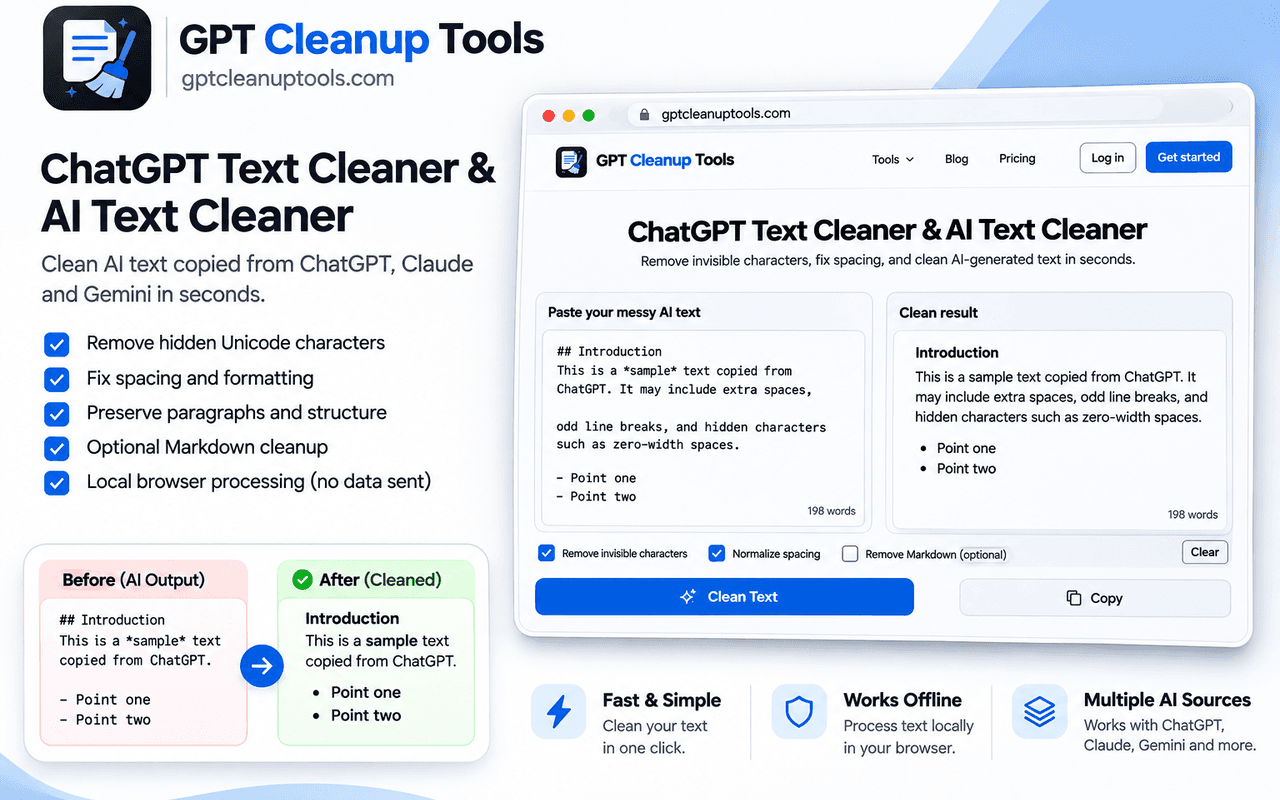
About this app
GPT Cleanup Tools is a free, browser-based suite built for the realities of AI-assisted writing. Its flagship ChatGPT AI Text Cleaner strips hidden Unicode characters — zero-width spaces, non-breaking spaces, byte-order marks, and soft hyphens — that quietly travel with text copied from ChatGPT, Claude, Gemini, and other LLMs. Beyond invisible characters, it normalizes curly quotes, em dashes, markdown remnants, and excess blank lines so text pastes predictably into Word, Google Docs, WordPress, Notion, and code editors. Everything runs client-side in JavaScript, meaning your content is never uploaded or stored. The platform bundles a growing toolbox: space and whitespace removers, format removers, invisible-character detectors, watermark detectors for ChatGPT and Claude, an AI detector, plus Turnitin and GPTZero checkers. A paid Pro humanizer routes text through Claude and GPT-4 to disrupt statistical patterns. It's honest about limits — cleaning removes technical fingerprints, not...
Key features
- 1Client-side ChatGPT AI Text Cleaner strips zero-width spaces, NBSPs, BOMs, and soft hyphens without uploading content.
- 2Normalizes curly quotes, em dashes, markdown remnants, and excess blank lines for predictable pasting.
- 3Broad free toolbox: space removers, format removers, invisible-character detectors, watermark detectors, and AI/Turnitin/GPTZero checkers.
Target customer profile
Drawn from the product itself, not from a survey.
Demographic
Students and academics submitting AI-assisted drafts
Pain points
Hidden characters break portals, inflate counts, and trip Turnitin/GPTZero
Primary needs
Clean, editor-safe text that pastes reliably into LMS portals
Demographic
Content creators and SEO marketers publishing AI drafts
Pain points
Markdown artifacts and invisible Unicode break CMS layouts and keyword parsing
Primary needs
Publish-ready, SEO-friendly plain text with consistent spacing
Demographic
Working professionals and enterprise teams
Pain points
Formatting glitches in corporate editors and compliance detectors like Copyleaks
Primary needs
Privacy-safe, client-side cleanup with no data uploads
Demographic
Developers and researchers handling AI or scraped text
Pain points
Zero-width spaces silently break code, JSON, CSV, and data pipelines
Primary needs
Syntax-preserving removal of invisible Unicode and stray control codes
Scout Review
Written by AI from measured evidence, scored out of 100.
GPT Cleanup Tools is a genuinely useful free utility wrapped in a homepage that undersells it. The core cleaner — stripping zero-width spaces, NBSPs, BOMs, and normalizing quotes and spacing — solves a real problem for anyone pasting LLM output into Word, WordPress, or a code editor, and doing it client-side is the right call for privacy. The tool grid is broad and the value proposition is clear above the fold. What holds it back is craft: broken glyphs, mismatched badges, contradictory marketing, no navigation, and a mobile experience that loads in eight seconds. None of that is fatal, and most of it is fixable in a weekend. The bones are good.
Measure by measure
Usability
58Paste-clean-copy is obvious and fast, but there's no real navigation, ~20 tool links and SEO text blocks bury the core task, and competing CTA pills interrupt reading.
Design
30Clear two-pane cleaner above the fold, but broken glyph boxes, a mismatched 'Find Song Lyrics' badge, and a detector-evasion banner that contradicts the site's own copy drag the page down.
Speed
46Desktop Lighthouse is a clean 100/100, but mobile scores 55/100 with an 8.0s LCP and 639ms TBT — the mobile experience is noticeably heavy.
Security
52HTTPS and HSTS are in place and client-side processing is a genuine privacy win, but there's no CSP, frame protection, Referrer-Policy, or DMARC, and no published audit.
Accessibility
70Lighthouse a11y scores 92/100, but unnamed buttons and insufficient contrast fail audits, and there's no accessibility statement or WCAG mention anywhere on the site.
Growth
62A real, specific problem — hidden Unicode breaking portals and code — with a free client-side wedge against paid rewriters and detectors. Broad audience, early stage.
Improvement areas
- Homepage craft: broken glyphs, mismatched badges, and a detector-evasion banner that contradicts the site's own copy.
- Mobile performance: 8.0s LCP and 639ms TBT make the tool slow for the students most likely to use it on a phone.
- Security hardening: no CSP, frame protection, Referrer-Policy, or DMARC; no published audit or security page.
Design & Usability
GPT Cleanup Tools leads with its strongest asset: a two-pane cleaner that makes paste-clean-copy obvious without scrolling. That clarity is undermined by a homepage that looks assembled from a template and never proofread — missing-glyph boxes in the headings, a 'Find Song Lyrics' badge on a formatting tool, and a black banner promising to 'pass 99% of detectors' that directly contradicts the site's own careful copy saying it isn't a bypass. Usability is decent where it counts: the core task is fast and the buttons are distinct. But the header offers no navigation, roughly twenty tool links and long SEO text blocks bury the cleaner, and competing CTA pills interrupt reading. The product works; the page around it needs an editor.
Speed & Security
Speed is a tale of two devices. Desktop Lighthouse is a perfect 100/100 with a 1.6s FCP, but mobile scores 55/100 with an 8.0s LCP and 639ms TBT — a heavy load for the students most likely to use it on a phone. Security is mid-tier: HTTPS and HSTS are enforced and the client-side JavaScript processing is a real privacy advantage, since text never leaves the browser. But the header probe found no CSP, no frame protection, no Referrer-Policy, and no DMARC, and there's no published audit, security page, or bug bounty. For a tool handling academic and professional text, the privacy story is good but the hardening story is thin.
Accessibility & Growth
Accessibility lands at a respectable 92/100 on Lighthouse, but the failing audits matter: buttons without accessible names and insufficient color contrast. There's no accessibility statement or WCAG mention, so the commitment is unstated. Growth is the most interesting dimension. The problem is real and specific — hidden Unicode from LLMs breaking portals, CMS layouts, and code — and the free, client-side wedge is a genuine differentiator against QuillBot (rewriting), GPTZero (detection), and Originality.ai (verification). The audience is broad to a fault, but the core insight holds. Domain registered October 2025, so it's early; the idea has room if execution tightens.
Conclusion
If you need to clean AI text right now, this does the job and doesn't upload your content anywhere — that alone puts it ahead of most of the category. But it's a product that needs a design pass and a copy edit before it can be recommended without caveats. Fix the broken glyphs, kill the '99% of detectors' banner that contradicts your own copy, add real navigation, and get mobile LCP under 2.5s. Do that and this becomes an easy recommendation. Leave it and it stays a useful tool with a homepage that looks like it was built by a search crawler.
Suggestions for improvement
- Fix the missing-glyph boxes in headings and body copy — they signal an unchecked build and undermine trust instantly.
- Remove or rewrite the 'pass 99% of detectors' banner; it contradicts the site's own copy and reads as an evasion claim.
- Add real header navigation so users can reach the ~20 tools without scrolling past SEO text blocks.
- Improve mobile performance: 8.0s LCP is too slow for the student-on-a-phone use case; defer non-critical scripts.
Alternatives comparison
Named competitors, point by point. Nobody paid to appear here or to be left out.
 GPT Cleanup Tools |  QuillBot |  GPTZero |  Originality.ai | |
|---|---|---|---|---|
| Core approach | Cleans hidden Unicode and formatting artifacts client-side | Paraphrases and rewrites wording | Detects and scores AI-generated text | AI and plagiarism detection for publishers |
| Free tier | Free cleaning tools; Pro humanizer is paid | Free tier with limits; premium paid | Limited free checks; paid plans | Paid, credit-based |
| Privacy / data handling | Client-side JS; content never uploaded | Text processed server-side | Text submitted for detection | Text submitted for detection |
| Primary use case | Fixing invisible characters and formatting before pasting | Rewording and paraphrasing drafts | Checking if text reads as AI-generated | Verifying originality and AI content at scale |
QuillBot
AI paraphrasing and rewriting tool that changes wording rather than just cleaning technical artifacts.
GPTZero
AI detection platform that scores text, often used alongside cleaners to verify results.
Originality.ai
AI and plagiarism detector aimed at publishers and SEO teams for content verification.
Comparing options? See GPT Cleanup Tools alternatives, scored side by side
More Productivity apps
View all Productivity
Puzzly – B2B Lead Generation & Sales Intelligence Platform
92Puzzly is an all-in-one B2B lead generation platform that...

Qamarero
92An all-in-one hospitality software for restaurants and ba...

EmbedMyReviews
92White-label reputation management software for agencies s...

StoryPad
92Privacy-first open source journal app with a continuous t...

Notion
92All-in-one AI workspace for docs, projects, and knowledge...

The Stack Newsletter
92A weekly newsletter delivering curated tech jobs, intervi...

Vibe Coding Agent Skills
92A free, open-source platform offering 110 AI agent skills...

QRBliss
91Branded QR codes with AI Brand Sync, 15 free dynamic code...

Gerty
91Private, local AI assistant for Mac that runs offline

Strukchad Property Management
91Property management for Kenyan letting agents: rent invoices raised every month, M-Pesa rent prompts to tenants, arrears tracking and landlord statements.

CC Switch
91Open-source desktop app for switching AI coding providers...

PitchWhip
90AI cold call scripts & direct dials from LinkedIn


A platform dedicated to providing unbiased reviews of newly launched applications, analyzing everything from their features to their full potential.
info@scoutforge.net© 2026 Scoutforge. All rights reserved.
