Cycling through all six. Tap any point to stop.
Measured on six things
Private desktop lab results tracker
Security
54Strong product-side story: ChaCha20-Poly1305 full-database encryption, PBKDF2 key derivation, no account, no cloud, no telemetry. But the site ships 4/12 security headers and publishes no SOC 2, ISO or pen-test evidence.
Screenshots
1 / 1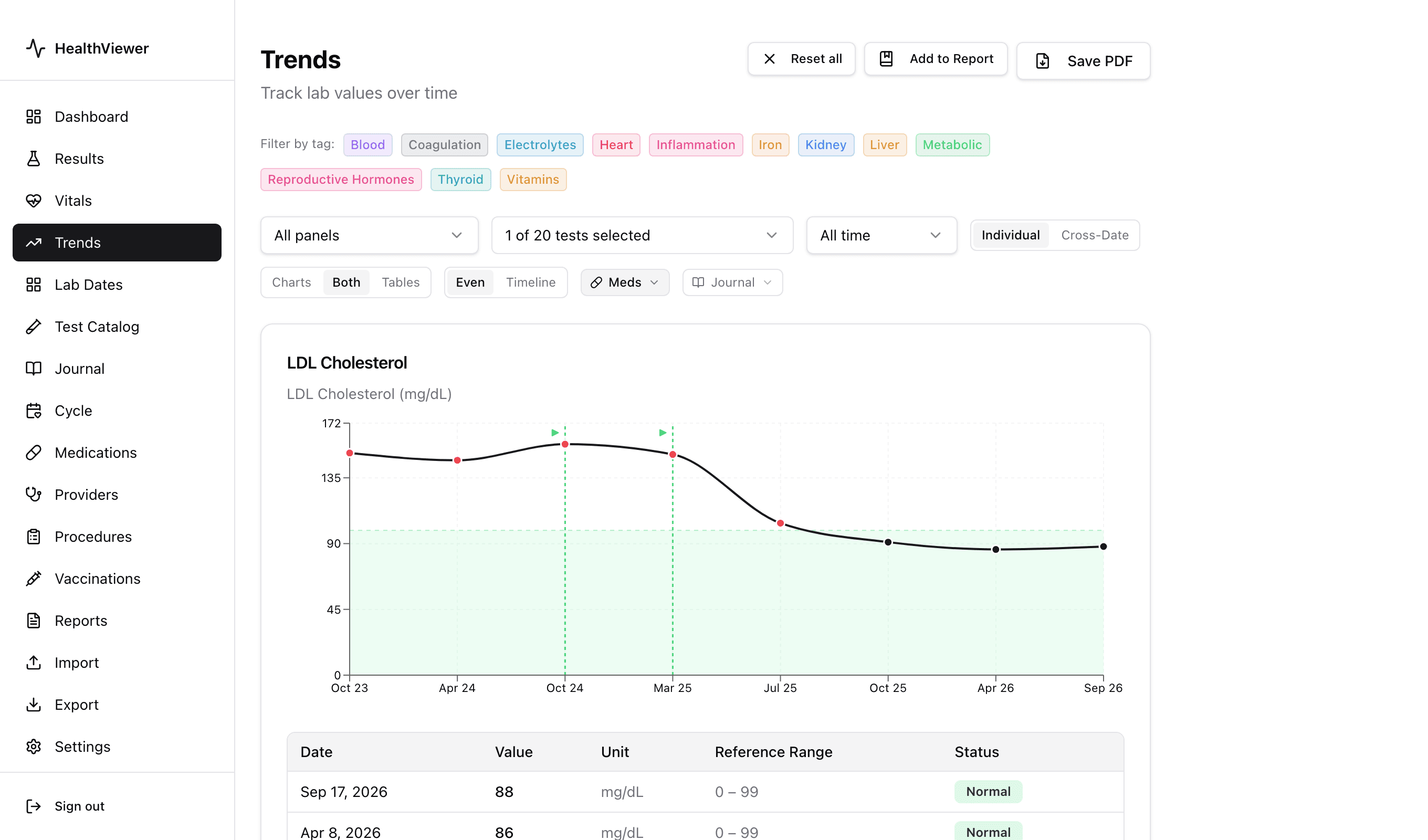
About this app
HealthViewer is a desktop app for Mac and Windows that turns scattered lab reports into one clear, chartable history. You import blood test results by uploading PDFs from Quest, LabCorp, Mayo, or other labs—scanned documents are processed locally—or by connecting directly to patient portals like Epic MyChart, Oracle Health, athenahealth, or eClinicalWorks where supported. CSV and health record exports work too. Once imported, every test is plotted on interactive trend charts, so you can see how LDL cholesterol, A1c, TSH, or vitamin D has moved across months or years, even across different labs and doctors. HealthViewer also tracks medications—dosage, start dates, notes—so you can line up treatment changes against lab shifts. The entire database is encrypted and it stays on your computer; there is no account, no cloud sync service, no subscription, and no telemetry.
Key features
- 1Import lab PDFs from Quest, LabCorp, Mayo and others; scanned documents processed locally with no upload.
- 2Interactive trend charts across months or years, across different labs and doctors, with reference-range shading.
- 3Medication tracking (dosage, start dates, notes) overlaid as markers against lab shifts.
- 4Full-database ChaCha20-Poly1305 encryption with a 256-bit PBKDF2-derived key; no account, no cloud, no telemetry.
- 5Export to PDF, CSV or JSON at any time; free view-only Android app opens the same encrypted file.
Target customer profile
Drawn from the product itself, not from a survey.
Demographic
Adults with chronic conditions (diabetes, thyroid, high cholesterol) managing frequent blood tests
Pain points
Results scattered across multiple patient portals; hard to see long-term trends; fear of cloud data breaches
Primary needs
One private place to track every lab value over time with clear charts and no subscription
Demographic
Health-optimizing biohackers and quantified-self enthusiasts who order their own labs
Pain points
Manually copying PDFs into spreadsheets; losing history when switching labs or providers
Primary needs
Automated import from PDFs and portals, interactive trend charts, full data export
Demographic
Caregivers and family members managing lab records for a parent or partner
Pain points
Juggling paper reports and portal logins; needing to share results with doctors quickly
Primary needs
Encrypted local storage, phone app for easy lookup at appointments, PDF export for sharing
Demographic
Privacy-conscious patients who refuse cloud health apps
Pain points
Distrust of apps that upload medical data; no offline options exist for lab tracking
Primary needs
Fully offline, encrypted database on their own computer with no account required
Scout Review
Written by AI from measured evidence, scored out of 100.
HealthViewer is a desktop lab-results tracker for Mac and Windows that imports PDFs from Quest, LabCorp, Mayo and others (scanned docs processed locally), connects to patient portals like Epic MyChart, Oracle Health, athenahealth and eClinicalWorks where supported, and plots every test on interactive trend charts with medication markers overlaid. The database is encrypted with ChaCha20-Poly1305 and stays on your machine — no account, no cloud sync, no telemetry, no subscription. A free view-only Android app opens the same encrypted file from a synced folder. At $24.99 one-time after a 7-day trial, it's priced against a category that mostly charges monthly. The site is fast and well-crafted; the app's information density and jargon are the main friction points.
Measure by measure
Usability
68Download CTA is unmissable, pricing sits right under it, platform cards split cleanly, and docs cover Getting Started, PDF formats and FAQ. Jargon-heavy controls and a flat sidebar keep it from feeling effortless for non-clinical users.
Design
71Judging the app UI via store material and site screenshots: restrained palette, semantic reference-range shading and medication markers make the core value legible. Homepage craft is strong. Flat 17-item sidebar and noisy Trends toolbar cost it.
Speed
88Lighthouse 100/100 on both mobile and desktop: LCP 901ms, CLS 0, TBT 0ms. A near-static marketing site that loads instantly and doesn't make you wait to read about your own bloodwork.
Security
54Strong product-side story: ChaCha20-Poly1305 full-database encryption, PBKDF2 key derivation, no account, no cloud, no telemetry. But the site ships 4/12 security headers and publishes no SOC 2, ISO or pen-test evidence.
Accessibility
78Lighthouse a11y 98/100 with one failing audit (no main landmark). Changelog shows deliberate a11y work and dark-mode fixes. No public WCAG statement or evidenced multi-language support, so it sits mid-band rather than top.
Growth
63Real, specific problem — scattered lab PDFs across portals — with a genuine wedge: cross-lab trend history, local encryption, one-time price. Category has headroom, but portals and Apple Health are free defaults that cap the ceiling.
Improvement areas
- Sidebar has ~17 flat items with no grouping; Trends toolbar uses unexplained jargon labels ('Even', 'Cross-Date', 'Meds').
- Marketing site ships only 4/12 security headers (no HSTS, CSP, frame protection) and publishes no SOC 2 or pen-test evidence.
- No public WCAG accessibility statement; single failing Lighthouse audit (missing main landmark); multi-language support not evidenced.
- iPhone app still 'coming soon'; phone app is view-only and requires manual file sync via cloud folder or cable.
Design & Usability
HealthViewer's interface earns its keep where it matters: the Trends chart shades reference ranges and drops dashed markers at medication starts, so the product's whole thesis is visible in one screenshot. The homepage backs that up with disciplined typography and a single green accent. Where it slips is density — a 17-item flat sidebar and a Trends toolbar stacking four segmented-control rows labeled 'Even', 'Cross-Date', 'Meds' and 'Journal' assume a user who already speaks the language. Usability is solid on the marketing side: the download button dominates the hero, pricing ($24.99 one-time, 7-day trial) sits directly beneath it, and platform cards split macOS, Windows and mobile cleanly. Docs cover Getting Started, supported PDF formats and an FAQ. The gap is in-product onboarding for non-clinical users.
Speed & Security
Speed is the standout measurement: Lighthouse 100/100 on both mobile and desktop, LCP 901ms, CLS 0, TBT 0ms. The marketing site is essentially static and never makes you wait. Security is a split verdict. On the product side the story is unusually strong for an indie desktop app — full-database ChaCha20-Poly1305 encryption, a 256-bit key derived via PBKDF2, no account, no cloud sync, no telemetry, and optional AI features that use your own API key and are off by default. On the web side it's thin: the HTTP probe found HTTPS enforced and SPF/DMARC present, but no HSTS, CSP, frame protection, X-Content-Type-Options, Referrer-Policy or Permissions-Policy — 4 of 12 checklist points. No SOC 2, ISO or pen-test evidence is published.
Accessibility & Growth
Accessibility lands at 98/100 in the Lighthouse audit with a single failing check — the page lacks a main landmark. The changelog shows the team actively working here (v0.1.68 lists accessibility improvements and dark-mode fixes), but there's no public WCAG statement and no evidenced multi-language support, so it sits mid-band rather than at the top. Growth is a judgement on the idea. The problem is real and specific: lab results scattered across Quest, LabCorp and multiple patient portals, with no cross-provider trend view. The target segments are named concretely — chronic-condition adults, self-ordering biohackers, caregivers, privacy refuseniks. The wedge is genuine: cross-lab history, local encryption, a one-time $24.99 price against subscription competitors. The ceiling is that MyChart and Apple Health are free defaults that already hold the data, and Epic keeps improving. Domain is ~0.5 years old and the Android app is live with iPhone 'coming soon' — early, but the idea has room.
Conclusion
If you're managing diabetes, thyroid or cholesterol and your history is spread across three portals and a shoebox of PDFs, HealthViewer solves a problem nothing free solves well: one chartable timeline across every lab and every doctor, on hardware you control. The one-time price is a genuine differentiator against subscription health apps, and the local-encryption architecture is the right call for medical data. Go in knowing the interface assumes some fluency — 'Cross-Date' and 'Meds' won't explain themselves — and that the phone app is view-only and Android-first. For the privacy-conscious patient with years of scattered results, that trade is worth making.
Suggestions for improvement
- Group the 17-item sidebar into sections (Data, Analysis, Records, Settings) so new users aren't scanning a flat list.
- Add tooltips or plain-language labels to 'Even', 'Cross-Date', 'Meds' and 'Journal' in the Trends toolbar.
- Publish a security page with a threat model and consider a bug bounty or third-party pen-test to back the encryption claims.
- Add HSTS, CSP and frame-protection headers to the marketing site — cheap wins for a privacy-first brand.
Alternatives comparison
Named competitors, point by point. Nobody paid to appear here or to be left out.
 HealthViewer | MyChart (Epic) | MyQuest |  Apple Health | |
|---|---|---|---|---|
| Cross-provider lab trend history | Yes — charts any test across labs and doctors over years | No — limited to one health system, minimal trend views | No — siloed to Quest tests only | Partial — stores some imported labs, limited trend tracking |
| Data storage model | Local encrypted .hvdb file; no cloud, no account | Provider-hosted cloud portal | Quest-hosted cloud portal | On-device and iCloud, within Apple's ecosystem |
| Pricing | $24.99 one-time after 7-day free trial; no subscription | Free (provided by health system) | Free portal access | Free with Apple device |
| Import sources | PDFs (Quest, LabCorp, Mayo, many others), CSV, C-CDA, portal connections | Automatic within connected health system only | Quest tests only | Some connected providers; limited lab import |
| Medication tracking alongside labs | Yes — dosage, start dates, notes overlaid on charts | Medication list, not correlated with lab trends | No | Medications tracked, not linked to lab trends |
| Mobile access | Free view-only Android app; iPhone coming soon | Full MyChart mobile app | MyQuest mobile app | Native iPhone app |
MyChart (Epic)
Patient portal used by many hospitals and clinics; shows lab results but only within one health system and with limited trend views.
MyQuest
Quest Diagnostics patient portal for viewing and downloading lab results; siloed to Quest tests and not a long-term tracker across providers.
Apple Health
iPhone health app that can store some lab results imported from connected providers, but trend tracking for blood tests is limited and data lives in Apple's ecosystem.
Comparing options? See HealthViewer alternatives, scored side by side
More Health & Wellness apps
View all Health & Wellness
StoryPad
92Privacy-first open source journal app with a continuous t...

Pushup RPG: Fitness Quest
90Pushup RPG is a camera-based push-up counter and fitness RPG for home workouts. Real push-ups and squats become attacks as you defeat 48 foes across 8 biomes, earn XP and loot, join guilds, and battle in live 40-second duels. Free on iOS and Android.

Gryper
89Workout tracker with muscle heatmaps and volume landmarks

Snapkin: Photo Calorie Counter
88Snapkin is a calorie tracker you use by photographing your plate.

Innermost
87An AI-powered emotional support app that acts as a person...

Cat Years to Human Years
86Free cat age calculator converting cat years to human years.

Mantra Meditation Timer
85A minimalist, distraction-free meditation timer for mantr...

TDEE Calculator
84Free TDEE calculator that estimates maintenance calories, weight loss targets, muscle gain calories, and macro recommendations based on your body stats and activity level.

FitLifeBud
84AI meal plans for your week, with one aisle-sorted shopping list

WellWired
84AI explained simply for older adults, with safety lessons...

TheBean.ai
84Adaptive AI personal trainer that evolves with your progr...

SayLift
84Voice workout log and calorie counter for iPhone


A platform dedicated to providing unbiased reviews of newly launched applications, analyzing everything from their features to their full potential.
info@scoutforge.net© 2026 Scoutforge. All rights reserved.
