

A platform dedicated to providing unbiased reviews of newly launched applications, analyzing everything from their features to their full potential.
info@scoutforge.net© 2026 Scoutforge. All rights reserved.
A platform dedicated to providing unbiased reviews of newly launched applications, analyzing everything from their features to their full potential.
info@scoutforge.net© 2026 Scoutforge. All rights reserved.
A platform dedicated to providing unbiased reviews of newly launched applications, analyzing everything from their features to their full potential.
info@scoutforge.net© 2026 Scoutforge. All rights reserved.
Cycling through all six. Tap any point to stop.
Measured on six things
Free, private time card calculator with overtime, breaks,...
HTTPS enforced with HSTS, and the tool runs client-side so data never leaves the browser. But only 4/12 security headers present: no CSP, no frame protection, no Referrer-Policy, and no SPF or DMARC records. No published audits or security page.
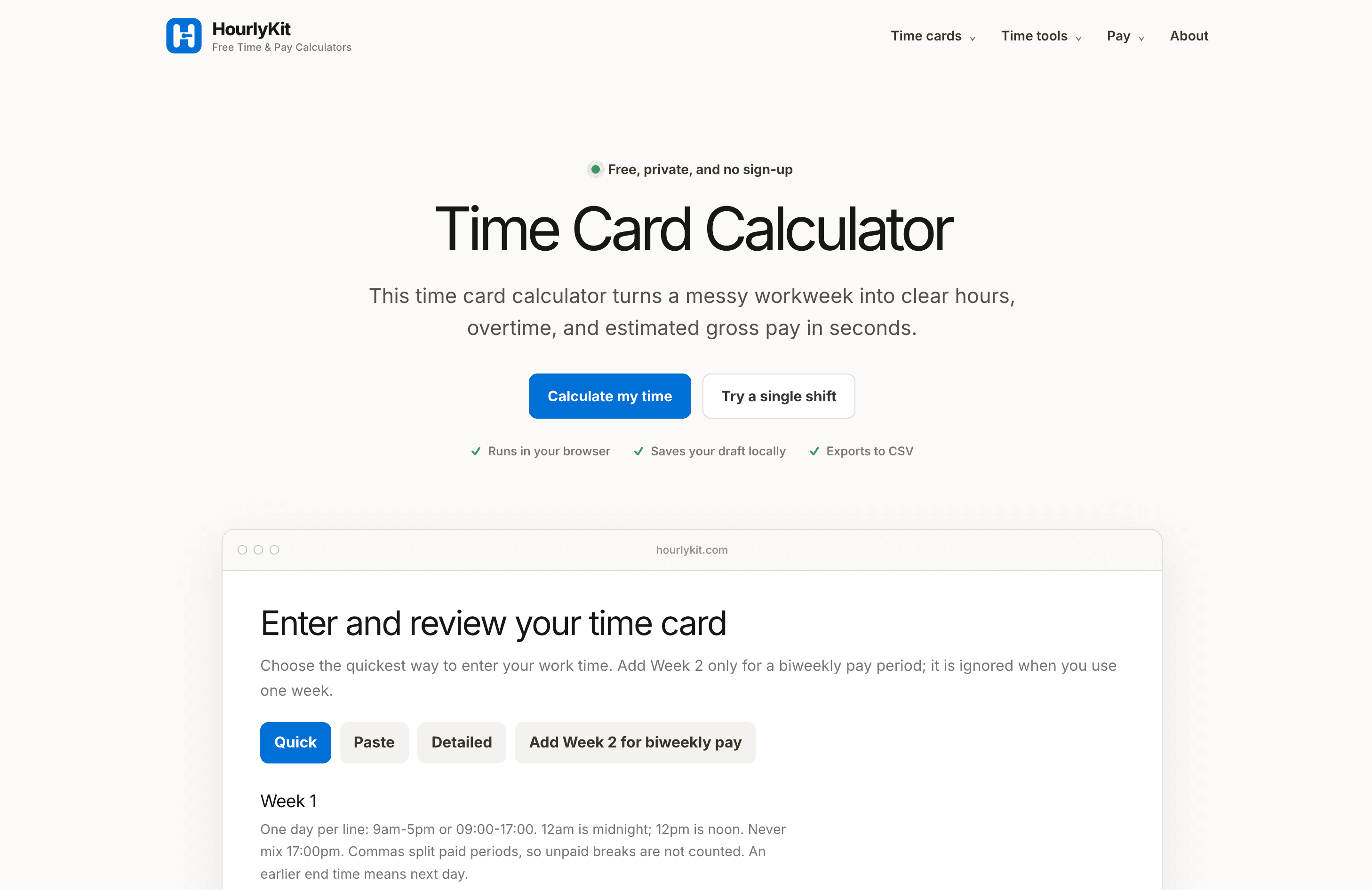
HourlyKit's Time Card Calculator is a free, browser-based tool that transforms messy workweeks into clear hours, overtime, and estimated gross pay. Designed for hourly employees, managers, and freelancers, it supports multiple entry methods—quick line-per-day, paste from any schedule, or a detailed editor for split shifts and overnight work. The calculator automatically handles unpaid breaks, combines split shifts, and applies overtime rules (weekly threshold and optional daily threshold) with a customizable multiplier. It shows its work by displaying applied daily entries, so you can review every assumption before relying on the total. Your data stays private—everything runs locally in your browser, and you can export, print, or copy your results. Whether you're checking a pay stub or organizing billable time, HourlyKit gives you a transparent, no-nonsense way to calculate your hours and pay.
Drawn from the product itself, not from a survey.
Demographic
Hourly employees
Pain points
Manually adding hours is time-consuming and error-prone, especially with breaks and overtime.
Primary needs
Quickly verify hours and estimated pay against pay stubs.
Demographic
Managers of small teams
Pain points
Reviewing schedules for overtime compliance and break accuracy is tedious.
Primary needs
Easily check proposed schedules for overtime and breaks.
Demographic
Freelancers
Pain points
Tracking billable hours across split shifts and multiple clients is disorganized.
Primary needs
Combine work blocks and export data for invoicing.
Written by AI from measured evidence, scored out of 100.
HourlyKit Time Card Calculator is a free, browser-based tool that turns a messy workweek into clear hours, overtime, and estimated gross pay — no account, no signup, no data leaving your machine. It supports three entry methods (quick line-per-day, paste from any schedule, detailed editor for split shifts and overnight work), automatically handles unpaid breaks, combines split shifts, and applies weekly and optional daily overtime rules with a customizable multiplier. The standout feature is transparency: it shows applied daily entries so you can review every assumption before trusting the total. The landing page embeds the live calculator in the hero, which is the right call. Speed is excellent (Lighthouse 98 mobile, 100 desktop). Accessibility is strong (96/100) with one contrast issue. Security is the weak spot — only 4/12 headers present, no CSP, no DMARC — though the client-side architecture is genuinely privacy-respecting. Growth is capped by the free, no-account model: a real problem, a real wedge, but no retention loop and no moat. It's a well-built utility that does one thing honestly and well.
No signup, no account, calculator works on first load. Three entry modes with inline examples ('Try a 9-5 week') cut the learning curve. Applied daily entries give real feedback. No docs or help center beyond the page itself.
Clean, calm landing page with the calculator live in the hero — no signup wall, no stock-photo fluff. Numbered sections and thin rules keep it scannable. Dense input block and a ghosted secondary CTA drag it below the best in class.
Lighthouse mobile 98/100 with LCP 2.1s, CLS 0, TBT 19ms; desktop a perfect 100/100. FCP at 901ms. For a page that ships a live interactive calculator, that's genuinely fast — no heavy SPA framework tax visible.
HTTPS enforced with HSTS, and the tool runs client-side so data never leaves the browser. But only 4/12 security headers present: no CSP, no frame protection, no Referrer-Policy, and no SPF or DMARC records. No published audits or security page.
Lighthouse accessibility 96/100 — strong baseline. One failing audit: insufficient color contrast on background/foreground pairs. No a11y statement, no multi-language support, and the audit was desktop-only with no responsive breakpoints confirmed.
Real problem, specific audience (hourly workers verifying pay stubs), and a genuine wedge: it shows applied entries instead of hiding the math. But it's a free single-purpose tool with no account, no retention loop, and no moat against a spreadsheet.
HourlyKit's landing page does the one thing most SaaS landing pages are too scared to do: it puts the actual product in the hero. The time card calculator is live, interactive, and usable before you scroll — no 'Book a demo', no email gate, no fake screenshot. The visual language is calm and disciplined: light blue numbered circles, thin horizontal rules, left-aligned bold headings against right-aligned body copy. Three entry modes (Quick, Paste, Detailed) are tabbed and explained with inline examples like 'Try a 9-5 week', which is exactly how you reduce first-time-user paralysis. The weak spots are real but minor: the secondary 'Try a single shift' button is nearly invisible next to the primary blue CTA, and the calculator form itself crams a dozen small inputs and checkboxes into one dense block that reads as visual noise. The results table and 'Applied daily entries' section sit directly below the inputs, so feedback is immediate. There's no help center or docs beyond the page, which is fine for a tool this focused but leaves edge cases (overnight shifts, daily OT rules) to be figured out by trial.
Speed is where HourlyKit genuinely shines. Lighthouse mobile scores 98/100 with an LCP of 2.1s, CLS of 0, TBT of 19ms, and FCP of 901ms; desktop hits a perfect 100/100. For a page that ships a fully interactive calculator with live-updating results tables, that's an impressive result — no heavy SPA framework tax, no render-blocking bloat. Security is a more mixed picture. The good news: HTTPS is enforced with HSTS, and the tool's architecture is genuinely privacy-friendly — everything runs client-side in the browser, drafts are saved locally, and the site explicitly states employee name and pay period fields are never used in calculation or saved. The bad news: only 4 of 12 standard security headers are present. There's no Content-Security-Policy, no X-Frame-Options or frame-ancestors, no X-Content-Type-Options, no Referrer-Policy, and no Permissions-Policy. DNS records show no SPF and no DMARC, which matters less for a tool with no email, but it's still a gap. No published SOC 2, ISO, or pen-test results — expected for a free indie tool, but it caps the score.
Accessibility lands at a strong 96/100 on the Lighthouse audit, with a single failing check: insufficient color contrast between background and foreground colors. That's the one issue a sighted user notices immediately, and it's worth fixing — light blue accents on white backgrounds are the likely culprit. Beyond the automated score, there's no accessibility statement, no documented keyboard navigation support, no multi-language options, and the audit was desktop-only with no responsive breakpoints confirmed, so mobile screen-reader behavior is unverified. On growth: the idea itself is sound. Hourly workers, small-team managers, and freelancers all have a real, recurring need to verify hours and estimated pay, and the wedge is specific — HourlyKit shows its work by displaying applied daily entries, so you can audit the calculation instead of trusting a black-box total. That's a genuine differentiator against Clockify, Toggl Track, and Harvest, all of which are account-based trackers, not instant calculators. The problem is the ceiling. It's a free, no-signup, no-account, no-data-stored tool. There's no retention loop, no network effect, no accumulating data advantage, and no obvious path to monetization. It's a beautifully executed utility that solves a real problem once and then has no reason to see you again.
Conclusion
If you're an hourly worker who wants to double-check a pay stub, a manager sanity-checking a proposed schedule for overtime, or a freelancer totaling split shifts before an invoice, HourlyKit does the job in under a minute with zero friction. It won't replace your payroll system, and it explicitly says so. It won't track clients or generate invoices, and it says that too. What it will do is show you exactly how it arrived at its number, which is more than most tools in this space bother to do. The gaps are fixable: tighten the security headers, fix the contrast issue, add a short help section for edge cases like overnight shifts and daily OT rules. None of those are hard. The harder question is whether a free, no-account calculator can ever become more than a one-time visit — and right now, nothing in the product answers that.
Named competitors, point by point. Nobody paid to appear here or to be left out.
 HourlyKit Time Card Calculator HourlyKit Time Card Calculator |  Clockify Clockify |  Toggl Track Toggl Track |  Harvest Harvest | |
|---|---|---|---|---|
| Pricing model | Free, no account required | Free tier; paid plans from ~$3.99/user/mo | Free tier; paid plans from ~$9/user/mo | Paid only; from ~$12/user/mo |
| Account required | No — works instantly in browser | Yes — signup required to track | Yes — signup required to track | Yes — signup required |
| Overtime calculation | Weekly + optional daily threshold, custom multiplier | Overtime rules on paid plans | Limited; not a core feature | Not a core feature |
| Data privacy / storage | Client-side only; nothing leaves browser | Cloud-stored; account data on servers | Cloud-stored; account data on servers | Cloud-stored; account data on servers |
| Invoicing / client management | No — explicitly not supported | Yes — invoicing on paid plans | Yes — via integrations | Yes — core feature |
| Export options | CSV, print, copy summary | CSV, PDF, Excel, API | CSV, PDF, API | CSV, PDF, API |
Clockify
Time tracking software with timesheet and reporting features.
Toggl Track
Simple time tracking tool for freelancers and teams.
Harvest
Time tracking and invoicing for freelancers and small teams.
Comparing options? See HourlyKit Time Card Calculator alternatives, scored side by side

An all-in-one hospitality software for restaurants and ba...

A weekly newsletter delivering curated tech jobs, intervi...

White-label reputation management software for agencies s...

Privacy-first open source journal app with a continuous t...

Puzzly is an all-in-one B2B lead generation platform that...

All-in-one AI workspace for docs, projects, and knowledge...

A free, open-source platform offering 110 AI agent skills...

Open-source desktop app for switching AI coding providers...

One verified handle for your online identity, readable by...

Frame-perfect video-to-GIF maker that runs entirely in yo...

White-label website audits that close deals for digital a...

Automated quote follow-up for trades and service businesses.
A platform dedicated to providing unbiased reviews of newly launched applications, analyzing everything from their features to their full potential.
info@scoutforge.net© 2026 Scoutforge. All rights reserved.
