Cycling through all six. Tap any point to stop.
Measured on six things
Catch a thought without leaving what you are doing. Notes, checklists and a little companion in your Mac's notch. $12 once.
Security
41HTTPS enforced and local-first storage with no account or analytics is a real privacy win. But the header probe found 3/12 checklist items — no HSTS, CSP, frame protection or DMARC — and no published audits.
Screenshots
1 / 3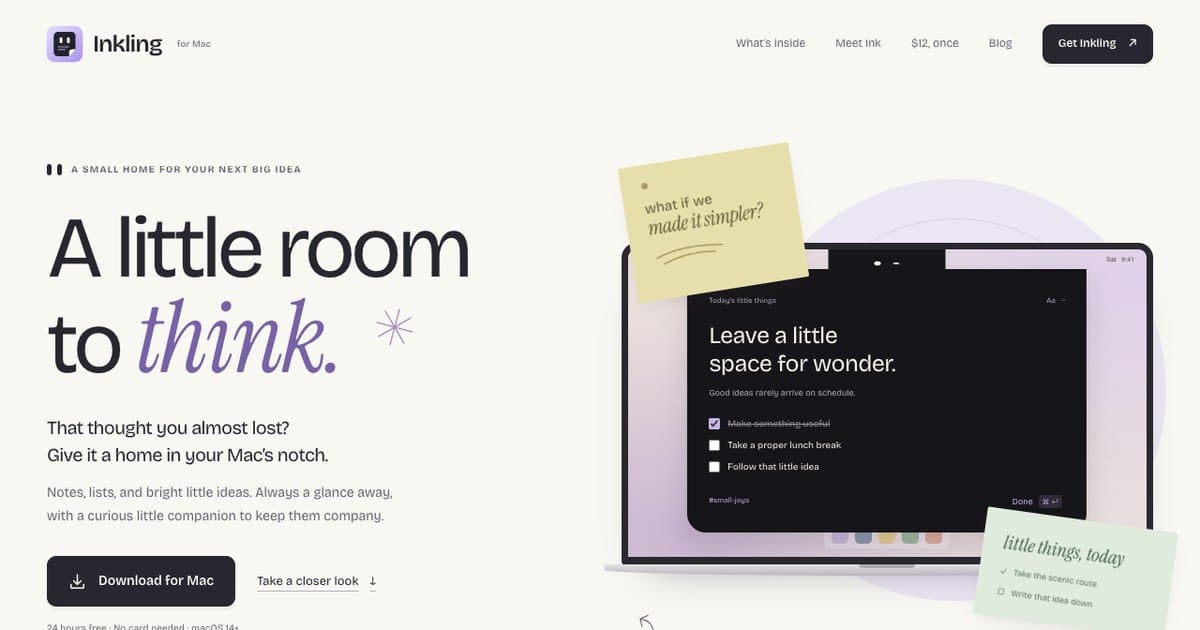
About this app
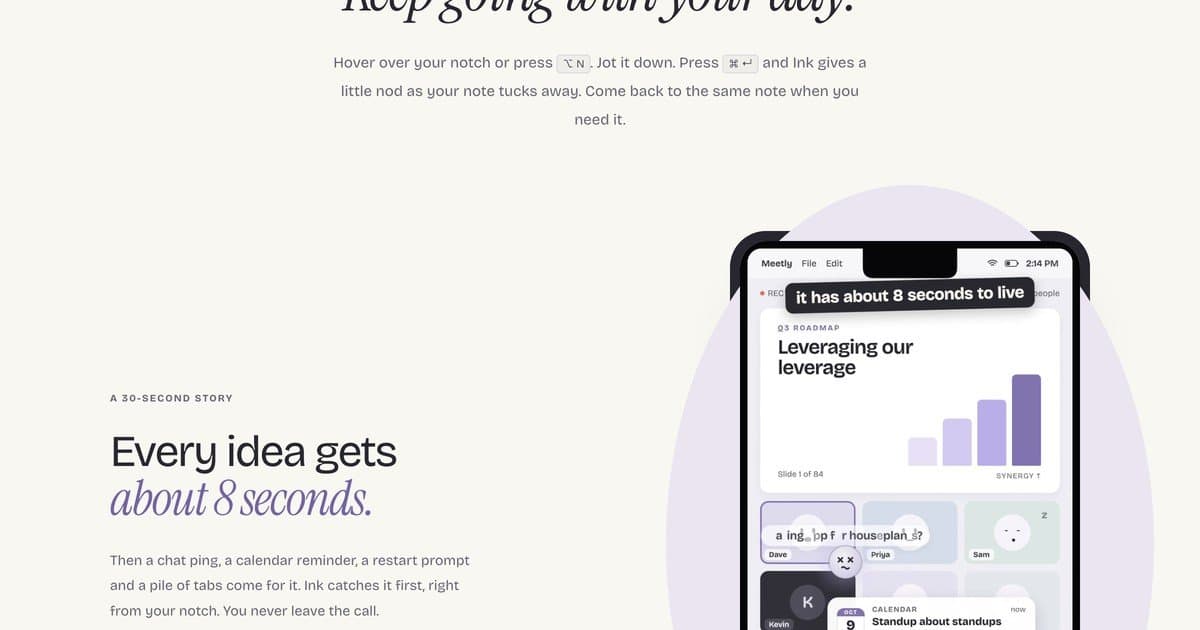
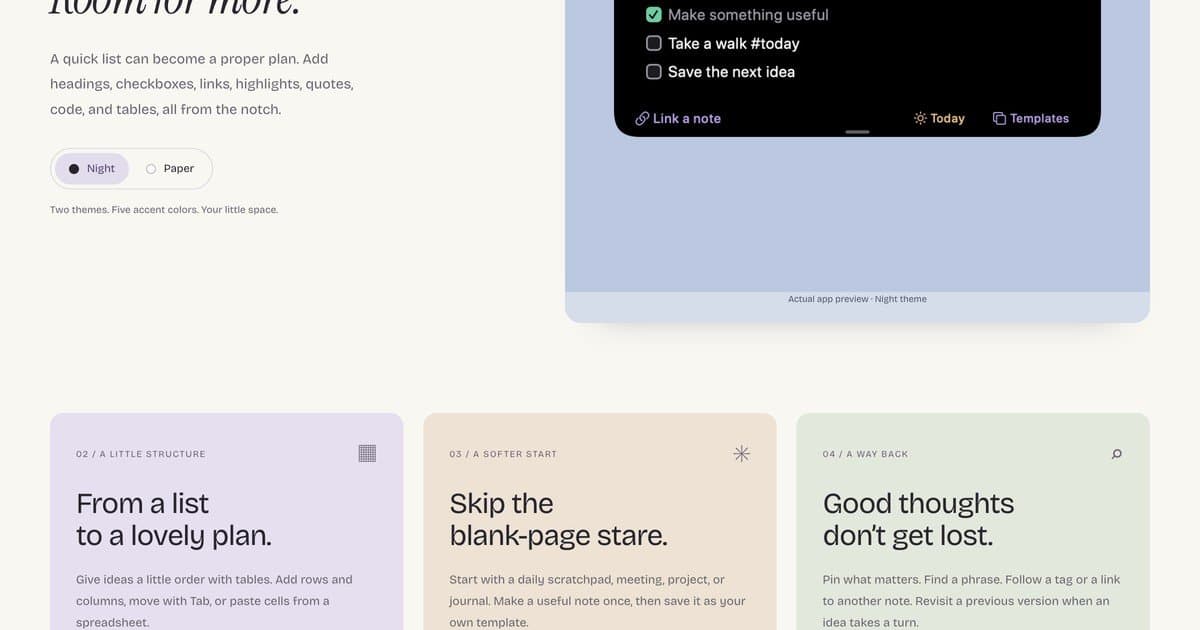
Inkling is a native notes app that lives in your MacBook's notch. Hover the notch or press Option-N, jot the thought down, and Command-Return tucks it away. A small companion called Ink gives a nod. Notes, checklists and tables stay on your Mac, with optional iCloud sync. $12 once, with a 24-hour free trial. Use it on up to 3 Macs.
Key features
- 1Notch-native capture: hover the notch or press Option-N, save with Command-Return.
- 2Local-first notes with optional private iCloud sync, no account, no analytics.
- 3Rich notes: headings, checkboxes, links, tables, templates, tags, version history.
- 4Import/export Markdown, RTF and PDF; daily local backups.
- 5$12 one-time licence, 24-hour free trial, up to 3 Macs, free updates.
Target customer profile
Drawn from the product itself, not from a survey.
Scout Review
Written by AI from measured evidence, scored out of 100.
Inkling is a notch-native Mac notes app with a genuinely charming pitch: hover the notch or hit Option-N, jot the thought, Command-Return and a little character named Ink nods as it tucks away. The site is well designed and fast, the FAQ is honest, and the $12 one-time price with a 24-hour trial is refreshing in a subscription-saturated category. Local-first storage with optional private iCloud sync and no account is a real privacy strength. The weaknesses are concrete: security headers are largely absent (3/12 checklist items, no CSP or HSTS), accessibility fails contrast and touch-target checks despite a 90 score, and the design has small-text and consistency nits. Growth is capped by a crowded field where Apple Notes is free, but the notch wedge is specific enough to matter.
Measure by measure
Usability
64Clear download CTA, honest FAQ covering virtual notch, shortcuts and trial terms, and Markdown/RTF/PDF export. Secondary link is low contrast and there's no live demo, only screenshots.
Design
71Cohesive, calm visual identity with custom notch illustrations and disciplined whitespace. Held back by tiny feature-card text and inconsistent illustration styles across the three cards.
Speed
70Desktop Lighthouse 94/100 and mobile 85/100 with near-zero CLS (0.003) and TBT 38ms. Mobile LCP of 3.6s is the one real drag on an otherwise snappy static site.
Security
41HTTPS enforced and local-first storage with no account or analytics is a real privacy win. But the header probe found 3/12 checklist items — no HSTS, CSP, frame protection or DMARC — and no published audits.
Accessibility
68Lighthouse 90/100 with solid structure, but three real failures: insufficient contrast, links distinguishable only by color, and undersized touch targets. No WCAG statement or a11y docs published.
Growth
58Real, specific wedge: notch-native capture via Option-N and a $12 one-time price in a subscription-heavy category. Crowded field (Apple Notes is free) caps how far it scales.
Improvement areas
- Security headers: only 3/12 checks pass — add HSTS, CSP, frame protection, DMARC.
- Accessibility: fix contrast, color-only links and touch targets; publish a WCAG statement.
- Design polish: enlarge feature-card text and unify illustration styles.
- Add a live demo or short video of the notch interaction above the fold.
Design & Usability
Inkling's site is a genuinely well-crafted piece of marketing: a soft palette, a big serif headline with a purple 'think.', and custom illustrations that show the notch interaction without a single video. The visual audit called it 'good' and the strengths are real — consistent rhythm, generous whitespace, a pricing card that states $12 once without apology. The cracks are in the details: feature-card body text is small enough to squint at, the three pastel cards each use a slightly different illustration style, and the mid-page mobile mockup is a dense pile of overlapping UI that fights the airy layout around it. Usability is solid where it counts — a clear 'Download for Mac' button, a scannable nav, and an FAQ that pre-answers the obvious objections (virtual notch on non-notch Macs, Option-N and Command-Return shortcuts, what happens after the trial). The secondary 'Take a closer look' link is low-contrast enough to miss, and there's no live demo, only screenshots. Competent, above average, not flawless.
Speed & Security
Speed is the strongest measured dimension. Desktop Lighthouse lands at 94/100 and mobile at 85/100, with a CLS of 0.003 and TBT of 38ms — this is a lean, static-feeling site that doesn't make you wait. The one blemish is mobile LCP at 3.6s, which is slow enough to notice on a phone. Security is the weak spot. HTTPS is enforced and the product's privacy posture is genuinely good — notes stay local, no Inkling account, no analytics, optional sync through your own iCloud — but the HTTP probe found only 3 of 12 checklist items: no HSTS, no CSP, no frame protection, no X-Content-Type-Options, no Referrer-Policy, no Permissions-Policy, and SPF without DMARC. There's no security page, no SOC 2 or ISO claim, no bug bounty. For a small indie Mac app that's not unusual, but it's clearly behind what a security-conscious buyer would want to see.
Accessibility & Growth
Accessibility scores 90/100 on Lighthouse, which sounds better than it is: the audit still flags insufficient color contrast, links distinguishable only by color, and touch targets too small or tightly spaced. There's no WCAG statement, no accessibility documentation, and the site is English-only. The structure is sound and keyboard users can navigate, but the contrast failures are the kind that actually block low-vision readers. Growth is a judgement on the idea, not the traction. The wedge is specific and real: capture a thought from the Mac's notch with Option-N, save with Command-Return, pay $12 once instead of a subscription. That's a genuine differentiator against Bear, Craft and Obsidian, and the companion character 'Ink' adds personality most note apps lack. The limit is the category — Apple Notes is free and already on every Mac, and the notch is a narrow surface. It's a well-aimed niche product, not a category-defining one.
Conclusion
If you live on a Mac, lose thoughts between calls, and resent paying monthly to store three sentences, Inkling is a sensible $12 gamble — the trial costs nothing and your notes stay yours even if you don't buy. If you need sync across devices beyond your own iCloud, deep collaboration, or enterprise-grade security documentation, look elsewhere. It's a small, well-made tool with a clear point of view, and that's more than most note apps can claim.
Suggestions for improvement
- Add HSTS, CSP, X-Content-Type-Options and a Referrer-Policy — the probe found only 3 of 12 header checks passing.
- Fix the contrast failures and color-only links flagged by Lighthouse; publish a short accessibility statement.
- Bump feature-card body text and unify the three illustration styles for visual consistency.
- Add a short live demo or GIF of the notch interaction so visitors can feel it before downloading.
Alternatives comparison
Named competitors, point by point. Nobody paid to appear here or to be left out.
 Inkling Inkling |  | |
|---|---|---|
| Pricing model | $12 one-time, 24-hour free trial, up to 3 Macs | Not provided in app details |
| Notch-native capture | Yes — hover notch or Option-N, save with Command-Return | Not provided in app details |
| Data storage & sync | Local-first, optional private iCloud sync, no account | Not provided in app details |
| Export formats | Markdown, rich text, PDF; Markdown import | Not provided in app details |
Comparing options? See Inkling alternatives, scored side by side
More Productivity apps
View all Productivity
Qamarero
92An all-in-one hospitality software for restaurants and ba...

The Stack Newsletter
92A weekly newsletter delivering curated tech jobs, intervi...

EmbedMyReviews
92White-label reputation management software for agencies s...

StoryPad
92Privacy-first open source journal app with a continuous t...

Puzzly – B2B Lead Generation & Sales Intelligence Platform
92Puzzly is an all-in-one B2B lead generation platform that...

Notion
92All-in-one AI workspace for docs, projects, and knowledge...

Vibe Coding Agent Skills
92A free, open-source platform offering 110 AI agent skills...

CC Switch
91Open-source desktop app for switching AI coding providers...

username.md
90One verified handle for your online identity, readable by...

What the GIF
89Frame-perfect video-to-GIF maker that runs entirely in yo...

AuditCloser
89White-label website audits that close deals for digital a...

NudgeWin
89Automated quote follow-up for trades and service businesses.


A platform dedicated to providing unbiased reviews of newly launched applications, analyzing everything from their features to their full potential.
info@scoutforge.net© 2026 Scoutforge. All rights reserved.
