Cycling through all six. Tap any point to stop.
Measured on six things
InsertKit combines AI voice typing, text expander snippets and clipboard history in one app.
Security
50HTTPS, SPF, and DMARC are in place and payments run through Stripe, but the header probe found no HSTS, CSP, frame protection, or secure cookies (4/13). No SOC 2, ISO, or security page published.
Screenshots
1 / 1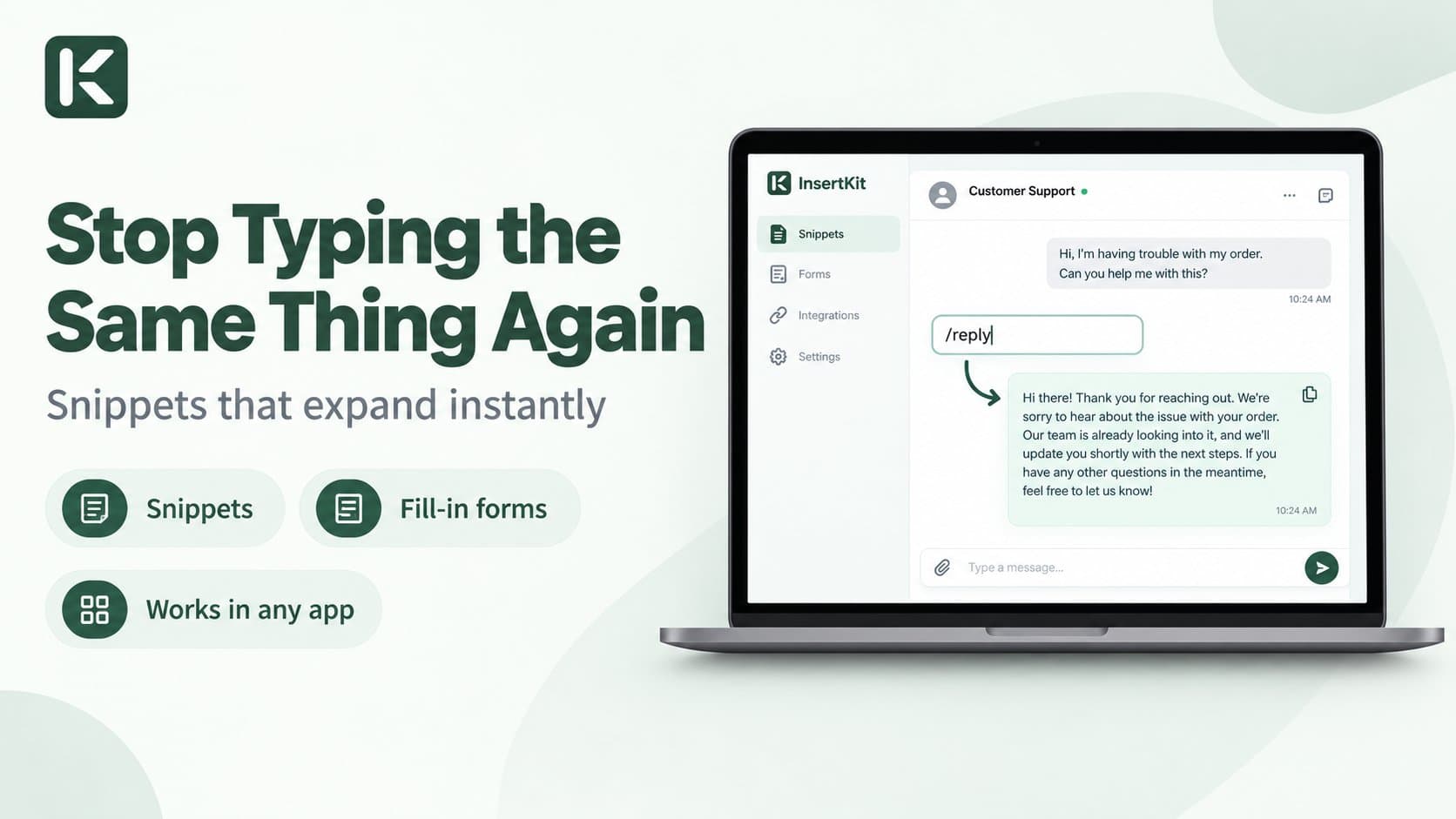
About this app
Most tools do only dictation or only saved phrases. InsertKit brings AI voice typing that works in 100+ languages, snippets you trigger with a short command like /reply, dynamic snippets with variations, clipboard history and cross-device sync together in one workflow. It runs quietly in the system tray on desktop and works in any app, so emails, support replies, notes and messages take less repetitive typing. Free tier available.
Key features
- 1AI voice typing in 100+ languages: hold a key, speak, and InsertKit transcribes, AI-formats, and pastes into any app.
- 2Smart text snippets with dynamic placeholders ({{name}}, {{date}}), variations, folders, and voice-command triggering.
- 3Clipboard history (Ctrl+Shift+Z) plus cross-device sync across Windows, Mac, Linux, Chrome, and Android.
Target customer profile
Drawn from the product itself, not from a survey.
Demographic
Customer support and success teams
Pain points
Retyping identical responses dozens of times daily, slow ticket resolution
Primary needs
Quick-access reply templates, shared team snippets, multi-app compatibility
Demographic
Sales and outreach professionals
Pain points
Inconsistent messaging, wasted time on repetitive follow-ups and emails
Primary needs
Dynamic snippets with placeholders, voice commands, CRM-friendly insertion
Demographic
Freelance developers and content creators
Pain points
Repeated code snippets, hashtags, invoices, and templates across projects
Primary needs
Clipboard history, cross-device sync, snippet organization with folders
Demographic
Founders and small marketing teams
Pain points
Inconsistent brand voice, team members retyping the same outreach
Primary needs
Shared snippet libraries, voice typing on the go, free plan to start
Scout Review
Written by AI from measured evidence, scored out of 100.
InsertKit is a competent, clearly positioned productivity tool that bundles text expansion, AI voice typing, clipboard history, and cross-device sync into one system-tray app. The landing page is polished and the core mechanic is demonstrated well; the free plan and no-account download make it easy to try. The measured weaknesses are real: mobile performance is mediocre, security headers are thin, accessibility has concrete failures, and the changelog and pricing FAQ don't render. It is a solid early-stage product with a genuine use case and a crowded competitive field.
Measure by measure
Usability
63Clear 4-step flow, a 2:14 demo, free plan with no credit card, and a no-account desktop download make the path to value short. But the changelog is stuck on 'Loading updates…' and pricing FAQ answers don't render.
Design
71Polished, coherent landing page: consistent green accent, strong serif/sans hierarchy, and a clear app-window mockup showing the core /reply mechanic. Trust logos and comparison-table dots are the weak spots.
Speed
58Desktop Lighthouse is a healthy 94/100, but mobile drops to 64/100 with LCP 3.7s and TBT 677ms. Fine on a laptop, noticeably sluggish on a phone.
Security
50HTTPS, SPF, and DMARC are in place and payments run through Stripe, but the header probe found no HSTS, CSP, frame protection, or secure cookies (4/13). No SOC 2, ISO, or security page published.
Accessibility
68Lighthouse a11y scores 88/100, but real audits fail: unnamed buttons, low-contrast text, non-sequential headings, no main landmark, and mismatched labels. Bengali language support is a genuine plus.
Growth
60A real, specific problem (retyping the same replies) with a genuine wedge: snippets + AI voice + clipboard in one app. The category is crowded and the differentiation is a bundle, not a moat.
Improvement areas
- Security headers are thin (4/13): add HSTS, CSP, frame protection, and secure cookies; publish a security page.
- Accessibility failures: unnamed buttons, low contrast, non-sequential headings, no main landmark.
- Broken content states: changelog stuck on 'Loading updates…' and pricing FAQ answers not rendering.
- Mobile performance: 64/100 with 3.7s LCP and 677ms TBT.
Design & Usability
InsertKit's landing page is genuinely well-built: a confident serif headline, a consistent green accent, and a floating app mockup that shows the /reply trigger expanding into a full message — the core mechanic demonstrated without a single word of explanation. The 4-step 'How it works' and a 2:14 demo video make the value legible fast, and the free plan with no credit card and a no-account desktop download keeps the path to first value short. The cracks show at the edges: trust logos are so low-contrast they read as texture, the comparison table uses identical dots for every feature, the changelog is permanently stuck on 'Loading updates…', and the pricing FAQ lists nine questions without rendering a single answer.
Speed & Security
Speed is a split verdict. Desktop Lighthouse lands at a strong 94/100, but mobile drops to 64/100 with a 3.7-second LCP and 677ms total blocking time — the site is snappy on a laptop and sluggish on a phone, which matters for a product that also ships an Android app. Security is the weakest measured dimension: HTTPS, SPF, and DMARC are present and payments run through Stripe, but the header probe found no HSTS, CSP, frame protection, X-Content-Type-Options, Referrer-Policy, Permissions-Policy, or secure cookies — 4 of 13 checklist points. There is no published SOC 2, ISO, or security page, which is understandable for a young product but leaves teams evaluating it with little to go on beyond 'Stripe handles the cards.'
Accessibility & Growth
Accessibility scores 88/100 on Lighthouse, but the failing audits are the ones that matter: buttons without accessible names, insufficient color contrast, headings out of sequence, no main landmark, and visible labels that don't match accessible names. Bengali language support is a real plus. On growth, the idea holds up: retyping identical support replies and outreach emails is a genuine, expensive problem, and the target segments (support, sales, creators, freelancers, founders) are named specifically. The wedge is the bundle — snippets, AI voice typing, clipboard history, and cross-device sync in one app — which is a real differentiator against TextExpander (no voice), Wispr Flow (no snippets), and TypeDesk (no AI voice). But it is a feature bundle, not a moat: any of those three could add the missing piece, and the category is crowded. Room to grow, no structural lock-in.
Conclusion
If you retype the same support replies or outreach emails all day, InsertKit is worth a free download — the snippet-plus-voice combination is genuinely convenient and the onboarding is frictionless. Go in expecting an early product: check the security posture yourself before rolling it out to a team, and don't count on the changelog for a roadmap. It earns a try, not yet a company-wide mandate.
Suggestions for improvement
- Fix the changelog 'Loading updates…' state and render the pricing FAQ answers — both are visible dead ends on core pages.
- Add HSTS, CSP, frame protection, and secure cookies; publish a short security page to give teams something to evaluate.
- Fix the failing a11y audits: name the buttons, raise contrast, order headings sequentially, add a main landmark.
- Improve mobile performance — 3.7s LCP and 677ms TBT are the main drag on the 64/100 mobile score.
Alternatives comparison
Named competitors, point by point. Nobody paid to appear here or to be left out.
 InsertKit InsertKit |  TextExpander TextExpander |  Wispr Flow Wispr Flow |  TypeDesk TypeDesk | |
|---|---|---|---|---|
| AI voice typing / dictation | Yes — AI-formats and pastes into any app, 100+ languages | No | Yes — core focus | No |
| Text expansion / snippets | Yes — dynamic fields, variations, folders | Yes — veteran, shared groups | Limited | Yes — solid feature set |
| Clipboard history | Yes — Ctrl+Shift+Z | No | No | No |
| Cross-device sync | Yes — Win/Mac/Linux/Chrome/Android | Yes | Yes | Yes |
| Free plan | Yes — daily voice limit on free tier | Trial only | Yes — limited free tier | Trial only |
| Android app | Yes | No | Yes | No |
TextExpander
A veteran text expansion tool with shared snippet groups, but it lacks voice typing and clipboard history and costs more.
Wispr Flow
AI dictation app focused on voice typing across apps, but without the snippet variations and clipboard management InsertKit offers.
TypeDesk
Text expansion and snippet manager for Windows and Mac with a solid feature set, though it misses AI voice formatting and Android support.
Comparing options? See InsertKit alternatives, scored side by side
More Productivity apps
View all Productivity
Qamarero
92An all-in-one hospitality software for restaurants and ba...

The Stack Newsletter
92A weekly newsletter delivering curated tech jobs, intervi...

EmbedMyReviews
92White-label reputation management software for agencies s...

StoryPad
92Privacy-first open source journal app with a continuous t...

Puzzly – B2B Lead Generation & Sales Intelligence Platform
92Puzzly is an all-in-one B2B lead generation platform that...

Notion
92All-in-one AI workspace for docs, projects, and knowledge...

Vibe Coding Agent Skills
92A free, open-source platform offering 110 AI agent skills...

CC Switch
91Open-source desktop app for switching AI coding providers...

username.md
90One verified handle for your online identity, readable by...

What the GIF
89Frame-perfect video-to-GIF maker that runs entirely in yo...

AuditCloser
89White-label website audits that close deals for digital a...

NudgeWin
89Automated quote follow-up for trades and service businesses.


A platform dedicated to providing unbiased reviews of newly launched applications, analyzing everything from their features to their full potential.
info@scoutforge.net© 2026 Scoutforge. All rights reserved.
