

A platform dedicated to providing unbiased reviews of newly launched applications, analyzing everything from their features to their full potential.
info@scoutforge.net© 2026 Scoutforge. All rights reserved.
A platform dedicated to providing unbiased reviews of newly launched applications, analyzing everything from their features to their full potential.
info@scoutforge.net© 2026 Scoutforge. All rights reserved.
A platform dedicated to providing unbiased reviews of newly launched applications, analyzing everything from their features to their full potential.
info@scoutforge.net© 2026 Scoutforge. All rights reserved.
Cycling through all six. Tap any point to stop.
Measured on six things
Say it messy. InstantOwl turns rambling voice notes into clear next moves: plans, tasks, drafts, and specs from one brain dump. Free to use.
HTTPS and SPF are in place, and the privacy FAQ makes strong no-data-selling claims. But HSTS, CSP, frame protection, and DMARC are all missing—only 3/12 security checklist points. No compliance certifications found.
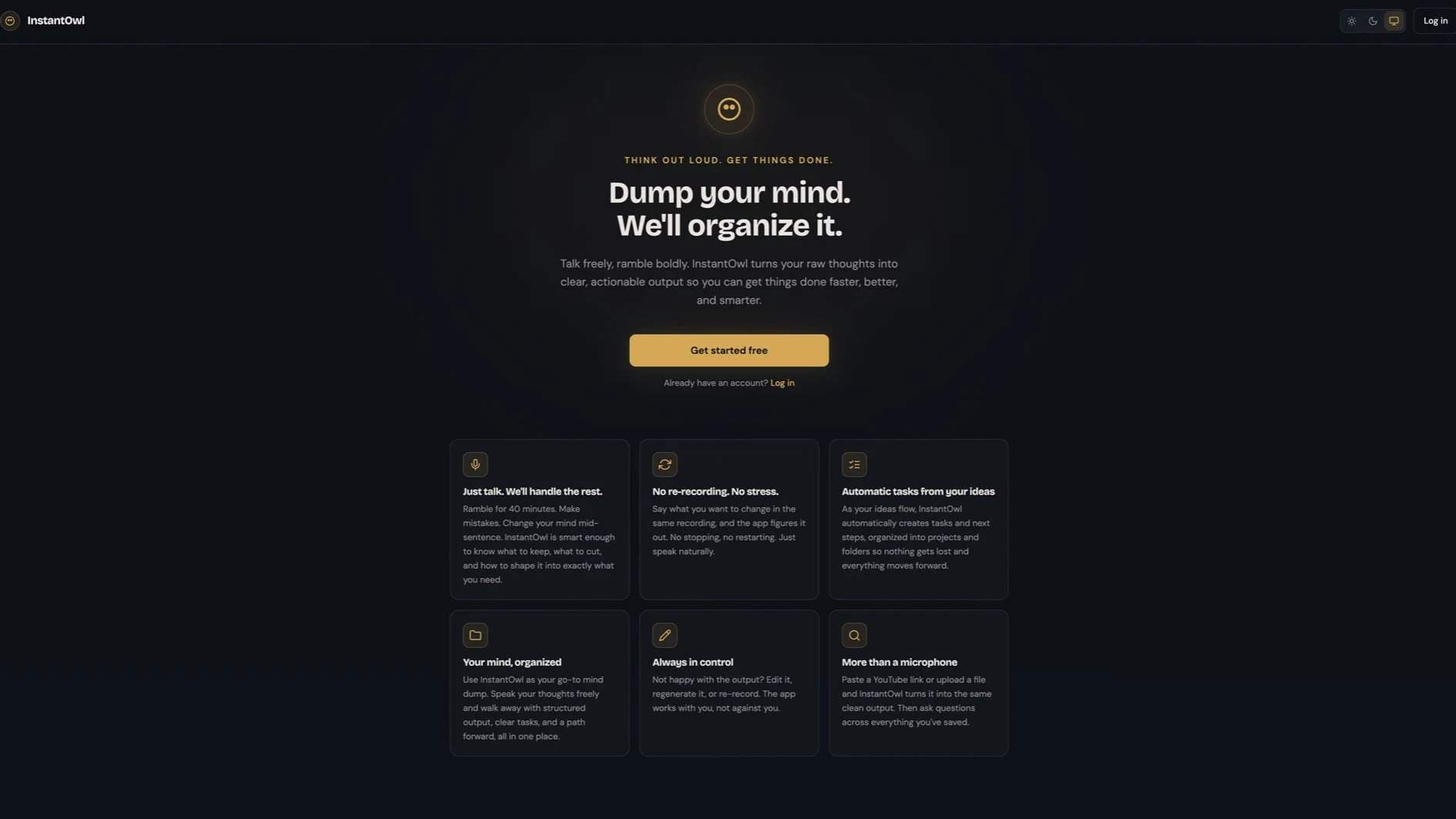
InstantOwl is the idea-to-execution app for people whose minds move faster than their tools. Hit record and talk the way you think. InstantOwl transcribes the ramble, finds the meaning inside it, and turns it into a clear next move: action plans, task lists, drafts, and specs. Notes apps keep your thoughts. InstantOwl finishes them. Ideal customers: indie hackers and vibe coders turning sparks into shippable projects, educators and content creators turning brainstorms into structured content, and anyone whose ideas arrive faster than they can type (ADHD-friendly by design). Main features: natural voice capture with no prompting or setup, automatic transcription, smart tags, multi-format output (one recording becomes a summary, action plan, email draft, spec, or outline), projects that keep spontaneous thoughts connected to the work they belong to, and a searchable archive with the original audio and full transcript beside every output. Web-based, mobile-first, free to use.
Drawn from the product itself, not from a survey.
Demographic
Professionals in fast-paced roles (managers, consultants, entrepreneurs) aged 25-45
Pain points
Overwhelmed by meetings, notes scattered across tools, time-poor, need quick turnarounds
Primary needs
Efficient capture of ideas, automatic organization, task extraction, seamless integration with existing workflows
Demographic
Students and researchers in higher education (ages 18-30)
Pain points
Difficulties with note-taking during lectures, cramming for exams, organizing research material
Primary needs
Voice-to-text for fast capture, structured notes for review, easy retrieval of key concepts
Demographic
Creative professionals and writers (designers, bloggers, content creators) you're 20-40
Pain points
Blocks and mental clutter, losing ideas before capturing them, needing to organize creative thoughts
Primary needs
A tool to capture inspirational moments, organize concepts, and generate outlines or drafts
Demographic
AI enthusiasts and developers (20-45)
Pain points
Manually crafting detailed prompts or specs, wasting time on repetitive writing
Primary needs
Speedy translation of ideas into structured format, integration with AI models, increased productivity
Written by AI from measured evidence, scored out of 100.
InstantOwl is a promising idea-to-execution tool with a clear value proposition: ramble into your phone, get structured output, tasks, and specs. The docs are excellent, the onboarding is fast, and the multi-format output is genuinely useful. But it's early days. Mobile performance is slow, security headers are sparse, and accessibility has known gaps. The design is clean but unremarkable. For a free tool, it's worth trying, especially for ADHD users or indie hackers who struggle to capture ideas. The biggest risk is competition—Otter and Notion AI could easily add these features. InstantOwl needs to execute fast and build a loyal niche before the giants notice.
Docs are genuinely thorough—recording, corrections, projects, tasks, formats, export all covered. Onboarding claim of one-minute value is compelling. But no visible pricing and a low-contrast login link add friction.
Clean, consistent gold/owl branding with clear hero hierarchy. But light-mode cards feel flat, dark-mode grid repeats the same idea six times, and minimal nav hides pricing. Solid but unremarkable for a modern SaaS.
Desktop performance is excellent (99/100), but mobile LCP at 7.2s is a real problem for a mobile-first app. CLS of 0 and low TBT are good. The mobile experience likely feels sluggish on load.
HTTPS and SPF are in place, and the privacy FAQ makes strong no-data-selling claims. But HSTS, CSP, frame protection, and DMARC are all missing—only 3/12 security checklist points. No compliance certifications found.
Lighthouse 88/100 with three specific failures: contrast, heading order, and user-scalable=no. No a11y statement or multi-language support found. Keyboard nav seems standard. Solid baseline but misses key WCAG items.
Real problem, clear wedge: automatic task extraction and multi-format output from one rambling recording. Targets a specific underserved segment (ADHD, indie hackers). But competition is strong and differentiation is a feature, not a moat.
InstantOwl presents a clean, consistent brand with a warm gold accent and owl motif that carries through light and dark modes. The hero is well-structured with a bold headline and clear CTA. However, the design falls short of excellent: light-mode cards lack depth, the dark-mode grid repeats the same message six times, and the minimal nav omits pricing. Usability is stronger, with impressively thorough docs covering everything from recording to data export. The one-minute onboarding claim is compelling, and the FAQ directly addresses competitive concerns. The low-contrast login link and missing pricing page are minor frictions in an otherwise smooth experience.
Speed is a mixed bag. Desktop performance is outstanding at 99/100, but mobile LCP of 7.2s is a serious issue for a mobile-first product—users may abandon before the page paints. Good CLS and TBT scores show the code is efficient once loaded. Security is a concern: HTTPS and SPF are present, but the absence of HSTS, CSP, and DMARC leaves the app exposed to common attacks. The privacy FAQ makes strong commitments, but without security headers or compliance certifications, trust is limited. For a tool handling personal voice data, this needs immediate attention.
Accessibility is decent but not exemplary. The 88/100 Lighthouse score is undermined by three specific failures: insufficient color contrast, non-sequential headings, and disabled pinch-zoom. No a11y statement or multi-language support exists. Growth potential is real: the problem of capturing and organizing rapid thoughts is genuine, and the automatic task extraction is a clear differentiator. The target segments (ADHD users, indie hackers) are underserved. However, the category is crowded with Otter, Notion AI, and others who could replicate this feature set. The wedge is a feature, not a moat, and the young domain (0.7 years) means no traction evidence yet.
Conclusion
InstantOwl has the right idea and a solid foundation. The one-minute onboarding and automatic task extraction are genuinely compelling. But it's a race against time and giants. Fix the mobile load time, add security headers, and publish a pricing page—even if it's 'free forever.' The owl is charming, but charm won't outrun Otter. If you're an indie hacker or someone with a head full of ideas and no time to type, give it a shot. It might just become your front door to your AI tools. Just be patient with that 7-second mobile load.
Named competitors, point by point. Nobody paid to appear here or to be left out.
 Instant Owl Instant Owl |  Otter.ai Otter.ai |  Notion AI Notion AI | VoiceInk | |
|---|---|---|---|---|
| Core value proposition | Turns rambling voice notes into structured output, tasks, and specs | Real-time meeting transcription and summarization | AI writing, summarizing, and organizing within Notion docs | Voice dictation into formatted text with custom commands |
| Automatic task extraction | Yes, pulls action items and resolves spoken due dates automatically | No, focuses on transcription and summaries, not task extraction | No, AI assists with writing and organizing, not task extraction from voice | No, focuses on dictation and formatting, not task extraction |
| Multi-format output from one recording | Yes, one recording becomes summary, action plan, email draft, spec, or outline | Limited, provides summaries and highlights, not multiple formats | Yes, AI can rewrite content into various formats within Notion | No, outputs formatted text, not multiple document types |
| Cross-recording Q&A | Yes, 'Ask Your Owl' with grounded answers and source citations | Limited, can search transcripts but not ask natural language questions | Yes, AI can answer questions across your Notion workspace | No, does not offer Q&A across recordings |
| Pricing model | Free to use, no pricing page visible | Freemium with Pro and Business tiers | Add-on to Notion's free/paid plans | One-time purchase or subscription |
Otter.ai
A popular AI meeting assistant that transcribes and summarizes conversations in real-time.
Notion AI
Integrates AI into Notion to help write, summarize, and organize notes and docs.
VoiceInk
A speech-to-text app that converts voice dictation into formatted text with custom commands.
Comparing options? See Instant Owl alternatives, scored side by side

An all-in-one hospitality software for restaurants and ba...

A weekly newsletter delivering curated tech jobs, intervi...

White-label reputation management software for agencies s...

Privacy-first open source journal app with a continuous t...

Puzzly is an all-in-one B2B lead generation platform that...

All-in-one AI workspace for docs, projects, and knowledge...

A free, open-source platform offering 110 AI agent skills...

Open-source desktop app for switching AI coding providers...

One verified handle for your online identity, readable by...

Frame-perfect video-to-GIF maker that runs entirely in yo...

White-label website audits that close deals for digital a...

Automated quote follow-up for trades and service businesses.
A platform dedicated to providing unbiased reviews of newly launched applications, analyzing everything from their features to their full potential.
info@scoutforge.net© 2026 Scoutforge. All rights reserved.
