Is this your app?
Claim IO Tools to manage its page, add your badge and see your traffic — free, and it stays free.
Cycling through all six. Tap any point to stop.
Measured on six things
A free, all-in-one web toolbox with 330+ utilities for productivity, development, and creativity, featuring AI-powered tools and a custom builder.
Accessibility
70Multi-language support is excellent, but no screen reader optimization or high-contrast modes available.
Screenshots
1 / 2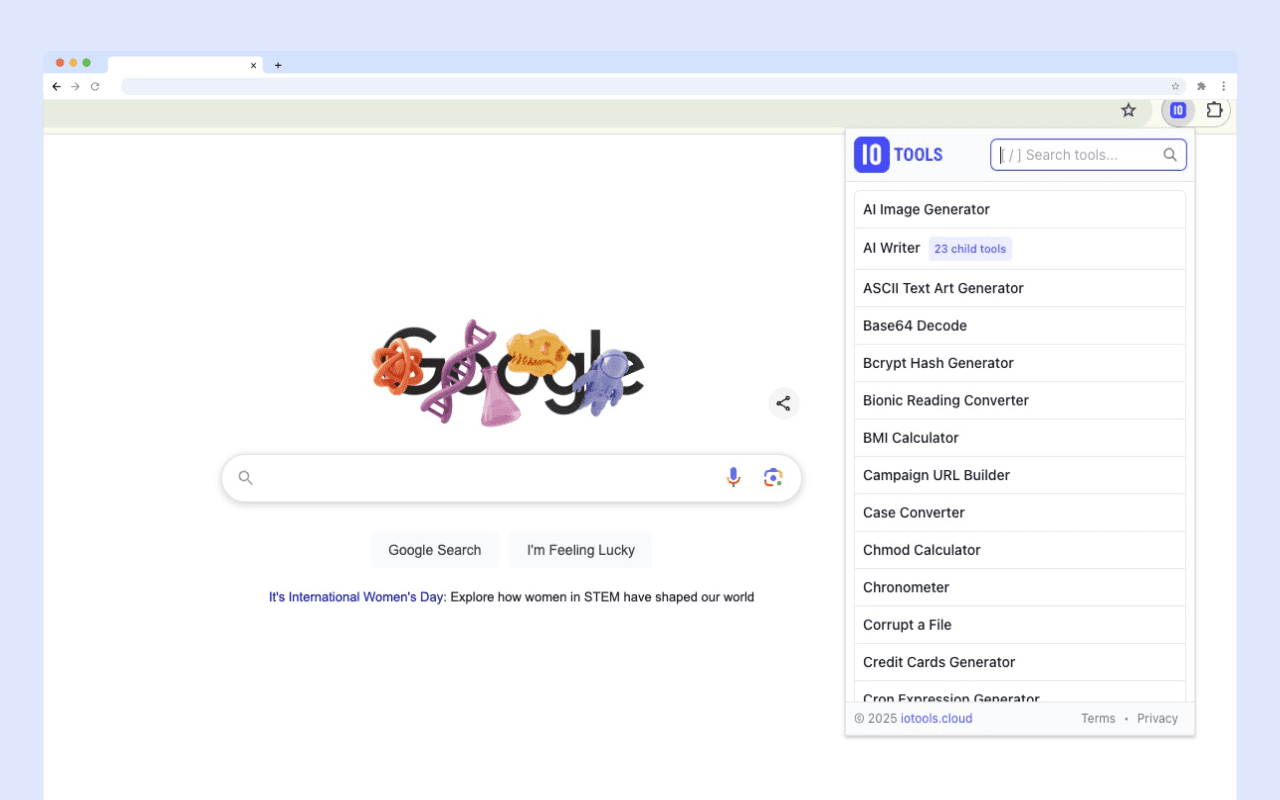
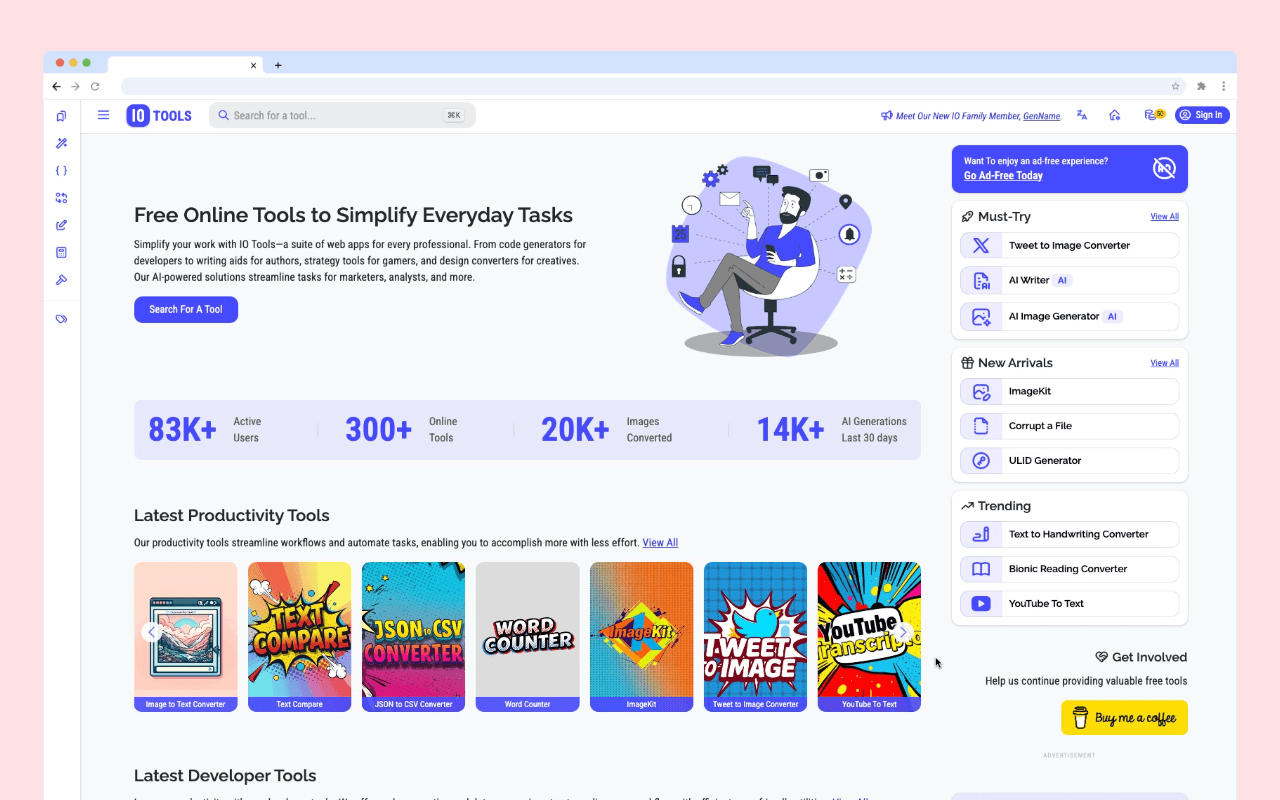
About this app
IO Tools is a versatile browser-based application that serves as a digital Swiss Army knife for professionals. It offers over 330 utilities, including PDF converters, SEO checkers, color palette generators, and AI-driven text summarizers, all accessible with a free tier that provides daily credits. The standout feature is the 'BYO Builder,' which allows users to create custom tools for niche workflows. With support for multiple languages and a user base of over 89,000, it's designed for freelancers, developers, and small teams seeking efficiency without subscription costs. The interface is clean and categorized, though the ad-supported free version can be cluttered. Security includes SSL encryption, and while it lacks advanced accessibility features, it remains a powerful tool for streamlining online tasks.
Key features
- 1Clean and intuitive interface with logical categorization and dark mode for user comfort
- 2Persistent search bar and extensive tool library of 330+ utilities for versatile functionality
- 3Innovative BYO Builder feature enabling custom tool creation for unique workflow needs
Target customer profile
Drawn from the product itself, not from a survey.
Demographic
Freelancers & Remote Workers
Pain points
Managing multiple tools and subscriptions, high costs for productivity software, time wasted on repetitive tasks
Primary needs
Cost-effective, all-in-one solutions for document conversion, SEO analysis, and creative tools to enhance workflow efficiency
Demographic
Small Business Teams
Pain points
Budget constraints, need for collaborative tools, difficulty in finding integrated solutions for various tasks
Primary needs
Affordable, scalable utilities for team productivity, including AI features and custom tool creation to support diverse business needs
Demographic
Developers & Tech Enthusiasts
Pain points
Juggling multiple development tools, lack of customization in free tools, slow performance in browser-based utilities
Primary needs
Fast, reliable tools for coding, debugging, and web diagnostics, with options for building personalized tools to fit specific tech workflows
Scout Review
Written by AI from measured evidence, scored out of 100.
IO Tools successfully delivers on its promise as a comprehensive digital Swiss Army knife, offering remarkable value through its extensive free tier and innovative custom tool builder. The platform excels in providing immediate utility across diverse professional needs while maintaining a straightforward, functional interface. The main compromises come in the form of ad-supported distractions and limited accessibility features, but these are understandable trade-offs for a free service of this scale.
Measure by measure
Usability
84Intuitive navigation for common tools with persistent search, though niche features require learning curve.
Design
75Clean but utilitarian interface with intuitive categorization and dark mode, though ad clutter detracts from the experience.
Speed
86Lightning-fast for basic utilities, though AI features can lag during peak hours and ads affect rendering.
Security
76Basic SSL encryption with no data storage beyond sessions, but lacks transparency reports or 2FA.
Accessibility
70Multi-language support is excellent, but no screen reader optimization or high-contrast modes available.
Growth
90High market demand for all-in-one solutions with innovative BYO Builder feature driving expansion potential.
Improvement areas
- Reduce ad clutter to enhance visual experience and minimize distractions
- Add accessibility features such as screen reader support and high-contrast modes
- Improve AI tool performance during peak hours and enhance security with transparency reports and 2FA
Design & Usability
IO Tools presents a clean, functional interface that gets the job done without unnecessary frills. The categorization system is logical, grouping tools into intuitive sections like 'Generators' and 'Converters,' making it easy to navigate the extensive collection. The persistent search bar is a lifesaver when you know exactly what you need among the 330+ options. Dark mode provides visual comfort for extended sessions, though the ad-supported free tier creates visual clutter that disrupts the otherwise streamlined experience. While common tools are immediately accessible, some specialized utilities like the CSS minifier require a brief learning period, suggesting room for improved onboarding.
Speed & Security
Performance-wise, IO Tools delivers impressive speed for most basic utilities, with text converters and simple generators working near-instantly. The browser-based nature keeps things responsive, though AI-powered features like image generators can experience noticeable delays during peak usage times. Security measures include standard SSL encryption, and the privacy policy clearly states that processed data isn't stored beyond immediate sessions - a reassuring feature for privacy-conscious users. However, the absence of detailed transparency reports, two-factor authentication, or independent security audits leaves room for improvement in building complete trust, especially for business users handling sensitive information.
Accessibility & Growth
Accessibility presents a mixed picture - while multi-language support covering Spanish, French, and German is commendable and expands its global reach, the platform lacks fundamental accessibility features like screen reader optimization, keyboard navigation enhancements, or high-contrast modes. The browser extensions for Chrome and Firefox improve accessibility in terms of convenience for frequent users. Growth potential is exceptionally strong given the increasing demand for consolidated tool solutions and the innovative BYO Builder feature that allows custom tool creation, positioning IO Tools well for future expansion in the competitive productivity tools market.
Conclusion
IO Tools is perfect for freelancers, developers, and small teams who need versatile functionality without subscription overhead. If you're tired of managing multiple specialized tools and don't mind some ad-supported clutter for free access to 330+ utilities, this platform offers exceptional value. The custom builder feature alone makes it worth exploring for anyone with unique workflow needs that standard tools don't address.
Suggestions for improvement
- Implement basic accessibility features including screen reader support and high-contrast mode options.
- Consider offering a limited ad-free experience for key tools to improve user retention.
- Publish regular security transparency reports to build trust with business users.
- Create a community feature request system to prioritize development based on user demand.
- Optimize AI tool performance during peak usage periods to maintain consistent experience quality.
Alternatives comparison
Named competitors, point by point. Nobody paid to appear here or to be left out.
 IO Tools IO Tools |  Adobe Acrobat Online Adobe Acrobat Online |  Pingdom Speed Test Pingdom Speed Test |  All-In-One Toolbox (Android) All-In-One Toolbox (Android) | |
|---|---|---|---|---|
| Pricing Model | Free with ads, premium subscription available | Subscription-based, higher cost | Freemium with paid upgrades | Free with in-app purchases |
| Tool Variety | 330+ diverse utilities | Specialized in PDF tools only | Focused on website performance | Mobile device optimization tools |
| Customization | BYO Builder for custom tools | Limited customization options | Standardized testing parameters | Pre-set mobile optimization tools |
| Platform Accessibility | Web-based, browser extensions | Web-based only | Web-based with some mobile access | Mobile app only |
Adobe Acrobat Online
A subscription-based service for PDF editing and conversion, offering more advanced features but at a higher cost.
Pingdom Speed Test
Specializes in website performance testing, providing detailed analytics but lacks the broad utility range of IO Tools.
All-In-One Toolbox (Android)
A mobile app with various utilities, focused on device optimization rather than web-based professional tools.
Comparing options? See IO Tools alternatives, scored side by side
More Productivity apps
View all Productivity
Notion
92All-in-one AI workspace for docs, projects, and knowledge...

Qamarero
92An all-in-one hospitality software for restaurants and ba...

EmbedMyReviews
92White-label reputation management software for agencies s...

StoryPad
92Privacy-first open source journal app with a continuous t...

Puzzly – B2B Lead Generation & Sales Intelligence Platform
92Puzzly is an all-in-one B2B lead generation platform that...

The Stack Newsletter
92A weekly newsletter delivering curated tech jobs, intervi...

Vibe Coding Agent Skills
92A free, open-source platform offering 110 AI agent skills...

QRBliss
91Branded QR codes with AI Brand Sync, 15 free dynamic code...

Gerty
91Private, local AI assistant for Mac that runs offline

CC Switch
91Open-source desktop app for switching AI coding providers...

username.md
90One verified handle for your online identity, readable by...

PitchWhip
90AI cold call scripts & direct dials from LinkedIn


A platform dedicated to providing unbiased reviews of newly launched applications, analyzing everything from their features to their full potential.
info@scoutforge.net© 2026 Scoutforge. All rights reserved.
