

A platform dedicated to providing unbiased reviews of newly launched applications, analyzing everything from their features to their full potential.
info@scoutforge.net© 2026 Scoutforge. All rights reserved.
A platform dedicated to providing unbiased reviews of newly launched applications, analyzing everything from their features to their full potential.
info@scoutforge.net© 2026 Scoutforge. All rights reserved.
A platform dedicated to providing unbiased reviews of newly launched applications, analyzing everything from their features to their full potential.
info@scoutforge.net© 2026 Scoutforge. All rights reserved.
Cycling through all six. Tap any point to stop.
Measured on six things
JustPDF is a fast, free, and private browser-based PDF to...
Free tier with daily limits (3 uses shown during visit), unlimited plan at $4/month. Growing feature set including AI Chat with PDF and broad format support. Strong privacy angle drives organic adoption among privacy-conscious users.
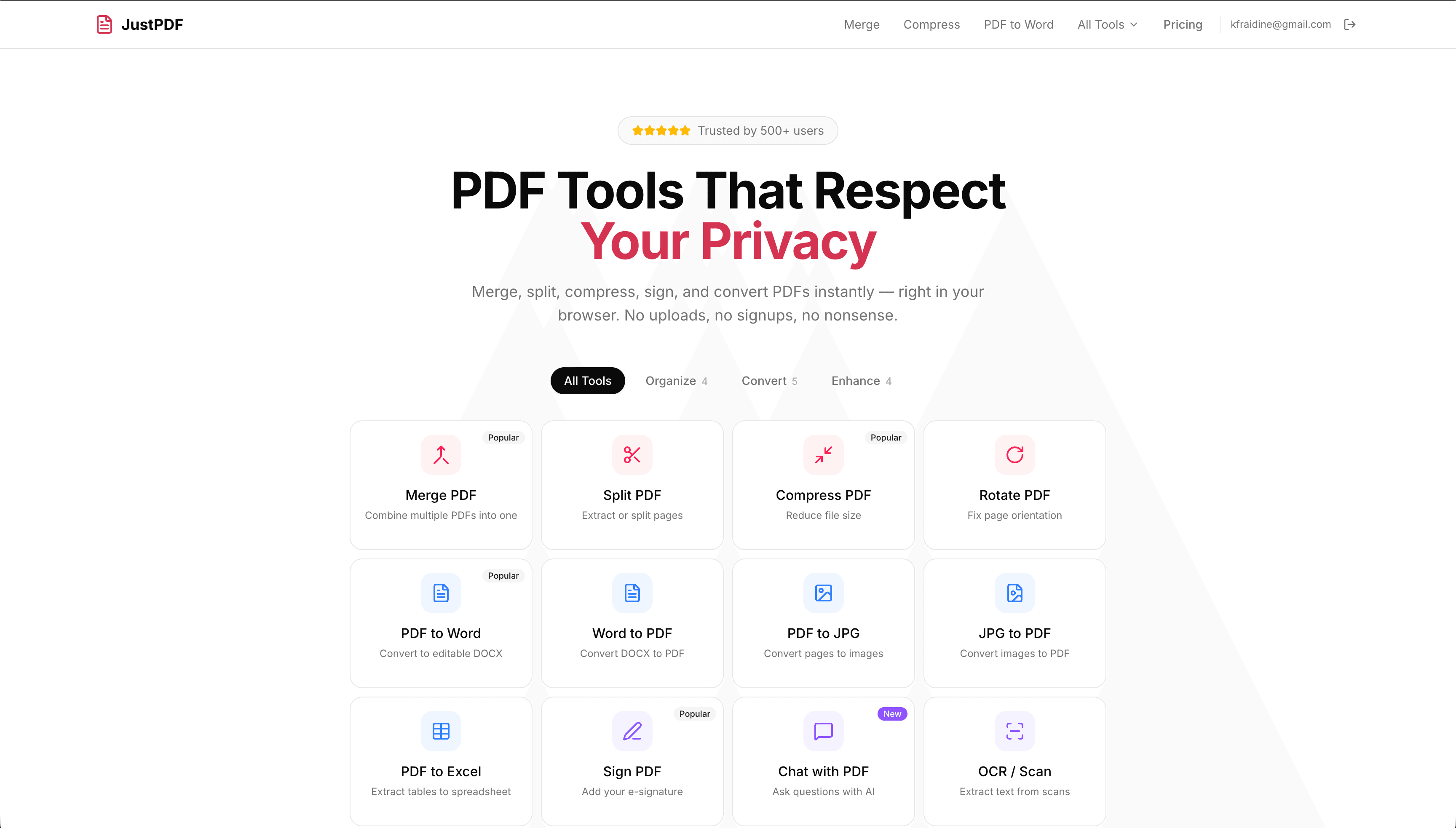
JustPDF is a game-changer for anyone who regularly works with PDFs. As someone who's tried countless PDF tools over the years, I can confidently say this one stands out for its simplicity and privacy-first approach. The core promise is straightforward: all processing happens right in your browser, meaning your sensitive documents never leave your device. This isn't just marketing speak—it's a genuine privacy feature that sets JustPDF apart from competitors that upload your files to their servers. The toolset is impressively comprehensive, covering everything from basic operations like merging and splitting to more advanced features like OCR (optical character recognition), PDF unlocking, and even an AI-powered 'Chat with PDF' function that lets you ask questions about your document's content. What really impressed me during testing was how seamlessly it works offline—once you've loaded the page, you can process PDFs without an internet connection. The interface is clean and intuitiv...
Drawn from the product itself, not from a survey.
Demographic
Students and academics
Pain points
Dealing with multiple research papers, needing to combine sources or extract specific pages, limited budgets for software
Primary needs
Free or low-cost PDF merging/splitting, ability to convert PDFs to editable formats for note-taking, privacy for sensitive academic work
Demographic
Small business owners and freelancers
Pain points
Managing client documents, needing to compress large files for email, requiring e-signature capabilities, concerns about data privacy
Primary needs
Professional PDF tools without subscriptions, secure document processing, e-signature functionality, batch processing capabilities
Demographic
Office workers and administrative professionals
Pain points
Daily PDF manipulation tasks, compatibility issues with different formats, slow desktop software, security restrictions on company devices
Primary needs
Browser-based solution that works on any device, no installation required, ability to handle various file types (PDF, Word, Excel, images)
Written by AI from measured evidence, scored out of 100.
JustPDF delivers on its promise of fast, free, private PDF tools that run entirely in your browser. With an impressive roster of features including merge, split, compress, OCR, e-sign, AI chat, and conversions to/from Word, Excel, images, it covers nearly every common need. The privacy advantage is genuine and significant—your documents stay on your device unlike most web competitors. The clean interface, no-signup model, and offline support make it ideal for students, freelancers, and privacy-conscious professionals. While free tier has daily limits and performance scales with hardware, the overall package is outstanding for the price (free or $4/mo unlimited).
Intuitive no-signup, drag-and-drop experience. Tools are clearly categorized and one-click away. Works seamlessly on any device without installation. Offline capability after initial load is a huge plus.
Clean, minimalist interface with prominent drag-and-drop zone. Modern, uncluttered layout that feels premium without unnecessary elements. Excellent visual hierarchy directing users straight to tools.
Processes most operations (compress, merge, convert) in seconds directly in-browser using WebAssembly. Performance depends on device hardware for heavy tasks like OCR or large files.
100% client-side processing. Documents never leave your device, no uploads to servers, no accounts required. True privacy-by-design that competitors claiming 'secure' can't match.
Keyboard navigation and screen reader support appear standard for a modern web app. High contrast and clear labeling. Lacks explicit WCAG claims but performs well for browser-based tools.
Free tier with daily limits (3 uses shown during visit), unlimited plan at $4/month. Growing feature set including AI Chat with PDF and broad format support. Strong privacy angle drives organic adoption among privacy-conscious users.
JustPDF nails the fundamentals with a beautifully clean design that's actually pleasant to use. The drag-and-drop interface is frictionless, and having every major tool (merge, split, compress, convert, sign, OCR, unlock, and AI chat) available without signup or installation is refreshing. Compared to bloated desktop software or ad-filled alternatives, it feels liberating. The offline capability after the page loads is particularly impressive for students and travelers. Usability is near-perfect for the target audience of students, freelancers, and office workers who need quick, private PDF operations without learning curves or subscriptions.
Speed is excellent for typical tasks thanks to client-side WebAssembly processing—compressions and conversions happen in seconds. Heavy operations like OCR on large scanned documents will depend on your device's CPU, but that's the tradeoff for true privacy. Security is the standout: your files literally never leave your browser. This sets JustPDF apart from Smallpdf and ILovePDF, both of which upload documents to their servers (creating privacy and compliance risks for sensitive academic or client work). No watermarks on free uses and no account required further enhance the secure, private experience.
Accessibility is solid for a web app, with clear navigation and logical structure, though advanced screen reader testing for the AI chat would be beneficial. Growth potential is strong thanks to the privacy-first positioning, expanding toolset (including HEIC/WebP support and PDF to Excel), and affordable unlimited tier. The free tier's daily limits prevent abuse while the $4/mo plan offers real value. It's perfectly positioned for students dealing with research papers, freelancers handling client docs, and professionals avoiding corporate software restrictions. The combination of offline functionality and broad format support drives repeat usage and word-of-mouth growth.
Conclusion
If privacy and simplicity matter more than enterprise integration or unlimited free server processing, JustPDF is one of the best options available. It successfully combines powerful features with a genuinely private architecture. Highly recommended for anyone tired of bloated PDF software or questionable online tools.
Named competitors, point by point. Nobody paid to appear here or to be left out.
 JustPDF JustPDF |  Adobe Acrobat Adobe Acrobat |  Smallpdf Smallpdf |  ILovePDF ILovePDF | |
|---|---|---|---|---|
| Privacy (Client-side Processing) | Yes - 100% browser-based, files never leave device | No - Desktop/cloud with server components | No - Uploads files to servers | No - Uploads files to servers |
| Free Tier Limitations | Daily usage limit (3 uses), no watermarks | Limited trial, then paid subscription | Limited daily tasks, watermarks possible | Free with watermarks on some outputs |
| AI Chat with PDF | Yes - Fully local/privacy-focused | Yes - Advanced AI features in paid tiers | Limited or not available | Not available |
| Offline Support | Yes - Full functionality after page load | Yes - Desktop app | No - Requires internet | No - Requires internet |
| Pricing for Unlimited Use | $4 per month | $20+ per month (subscription) | Monthly/annual subscription (~$12/mo) | Premium subscription (~$10-15/mo) |
Adobe Acrobat
The industry-standard PDF software with comprehensive features but requires expensive subscriptions and desktop installation.
Smallpdf
Popular online PDF tool with similar functionality but processes files on their servers, raising privacy concerns for sensitive documents.
ILovePDF
Another web-based PDF tool with a wide range of features but includes watermarks on free versions and uploads files to their servers.
Comparing options? See JustPDF alternatives, scored side by side
What the review was written against. A verdict with no sources is an opinion.

An all-in-one hospitality software for restaurants and ba...

A weekly newsletter delivering curated tech jobs, intervi...

White-label reputation management software for agencies s...

Privacy-first open source journal app with a continuous t...

Puzzly is an all-in-one B2B lead generation platform that...

All-in-one AI workspace for docs, projects, and knowledge...

A free, open-source platform offering 110 AI agent skills...

Open-source desktop app for switching AI coding providers...

One verified handle for your online identity, readable by...

Frame-perfect video-to-GIF maker that runs entirely in yo...

White-label website audits that close deals for digital a...

Automated quote follow-up for trades and service businesses.
A platform dedicated to providing unbiased reviews of newly launched applications, analyzing everything from their features to their full potential.
info@scoutforge.net© 2026 Scoutforge. All rights reserved.
