Cycling through all six. Tap any point to stop.
Measured on six things
KIIP exam practice, explained in your language.
Speed
44Lighthouse mobile 55/100 with a 15.2s LCP and 13.1s FCP — the hero is slow to paint on phones. Desktop is a healthier 77/100. CLS and TBT are clean, so it's weight, not jank.
Screenshots
1 / 3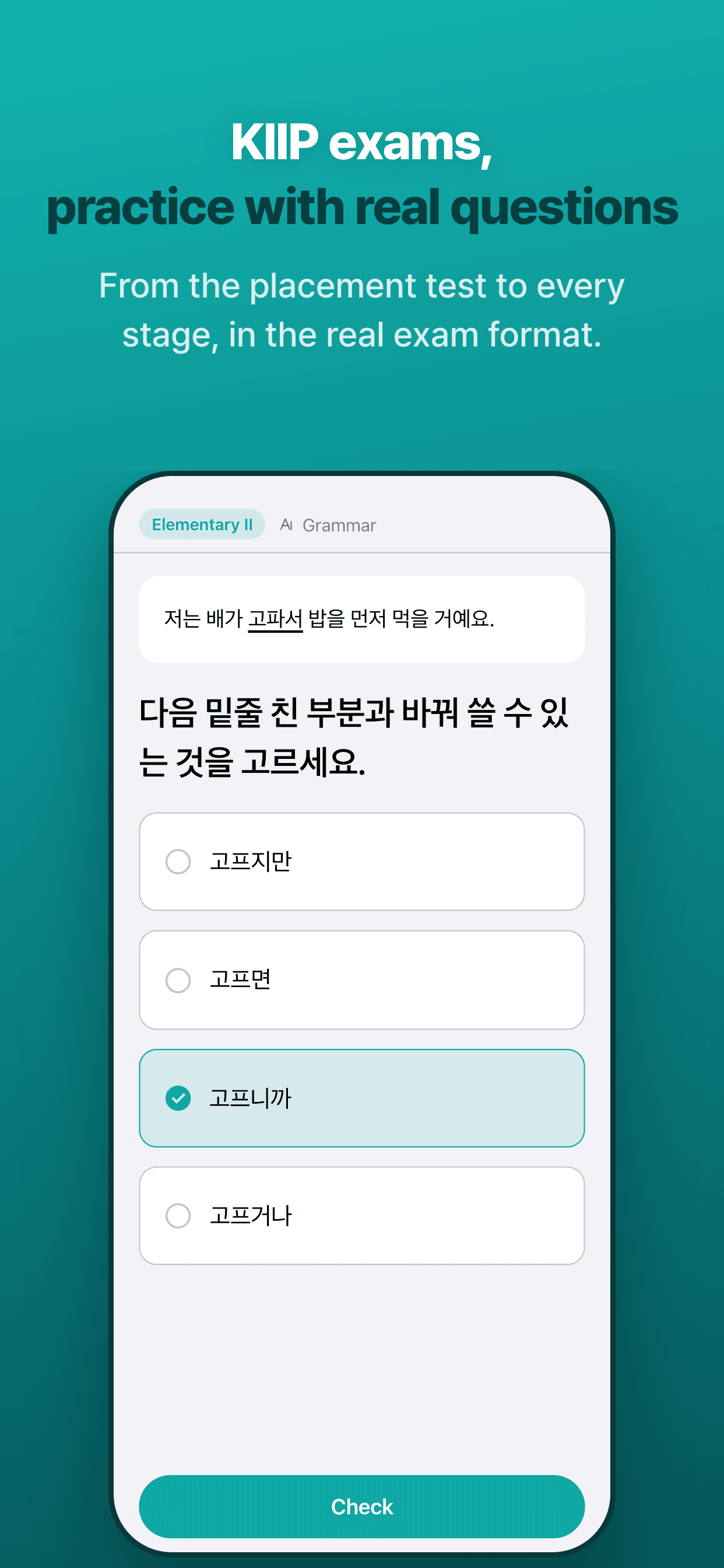
About this app
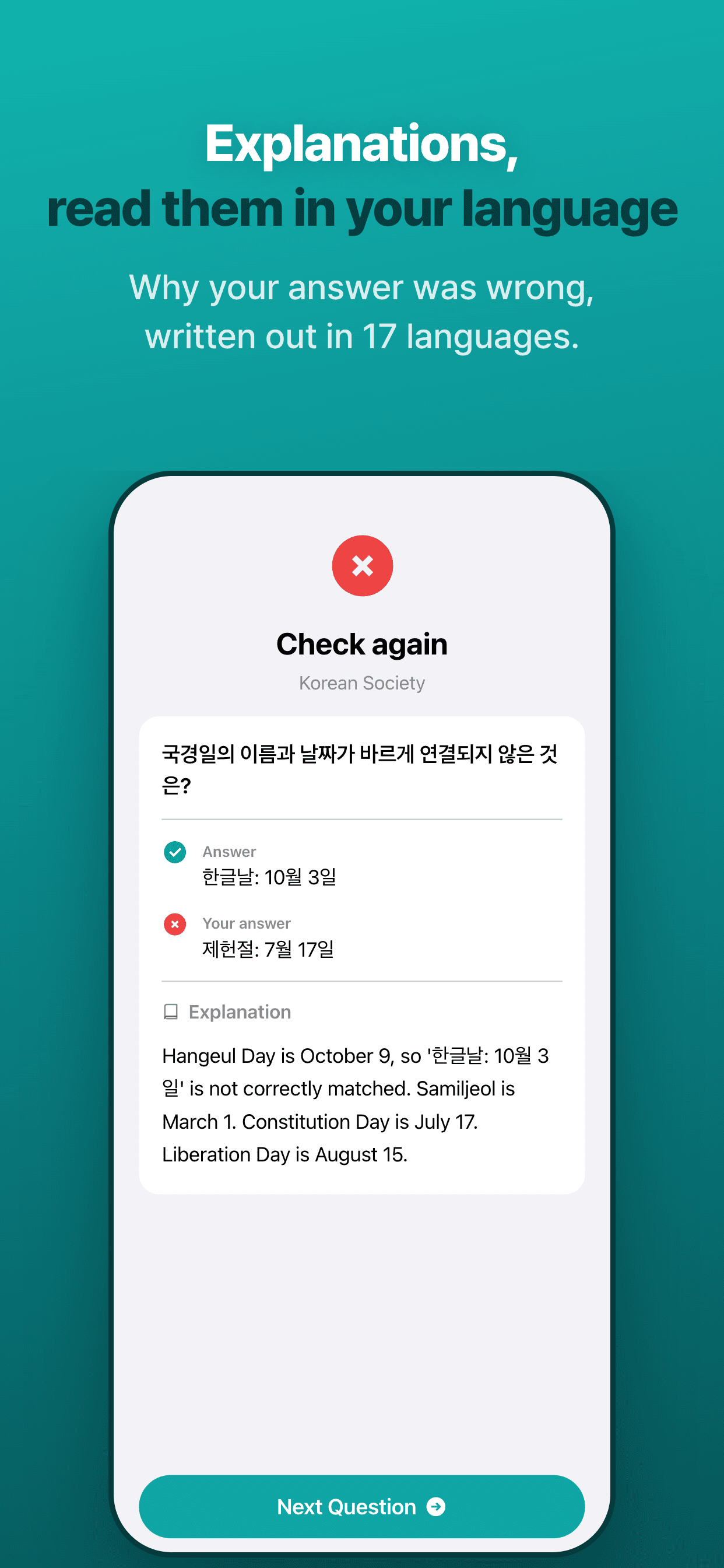
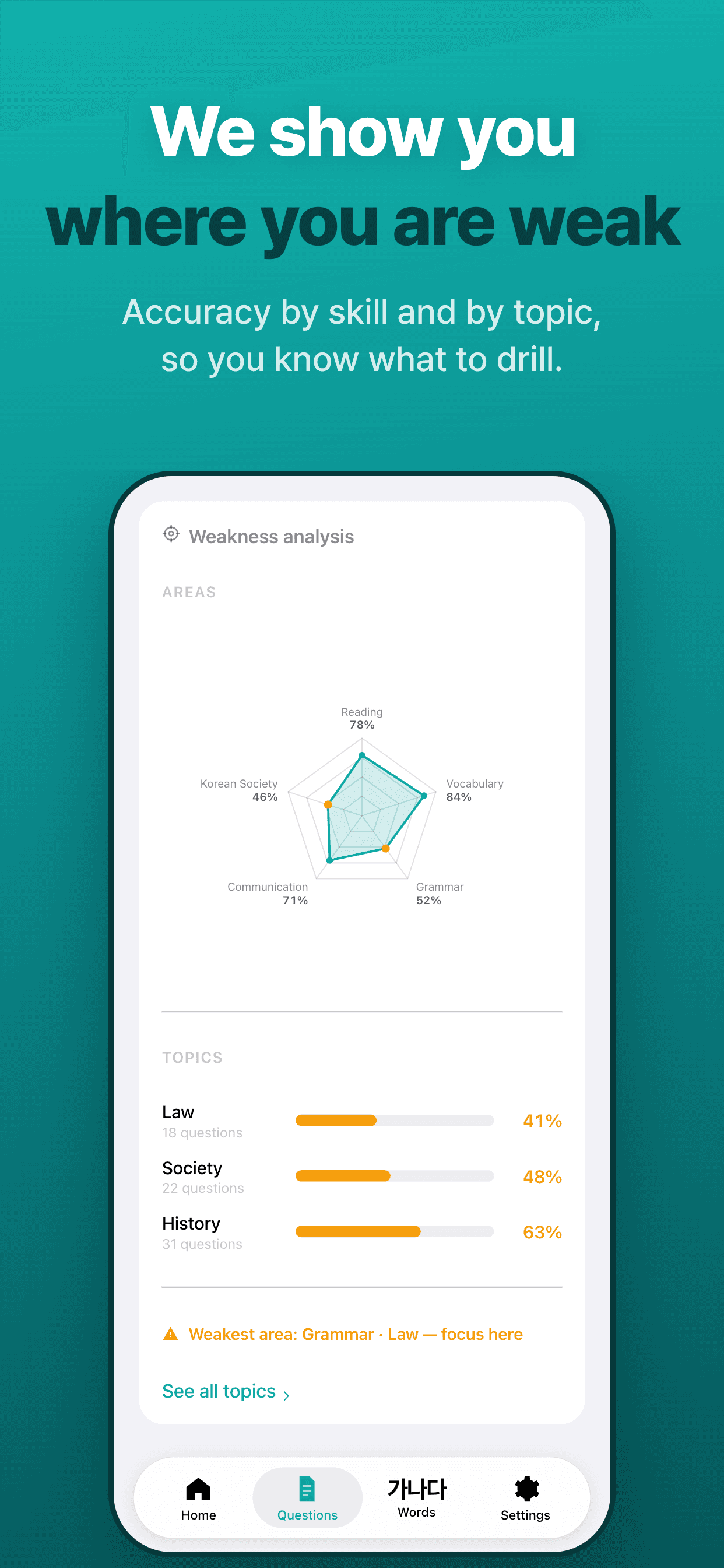
KIIP Study is exam practice for Korea's Social Integration Program (KIIP, 사회통합프로그램), which the Ministry of Justice runs for foreign residents. It covers the placement test, Elementary I and II, Intermediate I and II, and the permanent residency and naturalization tracks. Each exam-format question is a Korean passage with four options. After you answer, the app explains why the correct answer is right in one of 16 languages, including Vietnamese, Simplified Chinese, Tagalog, Khmer, Uzbek, Nepali, and Sinhala. Vocabulary practice follows the KIIP levels and mixes multiple choice, fill-in-the-blank, dictation, listen-and-type, and picture choice. Your accuracy is shown by area and topic. Pick the exam round you plan to take, and the home screen counts down to the application deadline and the exam. No ads, no account, and study records stay on your device. Free to use with daily limits; a subscription removes them. Not affiliated with the Ministry of Justice.
Key features
- 1Exam-format KIIP practice: passage-based multiple choice across placement, Elementary I–II, Intermediate I–II, Permanent Residency, and Naturalization.
- 2Every answer explained in one of 16 languages, including Vietnamese, Simplified Chinese, Tagalog, Khmer, Uzbek, Nepali, and Sinhala.
- 3Vocabulary drills by KIIP level mixing multiple choice, fill-in-the-blank, dictation, listen-and-type, and picture choice.
Target customer profile
Drawn from the product itself, not from a survey.
Demographic
Foreign residents in Korea preparing for KIIP placement or level exams
Pain points
General Korean apps don't cover KIIP exam format; Korean-only explanations hinder understanding
Primary needs
Exam-format practice with clear, native-language explanations and structured study
Demographic
Visa applicants (F-2-7, F-5, F-6) needing KIIP levels for points or exemptions
Pain points
Unclear which level is needed; study materials not aligned with visa requirements
Primary needs
Targeted practice for specific levels, progress tracking, and deadline reminders
Demographic
Marriage migrants and naturalization candidates balancing work and study
Pain points
Limited time; need flexible, bite-sized study sessions without ads or accounts
Primary needs
Five-minute daily practice with explanations in their own language
Scout Review
Written by AI from measured evidence, scored out of 100.
KIIP Study is a focused, well-built niche tool: exam-format practice for Korea's Social Integration Program, with every answer explained in one of 16 languages, no account, no ads, and on-device records. The app UI is clean and the feedback loop is exactly right for the audience. It's clearly differentiated from Memrise and Anki, which can't replicate KIIP format or native-language explanations without manual deck-building. The drags are a slow mobile first paint (15.2s LCP), a thin security header profile (5/13), and a few accessibility contrast issues. Nothing here is broken — it's a competent, specific product that needs polish on the technical edges.
Measure by measure
Usability
74No account, pick a stage once, questions stream one at a time, and every answer gets a native-language explanation. Onboarding is essentially 'tap Start.' Docs beyond the site are thin.
Design
71Judging the app UI and store material: consistent teal branding, clear green/red answer feedback, and realistic exam-format screenshots. Homepage comparison table and language stack are cramped.
Speed
44Lighthouse mobile 55/100 with a 15.2s LCP and 13.1s FCP — the hero is slow to paint on phones. Desktop is a healthier 77/100. CLS and TBT are clean, so it's weight, not jank.
Security
52HTTPS and HSTS enforced with SPF, and the no-account, on-device model limits stored data. But no CSP, frame protection, Referrer-Policy, secure cookies, or DMARC — 5/13 on header checks.
Accessibility
70Lighthouse a11y 93/100 with 17-language localization. Failing audits: insufficient color contrast, non-sequential headings, and no main landmark — real but fixable issues, no WCAG statement published.
Growth
68Sharp wedge: KIIP exam format plus 16-language explanations for a visa-driven, underserved audience. General Korean apps and TOPIK prep structurally don't cover this. Early stage (0.4yr domain, no ratings).
Improvement areas
- Mobile first paint is slow — 15.2s LCP and 13.1s FCP on Lighthouse mobile.
- Security headers incomplete: no CSP, frame protection, Referrer-Policy, Permissions-Policy, secure cookies, or DMARC.
- Accessibility contrast failures on the color-coded answer feedback, plus non-sequential headings and no main landmark.
Design & Usability
Judged on the app itself, not the landing page: the store screenshots show a clean, consistent interface — teal header, a Korean passage, four radio options, a Check button, then a green/red feedback state with an explanation card and language picker. That's the right flow for exam practice, and the branding carries from site to app without looking bolted on. Usability is the stronger half: no account, pick a stage once, questions stream one at a time, and every answer gets a plain explanation in your language. The countdown to application deadline and exam is a genuinely useful touch for a visa-driven audience. Weak spots are on the marketing side — a cramped comparison table and a long vertical language list — and the absence of any real syllabus or docs beyond the homepage bullets.
Speed & Security
Speed is the weak link. Lighthouse mobile scores 55/100 with a 15.2s LCP and 13.1s FCP; desktop is 77/100. CLS is 0 and TBT is 0ms, so the problem is payload and first paint, not runtime jank — the hero is heavy on phones. For a product pitched as five-minute daily practice, a 15-second first paint is a bad first impression. Security is middling: HTTPS and HSTS are enforced and SPF is set, and the no-account, on-device-records model genuinely limits stored personal data. But the header probe found no CSP, no frame protection, no Referrer-Policy, no Permissions-Policy, no secure cookies, and no DMARC — 5/13 on the checklist. No published audits, no security page, no bug bounty.
Accessibility & Growth
Accessibility lands at 70: Lighthouse scores 93/100 and the app is localized in 17 languages with explanations in 16, which is well above what most indie study apps manage. The failing audits are real but narrow — insufficient color contrast, non-sequential heading order, and a missing main landmark. Contrast is the one that matters most here, since the product's core feedback is color-coded green/red. No WCAG statement is published. Growth is the most interesting dimension: the target customer is specific (foreign residents needing KIIP levels for F-2-7, F-5, F-6 points or exemptions), the problem is real and deadline-driven, and the differentiator — exam-format questions with native-language explanations — is something general Korean apps and TOPIK prep structurally don't offer. The limit is that the moat is 'the official materials aren't translated or well-explained,' which is a gap that can close. Traction is early: domain registered 2026-06-11, iOS listing released 2026-05-10, no store ratings yet.
Conclusion
If you're a foreign resident in Korea staring down a KIIP placement test or counting visa points, this is a genuinely sensible tool — the exam format and the native-language explanations are the two things general Korean apps won't give you. Go in expecting a young product: no store ratings yet, no published syllabus, and a homepage that loads like it's on a 2014 connection. The core loop works. The edges need sanding.
Suggestions for improvement
- Cut mobile LCP from 15.2s — compress or lazy-load the hero imagery and preload the primary font.
- Add the missing security headers: CSP, X-Frame-Options, Referrer-Policy, Permissions-Policy, and DMARC.
- Fix the contrast failures on the green/red answer feedback — it's the product's core signal.
- Publish a real syllabus per KIIP level so users know what 'Intermediate II' actually covers.
Alternatives comparison
Named competitors, point by point. Nobody paid to appear here or to be left out.
 KIIP Study KIIP Study |  Memrise Memrise |  Anki Anki | |
|---|---|---|---|
| KIIP exam-format practice | Yes — placement, mid-term, comprehensive, PR and naturalization tracks | No — general Korean vocabulary and conversation | Only if the user builds a custom deck manually |
| Native-language answer explanations | 16 languages, shown immediately after each answer | Translation-based, not exam-answer explanations | Whatever the user writes into their own cards |
| Account required | No — records stay on device | Yes — account needed to sync progress | Optional — AnkiWeb sync is opt-in |
| Exam deadline countdown and reminders | Yes — application deadline, exam date, daily target, reminders | No | No — generic review scheduling only |
| Ads | None; free with daily limits, subscription removes them | Free tier includes ads; paid removes them | None — free and open source |
Memrise
A general language learning app with Korean courses, focusing on vocabulary and conversation rather than KIIP exam format.
Anki
A flashcard app that users can customize for KIIP study, but requires manual deck creation and lacks exam-specific content.
Comparing options? See KIIP Study alternatives, scored side by side
More Education apps
View all Education
The Stack Newsletter
92A weekly newsletter delivering curated tech jobs, intervi...

TranscriptYou
88Free YouTube transcript generator with timestamps and AI ...

Startup Science
88A unified platform replacing 12-20 disconnected tools for...

Coloring Pages Pro
87A massive collection of free printable coloring pages for...

CertWorthIt
87Data-driven tool revealing which certifications actually ...

RBQ Exam
87Online practice for the RBQ contractor licence exams in Québec: original questions, timed mock exams and lessons, in French or English.

HireVue Practice
85AI-powered HireVue practice with timed mock interviews, role-specific questions, transcripts, scoring, and actionable feedback.

Case Cub
85AI-powered law school study platform with 20,000+ case br...

Ciroexam
84All-in-one CIRO exam prep for CIRE and 8 other exams, wit...

Aptitude Test Prep
84Free timed practice for SHL, numerical, and logical tests...

PageCub
84Custom illustrated children's books created around your c...

WellWired
84AI explained simply for older adults, with safety lessons...


A platform dedicated to providing unbiased reviews of newly launched applications, analyzing everything from their features to their full potential.
info@scoutforge.net© 2026 Scoutforge. All rights reserved.
