Cycling through all six. Tap any point to stop.
Measured on six things
Small desktop tools such as ones that shrink videos and images without losing perceived quality, plus a free multi-monitor switcher.
Security
52HTTPS, CSP, SPF and DMARC are in place, and local-only processing removes most server-side risk. Missing HSTS, frame protection, and several hardening headers; no published audits.
Screenshots
1 / 1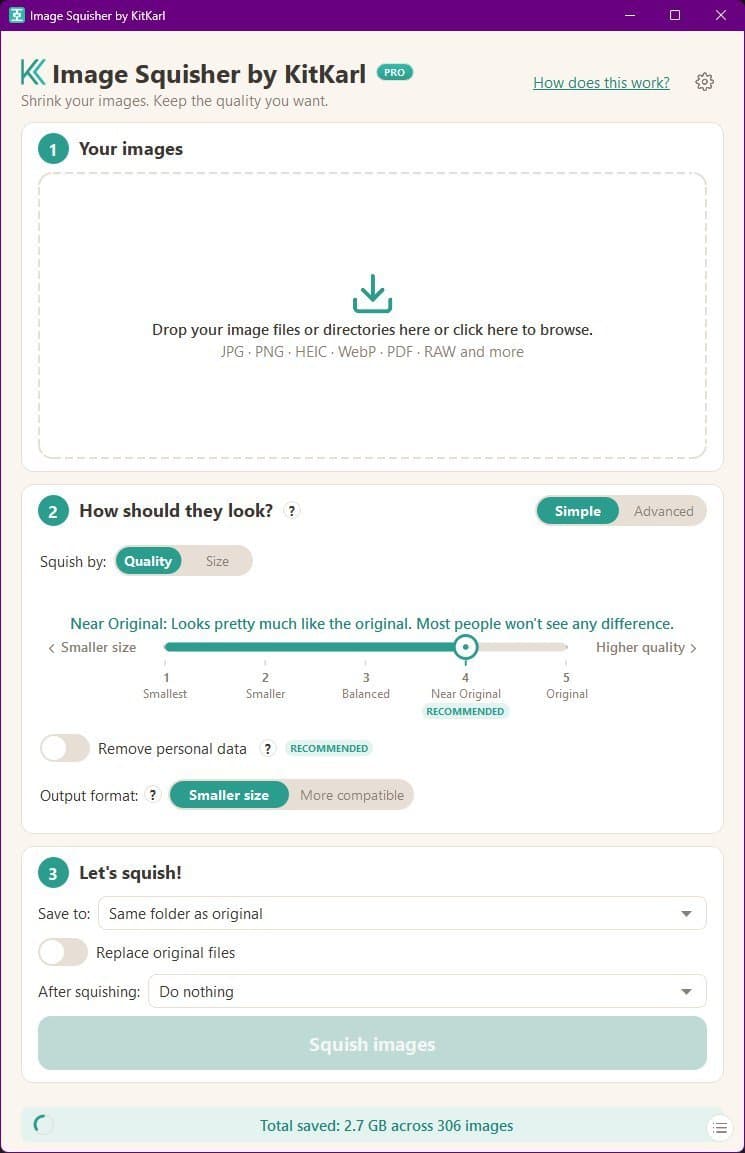
About this app
KitKarl is the small software shop of Karl Dominik. I build desktop tools that run entirely on your own machine. Video Squisher shrinks your videos automagically. Pick the quality you want in plain words. The program analyzes your video and automatically picks the best compression settings for that particular video. Local, private, no uploads. Windows, Mac, Linux. Image Squisher makes ANY format of images smaller or converts them to a different format: JPG, HEIC, camera RAW, animated files and PDFs. You pick the quality in plain words, it analyzes what compression works best for your image, and verifies its output against your original. EdgePop is a free multi-monitor switcher for Windows: hover the screen edge, click the window you want. About 2 MB. ScriptBridge fixes screenplay formatting at scriptbridge.app. Convert and manipulate your scripts in ANY format! They F'd up is a tracker for Microsoft's mistakes at theyfdup.com. See what Microsoft has screwed up now!
Key features
- 1Image Squisher: batch HEIC/RAW/JPG/PDF conversion with plain-word quality presets and output verification against the original.
- 2Video Squisher: drag-and-drop 4K compression with automatic per-video settings and visually lossless results.
- 3EdgePop: ~2 MB multi-monitor window switcher for Windows 10/11 with live thumbnail previews at screen edges.
- 4All tools run entirely locally — no uploads, no accounts, no ads, free to use.
Target customer profile
Drawn from the product itself, not from a survey.
Demographic
Photographers and content creators with large photo libraries
Pain points
Slow batch processing, loss of quality when compressing, HEIC/RAW conversion hassles
Primary needs
Fast, quality-preserving image compression; batch conversion; metadata stripping
Demographic
Videographers and drone enthusiasts storing hours of 4K footage
Pain points
Hard drive space exhaustion, complex encoding settings, quality loss
Primary needs
Simple drag-and-drop video compression with visually lossless results
Demographic
Multi-monitor power users on Windows
Pain points
Clunky window switching between screens, losing track of open apps
Primary needs
Instant window previews at screen edges for quick navigation
Scout Review
Written by AI from measured evidence, scored out of 100.
KitKarl is a one-person software shop with three genuinely useful desktop utilities and one joke site. The strongest asset is honesty: real before/after file sizes, clickable zoom, and a quality slider that maps directly onto the app's own control. Image Squisher and Video Squisher solve real problems — HEIC/RAW conversion, 4K footage bloat, batch resizing — with a privacy-first local-only architecture that cloud competitors can't match. EdgePop is a clever 2 MB multi-monitor switcher. The weaknesses are all in the wrapper: a stock-photo hero, low-contrast helper text, a repetitive long homepage, missing security headers, and a mobile LCP of 8.7 seconds. None of these are hard to fix, and fixing them would let the actual product — which is good — do the talking.
Measure by measure
Usability
64Plain-word quality sliders, a clear 'Meet [Product]' CTA per section, and free no-account downloads make onboarding obvious. The long repetitive homepage and sparse nav cost it points.
Design
70Real before/after file-size comparisons and a disciplined three-step app UI carry the design. Undercut by a stock grass-and-sky hero, low-contrast helper text, and a cropped EdgePop illustration.
Speed
57Desktop Lighthouse 91/100 but mobile 71/100 with an 8.7s LCP — the hero imagery and demo assets drag first paint on phones. CLS 0 and TBT 0ms show the code itself is lean.
Security
52HTTPS, CSP, SPF and DMARC are in place, and local-only processing removes most server-side risk. Missing HSTS, frame protection, and several hardening headers; no published audits.
Accessibility
80Lighthouse a11y 95/100 with responsive layout and plain-language labels. Failing contrast, missing main landmark, and mismatched accessible names keep it from the top of the band.
Growth
58Three specific niches (photo libraries, 4K footage, multi-monitor Windows) with a real privacy-first local wedge vs HandBrake and TinyPNG. Early stage; no traction signals yet.
Improvement areas
- Replace the stock grass-and-sky hero with a real product screenshot or the before/after comparison.
- Fix the 8.7s mobile LCP by compressing hero and demo imagery.
- Add missing security headers: HSTS, X-Content-Type-Options, Referrer-Policy, Permissions-Policy, frame protection.
- Increase contrast on small grey helper text and add a <main> landmark for accessibility.
Design & Usability
The strongest design decision on the site is showing real file sizes — 20.8 MB to 990 KB, 936.8 MB to 36.4 MB — with clickable zoom so you can try to spot the difference yourself. That's proof, not marketing. The app UI mirrors the homepage with a five-step quality slider (Smallest through Original) and a RECOMMENDED tag, so the demo and the product speak the same language. Usability is solid: every section ends with one clear 'Meet [Product]' CTA, downloads are free with no account, and the disabled 'Squish images' button makes the next step obvious. What drags both scores down is the wrapper: a stock grass-and-sky hero that reads as template, low-contrast grey helper text, a cropped EdgePop illustration, and a homepage so long and repetitive you scroll past the same three-button bar three times before reaching the last product.
Speed & Security
Speed is a tale of two devices. Desktop Lighthouse lands at 91/100 — the code is lean, CLS is 0, TBT is 0ms. Mobile drops to 71/100 with an 8.7-second LCP, which is the hero imagery and demo assets choking first paint on a phone connection. Fixing that is mostly image optimization, not architecture. Security is the weakest measured dimension: HTTPS, CSP, SPF and DMARC are configured, but HSTS, frame protection, X-Content-Type-Options, Referrer-Policy and Permissions-Policy are all missing — 6 of 12 checklist points. The saving grace is architectural: every product runs entirely on your machine with no uploads, so there's no server-side data store to breach. No published SOC 2, ISO, or pen-test documentation exists, which is normal for a solo shop but still leaves buyers without a compliance paper trail.
Accessibility & Growth
Accessibility scores 95/100 on Lighthouse, which is genuinely strong for an indie site. The remaining failures are fixable in an afternoon: insufficient color contrast on the small grey helper text, a missing <main> landmark, and visible text labels without matching accessible names. There's no published WCAG conformance statement, but the responsive layout and plain-language quality labels already do a lot of the work. Growth is a judgment call on the idea, not the traction. The domain is 0.3 years old with no visible community yet, but the positioning is specific: photographers drowning in HEIC and RAW, videographers with hours of 4K footage, and multi-monitor Windows users who want instant window previews. Against HandBrake the wedge is plain-language presets instead of a settings maze; against TinyPNG it's local desktop batch processing with video and RAW support. The privacy-first local angle is a real differentiator as cloud tools face data-handling scrutiny — but three unrelated utilities plus a Microsoft tracker under one brand dilutes the story.
Conclusion
If you're a photographer with a bloated library, a videographer with a full drive, or a Windows user juggling three monitors, KitKarl's tools are worth a download — they're free to try, they run locally, and the quality claims are backed by real files you can inspect. The site just needs to get out of its own way: swap the stock hero for a product screenshot, bump the helper text contrast, add the missing security headers, and compress the homepage images the way the app compresses everything else. A solo shop shipping three working utilities plus a Microsoft tracker is exactly the kind of indie software worth rooting for — it just needs a landing page that trusts its own product as much as the product deserves.
Suggestions for improvement
- Replace the stock grass-and-sky hero with a real product screenshot or the before/after comparison — lead with proof, not a meadow.
- Increase contrast on the small grey helper text under demos and sliders to pass WCAG AA.
- Add HSTS, X-Content-Type-Options, Referrer-Policy, Permissions-Policy, and frame protection headers — five quick wins.
- Compress the hero and demo images to fix the 8.7s mobile LCP; the tool that shrinks videos should shrink its own homepage.
Alternatives comparison
Named competitors, point by point. Nobody paid to appear here or to be left out.
 KitKarl |  HandBrake |  TinyPNG | |
|---|---|---|---|
| Video compression | Yes — Video Squisher with plain-word quality presets and automatic per-video settings | Yes — extensive manual encoding settings, steeper learning curve | No — images only |
| Image compression | Yes — Image Squisher, local desktop batch with HEIC/RAW/PDF support | No — video only | Yes — web-based, JPG/PNG/WebP, no RAW or HEIC |
| Local processing (no uploads) | Yes — all tools run entirely on your machine | Yes — desktop app, fully local | No — files uploaded to web service |
| Plain-language quality presets | Yes — Smallest, Smaller, Balanced, Near Original, Original | No — codec and bitrate settings require technical knowledge | Partial — simple but limited to a few quality levels |
| Multi-monitor window switching | Yes — EdgePop, ~2 MB Windows utility | No | No |
| Pricing | Free to use; paid purchase option available | Free and open source | Free tier with paid Pro plan |
HandBrake
Open-source video transcoder with extensive settings, but steeper learning curve.
TinyPNG
Web-based image compression tool, but no batch desktop app or video support.
Comparing options? See KitKarl alternatives, scored side by side
More Productivity apps
View all Productivity
Puzzly – B2B Lead Generation & Sales Intelligence Platform
92Puzzly is an all-in-one B2B lead generation platform that...

Qamarero
92An all-in-one hospitality software for restaurants and ba...

EmbedMyReviews
92White-label reputation management software for agencies s...

StoryPad
92Privacy-first open source journal app with a continuous t...

Notion
92All-in-one AI workspace for docs, projects, and knowledge...

The Stack Newsletter
92A weekly newsletter delivering curated tech jobs, intervi...

Vibe Coding Agent Skills
92A free, open-source platform offering 110 AI agent skills...

QRBliss
91Branded QR codes with AI Brand Sync, 15 free dynamic code...

Gerty
91Private, local AI assistant for Mac that runs offline

Strukchad Property Management
91Property management for Kenyan letting agents: rent invoices raised every month, M-Pesa rent prompts to tenants, arrears tracking and landlord statements.

CC Switch
91Open-source desktop app for switching AI coding providers...

PitchWhip
90AI cold call scripts & direct dials from LinkedIn


A platform dedicated to providing unbiased reviews of newly launched applications, analyzing everything from their features to their full potential.
info@scoutforge.net© 2026 Scoutforge. All rights reserved.
