Cycling through all six. Tap any point to stop.
Measured on six things
AI workspace turning data into actionable intelligence fo...
Speed
46Mobile Lighthouse 46/100 with slow LCP (13.3s) and TBT; desktop much better at 81/100. Marketing site feels snappier than the measured mobile numbers suggest.
Screenshots
1 / 1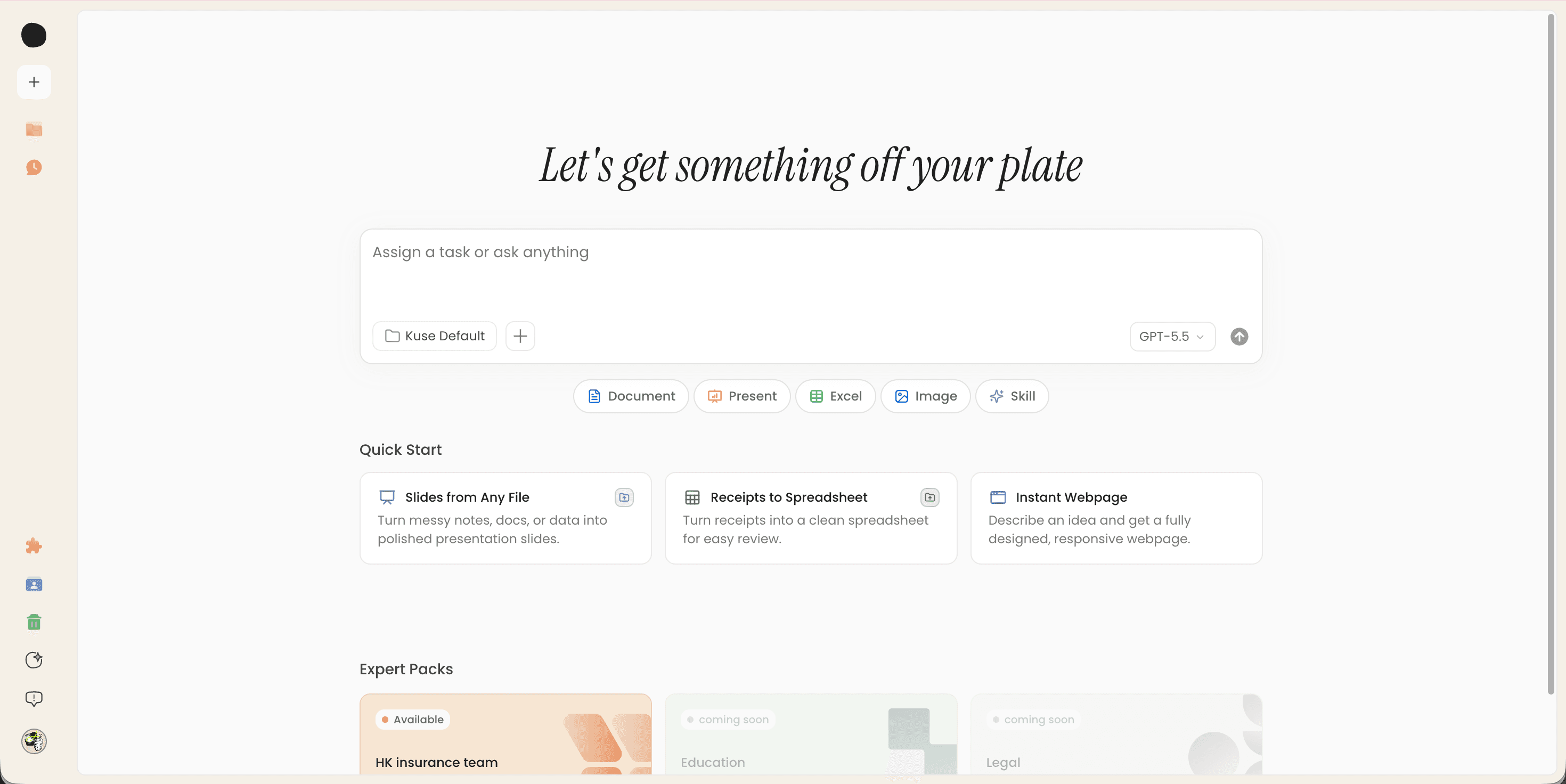
About this app
Kuse is an AI-powered workspace that helps you transform scattered information into structured, actionable intelligence. It connects with various data sources, lets you organize content around your specific context, and provides smart tools for analysis, summarization, and collaboration. Whether you're a researcher drowning in papers, a product manager synthesizing user feedback, or a strategist building competitive analyses, Kuse adapts to your workflow. It features a context-driven interface that remembers your projects and preferences, making it feel like a personal AI assistant that truly understands your needs. The platform also includes specialized tools like a formatter and exam paper generator, hinting at its versatility across different use cases. If you're tired of juggling multiple apps to make sense of your data, Kuse aims to be your single source of truth for intelligence.
Key features
- 1Context-driven AI workspace with document, spreadsheet, and presentation generation from mixed inputs.
- 2Workflow automation for recurring tasks across connected apps and data sources.
- 3Specialized tools including document formatter and exam paper generator with template replication.
Target customer profile
Drawn from the product itself, not from a survey.
Demographic
Knowledge workers and researchers handling large volumes of documents
Pain points
Overwhelmed by information overload, struggling to extract key insights from multiple sources
Primary needs
Centralized workspace for document analysis, AI-powered summarization, and context retention across projects
Demographic
Product managers and strategists conducting market research
Pain points
Manually synthesizing competitor data, user feedback, and industry reports
Primary needs
Automated research aggregation, context-aware analysis, and collaborative intelligence sharing
Demographic
Students and educators preparing academic materials
Pain points
Difficulty organizing research notes, generating study aids, and managing bibliography
Primary needs
AI-assisted note-taking, exam paper generation, and content formatting tools
Scout Review
Written by AI from measured evidence, scored out of 100.
Kuse positions itself as an AI workspace that turns scattered inputs into structured outputs with workflow automation and specialized tools. It offers clear pricing tiers, a free entry point, and visual canvas features that differentiate it from pure note-taking apps. Execution is solid in design consistency and security headers, while speed and navigation leave room for polish. Traction claims are ambitious but rest on self-reported numbers and early community signals rather than widespread independent reviews.
Measure by measure
Usability
62Google signup and free credits get users in fast; pricing tiers clear. App navigation uses unlabeled colored dots and weak CTAs reduce immediate clarity for new users.
Design
58Clean white app canvas with colored sidebar icons and consistent Quick Start cards, but homepage marketing has visual disconnects and incomplete sections.
Speed
46Mobile Lighthouse 46/100 with slow LCP (13.3s) and TBT; desktop much better at 81/100. Marketing site feels snappier than the measured mobile numbers suggest.
Security
74Strong header coverage (HTTPS, HSTS, frame protection, etc.) with 11/13 checklist points. No CSP and no public SOC 2/ISO reports found.
Accessibility
78Lighthouse 95/100 with only one viewport scaling issue. Responsive design visible; no dedicated accessibility statement or multi-language support verified.
Growth
682.8-year-old domain, 500k+ claimed users, 747 GitHub stars on open-source repo, Product Hunt/YouTube presence. Limited independent review volume on major platforms.
Improvement areas
- Mobile performance optimization to reduce LCP and improve Lighthouse mobile score.
- Navigation clarity with labeled sidebar elements and stronger primary CTAs.
- Public security/compliance documentation to support enterprise adoption.
Design & Usability
Kuse presents a clean productivity canvas with distinct colored sidebar icons and well-padded Quick Start cards, but the marketing homepage suffers from visual mismatches and incomplete 'coming soon' sections. Usability benefits from instant Google signup and generous free credits, yet the app's unlabeled navigation dots and lack of prominent CTAs create friction for first-time users. The overall experience sits in the competent middle: functional for returning users who already understand the visual canvas, but not particularly welcoming to newcomers.
Speed & Security
Performance is uneven, with mobile Lighthouse scores dragging due to slow LCP while desktop performs adequately. Security headers are mostly strong (HTTPS, HSTS, frame protection) but the absence of CSP and any published compliance reports keeps it from standing out. For a product targeting knowledge workers handling sensitive documents, the current posture is acceptable yet unremarkable compared with peers that publish audits.
Accessibility & Growth
Accessibility scores well on automated checks despite one viewport scaling issue, and the responsive layout supports broad device use. Growth signals are mixed: a 2.8-year domain, claimed 500k users, and an active GitHub repo with hundreds of stars suggest momentum, yet independent review volume remains low. The product shows trajectory through YouTube coverage and open-source efforts, but lacks the dense third-party validation typical of more mature tools in the space.
Conclusion
For researchers, PMs, and students drowning in documents, Kuse delivers a promising single workspace with context retention and generation tools. It won't replace Notion or Obsidian overnight, but the combination of visual workflows and credit-based access makes it worth testing for teams already comfortable with AI-assisted document work.
Suggestions for improvement
- Add text labels or tooltips to the sidebar icons to improve first-time navigation clarity.
- Publish a SOC 2 or similar compliance report to strengthen enterprise trust signals.
- Optimize mobile LCP and add a visible primary CTA on the task input bar.
Alternatives comparison
Named competitors, point by point. Nobody paid to appear here or to be left out.
 Kuse |  Notion AI |  Mem |  Obsidian | |
|---|---|---|---|---|
| AI-powered document and content generation from mixed sources | Strong visual canvas with workflow automation and specialized generators | Integrated AI assistant within note-taking; less emphasis on raw data transformation | Automatic note organization; fewer specialized output tools | Local linking and manual AI setup; no built-in context engine or generators |
| Pricing model and free tier access | Free tier with 1,800 credits; paid plans $19.9–$199.9/mo based on credits | Free personal plan; paid from ~$8–$15/user/mo for AI features | Free tier available; paid plans start around $10–$30/mo | Free core app; paid sync/publish from ~$5–$10/mo; AI via plugins |
| Open-source components and community traction | GitHub org with 747-star repo; active YouTube/Product Hunt presence | Closed source; large established user base and extensive templates | Closed source; smaller but dedicated user community | Strong open-source plugin ecosystem and large community forums |
Notion AI
Combined note-taking and AI assistant, but less focused on transforming raw data into intelligence graphs.
Mem
AI-powered knowledge management that automatically organizes notes, but lacks specialized tools like exam generators.
Obsidian
Local-first knowledge base with linking capabilities, but requires manual setup for AI features and lacks built-in context engine.
Comparing options? See Kuse alternatives, scored side by side
Sources
What the review was written against. A verdict with no sources is an opinion.
More Productivity apps
View all Productivity
Puzzly – B2B Lead Generation & Sales Intelligence Platform
92Puzzly is an all-in-one B2B lead generation platform that...

Qamarero
92An all-in-one hospitality software for restaurants and ba...

EmbedMyReviews
92White-label reputation management software for agencies s...

StoryPad
92Privacy-first open source journal app with a continuous t...

Notion
92All-in-one AI workspace for docs, projects, and knowledge...

The Stack Newsletter
92A weekly newsletter delivering curated tech jobs, intervi...

Vibe Coding Agent Skills
92A free, open-source platform offering 110 AI agent skills...

QRBliss
91Branded QR codes with AI Brand Sync, 15 free dynamic code...

Gerty
91Private, local AI assistant for Mac that runs offline

Strukchad Property Management
91Property management for Kenyan letting agents: rent invoices raised every month, M-Pesa rent prompts to tenants, arrears tracking and landlord statements.

CC Switch
91Open-source desktop app for switching AI coding providers...

PitchWhip
90AI cold call scripts & direct dials from LinkedIn


A platform dedicated to providing unbiased reviews of newly launched applications, analyzing everything from their features to their full potential.
info@scoutforge.net© 2026 Scoutforge. All rights reserved.
