Cycling through all six. Tap any point to stop.
Measured on six things
Read the Bible aloud and the page follows your voice.
Growth
58Real problem (staying consistent with Bible reading) with a specific differentiator: voice-following page turning no competitor offers. Early stage (domain 0.0 years, no ratings) is context, not score. Niche but underserved.
Screenshots
1 / 4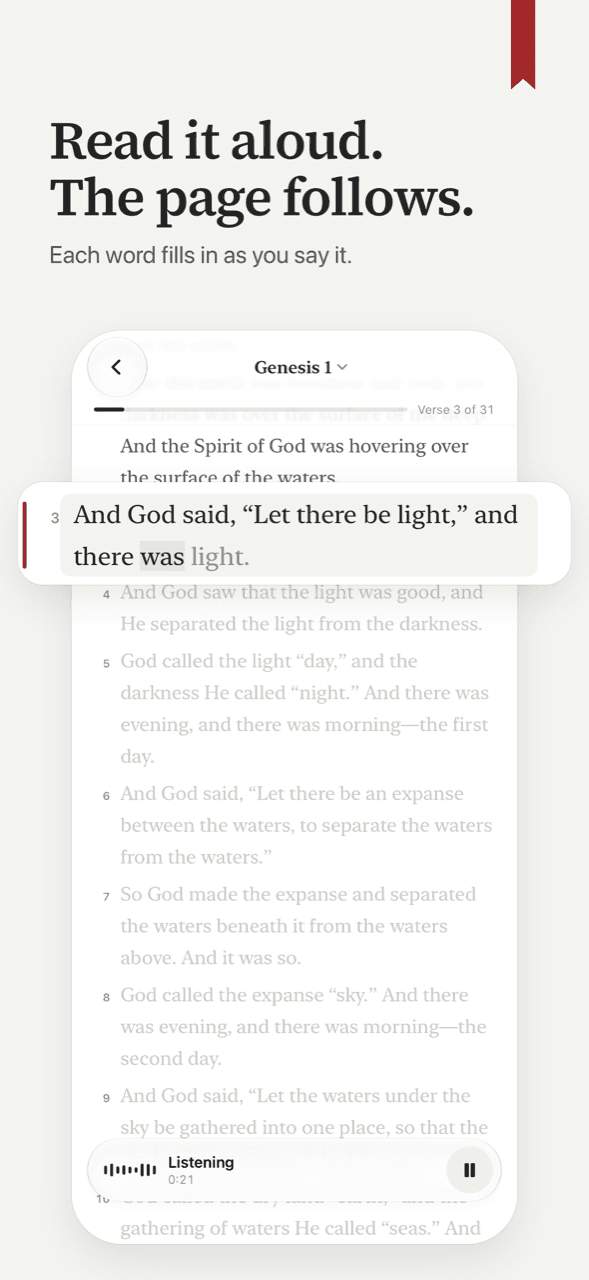
About this app
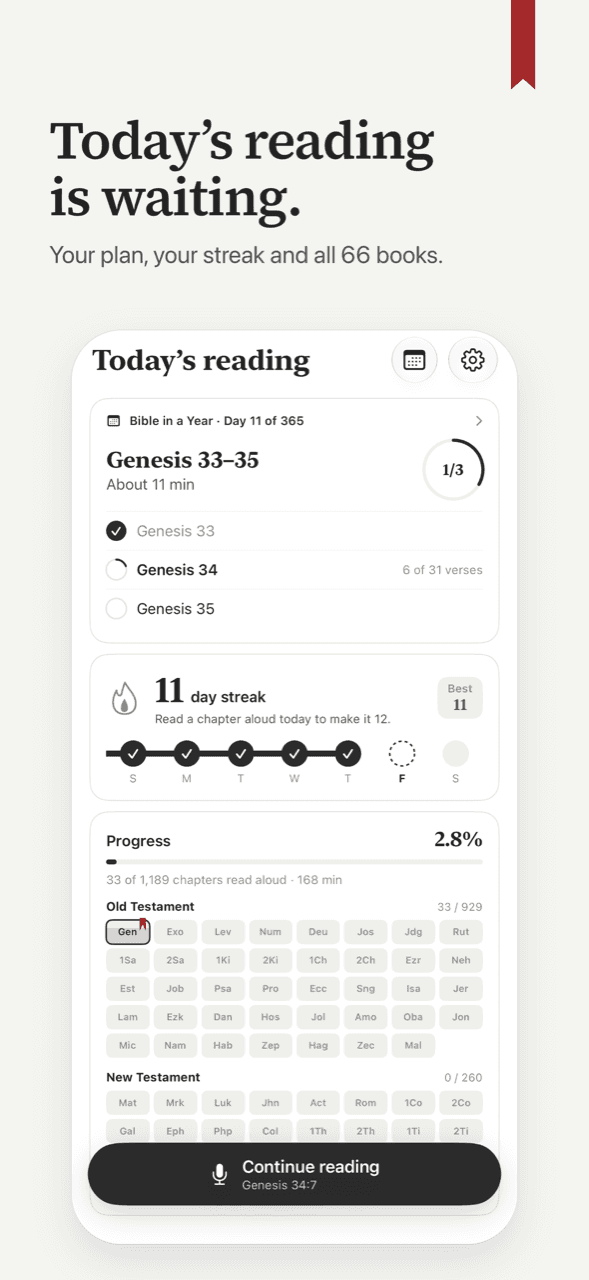
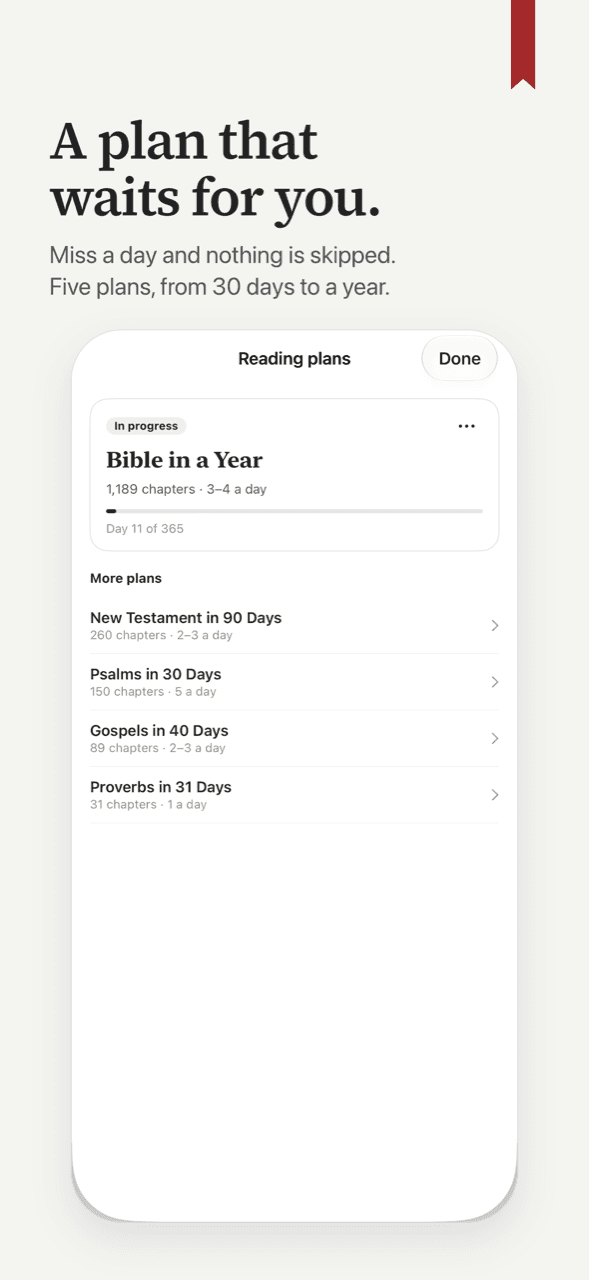
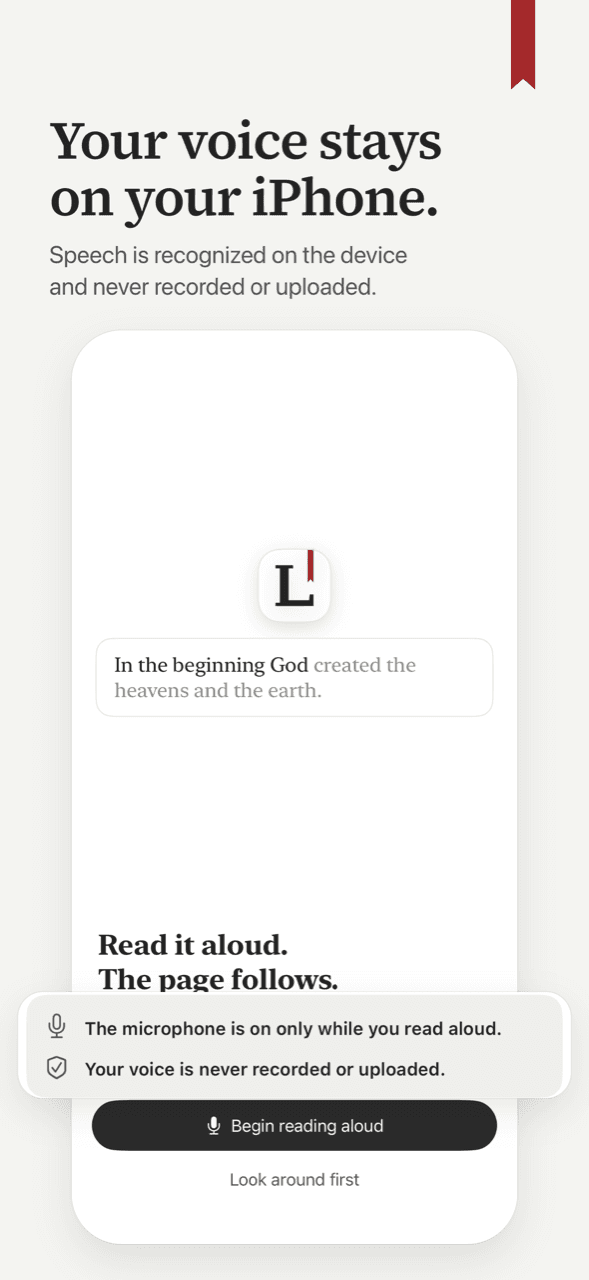
Lectern Bible listens as you read Scripture out loud and moves the page with your voice, one verse at a time. Words fill in as you say them. Nothing to tap. A chapter counts only when you read it aloud; there is no swiping to the end. If the page did not catch a verse, it says so and waits for you to read it again. Choose a plan and each day's portion is on the home screen: the Bible in a Year, the New Testament in 90 Days, the Psalms in 30, the Gospels in 40 or Proverbs in 31. Miss a day and the plan waits for you. Read a chapter aloud and the day counts toward your streak, and every chapter fills in its book across all 66. Speech is recognized on your iPhone. Nothing you say is recorded or uploaded. No ads, no account. The first three chapters you read aloud are free, and reading the text silently is always free. Scripture is from the Berean Standard Bible (BSB), dedicated to the public domain. For iPhone, iOS 26 or later.
Key features
- 1Voice-following page turning: reads aloud and the page moves verse by verse, with words filling in as you speak.
- 2Structured reading plans: Bible in a Year, NT in 90 Days, Psalms in 30, Gospels in 40, Proverbs in 31.
- 3On-device speech recognition with no recording or upload, no account required, works offline.
Target customer profile
Drawn from the product itself, not from a survey.
Demographic
Individuals seeking a structured Bible reading routine
Pain points
Struggling to stay consistent with daily reading plans
Primary needs
A tool that tracks progress and keeps them motivated
Demographic
Christians who prefer reading Scripture aloud for focus and meditation
Pain points
Losing place while reading aloud or needing to tap to scroll
Primary needs
Hands-free page turning that follows their voice
Demographic
Privacy-conscious users concerned about data collection
Pain points
Worry that voice data is recorded or uploaded
Primary needs
On-device processing with no account required
Demographic
Busy professionals with limited time for Bible study
Pain points
Difficulty finding time to read consistently
Primary needs
Short, focused reading sessions with progress tracking
Scout Review
Written by AI from measured evidence, scored out of 100.
Lectern Bible is a focused, well-executed iOS app that solves a specific problem: reading Scripture aloud without touching the screen. The voice-following page turning works, the progress tracking is thoughtful, and the privacy stance (on-device speech, no account) is a genuine strength. Design is clean with a coherent visual identity, though the marketing site has contrast issues. Usability is strong for a v1.2, with clear onboarding and graceful interruption handling. Speed is excellent on desktop but mobile LCP is a bit slow. Security is baseline-adequate with no audits. Accessibility is good but English-only. Growth is promising but niche. Overall, a solid early-stage product with a clear niche and room to grow.
Measure by measure
Usability
68Onboarding is three clear steps, interruptions handled gracefully, no account needed, offline works. First three chapters free then paywall; no trial that auto-charges. Solid for a v1.2 app.
Design
71Judged on app UI and store screenshots: coherent red ribbon motif, crisp verse text, subtle read-line graying, and clean progress widgets. Homepage has low-contrast body text and cramped feature grid.
Speed
72Lighthouse mobile 88/100 (LCP 3.6s, TBT 120ms), desktop 100/100. Native iOS app with on-device speech recognition means no server round-trips for core function. Lightweight static marketing site.
Security
62HTTPS enforced with HSTS, frame protection, and referrer policy. No CSP or Permissions-Policy; DMARC missing. Privacy policy states on-device speech, no recording or upload, no account. No third-party audits claimed.
Accessibility
78Lighthouse a11y 96/100 with one contrast failure. Light/dark mode and adjustable text size in app. No WCAG statement or accessibility page. English-only localization limits reach.
Growth
58Real problem (staying consistent with Bible reading) with a specific differentiator: voice-following page turning no competitor offers. Early stage (domain 0.0 years, no ratings) is context, not score. Niche but underserved.
Improvement areas
- Homepage body text contrast fails accessibility; fix the light gray on off-white background.
- English-only localization limits reach; add more languages for global Bible readers.
- No iPad or Android version; expanding platforms would broaden the addressable market.
Design & Usability
Lectern Bible's design is judged on its app UI and store screenshots, not just the marketing site. The app uses a coherent red ribbon motif across progress bars, highlights, and the logo, with crisp verse text and subtle graying of read lines. The reading view shows a non-intrusive listening indicator and keeps the screen on. The homepage has a low-contrast body text section and a cramped six-item feature grid, but the app itself is cleaner. Usability is strong for a v1.2: three-step onboarding, graceful handling of missed verses and interruptions, no account required, offline support, and a free tier of three chapters. The paywall after three chapters is a hard stop, but there's no auto-charging trial. For an early-stage iOS app, this is competent execution.
Speed & Security
Speed is a mixed bag: Lighthouse desktop performance is a perfect 100/100, but mobile drops to 88/100 with an LCP of 3.6s — noticeable on slower connections. The app itself runs speech recognition on-device, so core functionality doesn't depend on server latency. Security is adequate but not exceptional: HTTPS is enforced with HSTS, frame protection, and referrer policy, but CSP and Permissions-Policy are missing, and DMARC is absent. The privacy policy clearly states that speech is processed on-device and nothing is recorded or uploaded, which is a strong trust signal for a voice-based app. No third-party audits or SOC 2 claims are present, which is typical for a new indie app. The 8/12 security header score reflects a solid baseline without going above and beyond.
Accessibility & Growth
Accessibility scores well at 96/100 on Lighthouse, with the only failure being insufficient contrast on some text — ironic for a reading app. The app supports light/dark mode and adjustable text size, but there's no WCAG statement or accessibility page, and it's English-only. Growth potential is moderate: the problem of staying consistent with Bible reading is real, and the voice-following page turning is a genuine differentiator that YouVersion and Bible.is don't offer. However, the target market is niche, the app is brand new (domain registered October 2026, no ratings yet), and it competes against free, entrenched alternatives. The wedge is sharp but the ceiling is limited without expanding platforms or languages.
Conclusion
If you've ever tried to read the Bible aloud and lost your place because you had to tap the screen, Lectern Bible is the app you've been waiting for. It's not trying to be YouVersion — it's a focused tool for a specific habit. The free tier is generous enough to test the core loop, and the one-time purchase option is a nice alternative to subscriptions. The main risks are platform lock-in (iPhone only, iOS 26+) and the niche audience. But for what it does, it does it well. If you're the target user, this is worth a download.
Suggestions for improvement
- Add an accessibility statement and fix the contrast issue on the homepage body text.
- Expand localization beyond English to reach non-English-speaking Bible readers.
- Consider an iPad layout and Android version to broaden the addressable market.
- Publish a security page or third-party audit to strengthen trust for privacy-conscious users.
Alternatives comparison
Named competitors, point by point. Nobody paid to appear here or to be left out.
 Lectern Bible Lectern Bible |  YouVersion Bible App YouVersion Bible App | Bible.is | |
|---|---|---|---|
| Voice-following page turning (reads aloud, page moves automatically) | Yes — core feature; words fill in as you speak, page moves at verse end. | No — requires manual scrolling or tapping; audio Bible plays but doesn't follow your voice. | No — offers audio recordings and text, but no interactive read-aloud tracking. |
| On-device speech recognition (no recording or upload) | Yes — speech recognized on iPhone; nothing recorded or uploaded. | N/A — no voice input feature; audio is pre-recorded playback. | N/A — no voice input feature; audio is pre-recorded playback. |
| Structured reading plans with streak tracking | Yes — multiple plans (Bible in a Year, NT in 90, etc.) with daily streak and progress tracking. | Yes — extensive reading plans with streaks and community features. | Limited — focuses on audio Bible listening, not structured reading plans with streaks. |
| Free tier / pricing model | First 3 chapters free; then yearly/monthly subscription or one-time purchase. Silent reading always free. | Free with optional donations; no paywall for core features. | Free; supported by ministry donations. |
| Platform availability | iPhone only (iOS 26+); Android coming soon. | iOS, Android, web, and more. | iOS, Android, web. |
YouVersion Bible App
A popular Bible app with reading plans, audio Bibles, and community features, but no voice-following page turning.
Bible.is
Offers audio Bible recordings and text, but lacks the interactive read-aloud tracking unique to Lectern Bible.
Comparing options? See Lectern Bible alternatives, scored side by side
More Education apps
View all Education
The Stack Newsletter
92A weekly newsletter delivering curated tech jobs, intervi...

Startup Science
88A unified platform replacing 12-20 disconnected tools for...

TranscriptYou
88Free YouTube transcript generator with timestamps and AI ...

Coloring Pages Pro
87A massive collection of free printable coloring pages for...

RBQ Exam
87Online practice for the RBQ contractor licence exams in Québec: original questions, timed mock exams and lessons, in French or English.

HireVue Practice
85AI-powered HireVue practice with timed mock interviews, role-specific questions, transcripts, scoring, and actionable feedback.

Case Cub
85AI-powered law school study platform with 20,000+ case br...

Ciroexam
84All-in-one CIRO exam prep for CIRE and 8 other exams, wit...

Aptitude Test Prep
84Free timed practice for SHL, numerical, and logical tests...

PageCub
84Custom illustrated children's books created around your c...

WellWired
84AI explained simply for older adults, with safety lessons...

Timix - A Modern Timer
84Turn timers into powerful routines with automation, widge...


A platform dedicated to providing unbiased reviews of newly launched applications, analyzing everything from their features to their full potential.
info@scoutforge.net© 2026 Scoutforge. All rights reserved.
