Cycling through all six. Tap any point to stop.
Measured on six things
Ledge turns your Mac's notch into a shelf. Drag a file up, let go, and hand it to any app later as the right kind of thing. $19 once.
Security
44HTTPS enforced and SPF present, but no HSTS, CSP, frame protection, or Referrer-Policy — 3/12 header checklist points. Apple notarization and a network-blocking build gate are real pluses; no third-party audit or bug bounty found.
Screenshots
1 / 3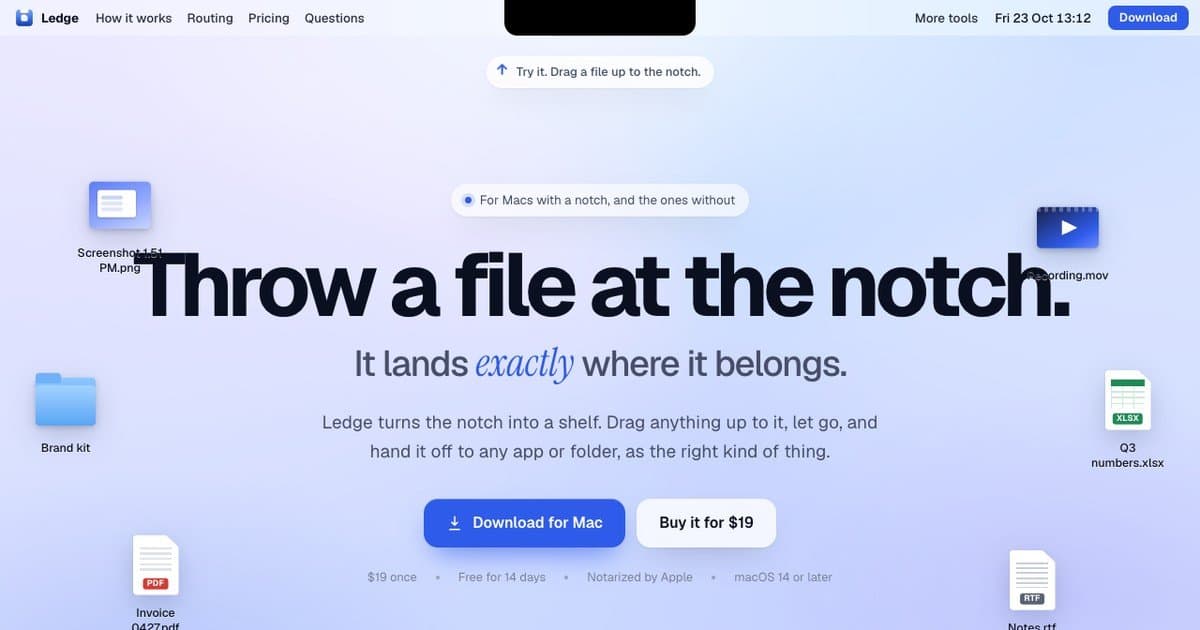
About this app
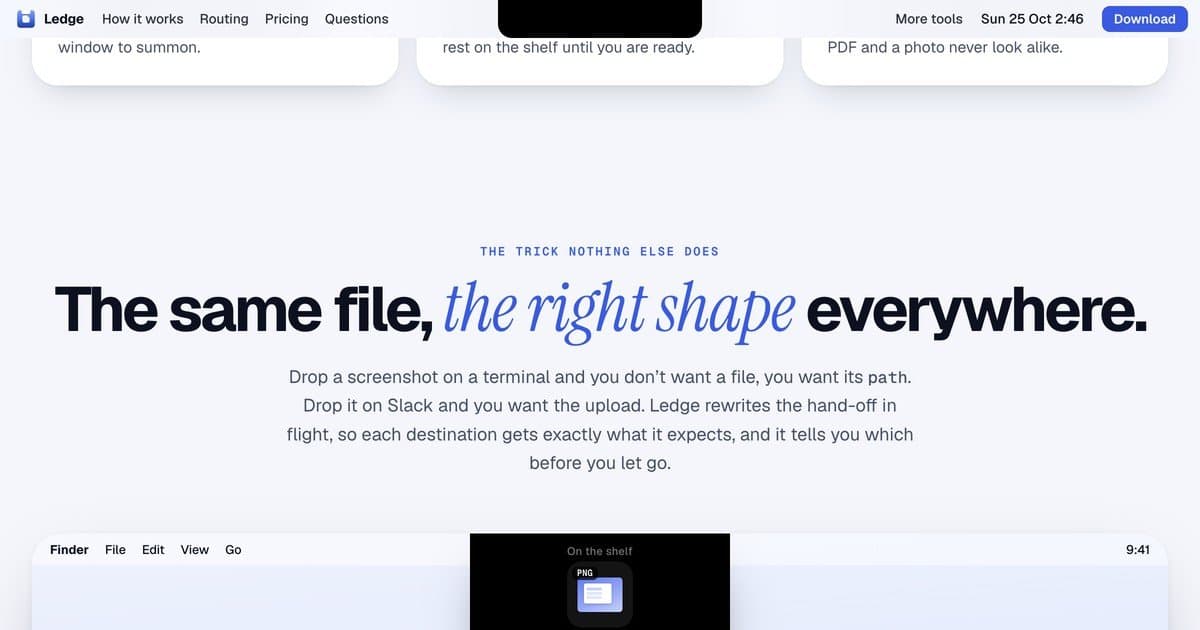
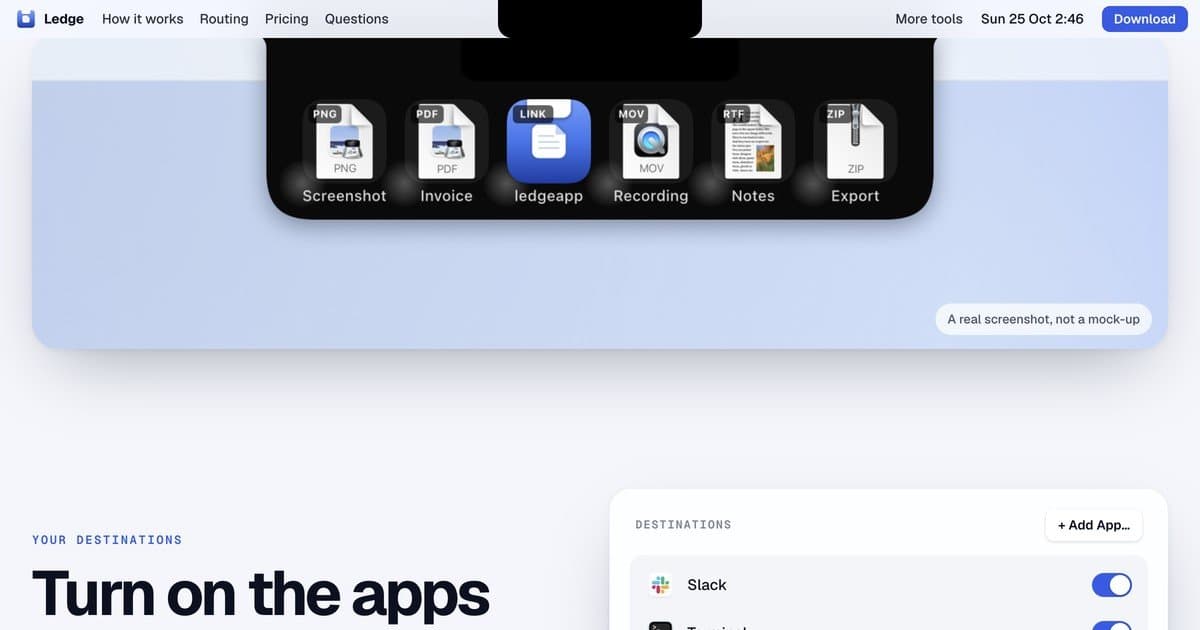
Ledge turns the notch on your Mac into a shelf. Drag any file up to the notch, let go, and hand it off later to any app or folder. It holds screenshots, PDFs, folders, app bundles, images, links and text, and each tile shows a real preview, a clean name and a type badge. The hand-off adapts to where it goes: Terminal gets the quoted path typed in, Slack and Mail get the file attached, a folder gets the file (or a JPG if you set a rule). Per-app rules let you decide. Option-Space opens it, or click the notch. It works on Macs without a notch too, and settles into a hairline when idle. No account, no cloud. $19 once, free for 14 days, macOS 14 or later.
Key features
- 1Notch-as-shelf: drag any file to the notch and it lands with a real preview, clean name, and type badge.
- 2Per-app hand-off rules: Terminal gets a quoted path, Slack/Mail get attachments, folders get files or JPGs.
- 3No account, no cloud: licence activation and update checks only, with a build gate blocking other network access.
Target customer profile
Drawn from the product itself, not from a survey.
Scout Review
Written by AI from measured evidence, scored out of 100.
Ledge is a well-executed indie Mac utility with a genuinely clever mechanic: drag a file to the notch, and it lands on a shelf that knows what shape each destination wants. The landing page sells it in seconds with a live interactive demo, a clear $19 one-time price, and an FAQ that answers the notch question before you ask. The app's security story is stronger than its website's — notarization and a network-blocking build gate are real, while the site runs with almost no security headers. Accessibility has concrete failures worth fixing. The idea is differentiated enough to grow, but it's early and single-platform.
Measure by measure
Usability
74Signup-to-value is basically zero: download, drag a file, done. Live notch demo on the page, documented ⌥Space shortcut, and an FAQ that pre-answers the notch-less-Mac question. Trial needs no card.
Design
71Polished macOS-native landing page: oversized headline, blue italic accent, soft periwinkle gradient, and floating file tiles that explain the notch-shelf idea instantly. Undercut by a placeholder-looking black logo and slightly loose icon alignment.
Speed
58Desktop Lighthouse 93/100 but mobile drops to 73 with a 4.5s LCP and 3.6s FCP. CLS is a clean 0 and TBT is 49ms, so it's a heavy-first-paint problem, not a jank problem.
Security
44HTTPS enforced and SPF present, but no HSTS, CSP, frame protection, or Referrer-Policy — 3/12 header checklist points. Apple notarization and a network-blocking build gate are real pluses; no third-party audit or bug bounty found.
Accessibility
60Lighthouse 87/100 with real failures: low-contrast text, links without discernible names, and touch targets too small. English-only, no a11y statement. The documented keyboard shortcut is a genuine plus.
Growth
63Real problem (files scattered across desktop, Downloads, tabs), specific wedge (per-app hand-off rules), and a $19 one-time price against subscription norms. Early — domain is 0.2 years old — but the idea has room.
Improvement areas
- Website security headers: no HSTS, CSP, frame protection, or Referrer-Policy (3/12 checklist points).
- Mobile performance: 4.5s LCP and 3.6s FCP drag the Lighthouse mobile score to 73/100.
- Accessibility: contrast, link names, and touch-target failures on the marketing site; no a11y statement.
Design & Usability
Ledge's site does the hard thing well: it makes an abstract gesture legible in about four seconds. The oversized 'Throw a file at the notch' headline, the blue italic 'exactly', and the floating PDF/folder/spreadsheet tiles all point at the same idea without a single explainer video. The live notch demo on the page is the smartest move here — you can try the interaction before you download anything. Usability is close to frictionless: download CTA in nav and hero, a $19 buy button, a 14-day trial with no card, and an FAQ that pre-empts the obvious objection ('do I need a notch?'). The deductions are cosmetic but real: a black rectangle logo in the nav that reads as a placeholder, and floating icons that drift a little too close to the headline. Neither breaks anything, but both signal a product still being polished.
Speed & Security
Speed is a tale of two devices. Desktop Lighthouse lands at 93/100 — genuinely snappy. Mobile drops to 73 with a 4.5-second LCP and 3.6-second FCP, which means phone visitors watch a gradient before anything useful appears. CLS of 0 and TBT of 49ms show the page isn't janky, just heavy on first paint; image optimization and preloading the hero would close most of the gap. Security is where the story gets uneven. The app itself has credible claims: Developer ID signing, Apple notarization, and a build gate that fails release if the binary can reach the network — that's a stronger posture than most indie Mac utilities bother with. But the marketing site scores 3/12 on header hygiene: no HSTS, no CSP, no frame protection, no Referrer-Policy. No SOC 2, ISO, pen-test, or bug bounty is published, which is normal for a $19 indie app but leaves the security story resting entirely on the maker's own claims.
Accessibility & Growth
Accessibility lands at 87/100 on Lighthouse, which sounds better than it is: the failures are the ones that actually bite — insufficient color contrast, links without discernible names, and touch targets too small or too close together. On a page built around a drag gesture, small hit targets are a poor fit. There's no accessibility statement, no WCAG claim, and the site is English-only. The documented ⌥Space shortcut is a genuine keyboard win for the app itself. Growth is the most interesting dimension. The problem is real and specific: files pile up on the desktop, in Downloads, in a dozen tabs, and the notch is already at the top of every screen where the cursor drifts. The wedge — per-app hand-off rules that rewrite the format in flight (Terminal gets a quoted path, Slack gets an attachment, a folder gets a JPG if you set a rule) — is a workflow the listed alternatives don't demonstrate. The $19 one-time price against subscription norms is a second differentiator. The honest limit: this is a single-platform utility with no network effects and no data advantage, so growth depends on Mac power users finding it and on the maker shipping more Everyday Mac Tools. The domain is 0.2 years old, so traction is essentially zero — that's context, not a verdict.
Conclusion
If you're a Mac power user who drags screenshots into Slack and paths into Terminal all day, Ledge is a $19 bet with a free trial attached — low risk, real payoff. If you're on a notch-less Mac, it still works, but the magic is diminished. The product is more finished than the website around it; fix the logo, tighten the mobile LCP, add the security headers, and this goes from 'nice indie tool' to 'why doesn't Apple ship this.'
Suggestions for improvement
- Replace the black rectangle nav logo with a real mark — it's the first thing that reads as unfinished.
- Cut mobile LCP from 4.5s: compress hero images, preload the headline font, and serve responsive sizes.
- Add HSTS, CSP, X-Content-Type-Options, and Referrer-Policy — four headers, maybe an hour of work.
- Fix the three Lighthouse a11y failures: contrast, link names, and touch-target spacing.
Alternatives comparison
Named competitors, point by point. Nobody paid to appear here or to be left out.
 Ledge Ledge |  | |
|---|---|---|
| Pricing model | $19 one-time, 14-day free trial, 7-day refund | Not specified in provided details |
| Platform support | macOS 14+ only, universal (Apple silicon + Intel) | Not specified in provided details |
| Cloud / account requirement | No account, no cloud; local-only with licence activation | Not specified in provided details |
| Per-destination format rules | Yes — Terminal gets path, Slack gets attachment, folders get file or JPG | Not specified in provided details |
| Keyboard shortcut access | ⌥Space opens/closes the shelf; click the notch as alternative | Not specified in provided details |
Comparing options? See Ledge alternatives, scored side by side
More Productivity apps
View all Productivity
Qamarero
92An all-in-one hospitality software for restaurants and ba...

The Stack Newsletter
92A weekly newsletter delivering curated tech jobs, intervi...

EmbedMyReviews
92White-label reputation management software for agencies s...

StoryPad
92Privacy-first open source journal app with a continuous t...

Puzzly – B2B Lead Generation & Sales Intelligence Platform
92Puzzly is an all-in-one B2B lead generation platform that...

Notion
92All-in-one AI workspace for docs, projects, and knowledge...

Vibe Coding Agent Skills
92A free, open-source platform offering 110 AI agent skills...

CC Switch
91Open-source desktop app for switching AI coding providers...

username.md
90One verified handle for your online identity, readable by...

What the GIF
89Frame-perfect video-to-GIF maker that runs entirely in yo...

AuditCloser
89White-label website audits that close deals for digital a...

NudgeWin
89Automated quote follow-up for trades and service businesses.


A platform dedicated to providing unbiased reviews of newly launched applications, analyzing everything from their features to their full potential.
info@scoutforge.net© 2026 Scoutforge. All rights reserved.
