Cycling through all six. Tap any point to stop.
Measured on six things
Seriously proactive personal productivity app
Security
52HTTPS and HSTS are in place, and the site makes real privacy claims (no training on your data, full deletion). But 4/12 on headers — no CSP, no frame protection, no Referrer-Policy — and no SPF or DMARC on the domain. No SOC 2 or ISO claim found.
Screenshots
1 / 5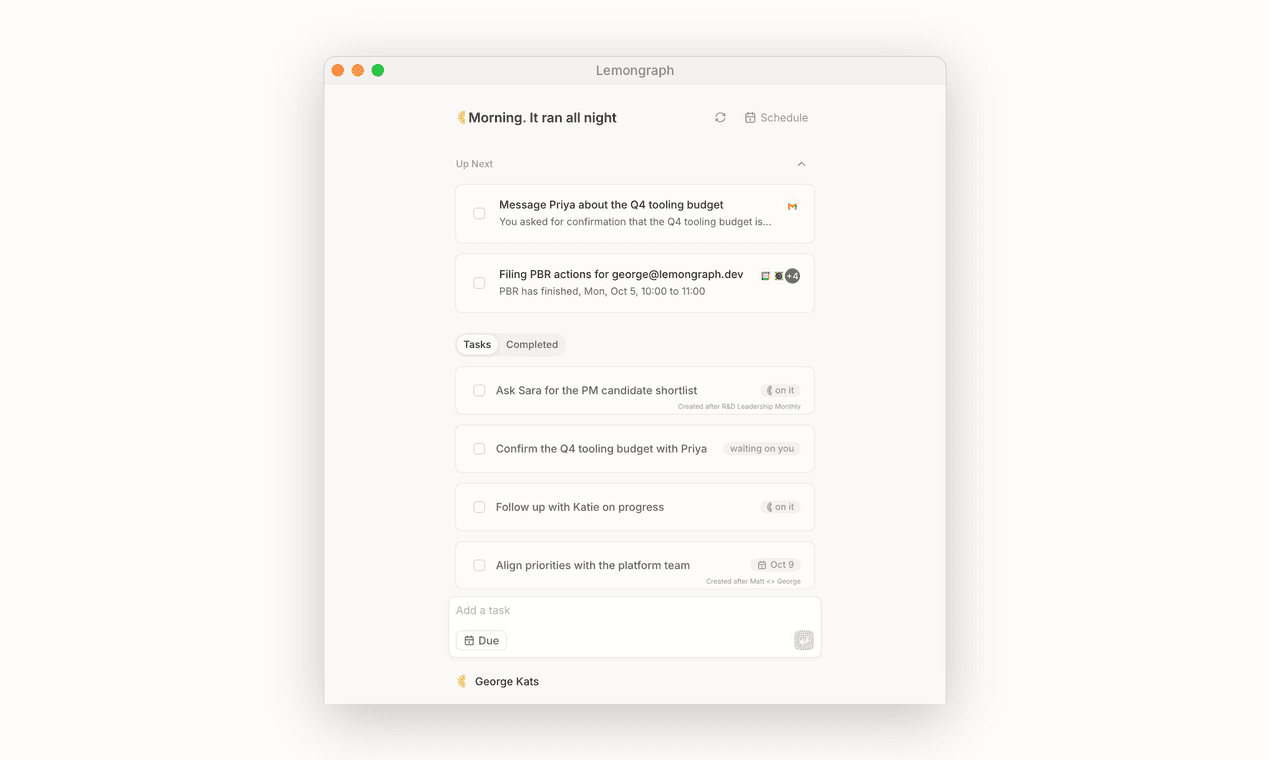
About this app
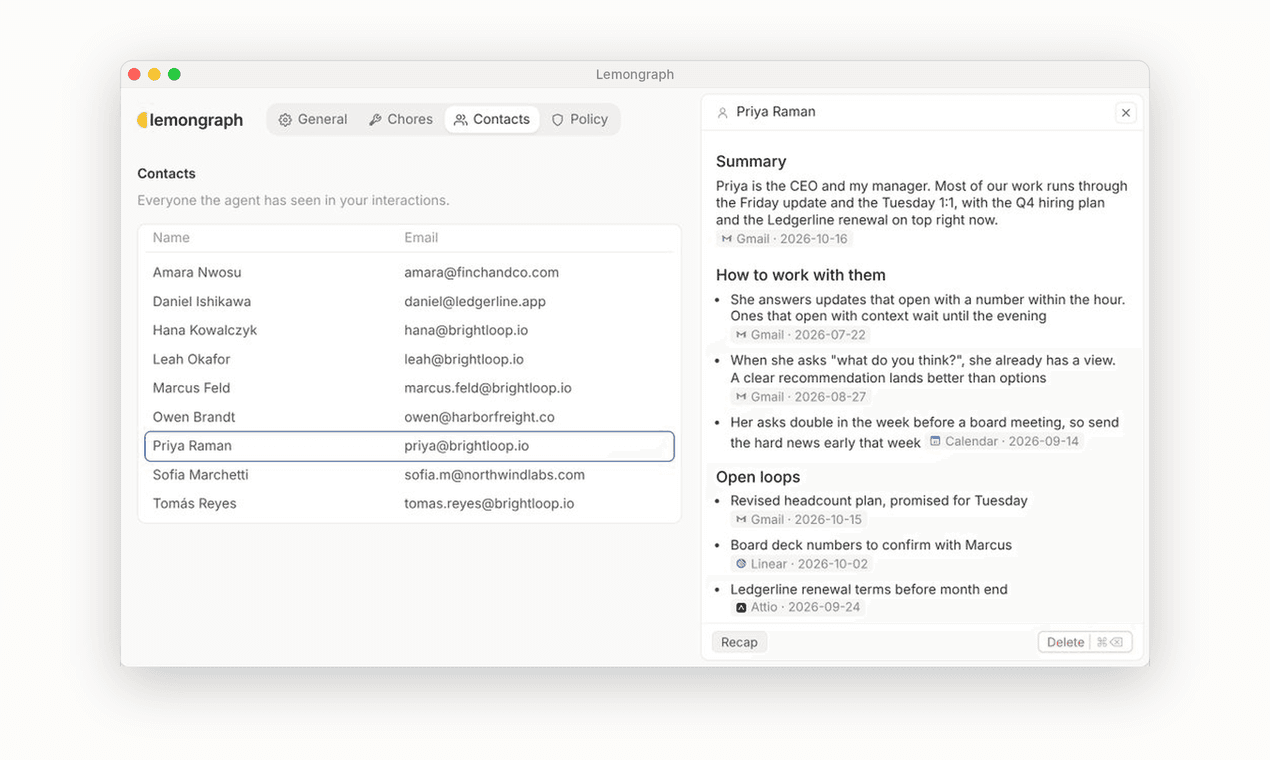
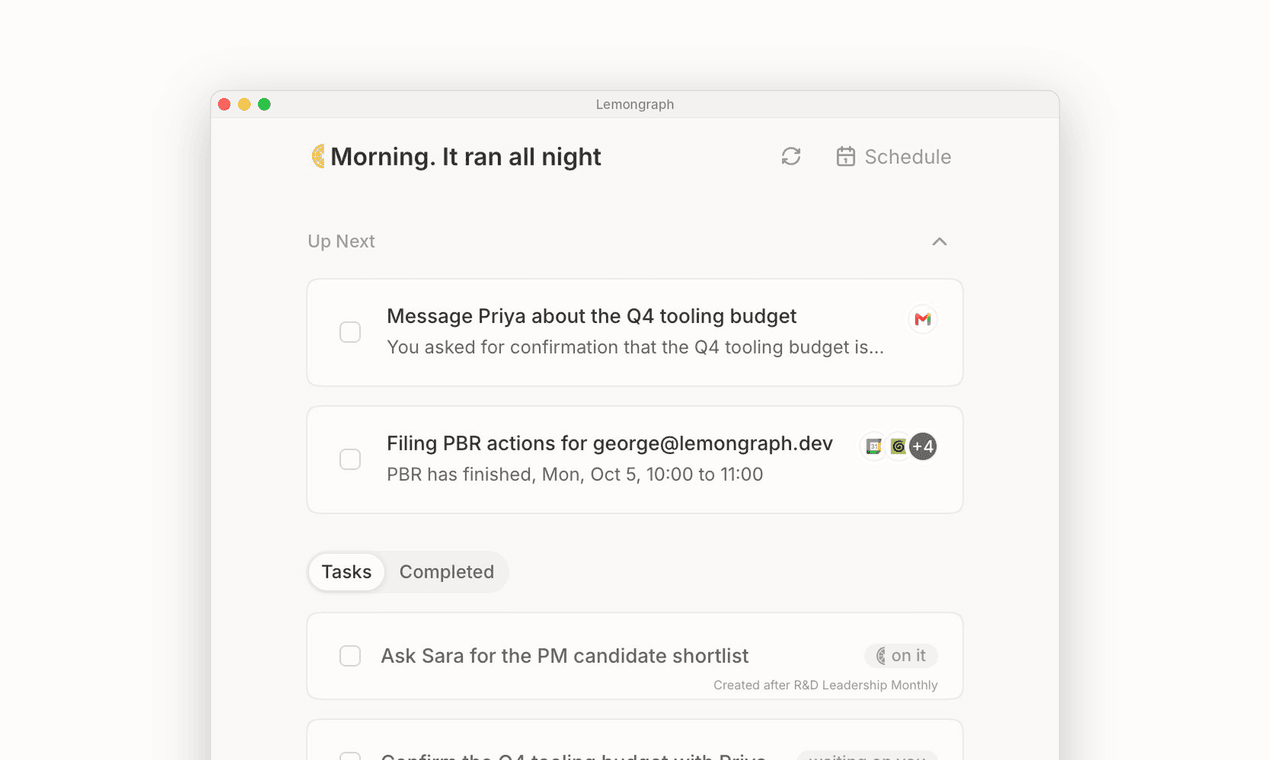
We noticed something about our own workdays. Almost every conversation ends with a promise. Keeping up with all of them slowly becomes a job of its own. What if personal task management took on that job? Picking up action items, watching signals and prioritizing the way you would. So we built Lemongraph to take that job off your plate. It picks up what you promised in meetings and email and lines it up in Up next. By the time you sit down your day is already sorted the way you'd sort it yourself. Some work you do over and over. The kind you'd happily hand to someone if you had someone. When Lemongraph spots one of those chores it shows up with a Hire button. Say yes once and next time it just asks for your OK. You won't find a chat box anywhere. You don't have to prompt it or explain yourself. It just learns your context and brings up what matters right when it matters. And it will never surprise you. Every action waits for your yes until you decide it doesn't have to.
Key features
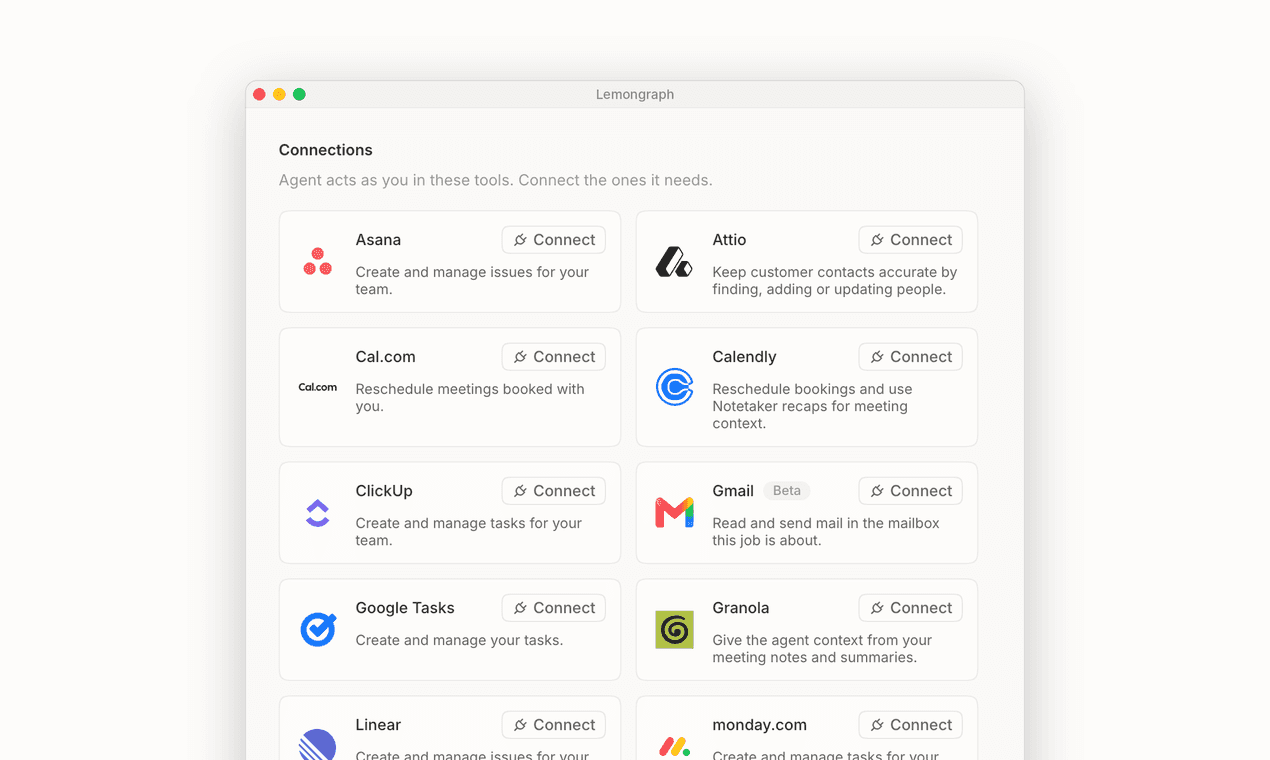
- 1Pulls action items from Gmail, Google Calendar, Drive, Notion, Linear, Asana, ClickUp, Monday, Attio, Calendly, Granola and Wispr Flow into one Up Next list.
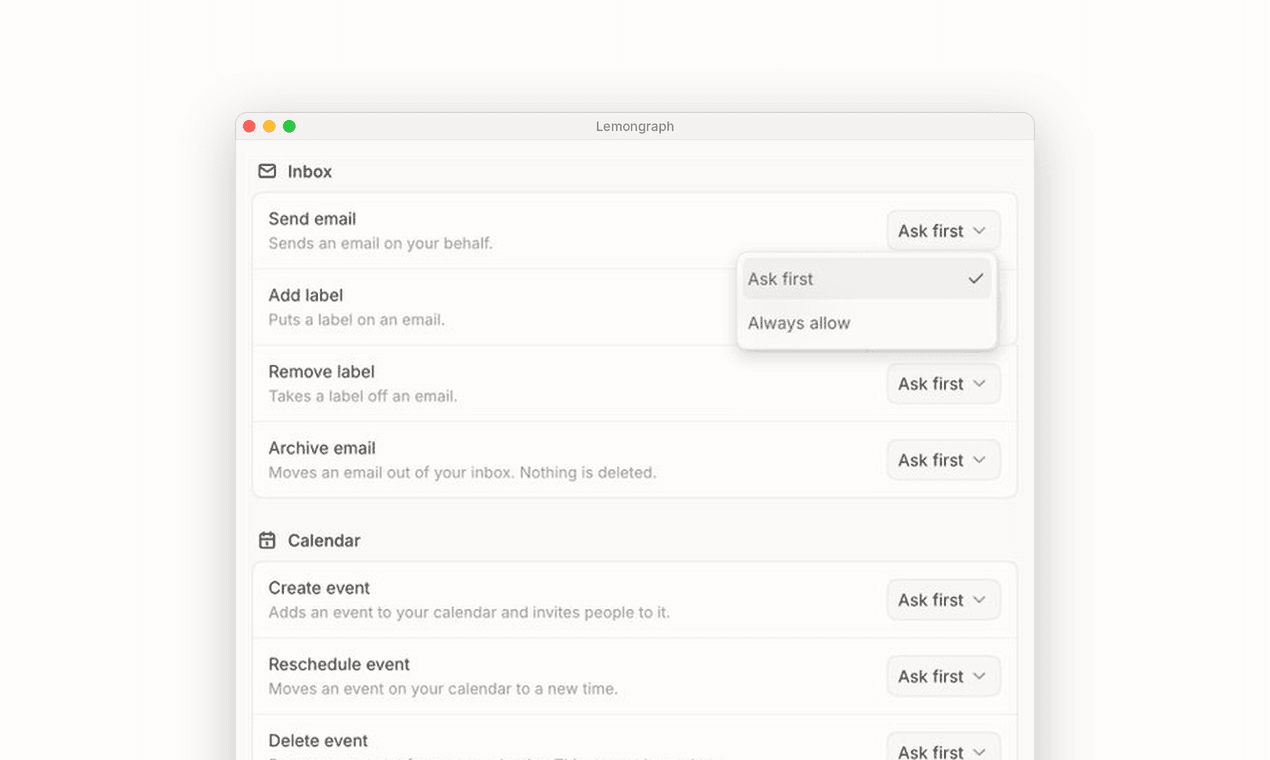
- 2Permission-in-slices model: every action has an 'Ask first' setting, and the agent never acts without your OK.
- 3Hire button for recurring chores — approve once, then it just asks for confirmation next time.
- 4No chat box by design: the agent learns context and surfaces what matters instead of waiting for prompts.
- 5Deterministic completion checking so the agent never grades its own work.
Target customer profile
Drawn from the product itself, not from a survey.
Demographic
People whose workday is full of meetings, email and promises to keep
Pain points
Almost every conversation ends with a promise. Keeping up with all of them slowly becomes a job of its own.
Primary needs
Picking up action items, watching signals and prioritizing the way you would.
Scout Review
Written by AI from measured evidence, scored out of 100.
Lemongraph is a task manager for people whose work is mostly other people. It pulls action items from Gmail, Calendar, Notion, Linear and ten other sources, lines them up in Up Next, and offers a Hire button when it spots a recurring chore. The permission model is the standout: every action has an 'Ask first' setting you can read at a glance, and the product explicitly refuses to ship a chat box. The app UI is polished and native-feeling. The marketing site undersells it badly — dense paragraphs, a buried CTA, a truncated FAQ, and a 10.1-second mobile LCP that will cost real signups. Security headers are thin (4/12, no SPF/DMARC) despite strong privacy claims. Pricing is $0 for 15 chore runs/month or $20/month for 100 and unlimited integrations.
Measure by measure
Usability
63Strong integration list (Gmail, Calendar, Notion, Linear, Asana, ClickUp, Monday, Attio) and a real free tier at 15 chore runs/month. But the FAQ is truncated, the CTA is buried, and there's no demo or video to show the flow.
Design
70App UI is genuinely polished — dimmed completed rows, right-aligned due dates, a scannable 'Ask first' permission column. The marketing site is the weak half: dense unbroken paragraphs and a floating hero box.
Speed
57Desktop Lighthouse 91/100 is genuinely fast. Mobile is the problem: 66/100 with a 10.1s LCP — that's a ten-second wait for the hero to paint on a phone. CLS 0 and TBT 203ms are clean, so it's a payload issue, not a code issue.
Security
52HTTPS and HSTS are in place, and the site makes real privacy claims (no training on your data, full deletion). But 4/12 on headers — no CSP, no frame protection, no Referrer-Policy — and no SPF or DMARC on the domain. No SOC 2 or ISO claim found.
Accessibility
68Lighthouse 90/100 is solid, but four real failures: contrast, unfocusable skip links, undersized touch targets, and labels that don't match accessible names. No accessibility statement or WCAG mention anywhere on the site.
Growth
62A real, specific problem — promises made in meetings and email that nobody tracks — with a genuine wedge: no chat, deterministic completion, and a 'Hire' button for recurring chores. Narrow by design, which limits ceiling but sharpens the pitch.
Improvement areas
- Mobile performance: 10.1s LCP and 66/100 Lighthouse score will cost signups on phones.
- Security headers: 4/12 on the probe, no CSP or frame protection, and no SPF/DMARC on the domain.
- Homepage: dense unbroken paragraphs, buried CTA, truncated FAQ with no answers, no demo or video.
- Accessibility: four failing audits (contrast, skip-link focus, touch targets, label names) and no a11y statement.
Design & Usability
The app itself is the strong half. Screenshots show a macOS-native window with 'Up Next' and 'Tasks Completed' cleanly separated, completed rows dimmed, due dates right-aligned, and a settings table where every action has an explicit 'Ask first' dropdown. That's a permission model you can read at a glance, which is rare. The marketing site is the opposite: a floating black hero box, then paragraphs of philosophy before any UI proof, and a FAQ sidebar showing six questions with zero answers expanded. The CTA sits low with no trust signals around it. Fourteen integrations are listed — Gmail, Calendar, Notion, Linear, Asana, ClickUp, Monday, Attio — but there's no demo, no video, and no walkthrough of the flow that makes them matter.
Speed & Security
Desktop Lighthouse lands at 91/100, which is genuinely fast. Mobile is a different story: 66/100 with a 10.1-second LCP. Ten seconds before the hero paints on a phone is enough to lose most visitors, and it's a payload problem, not a code problem — CLS is 0 and TBT is a clean 203ms. Security is mixed. HTTPS is enforced with HSTS, and the site makes concrete privacy promises: AI partners can't train on your data, account deletion erases everything, and the product is built on a permission-in-slices model. But the header probe scores 4/12 — no CSP, no frame protection, no X-Content-Type-Options, no Referrer-Policy, no Permissions-Policy — and the domain has no SPF or DMARC records, meaning anyone can spoof email from lemongraph.dev. No SOC 2, ISO, or pen-test claim was found.
Accessibility & Growth
Accessibility scores 90/100 on Lighthouse, which sounds better than it is. The four failing audits are the ones that actually bite: insufficient color contrast, skip links that don't take focus, touch targets too small, and visible labels that don't match their accessible names. There's no accessibility statement or WCAG mention on the site, and the copy is English-only. Growth is the most interesting dimension. Lemongraph names a real problem — the promises made in meetings and email that nobody tracks — and aims at a specific customer: people whose workday runs through other people. The wedge is real: no chat box, deterministic completion checking so the agent never grades its own work, and a 'Hire' button for recurring chores that asks once and then just requests an OK. That's a sharper position than the general-assistant crowd it name-checks. The limit is ceiling: a deliberately narrow tool for one kind of day, priced at $20/month, competing against Todoist and Things which cost less and do the adjacent job.
Conclusion
If you live in meetings and your to-do list is really a list of things you promised other people, Lemongraph is aimed squarely at you and the permission model is worth the look. Start on the free tier — 15 chore runs a month is enough to know whether the triage actually matches how you'd sort your own day. Before you connect Gmail and Calendar, read the security page and decide whether the header gaps matter for your threat model. And if you're the maker: fix the mobile LCP, expand the FAQ, and put a real demo above the fold. The product is better than the page selling it.
Suggestions for improvement
- Fix the 10.1s mobile LCP — compress hero assets and defer non-critical JS; desktop already proves the stack can be fast.
- Add CSP, X-Content-Type-Options, Referrer-Policy, and publish SPF/DMARC records for the domain.
- Expand the homepage FAQ so answers are visible, and move a real product demo or video above the fold.
- Publish an accessibility statement and fix the four failing audits: contrast, skip-link focus, touch targets, label names.
Alternatives comparison
Named competitors, point by point. Nobody paid to appear here or to be left out.
 Lemongraph Lemongraph |  Todoist Todoist | Things |  Any.do Any.do | |
|---|---|---|---|---|
| Pricing | Free ($0, 15 chore runs/mo) or Pro $20/mo (100 runs, unlimited integrations) | Free tier; Pro ~$4/mo billed annually; Business ~$6/user/mo | One-time purchase ~$49.99 Mac, ~$9.99 iPhone/iPad; no subscription | Free tier; Premium ~$3/mo; Family plan available |
| AI action-item capture from email and meetings | Yes — core feature; pulls promises from Gmail, Calendar, Granola, Wispr Flow | Limited AI assist for task creation; no meeting/email promise extraction | No — manual entry only, no AI capture | Basic AI assistant for list creation; no promise tracking |
| Permission controls for automated actions | Per-action 'Ask first' vs 'Always allow' with permission-in-slices model | N/A — no autonomous actions to permission | N/A — no autonomous actions | N/A — no autonomous actions |
| Integrations | Gmail, Google Calendar, Drive, Tasks, Cal.com, Calendly, Granola, Wispr Flow, Notion, Linear, Asana, ClickUp, Monday, Attio | 80+ integrations incl. Gmail, Calendar, Slack, Notion, Zapier | Minimal — Calendar, Reminders; no third-party app integrations | Calendar, WhatsApp, Slack, Gmail, Zapier |
| Chat / prompt-based interface | No chat by design — learns context and surfaces tasks proactively | Natural-language quick add; no chat assistant | No | AI assistant chat for list creation |
Todoist
To-do list and task manager
Things
Personal task manager for Mac, iPhone and iPad
Any.do
To-do list, planner and calendar app
Comparing options? See Lemongraph alternatives, scored side by side
More Productivity apps
View all Productivity
Qamarero
92An all-in-one hospitality software for restaurants and ba...

The Stack Newsletter
92A weekly newsletter delivering curated tech jobs, intervi...

EmbedMyReviews
92White-label reputation management software for agencies s...

StoryPad
92Privacy-first open source journal app with a continuous t...

Puzzly – B2B Lead Generation & Sales Intelligence Platform
92Puzzly is an all-in-one B2B lead generation platform that...

Notion
92All-in-one AI workspace for docs, projects, and knowledge...

Vibe Coding Agent Skills
92A free, open-source platform offering 110 AI agent skills...

CC Switch
91Open-source desktop app for switching AI coding providers...

username.md
90One verified handle for your online identity, readable by...

What the GIF
89Frame-perfect video-to-GIF maker that runs entirely in yo...

AuditCloser
89White-label website audits that close deals for digital a...

NudgeWin
89Automated quote follow-up for trades and service businesses.


A platform dedicated to providing unbiased reviews of newly launched applications, analyzing everything from their features to their full potential.
info@scoutforge.net© 2026 Scoutforge. All rights reserved.
