Cycling through all six. Tap any point to stop.
Measured on six things
LensUp Scanner is a free, browser-based document scanner that turns phone photos into clean, printable PDFs and includes ID-card copy and PDF tools; every tool is free, and the free tools process your files on your device.
Growth
58Real, universal problem with a concrete wedge: on-device, no-upload, no-account scanning plus ID-card and passport tools. Crowded category — Adobe Scan, CamScanner, Microsoft Lens — so privacy is the differentiator, not capability.
Screenshots
1 / 1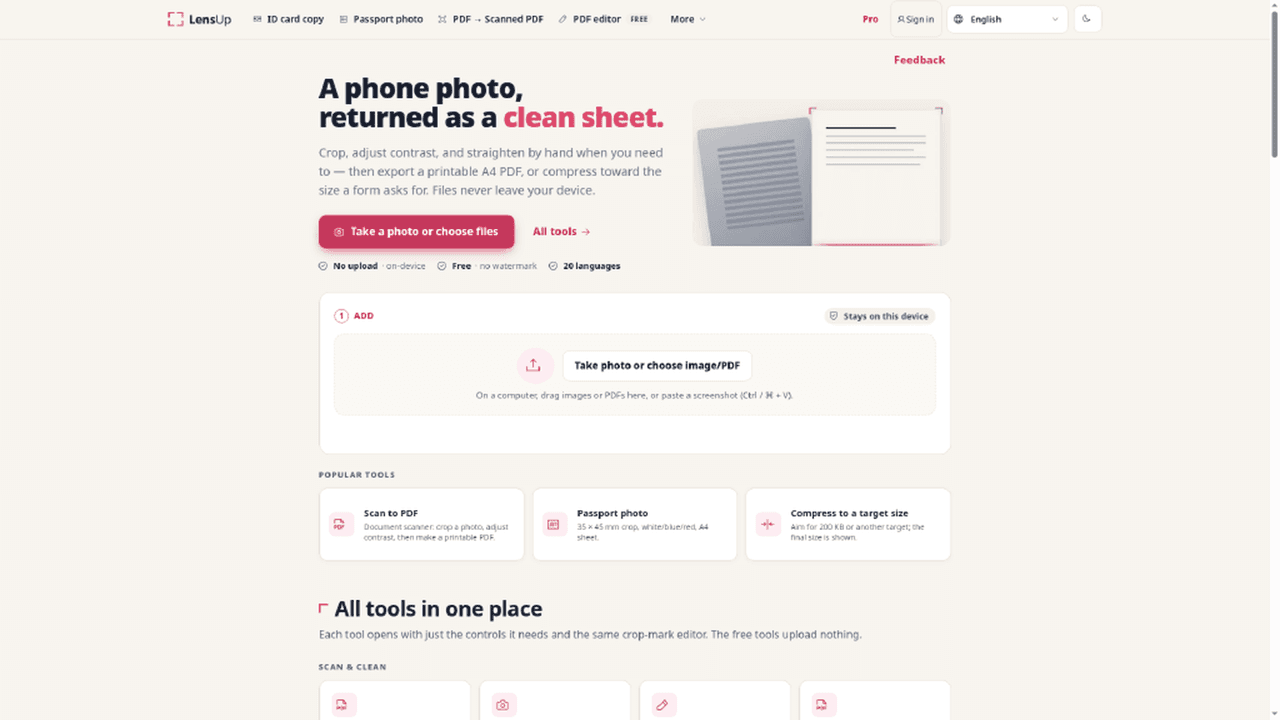
About this app
LensUp Scanner is a free, browser-based document scanner that turns phone photos into clean, printable PDFs and includes ID-card copy and PDF tools; its free tools process your files on your device. To scan, take a photo of a page with your phone, then crop it, correct the perspective and remove shadows so the page comes out flat and even. You can scan several pages in a row and save them together as one multi-page PDF. The ID-card copy tool places the front and back of a card on a single printable sheet. For documents you already have, there's a PDF editor along with tools to merge several PDFs into one and to add a signature. Everything opens in the browser, and the site is available in 20 languages. Pricing: Free
Key features
- 1On-device document scanning: photo to clean, printable A4 PDF with crop, perspective and shadow correction — no upload, no account.
- 2ID card copy and passport photo tools that place front and back at real size on a single printable A4 sheet.
- 3PDF toolkit: editor, merge, signature, compress to a target size (e.g. 200 KB) and resize in cm at a chosen DPI.
Target customer profile
Drawn from the product itself, not from a survey.
Demographic
Students, freelancers and anyone with paperwork to scan
Pain points
No scanner on hand and photos of pages look skewed or shadowy
Primary needs
Turn phone photos into clean, printable A4 PDFs
Scout Review
Written by AI from measured evidence, scored out of 100.
LensUp Scanner is a browser-based document scanner that does the boring thing well: photo in, clean printable A4 PDF out, no account, no install, no upload. The free tool set is broad — scan to PDF, ID card copy, passport photo, compress to a target size, PDF editor, merge, signature — and the site is genuinely fast (mobile Lighthouse 97) with a clean, calm interface. The privacy model is the real differentiator: free tools process on-device, and the site says so repeatedly without shouting. The weak spots are structural rather than embarrassing: a 20+ tool grid that overwhelms newcomers, a generic hero illustration, missing CSP and DMARC headers, no published accessibility conformance statement, and a Pro tier that is currently switched off at checkout. Against Adobe Scan, the case is privacy and zero-install rather than features. For students and freelancers who need a clean PDF from a phone photo right now, it works.
Measure by measure
Usability
68No account, no install, three numbered steps and an FAQ right on the page — signup-to-value time is roughly zero. Guides are content marketing, not per-tool help, and Pro checkout is currently switched off.
Design
71Calm beige-and-magenta palette, consistent pink-icon tool cards and a clear Add/Adjust/Export flow. Held back by a generic hero illustration and a 20+ card wall that buries the good stuff.
Speed
88Lighthouse mobile 97/100 with LCP 1.8s, CLS 0 and TBT 160ms; desktop 85/100. On-device processing keeps the heavy PDF work off the network. One of the snappier tool sites in this category.
Security
74HTTPS enforced with HSTS, frame protection, Referrer-Policy and Permissions-Policy set (9/12 probe points). Missing CSP and DMARC. On-device processing is a real privacy win; no SOC 2 or audit claims published.
Accessibility
79Lighthouse accessibility 100/100 on automated checks, 20-language support and multi-language guides. No published WCAG conformance statement, so the perfect score is a floor, not a ceiling.
Growth
58Real, universal problem with a concrete wedge: on-device, no-upload, no-account scanning plus ID-card and passport tools. Crowded category — Adobe Scan, CamScanner, Microsoft Lens — so privacy is the differentiator, not capability.
Improvement areas
- Pro checkout is disabled ('isn't available right now'), turning the upsell panel into a dead end for anyone ready to pay.
- No CSP header and no DMARC record; no published SOC 2, ISO or pen-test documentation to back the privacy positioning.
- 20+ tool cards in one vertical list overwhelm first-time visitors; no search or category tabs to shortcut the scroll.
Design & Usability
LensUp's homepage is a well-organized toolbox wearing a slightly generic coat. The beige-and-magenta palette is calm and appropriate, the pink-icon tool cards are consistent, and the green 'Stays on this device' badge does real work — it answers the first question anyone has about a scanner before they ask it. The Add / Adjust / Export flow is numbered and legible, and the FAQ accordion means you can learn the product without clicking anything. Where it slips: the hero illustration is noticeably weaker than the UI cards beneath it, and the 20+ tool grid is a wall. A first-time visitor looking for 'scan to PDF' has to trust the Popular Tools row to shortcut the scroll. Usability is genuinely strong on the free path — no account, no install, three steps — but the Pro tier is currently unavailable at checkout, which turns the upsell into a dead end, and the /guides/ section is SEO content rather than per-tool help documentation.
Speed & Security
Speed is the standout. Lighthouse mobile 97/100 with an LCP of 1.8s, CLS of 0 and TBT of 160ms; desktop lands at 85/100. That is a genuinely fast site, and the architecture explains it — the PDF work runs on the device, so there is no server round-trip in the critical path. Security is solid-but-unremarkable at the header level: HTTPS enforced, HSTS, frame protection, Referrer-Policy and Permissions-Policy all present, 9 of 12 probe points. The two gaps are CSP and DMARC, both of which are the kind of thing a security reviewer notices and a casual user never will. The bigger story is the privacy model: free tools process on-device and never upload, which is a meaningful claim in a category with a history of sketchy data handling. Pro does store files server-side in 'My files' with 1-30 day share links, and the pricing page is honest about that. No SOC 2, ISO or pen-test claims are published, and payments route through Stripe Managed Payments or Waffo as merchant of record.
Accessibility & Growth
Accessibility scores 100/100 on Lighthouse's axe-core checks, which is a strong automated result but only covers part of WCAG — there is no published conformance statement to confirm the rest. The 20-language support is real and visible: the guides section publishes in Italian, Portuguese, Hindi, Arabic, Japanese and German, not just English with a flag dropdown. Growth is the interesting question. The problem is universal and the wedge is specific: on-device processing, no account, no watermark, plus ID-card and passport-photo tools that most free scanners bury behind a paywall. Against Adobe Scan and CamScanner, the differentiator is privacy and zero-install, not a capability nobody else has. That is a real reason to pick it, but it is a positioning advantage rather than a structural moat — a competitor can copy 'no upload' messaging tomorrow. The category has headroom because document scanning is a recurring chore, but the domain is 0.3 years old and the product is early.
Conclusion
If you need a document scanned in the next five minutes and you don't want to install anything or hand your paperwork to a server, LensUp is the shortest path from phone photo to printable PDF that this category currently offers. The free tier is not a teaser — it is the product, and it does the job. What it is not yet is a business: Pro checkout is disabled, the compliance paperwork is thin, and the moat is a promise competitors can copy. Worth bookmarking for the free tools today; worth watching to see whether the privacy position turns into something harder to clone.
Suggestions for improvement
- Publish a WCAG 2.2 AA conformance statement to back up the 100/100 automated score with a real claim.
- Add a Content-Security-Policy header and a DMARC record — both are cheap and close the two probe gaps.
- Collapse the 20+ tool grid behind category tabs or a search box so first-time visitors aren't scrolling a wall.
- Fix the Pro checkout dead end or hide the upsell panel until billing is live — a locked door reads as broken.
Alternatives comparison
Named competitors, point by point. Nobody paid to appear here or to be left out.
 LensUp Scanner: Free Online Document Scanner LensUp Scanner: Free Online Document Scanner |  Adobe Scan Adobe Scan | |
|---|---|---|
| Price for core scanning | Free, no account, no watermark | Free tier; premium features require Adobe subscription |
| Install required | No — runs entirely in the browser | Yes — iOS/Android app install |
| Where files are processed | On-device for free tools; Pro 'My files' stores on servers | On-device capture with Adobe cloud sync for Document Cloud |
| ID card / passport photo tools | Yes — ID card front+back on one A4 sheet, 35×45 mm passport crop | ID card scanning supported; passport photo crop not a core feature |
| Multi-language support | 20 languages including guides in Hindi, Arabic, Japanese | Broad localization via Adobe's global app localization |
| PDF editing / merge / signature | Yes — PDF editor, merge, signature, compress to target size | Yes — full Acrobat editing, merge and sign, some behind subscription |
Comparing options? See LensUp Scanner: Free Online Document Scanner alternatives, scored side by side
More Productivity apps
View all Productivity
Qamarero
92An all-in-one hospitality software for restaurants and ba...

The Stack Newsletter
92A weekly newsletter delivering curated tech jobs, intervi...

EmbedMyReviews
92White-label reputation management software for agencies s...

StoryPad
92Privacy-first open source journal app with a continuous t...

Puzzly – B2B Lead Generation & Sales Intelligence Platform
92Puzzly is an all-in-one B2B lead generation platform that...

Notion
92All-in-one AI workspace for docs, projects, and knowledge...

Vibe Coding Agent Skills
92A free, open-source platform offering 110 AI agent skills...

CC Switch
91Open-source desktop app for switching AI coding providers...

username.md
90One verified handle for your online identity, readable by...

What the GIF
89Frame-perfect video-to-GIF maker that runs entirely in yo...

AuditCloser
89White-label website audits that close deals for digital a...

NudgeWin
89Automated quote follow-up for trades and service businesses.


A platform dedicated to providing unbiased reviews of newly launched applications, analyzing everything from their features to their full potential.
info@scoutforge.net© 2026 Scoutforge. All rights reserved.
