Cycling through all six. Tap any point to stop.
Measured on six things
Screen time limits, pauses before scrolling and accountability from a partner.
Speed
58Desktop Lighthouse 88/100 but mobile 63/100 with a 7.5s LCP — the hero is heavy enough to stall first paint on phones. TBT 32ms and CLS 0.071 are fine.
Screenshots
1 / 1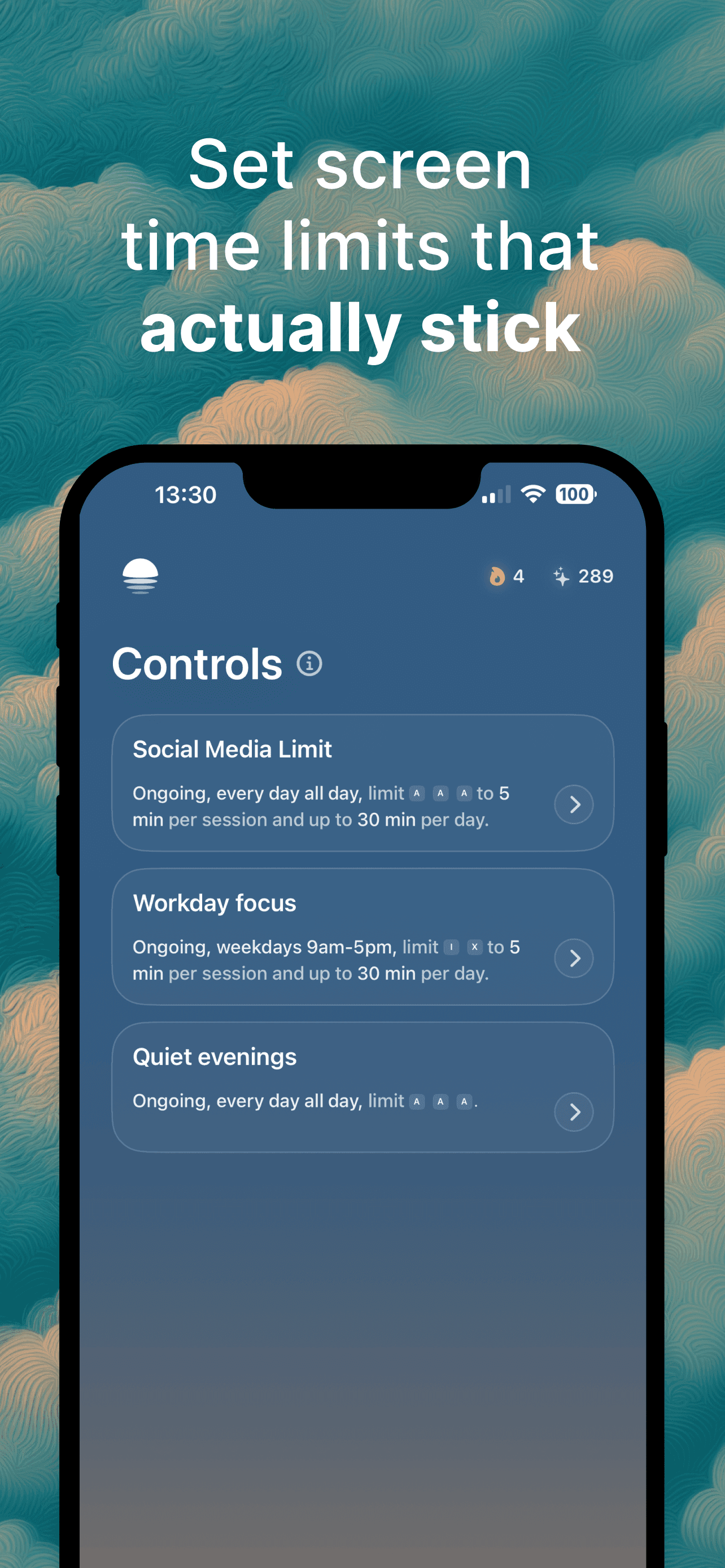
About this app
LightScroll helps you spend less time on distracting apps and websites. Set daily limits, shorter sessions or scheduled boundaries. A wait, breathing exercise or minigame adds a pause before access. When you reach a limit, you can require a longer wait, ask a partner for a six-digit code or allow no extra time. Streaks, XP and shared challenges help you keep going. Available on iPhone and Mac. Plus adds customization and Hardcore mode to make impulsive changes to your rules harder.
Key features
- 1Daily limits, shorter sessions and scheduled boundaries for distracting apps and sites.
- 2Friction before access: wait, breathing exercise, minigame, or a partner's six-digit code.
- 3Streaks, XP and shared challenges with accountability partners to sustain habits.
- 4Plus tier adds Hardcore mode, custom frictions, zero-allowance blocking and no Override.
- 5Available on iPhone and Mac with a free Basic tier covering two Controls.
Target customer profile
Drawn from the product itself, not from a survey.
Demographic
People doing focused work
Pain points
Distracting websites interrupt planned work.
Primary needs
Daily limits, shorter sessions and scheduled boundaries.
Demographic
Students
Pain points
Automatic app opening interrupts study sessions.
Primary needs
A pause before access and planned breaks.
Scout Review
Written by AI from measured evidence, scored out of 100.
LightScroll is a well-branded, thoughtfully-designed screen-time app with a genuinely differentiated pitch: friction over blocking. The app UI is clean, the pricing table is honest, and the accessibility audit is flawless. The website lets the product down — an empty first screen, low-contrast nav, and a 7.5-second mobile LCP that undercuts the whole 'reclaim your time' message. Security is solid-but-unremarkable (9/12 headers, no CSP, no DMARC, no published audits). Growth potential is real but capped by the Apple-only footprint against Freedom's cross-platform reach. A strong indie product with a marketing site that needs another pass.
Measure by measure
Usability
66Clear download CTAs, a legible Basic-vs-Plus pricing table, and a scannable Controls screen. Onboarding depth and help-center quality aren't verifiable from the fetched content.
Design
68Moody dark-teal branding with atmospheric illustration and a clean, well-spaced app UI. Held back by an empty-feeling hero and small, low-contrast nav text on desktop.
Speed
58Desktop Lighthouse 88/100 but mobile 63/100 with a 7.5s LCP — the hero is heavy enough to stall first paint on phones. TBT 32ms and CLS 0.071 are fine.
Security
74HTTPS enforced with HSTS, frame protection, and most hardening headers present (9/12). Missing CSP and DMARC, and no published SOC 2, pen-test or bug-bounty program.
Accessibility
80Lighthouse accessibility audit scored a perfect 100/100. No public WCAG statement or a11y page, and multi-language support isn't evidenced, so it sits mid-band rather than top.
Growth
62Real problem, specific wedge: friction (waits, breathing, partner codes, Hardcore mode) instead of pure blocking. iOS/macOS-only limits reach against Freedom's cross-platform base.
Improvement areas
- Mobile performance: 7.5s LCP needs to come down to the 2.5s range.
- Hero section renders nearly empty on first paint; headline and CTA should be above the fold.
- Missing CSP header and DMARC record; no published security or compliance page.
- No accessibility statement or multi-language support despite a perfect automated audit.
Design & Usability
The visual identity is genuinely distinctive — moody teal, atmospheric illustration, a 3D suitcase that no competitor would ship. The app UI itself is the stronger half: rounded cards, clear hierarchy, obvious tap targets on the Controls screen. The website is where it slips. The hero renders nearly empty on first paint, forcing a scroll before the headline 'Take control of your screen time' and the download buttons appear, and the top nav is small, low-contrast gray on deep teal. Usability is competent: two clear download CTAs, a Basic-vs-Plus pricing table that actually explains what each tier unlocks, and a nav that names How it works, Pricing, For teams and Help. What we can't verify is onboarding depth or help-center quality — the fetched content doesn't show either. Solid, not exceptional.
Speed & Security
Speed is the weak spot. Desktop Lighthouse lands at 88/100, but mobile drops to 63/100 with a 7.5-second LCP — nearly three times the 'good' threshold. TBT of 32ms and CLS of 0.071 are healthy, so the bottleneck is almost certainly the heavy hero imagery, not JavaScript. For a product whose entire pitch is reclaiming attention, a seven-second first paint is an awkward first impression. Security is better than average for an indie iOS app: HTTPS enforced, HSTS on, frame protection, X-Content-Type-Options, Referrer-Policy and Permissions-Policy all present — 9 of 12 checklist points. The gaps are a missing Content-Security-Policy header and no DMARC record, plus no published SOC 2, pen-test or bug-bounty program. For a consumer app handling behavioral data, that's a reasonable baseline but not a compliance story.
Accessibility & Growth
Accessibility is the standout: Lighthouse's axe-core audit scored a perfect 100/100, which is rare even for mature products. That covers automated checks only — contrast, labels, ARIA — not keyboard flows or screen-reader experience. There's no WCAG statement, no accessibility page, and no evidence of multi-language support, so the score sits mid-band rather than at the top. Growth is a judgment on the idea, not the traction. The problem is real and the wedge is specific: LightScroll doesn't just block, it inserts friction — a wait, a breathing exercise, a minigame, a six-digit code from a partner — and layers streaks, XP and shared challenges on top. That's a behavioral-design angle Freedom doesn't lead with. The limit is reach: iOS and macOS only, against a cross-platform incumbent. The idea has room; the platform ceiling is the constraint.
Conclusion
If you're on iPhone and Mac and you've bounced off pure blockers because you just override them, LightScroll's friction model is worth a look — the free tier gives you two Controls and unlimited accountability partners, which is a fair way to test the concept. If you need Android, Windows or a compliance paper trail, look elsewhere. The product is more interesting than its homepage suggests; fix the hero, cut the LCP, and it's a much easier recommendation.
Suggestions for improvement
- Fix the mobile LCP — 7.5s is the single biggest drag on the site; compress or lazy-load the hero imagery.
- Raise nav contrast and size on desktop; small gray-on-teal text is hard to read.
- Add a Content-Security-Policy header and a DMARC record to close the two security gaps.
- Publish an accessibility statement and a short security page — the 100/100 audit deserves a receipt.
Alternatives comparison
Named competitors, point by point. Nobody paid to appear here or to be left out.
 LightScroll LightScroll |  Freedom Freedom | |
|---|---|---|
| Platform coverage | iPhone and Mac only | Cross-platform: iOS, Android, Mac, Windows, Chrome, web |
| Core blocking model | Friction-first: waits, breathing, minigames, partner codes before access | Scheduled blocking sessions and focus modes |
| Accountability features | Unlimited friends, accountability partners, shared challenges, streaks and XP | Focus sessions and scheduled blocks; limited social accountability |
| Free tier | Basic free forever: 2 Controls, unlimited friends, standard frictions | Limited free sessions; full features require subscription |
| Hardcore / lock-down mode | Plus: Hardcore mode, zero allowance, Override disabled | Locked mode available on paid plans |
Comparing options? See LightScroll alternatives, scored side by side
More Productivity apps
View all Productivity
Qamarero
92An all-in-one hospitality software for restaurants and ba...

The Stack Newsletter
92A weekly newsletter delivering curated tech jobs, intervi...

EmbedMyReviews
92White-label reputation management software for agencies s...

StoryPad
92Privacy-first open source journal app with a continuous t...

Puzzly – B2B Lead Generation & Sales Intelligence Platform
92Puzzly is an all-in-one B2B lead generation platform that...

Notion
92All-in-one AI workspace for docs, projects, and knowledge...

Vibe Coding Agent Skills
92A free, open-source platform offering 110 AI agent skills...

CC Switch
91Open-source desktop app for switching AI coding providers...

username.md
90One verified handle for your online identity, readable by...

What the GIF
89Frame-perfect video-to-GIF maker that runs entirely in yo...

AuditCloser
89White-label website audits that close deals for digital a...

NudgeWin
89Automated quote follow-up for trades and service businesses.


A platform dedicated to providing unbiased reviews of newly launched applications, analyzing everything from their features to their full potential.
info@scoutforge.net© 2026 Scoutforge. All rights reserved.
