Cycling through all six. Tap any point to stop.
Measured on six things
Train custom LoRAs for AI image & video models in the clo...
Security
28HTTP probe found HTTPS not enforced, no HSTS, no CSP, no frame protection, no Referrer-Policy, and no SPF/DMARC — 0/12 checklist points. No published security page or compliance claims.
Screenshots
1 / 1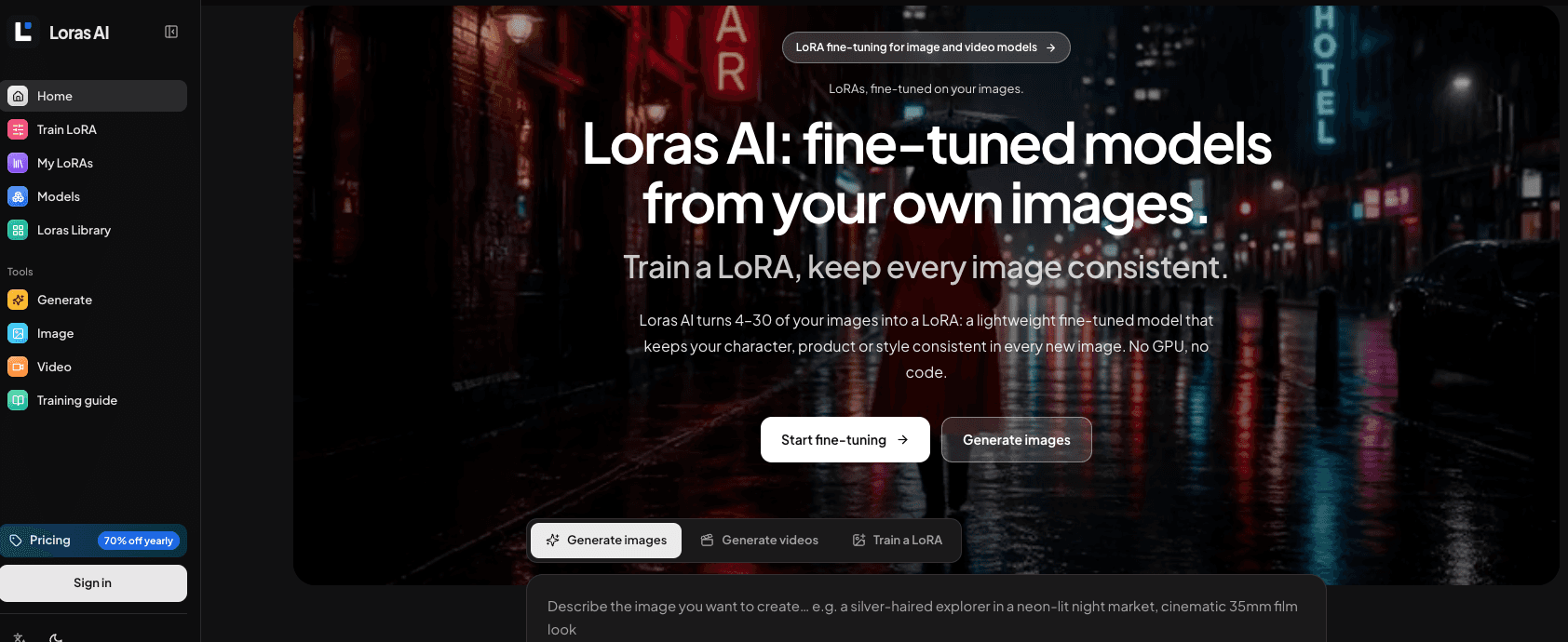
About this app
Loras AI is a browser-based platform that lets you train custom LoRA adapters for top AI image and video models, including Krea 2, FLUX.1 Dev, FLUX.2 Dev, Qwen Image 2512, Z-Image Turbo, Wan 2.2, and LTX-2 19B. Instead of setting up a local GPU or juggling scripts, you upload 4–30 curated images (or short video clips for the video models), review captions and a trigger word, and submit a cloud training task. Once training finishes, you can generate new scenes directly in the same workspace using a compatible model—so a character, product, or art style stays consistent across prompts. The workflow is built for creatives who need repeatable results: an integrated caption editor, dataset limits, fixed step counts, and pay-per-task credit pricing are all shown before you commit. There are presets for character, product, style, and even video LoRAs, plus guides on dataset prep, captioning, training steps, and evaluation. Everything runs online with no downloads, but it's worth noting tha...
Key features
- 1Cloud LoRA training for FLUX, Krea 2, Qwen Image, Z-Image, Wan 2.2 and LTX-2 with no local GPU.
- 2Integrated caption editor and trigger-word review before submitting a training task.
- 3Train-then-generate in one browser workspace with pay-per-task credit pricing shown upfront.
Target customer profile
Drawn from the product itself, not from a survey.
Demographic
Comic artists & storybook illustrators
Pain points
Character faces and outfits drift between panels; manual consistency is slow
Primary needs
Reusable character LoRA that keeps identity stable across poses and scenes
Demographic
E-commerce product photographers & store owners
Pain points
Costly studio shoots for every new scene; product shape must stay exact
Primary needs
Product LoRA trained once, then placed in new scenes without reshoots
Demographic
Brand designers & creative teams
Pain points
Hard to scale a consistent visual style across many assets and teammates
Primary needs
Shared style LoRA the whole team can reuse for on-brand imagery
Demographic
AI hobbyists without a strong GPU
Pain points
Local LoRA training demands VRAM, setup, and coding know-how
Primary needs
Cloud training and generation in one browser workspace, pay-per-task
Scout Review
Written by AI from measured evidence, scored out of 100.
Loras AI is a competent, clearly positioned cloud LoRA trainer with a real product feel and a genuinely useful training guide. It's strongest on accessibility and design coherence, weakest on security hygiene — 0/12 on the header/DNS checklist is hard to wave away for a site handling user photos. The pricing page being entirely 'Plan preview · Not yet available' undercuts the commercial story. Against Civitai, Replicate and Kohya_ss, the wedge is integration and no-GPU convenience, which is real but copyable.
Measure by measure
Usability
66Clear primary path with hero CTAs and an inline prompt box, a three-step explainer, example cards, and a real training guide. Undercut by pricing plans marked 'Plan preview · Not yet available' and dense small-text sections.
Design
70Coherent dark system with consistent type, card radius and accent color; sidebar plus inline generator give a genuine product-app feel. Held back by tiny grey copy on near-black and clipped marquee/masonry edges.
Speed
68Lighthouse mobile 79/100 and desktop 77/100 with CLS 0 and FCP 1.1s. LCP at 3.5s and TBT 452ms keep it out of the top tier — solid but not snappy.
Security
28HTTP probe found HTTPS not enforced, no HSTS, no CSP, no frame protection, no Referrer-Policy, and no SPF/DMARC — 0/12 checklist points. No published security page or compliance claims.
Accessibility
82Lighthouse accessibility 100/100 with only one failing audit (visible text labels lacking matching accessible names). Four-language support and a theme toggle add real coverage beyond the automated checks.
Growth
62Real problem (LoRA training needs a GPU and scripts), specific segments named, and a genuine wedge: train-then-generate in one browser workspace with pay-per-task credits.
Improvement areas
- Security headers: HTTPS not enforced, no HSTS/CSP/DMARC — 0/12 on the probe checklist.
- Pricing tiers all marked 'Plan preview · Not yet available,' blocking real commercial trust.
- Small grey body copy on near-black and clipped marquee/masonry edges hurt legibility and polish.
Design & Usability
Loras AI looks like a product, not a brochure — the sidebar and inline generator put you in the workspace from the first screen, and the dark system is disciplined: one type family, consistent card radius, restrained accent. The three-step Upload/Fine-tune/Create explainer and the example cards do real work for visitors who don't know what a LoRA is, and the training guide at /guides/how-to-train-a-lora is genuinely useful. Where it slips: supporting copy is tiny grey on near-black, the model marquee and 'Made with' masonry clip at the edges, and the pricing page labels every tier 'Plan preview · Not yet available' — which makes the whole commercial layer feel like a mockup.
Speed & Security
Speed is decent but not impressive: Lighthouse mobile 79/100 and desktop 77/100, CLS 0 and FCP 1.1s are good, but LCP 3.5s and TBT 452ms keep it out of the fast tier. Security is the weak spot. The HTTP probe found HTTPS not enforced, no HSTS, no CSP, no frame protection, no Referrer-Policy, and no SPF or DMARC — 0/12 checklist points. There's no security page, no compliance claim, no bug bounty. For a site that asks you to upload photos of your face and your products, that's a real gap, not just a missing badge.
Accessibility & Growth
Accessibility is the strongest dimension: Lighthouse 100/100 with a single failing audit (visible text labels lacking matching accessible names), plus four-language support and a theme toggle. Growth is a judgement on the idea: the problem is real — local LoRA training demands VRAM and scripts — and the segments are specific (comic artists, product photographers, brand teams, GPU-less hobbyists). The wedge is integrated train-then-generate in one browser workspace with pay-per-task credits. But Civitai owns the community, Replicate owns the API, and Kohya is free; the differentiator is UX packaging, not a structural moat.
Conclusion
If you want to train a character or product LoRA without touching a GPU or a Python script, this is a reasonable place to start — the workflow is legible and the guide is honest about what training does and doesn't do. Before you upload anything sensitive, though, note that the site doesn't enforce HTTPS, ships no CSP or HSTS, and has no SPF/DMARC. Fix the security basics and ship the actual plans, and this moves up a tier quickly.
Suggestions for improvement
- Enforce HTTPS with HSTS, add CSP, X-Content-Type-Options, Referrer-Policy and Permissions-Policy headers.
- Publish SPF and DMARC records for the domain — currently absent.
- Ship the pricing plans for real; 'Plan preview · Not yet available' on every tier kills trust.
- Raise the small grey body copy contrast and fix the clipped marquee/masonry edges.
Alternatives comparison
Named competitors, point by point. Nobody paid to appear here or to be left out.
 Loras AI | Civitai |  Replicate |  Kohya_ss | |
|---|---|---|---|---|
| Cloud LoRA training without a local GPU | Yes — browser-based cloud training for image and video models | Limited — some training options, primarily a model-sharing hub | Yes — via API, developer-oriented | No — requires your own GPU and local setup |
| Integrated generation in the same workspace after training | Yes — generate with a compatible model from My LoRAs | Partial — generation available, training integration limited | Yes — via API calls, not a unified UI | No — training only, separate inference tooling needed |
| Caption editor and trigger-word review before training | Yes — built-in caption editor with trigger word | Limited | Manual — via dataset files | Yes — via config files and folder captions |
| Pay-per-task credit pricing shown upfront | Yes — credit costs shown before submit (plans marked preview) | Freemium with buzz purchases | Yes — per-second/per-run billing | Free — open source, you pay for hardware |
| Community model sharing and discovery | No — 'Made with' gallery only, no community hub | Yes — core strength, large model-sharing community | Partial — public models, developer-focused | No — GitHub repo only |
Civitai
Community hub for sharing and discovering LoRA models, with some training options.
Replicate
Cloud API platform for running and fine-tuning models, including LoRA training.
Kohya_ss
Popular open-source toolkit for training LoRAs locally, requiring your own GPU.
Comparing options? See Loras AI alternatives, scored side by side
More Productivity apps
View all Productivity
Puzzly – B2B Lead Generation & Sales Intelligence Platform
92Puzzly is an all-in-one B2B lead generation platform that...

Qamarero
92An all-in-one hospitality software for restaurants and ba...

EmbedMyReviews
92White-label reputation management software for agencies s...

StoryPad
92Privacy-first open source journal app with a continuous t...

Notion
92All-in-one AI workspace for docs, projects, and knowledge...

The Stack Newsletter
92A weekly newsletter delivering curated tech jobs, intervi...

Vibe Coding Agent Skills
92A free, open-source platform offering 110 AI agent skills...

QRBliss
91Branded QR codes with AI Brand Sync, 15 free dynamic code...

Gerty
91Private, local AI assistant for Mac that runs offline

Strukchad Property Management
91Property management for Kenyan letting agents: rent invoices raised every month, M-Pesa rent prompts to tenants, arrears tracking and landlord statements.

CC Switch
91Open-source desktop app for switching AI coding providers...

PitchWhip
90AI cold call scripts & direct dials from LinkedIn


A platform dedicated to providing unbiased reviews of newly launched applications, analyzing everything from their features to their full potential.
info@scoutforge.net© 2026 Scoutforge. All rights reserved.
