Cycling through all six. Tap any point to stop.
Measured on six things
Export Bulk EML Files to PDF by Mac EML to PDF Converter
Design
45Dated mid-2000s aesthetic: gradient toolbars, thick borders, old Mac OS X window chrome. Red 'Offers' pill clashes with blue palette. Text-dense layout with competing CTAs. Functional but visually stuck in the past.
Screenshots
1 / 1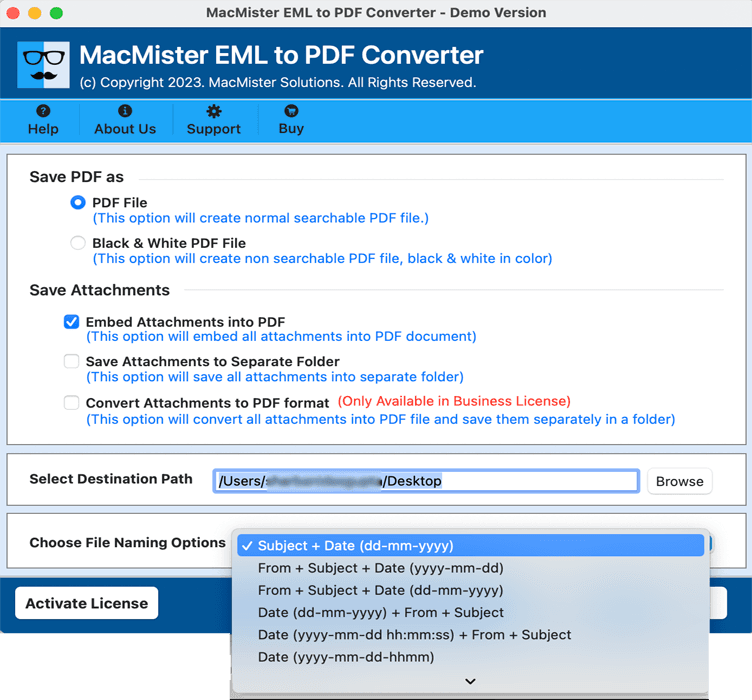
About this app
MacMister EML to PDF Converter for Mac is created to save .eml files as .pdf documents on macOS. It allows users to add individual EML files or entire folders for convenient email conversion. The Mac EML to PDF software is designed to preserve important email details, including headers, message content, attachments, hyperlinks, images, and signatures, according to the available settings. With batch conversion support and file-naming options, users can manage multiple email messages and organize the resulting PDF documents efficiently. It is useful for professionals, businesses, and individuals who need to archive email correspondence, maintain digital records, share important messages, or prepare emails for printing. The EML to PDF tool for Mac provides a straightforward way to convert EML files to PDF without manually processing every email through an email application's print function.
Key features
- 1Batch convert multiple EML files to PDF on Mac using Add File(s) or Add Folder options
- 2Preserve email headers, message content, attachments, hyperlinks, images, and signatures during conversion
- 3Multiple file-naming combinations (subject + date, from + subject + date, etc.) to organize output PDFs
Target customer profile
Drawn from the product itself, not from a survey.
Demographic
Legal professionals and paralegals
Pain points
Needing to archive emails in non-editable PDF format for court or client records.
Primary needs
Accurate conversion preserving email headers, timestamps, and attachments for legal compliance.
Demographic
Business administrators and HR managers
Pain points
Managing large volumes of EML emails and needing to share them securely or store long-term.
Primary needs
Batch conversion to PDF for easy sharing, printing, and archiving without losing formatting.
Demographic
IT support and data migration specialists
Pain points
Migrating email data from legacy systems or clients that use EML format.
Primary needs
Reliable, fast conversion of EML files to PDF with options to preserve attachments and folder hierarchy.
Scout Review
Written by AI from measured evidence, scored out of 100.
MacMister EML to PDF Converter for Mac is a functional utility for a specific job: turning .eml files into PDFs on macOS. It does that job with batch conversion, file-naming options, and attachment preservation. The free demo and 30-day guarantee lower the risk. But the product feels dated — the UI looks like 2007, the homepage is a text wall, and the security posture, while decent on headers, lacks any published audit. For legal and HR users who need this exact workflow, it's a reasonable choice. For everyone else, the free print-to-PDF option in Apple Mail is probably enough.
Measure by measure
Usability
58Free demo and 8-step guide lower the barrier. Batch conversion and file-naming options are genuinely useful. But wall-of-text homepage and four competing CTAs make priority unclear. Solid for a utility, not polished.
Design
45Dated mid-2000s aesthetic: gradient toolbars, thick borders, old Mac OS X window chrome. Red 'Offers' pill clashes with blue palette. Text-dense layout with competing CTAs. Functional but visually stuck in the past.
Speed
68Lighthouse mobile 80/100, desktop 90/100. LCP 3.5s on mobile is above the 2.5s 'good' threshold, but CLS 0.019 and TBT 51ms are clean. Decent for a marketing site with embedded screenshots.
Security
74Strong header hygiene: HTTPS enforced, HSTS, CSP, frame protection, X-Content-Type-Options, Referrer-Policy all present. SPF configured. Missing DMARC and Permissions-Policy. No published audits or SOC 2.
Accessibility
80Lighthouse a11y score 97/100. One contrast failure flagged. No accessibility statement or WCAG claim. English-only. Strong automated score but unverified beyond that.
Growth
52Real problem (email archiving for legal/HR), specific niches named. But Mac-only EML-to-PDF is a narrow wedge, and the site doesn't explain why it beats MailRaider or just printing from Mail. Room to grow, no moat.
Improvement areas
- Dated UI with gradient toolbars and thick borders; needs a modern macOS design refresh
- Homepage is text-dense with competing CTAs; simplify and clarify the primary action
- Missing DMARC and Permissions-Policy headers; no published security audit or compliance certification
Design & Usability
MacMister EML to PDF Converter for Mac looks and feels like software from another era. The homepage is a wall of bullet points, the app screenshot shows gradient toolbars and thick borders, and the red 'Offers' pill in the nav bar fights the blue theme like it lost a bet. Four different 'Download' and 'Buy Now' buttons compete for attention, making it unclear where to start. On the usability side, there's a free demo and an eight-step guide, which helps. Batch conversion and file-naming options are genuinely useful for the legal and HR professionals this targets. But the density of text on the homepage — eight to ten bullets per section — makes scanning painful. It works, but it doesn't inspire confidence that the underlying tool is modern.
Speed & Security
Speed is a mixed bag. Lighthouse gives the site 80/100 on mobile and 90/100 on desktop, with clean CLS (0.019) and TBT (51ms). But the mobile LCP of 3.5 seconds is above Google's 2.5s 'good' threshold, meaning the first meaningful paint takes a beat longer than it should. Security is stronger: HTTPS enforced, HSTS, CSP, frame protection, X-Content-Type-Options, and Referrer-Policy all present — 10 of 12 checklist points. SPF is configured, but DMARC is missing, which leaves the domain open to spoofing. There's no Permissions-Policy header either. For a tool handling legal correspondence, the header hygiene is solid but the absence of any published security audit or compliance certification is a gap worth noting.
Accessibility & Growth
Accessibility scores well on automated checks: Lighthouse gives it 97/100, with only one contrast failure flagged. But there's no accessibility statement, no WCAG conformance claim, and the site is English-only — so the automated score is the ceiling of what's verified, not the floor. Growth is the harder question. The problem is real: legal professionals and HR managers do need to archive emails as non-editable PDFs. The niches are specific. But the wedge is narrow — Mac-only EML-to-PDF — and the site never explains why someone should pick this over MailRaider (which lacks batch) or just using Apple Mail's print-to-PDF. The domain is 4.8 years old, which suggests staying power, but the positioning doesn't show a moat. It's a competent utility in a small pond.
Conclusion
If you're a paralegal drowning in .eml files and need them as PDFs yesterday, this tool will get you there. It's not pretty, it's not fast on mobile, and it won't win design awards. But it converts, it preserves attachments, and it has a demo so you can test before you buy. Just don't expect it to feel like software from this decade.
Suggestions for improvement
- Modernize the app UI: replace gradient toolbars and thick borders with a flat, contemporary macOS design language
- Add DMARC and Permissions-Policy headers to complete the security posture
- Publish an accessibility statement and fix the flagged contrast issue to move beyond automated compliance
- Clarify the value proposition on the homepage: explain why this beats MailRaider or Apple Mail's print-to-PDF
Alternatives comparison
Named competitors, point by point. Nobody paid to appear here or to be left out.
 MacMister EML to PDF Converter for Mac MacMister EML to PDF Converter for Mac |  MailRaider MailRaider |  EML to PDF Converter by SysTools EML to PDF Converter by SysTools | macmister | |
|---|---|---|---|---|
| Platform support | macOS native | macOS native | Windows only | macOS native |
| Batch conversion | Yes — Add Folder for bulk EML files | No — lacks batch processing for large volumes | Yes | Yes — email backup focus |
| Attachment preservation | Yes — embed and save attachments | General email conversion focus | Yes | Backup focus, not PDF conversion |
| Free demo available | Yes — free demo download | Not specified | Yes — trial version | Yes — free demo |
| File naming options | Multiple combinations (subject + date, from + subject + date) | Not specified | Yes | Not applicable — backup tool |
MailRaider
A Mac app that can convert EML files to PDF, though it's more focused on general email conversion and lacks batch processing for large volumes.
EML to PDF Converter by SysTools
A Windows-based tool for converting EML to PDF, but doesn't have a native Mac version, requiring workarounds like virtual machines.
macmister
Comparing options? See MacMister EML to PDF Converter for Mac alternatives, scored side by side
More Productivity apps
View all Productivity
Qamarero
92An all-in-one hospitality software for restaurants and ba...

The Stack Newsletter
92A weekly newsletter delivering curated tech jobs, intervi...

EmbedMyReviews
92White-label reputation management software for agencies s...

StoryPad
92Privacy-first open source journal app with a continuous t...

Puzzly – B2B Lead Generation & Sales Intelligence Platform
92Puzzly is an all-in-one B2B lead generation platform that...

Notion
92All-in-one AI workspace for docs, projects, and knowledge...

Vibe Coding Agent Skills
92A free, open-source platform offering 110 AI agent skills...

CC Switch
91Open-source desktop app for switching AI coding providers...

username.md
90One verified handle for your online identity, readable by...

What the GIF
89Frame-perfect video-to-GIF maker that runs entirely in yo...

AuditCloser
89White-label website audits that close deals for digital a...

NudgeWin
89Automated quote follow-up for trades and service businesses.


A platform dedicated to providing unbiased reviews of newly launched applications, analyzing everything from their features to their full potential.
info@scoutforge.net© 2026 Scoutforge. All rights reserved.
