Cycling through all six. Tap any point to stop.
Measured on six things
Mac tool to bulk convert CSV contacts to VCF and PDF.
Design
46Homepage reads as dated SEO-first marketing: bold keyword runs, generic stock hero, mismatched trust badges. App UI is linear and legible but ships a personal '/Users/sonika' path and an unclear PDF save control.
Screenshots
1 / 3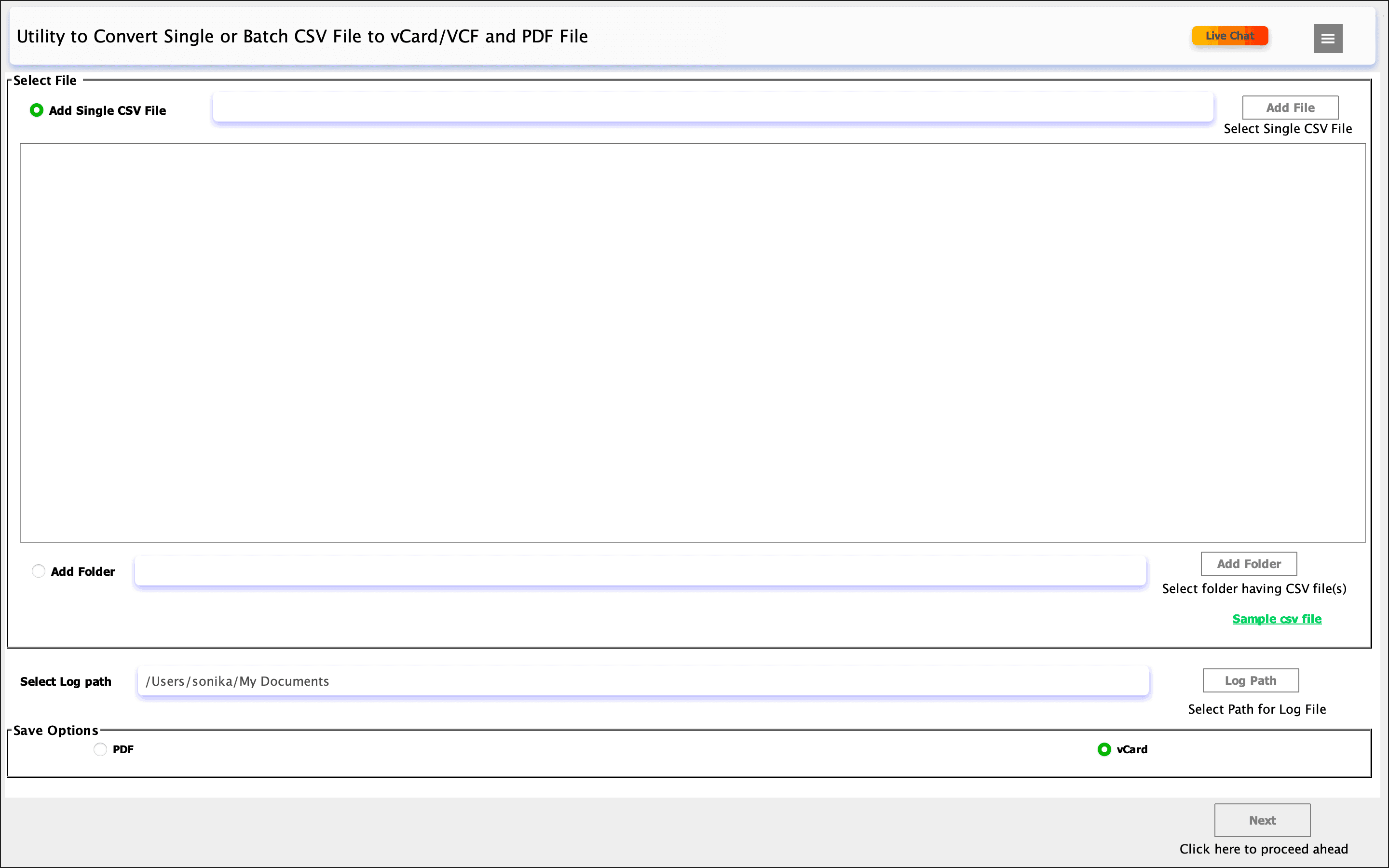
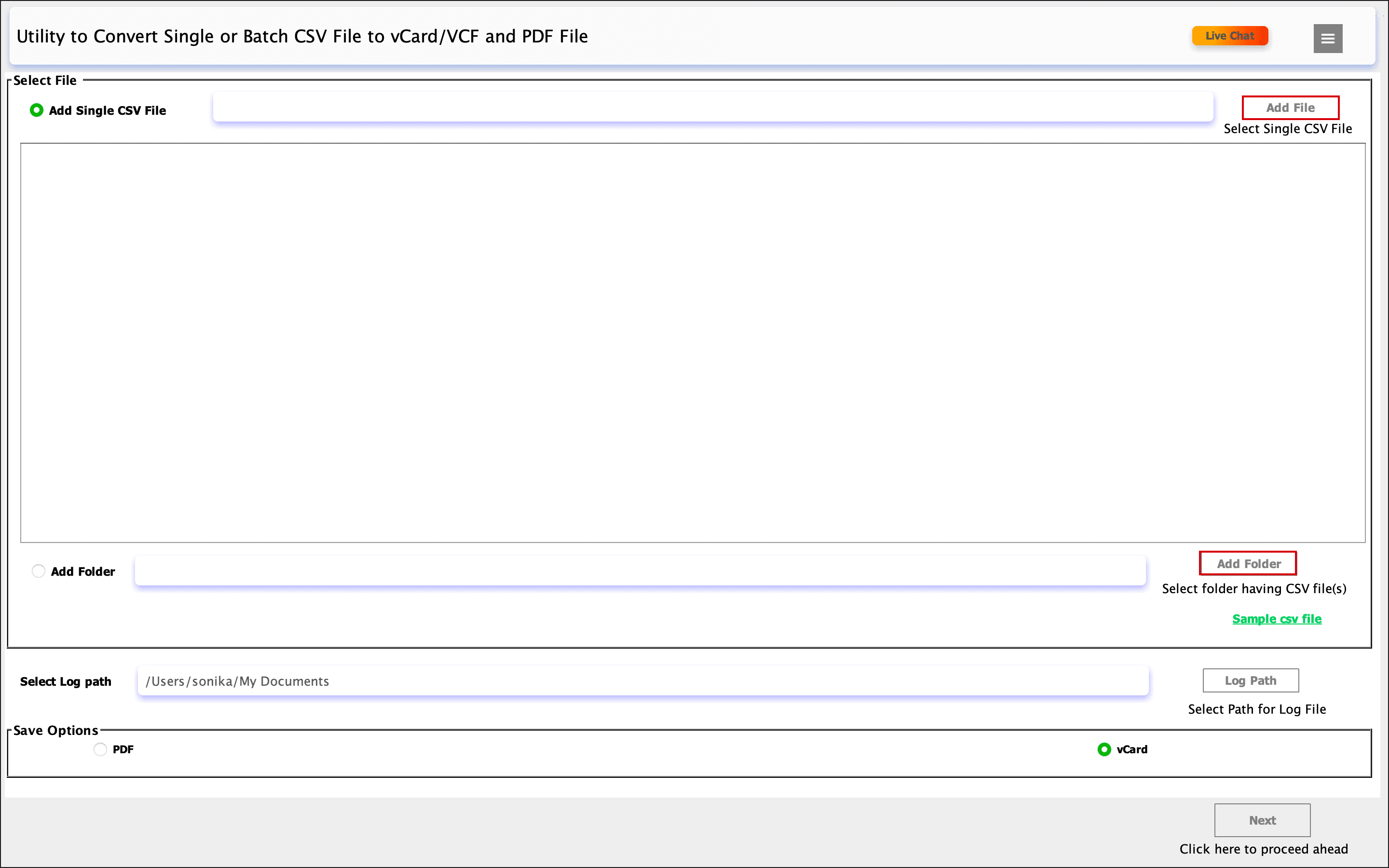
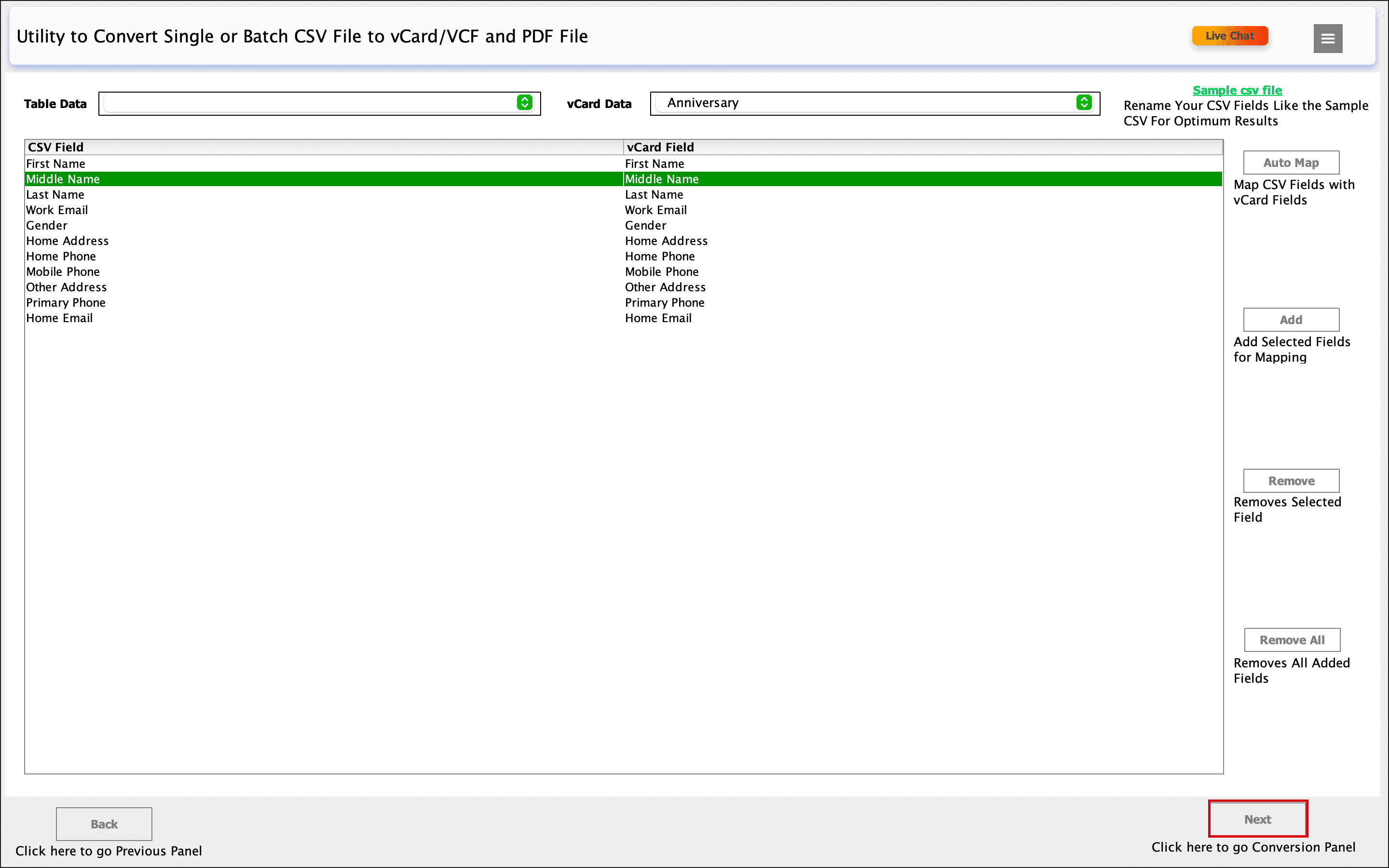
About this app
MacSonik CSV to vCard Converter is a specialized macOS utility for converting CSV contact files into vCard (VCF) format, with support for vCard versions 2.1, 3.0, and 4.0. It handles single files or entire folders in one go, offers flexible field mapping (auto or manual), and lets you save all contacts in a single VCF or as blank vCard files. A handy bonus: it also exports CSV to PDF. The software keeps original data intact, provides multiple naming conventions, and lets you choose the destination path. A free demo converts the first 50 rows per CSV, while the full version unlocks unlimited conversion. It’s designed for Mac users who need a fast, reliable, and user-friendly way to migrate contact data between apps that don’t natively support CSV import.
Key features
- 1Convert single CSV files or entire folders to vCard 2.1, 3.0 or 4.0 in one batch
- 2Auto or manual field mapping between CSV columns and vCard fields
- 3Save all contacts in one VCF or as blank vCard files, with naming conventions and custom destination
- 4Bonus CSV-to-PDF export with password protection and orientation options
- 5Free demo converts the first 50 rows per CSV; full version unlocks unlimited conversion
Target customer profile
Drawn from the product itself, not from a survey.
Demographic
Mac users migrating contacts between email clients
Pain points
Manual CSV-to-vCard conversion is tedious and error-prone
Primary needs
Bulk convert CSV contacts to VCF with field mapping
Demographic
IT admins managing large contact databases
Pain points
Existing tools lack folder-level batch conversion and version control
Primary needs
Convert entire folders to vCard 2.1/3.0/4.0 with data integrity
Demographic
Small business owners switching CRM or email platforms
Pain points
Contact data stuck in CSV; need compatibility with Apple Contacts, Outlook, etc.
Primary needs
Export CSV to vCard and PDF for backup and sharing
Scout Review
Written by AI from measured evidence, scored out of 100.
MacSonik CSV to vCard Converter is a focused macOS utility that does one job: turn CSV contact files into vCard 2.1/3.0/4.0, singly or by folder, with field mapping and a CSV-to-PDF side door. The marketing site is dated and SEO-heavy, but the underlying product is documented, supported by live chat and phone, and testable via a 50-row free demo. Speed and security headers are genuinely good; accessibility is the clear weak point with eight failing Lighthouse audits. Growth is limited by a crowded niche and a one-time-purchase model, but the tool knows exactly who it's for.
Measure by measure
Usability
58An 8-step documented guide, live chat, phone support and a 50-row free demo make the flow learnable. But Download and Purchase compete above the fold, and the useful FAQ sits under a wall of specs.
Design
46Homepage reads as dated SEO-first marketing: bold keyword runs, generic stock hero, mismatched trust badges. App UI is linear and legible but ships a personal '/Users/sonika' path and an unclear PDF save control.
Speed
68Lighthouse desktop 92 and mobile 83 with a near-perfect CLS of 0.001 and 135ms TBT. Mobile LCP of 4.2s is the one soft spot on an otherwise snappy marketing site.
Security
74Full header stack verified: HTTPS, HSTS, CSP, frame protection, Referrer and Permissions policies, plus SPF and DMARC — 12/12 on the probe. No published SOC 2, ISO or pen-test report to push it higher.
Accessibility
46Lighthouse 66/100 with eight failing audits: low contrast, missing alt text, broken heading order, color-only links, ARIA role violations. No accessibility statement or WCAG claim anywhere on the site.
Growth
54A real, narrow problem — CSV contacts stuck outside Apple Contacts — with folder batching and version control as the wedge. But vCard Wizard and SysTools already sit in this lane, and the ceiling is a one-time utility purchase.
Improvement areas
- Accessibility: eight failing Lighthouse audits including alt text, contrast and heading order
- Design: dated homepage, SEO-stuffed copy, and a personal path visible in shipped screenshots
- Security: no SOC 2, ISO or pen-test documentation to back the '100% safe' claim
- Growth: crowded niche with vCard Wizard and SysTools, and a one-time-purchase ceiling
Design & Usability
The homepage is doing SEO cosplay: bold keyword runs in the hero, a generic monitor-and-cloud illustration, and trust badges crammed together under it. The app UI itself is more honest — a linear select-file, map-fields, choose-version, convert flow that's easy to follow. Usability is carried by real support (live chat, a phone number, an 8-step guide) and a 50-row free demo that lets you test before buying. The friction is in the framing: Download and Purchase fight for the same eyeball above the fold, and the genuinely useful FAQ sits below a long specification block. A shipped screenshot still shows '/Users/sonika/My Documents' as the default path, which is the kind of detail that tells you nobody did a final pass.
Speed & Security
Speed is the strongest measured dimension: desktop Lighthouse 92, mobile 83, CLS 0.001 and TBT 135ms. The only blemish is a 4.2s mobile LCP, likely the hero image. Security is solid on the infrastructure side — HTTPS enforced, HSTS, CSP, frame protection, Referrer and Permissions policies, plus SPF and DMARC, a clean 12/12 on the header probe. What's missing is the compliance layer: no SOC 2, no ISO, no published pen-test, no security page. For a utility that handles contact databases, that's a gap worth closing, but the baseline hygiene is better than most tools in this niche.
Accessibility & Growth
Accessibility is the weak spot: Lighthouse 66/100 with eight failing audits covering contrast, missing alt text, heading order, color-only links and ARIA role violations. There's no accessibility statement and no WCAG claim, so this looks like an area nobody has touched. Growth is a judgement call on the idea. The problem is real — CSV contacts that won't import into Apple Contacts or Outlook — and the wedge is specific: folder-level batch conversion, field mapping, vCard 2.1/3.0/4.0 output, and a CSV-to-PDF bonus. But vCard Wizard and SysTools already occupy this lane, and a one-time utility purchase has a low ceiling. It's a competent niche tool, not a category-defining one.
Conclusion
If you're a Mac user with a CSV of contacts that Apple Contacts refuses to swallow, this does the job and lets you try before you buy. If you need enterprise compliance paperwork or a polished, accessible experience, look elsewhere or budget time for workarounds. The bones are solid; the presentation and accessibility need a real pass.
Suggestions for improvement
- Fix the eight failing Lighthouse accessibility audits: alt text, contrast, heading order, ARIA roles.
- Remove the personal '/Users/sonika' path from shipped screenshots and default UI states.
- Publish a security page or third-party audit to back the '100% safe and secure' claim.
- Move the FAQ conversion steps above the specification block and clarify the PDF save control.
Alternatives comparison
Named competitors, point by point. Nobody paid to appear here or to be left out.
 MacSonik CSV to vCard Converter | vCard Wizard |  CSV to vCard Converter by SysTools | |
|---|---|---|---|
| Platform support | macOS (Windows version also offered) | Windows (with Mac-oriented workflows) | Windows |
| Batch / folder conversion | Single file or entire folder of CSVs | Batch processing supported | Bulk conversion supported |
| vCard version selection | vCard 2.1, 3.0, 4.0 | Multiple vCard versions supported | Multiple vCard versions supported |
| Field mapping | Auto Map or manual mapping | Field mapping supported | Field mapping supported |
| Free trial / demo | Free demo converts first 50 rows per CSV | Trial version available | Demo version available |
| CSV to PDF export | Yes, with password and orientation options | Not a listed feature | Not a listed feature |
vCard Wizard
A dedicated tool to convert CSV to vCard and vice versa, with support for various vCard versions and batch processing.
CSV to vCard Converter by SysTools
Windows-based utility to convert CSV files to vCard format, supporting bulk conversion and field mapping.
Comparing options? See MacSonik CSV to vCard Converter alternatives, scored side by side
More Productivity apps
View all Productivity
Puzzly – B2B Lead Generation & Sales Intelligence Platform
92Puzzly is an all-in-one B2B lead generation platform that...

Qamarero
92An all-in-one hospitality software for restaurants and ba...

EmbedMyReviews
92White-label reputation management software for agencies s...

StoryPad
92Privacy-first open source journal app with a continuous t...

Notion
92All-in-one AI workspace for docs, projects, and knowledge...

The Stack Newsletter
92A weekly newsletter delivering curated tech jobs, intervi...

Vibe Coding Agent Skills
92A free, open-source platform offering 110 AI agent skills...

QRBliss
91Branded QR codes with AI Brand Sync, 15 free dynamic code...

Gerty
91Private, local AI assistant for Mac that runs offline

Strukchad Property Management
91Property management for Kenyan letting agents: rent invoices raised every month, M-Pesa rent prompts to tenants, arrears tracking and landlord statements.

CC Switch
91Open-source desktop app for switching AI coding providers...

PitchWhip
90AI cold call scripts & direct dials from LinkedIn


A platform dedicated to providing unbiased reviews of newly launched applications, analyzing everything from their features to their full potential.
info@scoutforge.net© 2026 Scoutforge. All rights reserved.
