Cycling through all six. Tap any point to stop.
Measured on six things
Find and delete duplicate files on Mac, Windows, and Linu...
Design
44Dated, patchwork visual system: gradient nav strip, floating chat/FAQ tabs, and stock illustration clash. Mac tab selected while screenshots show a Windows window. Keyword-stuffed hero copy reads as SEO filler, not a value prop.
Screenshots
1 / 4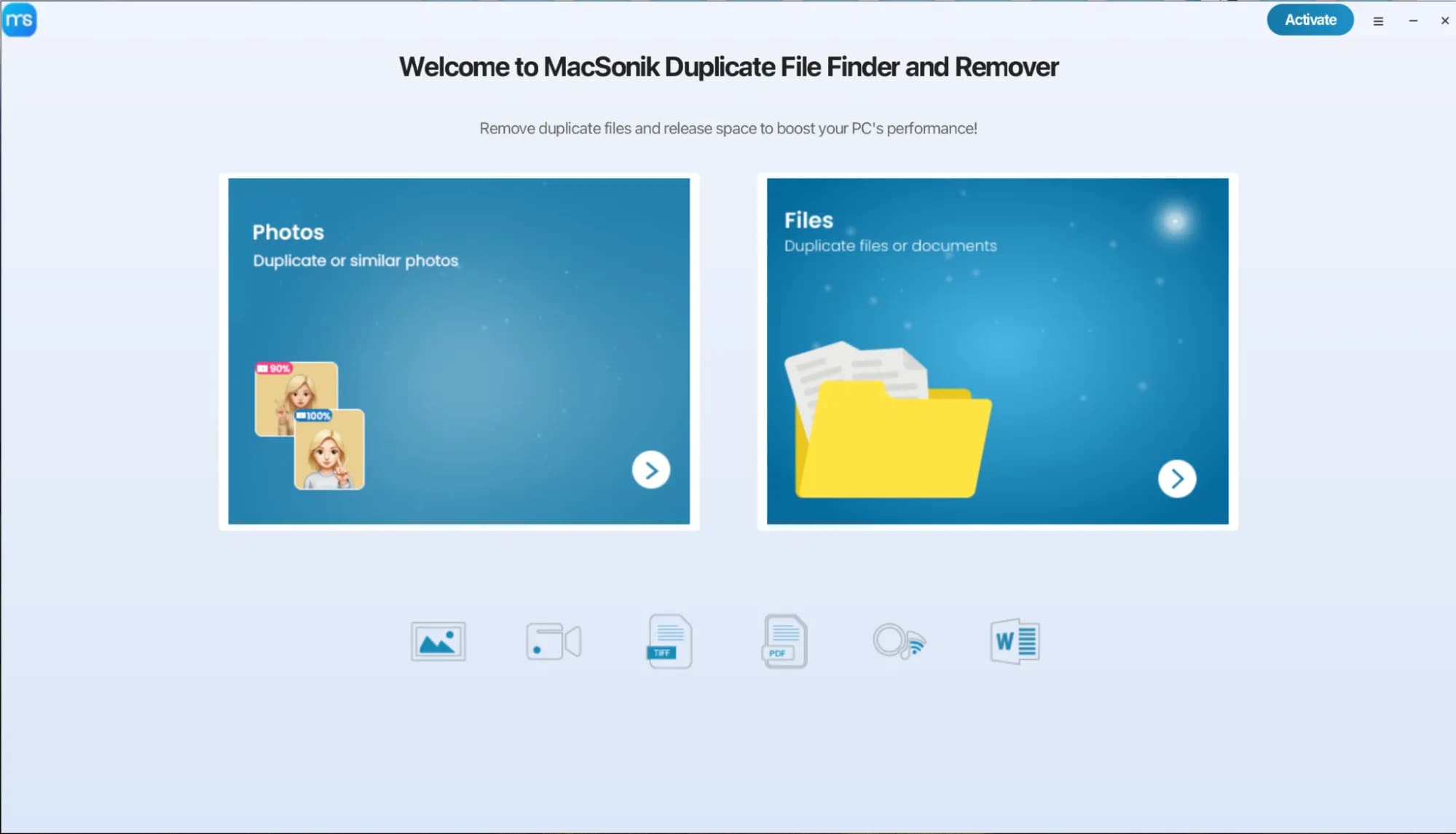
About this app
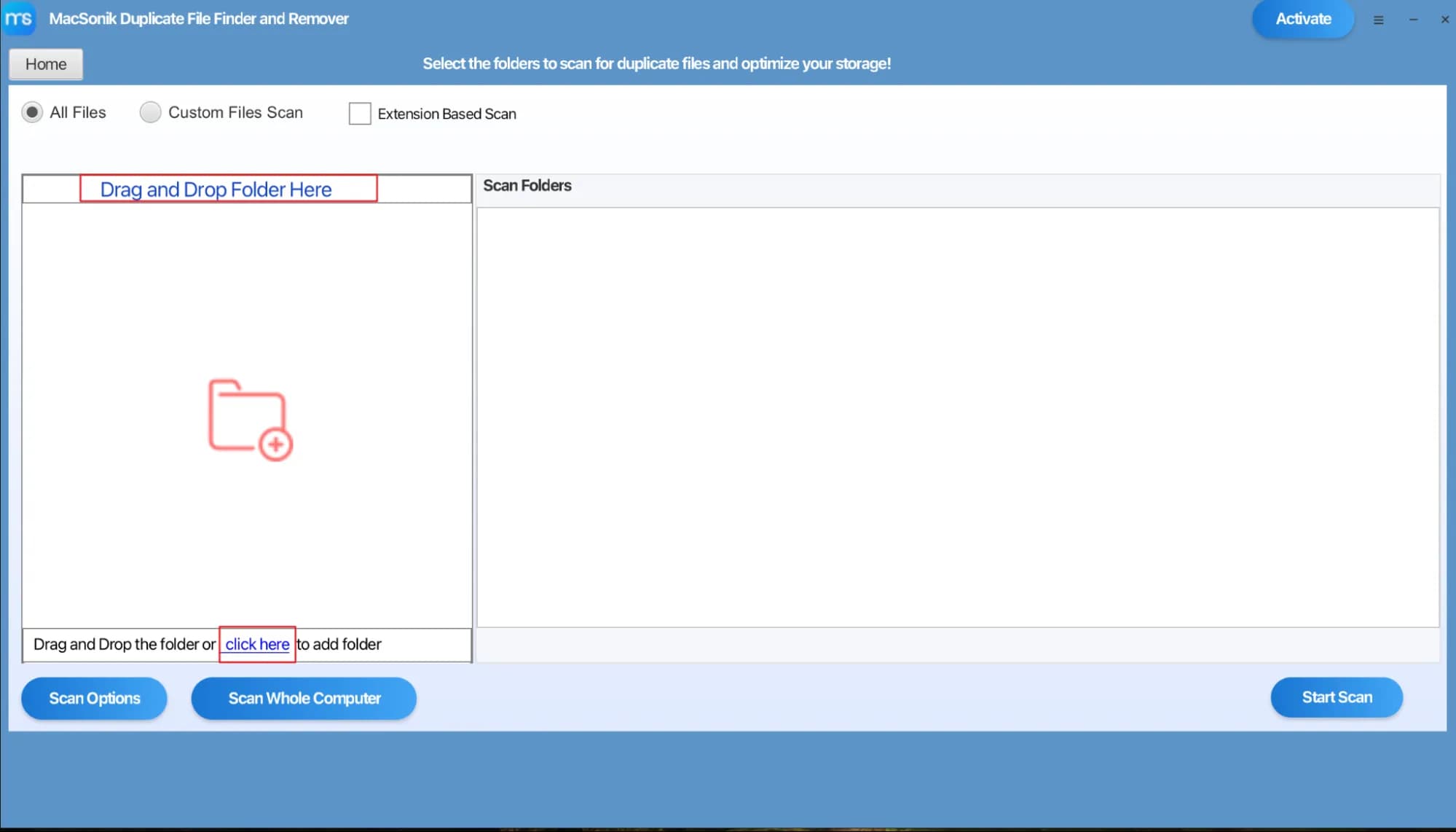
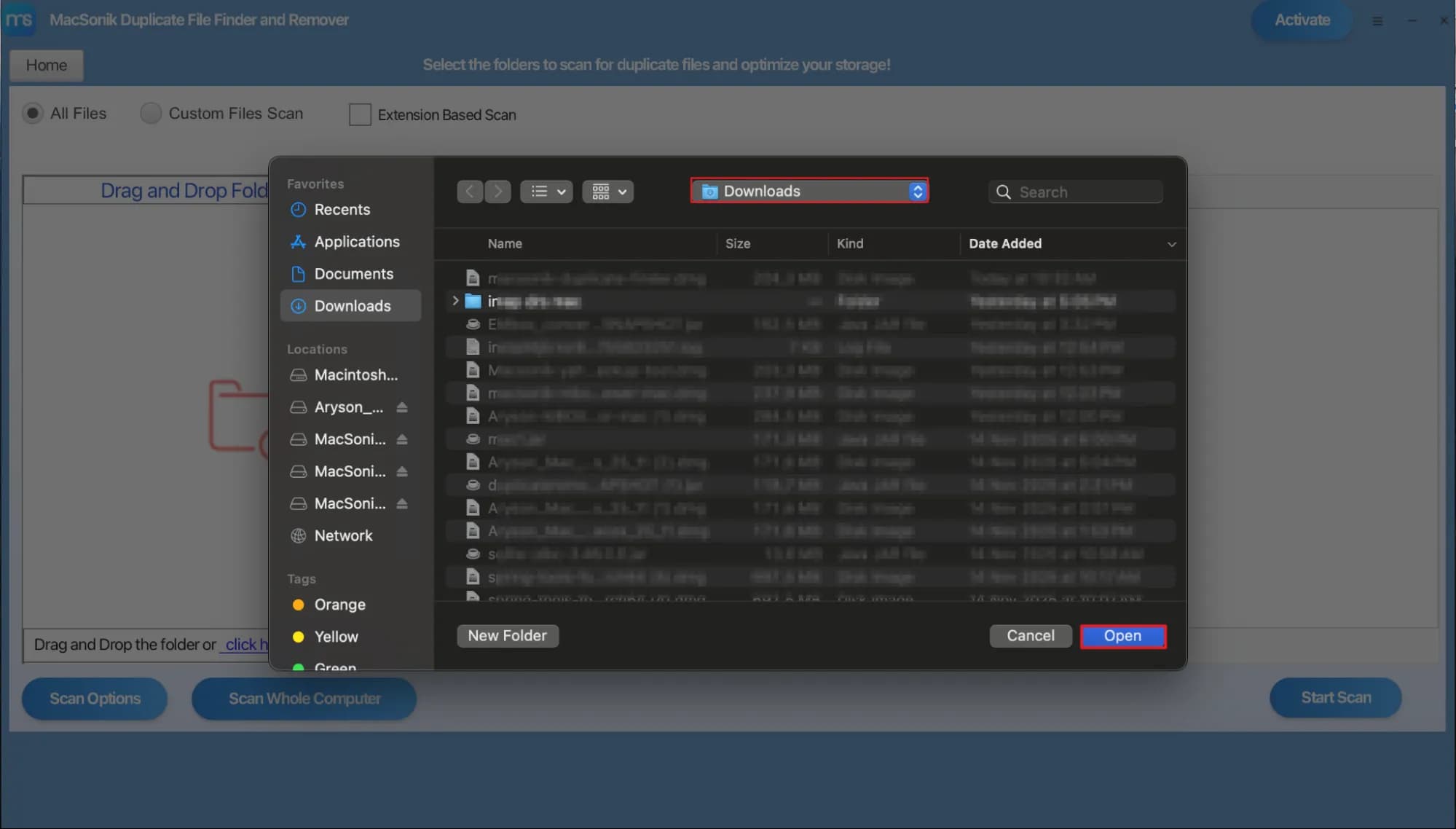
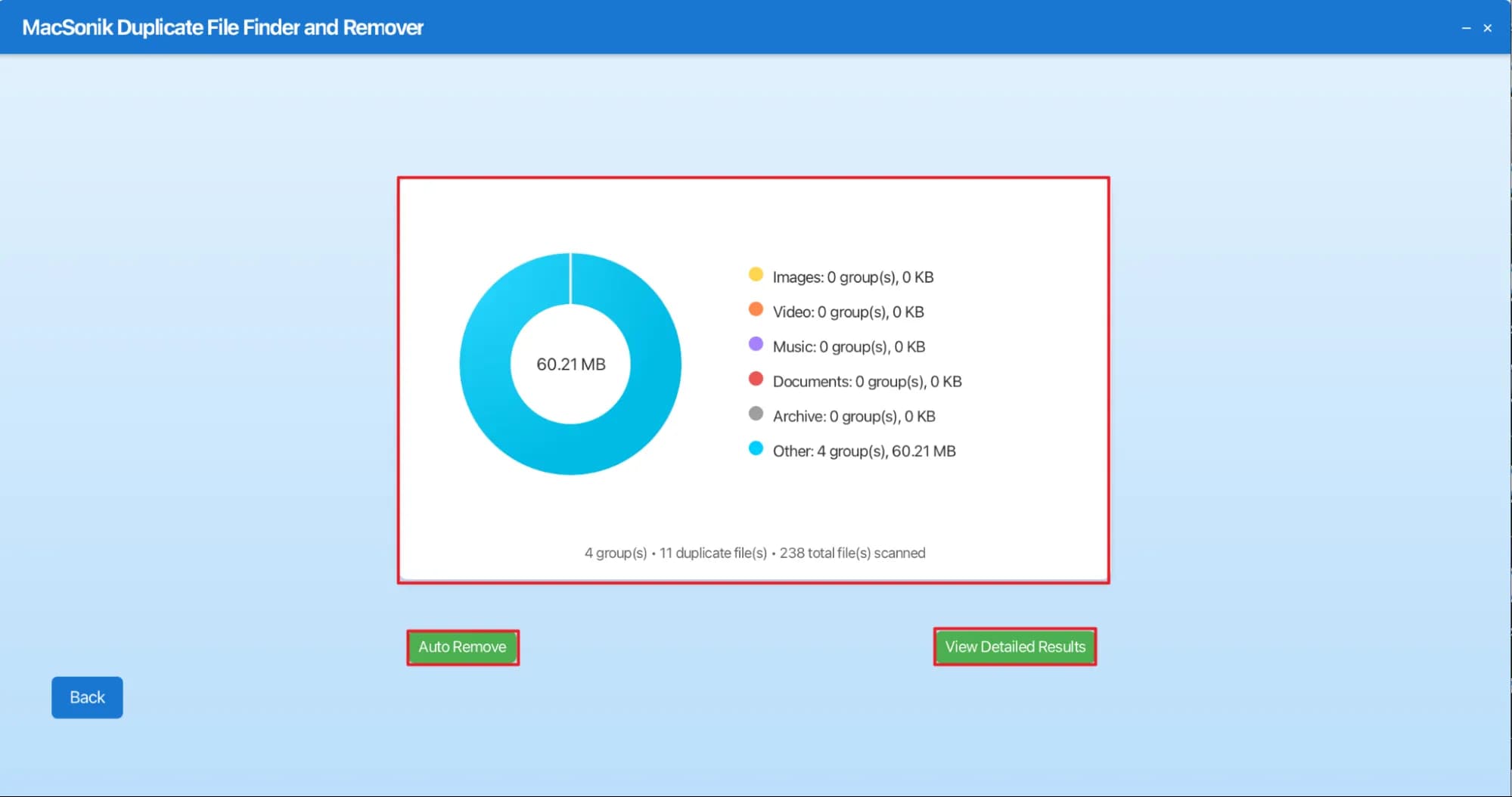
MacSonik Duplicate File Finder and Remover is a robust utility designed to help you reclaim storage space by identifying and eliminating duplicate files across your Mac, Windows, or Linux system. Whether you're a professional managing large volumes of documents, a creative with extensive media libraries, or a casual user with cluttered folders, this tool offers a streamlined solution. It supports a wide range of file types—including photos, videos, audio, PDFs, and documents—and allows you to scan entire folders or specific directories, comparing files by name or content. The intuitive interface makes it easy to preview duplicates, choose to move them to a separate folder, send them to trash, or delete them permanently. With both single and batch modes, you can handle duplicates efficiently, and the tool even works with external drives. MacSonik Duplicate File Finder is available for macOS, Windows, and Linux, with a free version that lets you test the waters (limited to 50 files pe...
Key features
- 1Cross-platform duplicate detection for Mac, Windows, and Linux, including external drives.
- 2Scan by file name or content across photos, videos, audio, PDFs, and documents.
- 3Preview duplicates and choose to move to a folder, trash, or delete permanently.
- 4Single and batch modes with root-folder and subfolder scanning options.
Target customer profile
Drawn from the product itself, not from a survey.
Demographic
Photographers and videographers with large media libraries
Pain points
Accumulation of duplicate photos and videos across multiple folders and drives, leading to wasted storage and difficulty in organizing.
Primary needs
Efficiently identify and remove duplicate media files without affecting originals, and free up storage space.
Demographic
IT administrators and office managers handling shared file servers
Pain points
Duplicates proliferate across shared drives, causing confusion, version control issues, and unnecessary storage costs.
Primary needs
Batch removal of duplicates from network drives and external storage, with safe preview and selective deletion.
Demographic
Students and researchers with extensive document collections
Pain points
Multiple copies of research papers, PDFs, and assignments scattered across folders, making it hard to find the latest version.
Primary needs
Quickly scan and clean up duplicate documents by content or name, and organize files into a separate folder for review.
Scout Review
Written by AI from measured evidence, scored out of 100.
MacSonik Duplicate File Finder is a competent utility wrapped in a dated, contradictory marketing site. The core promise — find and remove duplicate files across Mac, Windows, and Linux — is real, and the site backs it with a genuine step-by-step guide and live support. Speed is excellent (91 mobile, 98 desktop Lighthouse) and security headers are clean (12/12). But the design is a patchwork of legacy download-portal patterns, the platform messaging contradicts itself, accessibility fails on contrast and alt text, and the free tier's limits are hidden below the fold. Against Gemini 2, Duplicate Cleaner, and dupeGuru, the cross-platform angle is the only real differentiator — and dupeGuru matches it for free.
Measure by measure
Usability
58A 10-step written guide and live chat/phone support are genuinely helpful. But the free-version limits (50 files per folder, one delete at a time) hide in a table far below the hero, so users discover the wall after downloading.
Design
44Dated, patchwork visual system: gradient nav strip, floating chat/FAQ tabs, and stock illustration clash. Mac tab selected while screenshots show a Windows window. Keyword-stuffed hero copy reads as SEO filler, not a value prop.
Speed
82Lighthouse mobile 91/100 (LCP 3.2s, CLS 0, TBT 36ms) and desktop 98/100. The site is genuinely snappy with no layout shift and no lag complaints in the collected evidence.
Security
70Strong header hygiene: HTTPS, HSTS, CSP, frame protection, SPF and DMARC all present (12/12 checklist). No SOC 2/ISO/pen-test claims found. Setup docs telling users to disable firewall and antivirus is a real concern.
Accessibility
46Lighthouse a11y 61/100 with failing contrast, missing alt text, non-sequential headings, color-only links, and unnamed links. No accessibility statement or WCAG mention anywhere on the site.
Growth
54Real, well-understood problem with specific segments. Cross-platform Mac/Windows/Linux is a genuine edge over Gemini (Mac-only) and Duplicate Cleaner (Windows-only), but dupeGuru is free and open-source and does the same job.
Improvement areas
- Platform messaging contradicts itself: Mac tab selected but Windows screenshot and Microsoft Store button shown.
- Free-tier limits (50 files per folder, one delete at a time) hidden below the fold instead of in the hero.
- Accessibility failures: missing alt text, low contrast, non-sequential headings, unnamed links (Lighthouse 61/100).
- Setup guide tells users to disable firewall and antivirus — a trust and security concern for a file-deletion tool.
Design & Usability
The landing page is stuck in a download-portal era: a gradient sub-nav, floating chat and FAQ bubbles, and a stock monitor-and-cloud illustration fighting for space. The worst offender is the platform switcher — the Mac tab is selected, the copy says 'for Mac', and the screenshot right next to it is a Windows window with a Microsoft Store button. The hero copy is keyword-stuffed SEO filler ('powerful and trustworthy software') instead of a value proposition. Usability is better than design: there's a real 10-step guide and live chat/phone support, which is more than many indie tools offer. But the free tier's limits — 50 files per folder, one file deleted at a time — are buried in a comparison table far below the fold, so users hit the wall after downloading. That's a trust problem disguised as a layout problem.
Speed & Security
Speed is the standout: Lighthouse mobile 91/100 with LCP 3.2s, CLS 0, and TBT 36ms; desktop 98/100. The site loads fast and doesn't shift. Security is a mixed bag. The HTTP probe found a clean 12/12: HTTPS enforced, HSTS, CSP, frame protection, X-Content-Type-Options, Referrer-Policy, Permissions-Policy, plus SPF and DMARC. That's better header hygiene than most SaaS sites twice this size. But there's no SOC 2, ISO, pen-test, or bug bounty claim anywhere, and the setup guide actively tells users to turn off their firewall and temporarily disable antivirus to run the software. For a tool that scans and deletes files across your whole disk, that instruction is a genuine red flag, not a nitpick.
Accessibility & Growth
Accessibility is the weakest measured dimension: Lighthouse 61/100 with failing contrast, missing alt attributes, non-sequential headings, color-only links, unnamed links, and malformed list/ARIA structure. No accessibility statement or WCAG mention exists on the site. Growth is a judgment call on the idea. The problem — duplicate files eating storage — is real and the target segments (photographers, IT admins, students) are specific. The cross-platform Mac/Windows/Linux support is a genuine edge over Gemini 2 (Mac-only) and Duplicate Cleaner (Windows-only). But dupeGuru is free, open-source, and also cross-platform, and Gemini 2 has smarter similar-photo detection. The wedge is 'paid and cross-platform,' which is thin against a free competitor. There's room in the category, but nothing in the material explains why a user picks this over dupeGuru.
Conclusion
If you need a cross-platform duplicate finder and you're willing to pay for a guided UI and live support, MacSonik does the job. If you're on Mac only, Gemini 2 is smarter about similar photos. If you're on Windows only, Duplicate Cleaner has deeper filters. And if you just want free, dupeGuru exists and runs everywhere. MacSonik's job is to convince you the paid, supported, three-OS package is worth it — and right now the site spends more energy on SEO keywords than on that argument. Fix the platform messaging, surface the free-tier limits in the hero, and clean up the accessibility failures, and this becomes a much easier recommendation.
Suggestions for improvement
- Fix the platform switcher: the Mac tab shows a Windows screenshot and a Microsoft Store button. Match the screenshot and store link to the selected platform.
- Move the free-version limits (50 files per folder, one delete at a time) into the hero so users know the wall before downloading.
- Remove the 'disable firewall and antivirus' setup instructions or replace them with proper allowlisting guidance — it undermines trust for a file-deletion tool.
- Fix accessibility: add alt text, raise contrast, correct heading order, and give links discernible names to lift the 61/100 Lighthouse score.
Alternatives comparison
Named competitors, point by point. Nobody paid to appear here or to be left out.
 MacSonik Duplicate File Finder and Remover | Gemini 2 | Duplicate Cleaner | dupeGuru | |
|---|---|---|---|---|
| Platform support | Mac, Windows, Linux | Mac only | Windows only | Mac, Windows, Linux |
| Pricing model | Paid with limited free demo (50 files/folder, 1 delete at a time) | Paid subscription with free trial | Paid with free trial | Free and open-source |
| Similar-photo detection | Duplicate or similar photos (per guide) | Yes, smart similar-photo scanning | Limited; focused on exact duplicates | Yes, configurable fuzzy matching |
| Advanced filters | File protection, date, size, extension filters | Smart selection, similar-photo tuning | Advanced filters, multiple drives | Customizable matching options |
| Live support | Live chat and phone support | Email/support portal | Email support | Community/forum support |
Gemini 2
A popular duplicate file finder for Mac that offers smart scanning and removal of duplicates, including similar photos and music.
Duplicate Cleaner
A powerful duplicate file removal tool for Windows with advanced filters and support for multiple drives.
dupeGuru
A free, open-source duplicate finder available for Mac, Windows, and Linux, with customizable matching options.
Comparing options? See MacSonik Duplicate File Finder and Remover alternatives, scored side by side
More Productivity apps
View all Productivity
Puzzly – B2B Lead Generation & Sales Intelligence Platform
92Puzzly is an all-in-one B2B lead generation platform that...

Qamarero
92An all-in-one hospitality software for restaurants and ba...

EmbedMyReviews
92White-label reputation management software for agencies s...

StoryPad
92Privacy-first open source journal app with a continuous t...

Notion
92All-in-one AI workspace for docs, projects, and knowledge...

The Stack Newsletter
92A weekly newsletter delivering curated tech jobs, intervi...

Vibe Coding Agent Skills
92A free, open-source platform offering 110 AI agent skills...

QRBliss
91Branded QR codes with AI Brand Sync, 15 free dynamic code...

Gerty
91Private, local AI assistant for Mac that runs offline

Strukchad Property Management
91Property management for Kenyan letting agents: rent invoices raised every month, M-Pesa rent prompts to tenants, arrears tracking and landlord statements.

CC Switch
91Open-source desktop app for switching AI coding providers...

PitchWhip
90AI cold call scripts & direct dials from LinkedIn


A platform dedicated to providing unbiased reviews of newly launched applications, analyzing everything from their features to their full potential.
info@scoutforge.net© 2026 Scoutforge. All rights reserved.
